
You log in and suddenly see the message “facebook suspended my account”? This means your Facebook account is suspended, you lose access, cannot message, or post, which even affects your work, advertising, and customer communication.
So what is the cause and how can you recover it the fastest? In this article, Hidemyacc will help you clearly understand why a Facebook account is suspended and guide you through the most effective 5-step appeal process.
1. What is Facebook suspended? How to distinguish it from a disabled Facebook account
To treat the issue correctly, you first need to clearly distinguish whether your account is being penalized by Facebook or if it's just due to your personal settings.
1.1. What is a suspended Facebook account?
A suspended Facebook account is a state where Meta temporarily blocks your access due to suspected violations of Community Standards or the detection of unusual security-related activities.
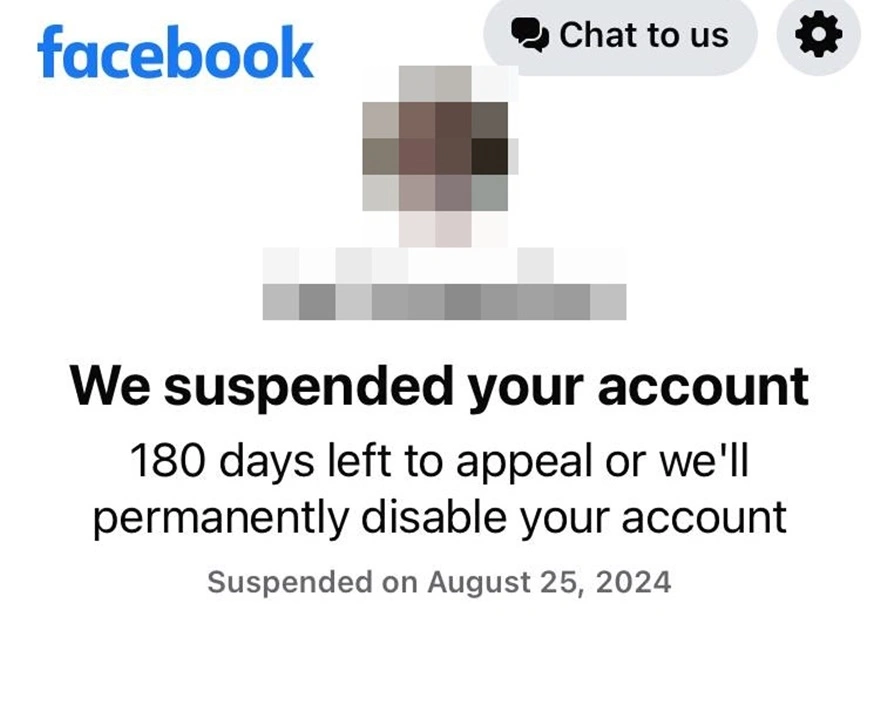
Essentially, this is a forced lock from the system, not an action actively taken by the user. The clearest sign is that upon logging in, you will see a notification requesting identity verification or a request review button to submit an appeal.
If you do not resolve it within the system's specified time, the suspended Facebook account may be changed to a more severe status: “Permanently disabled”, at which point the chance of recovery will be very low.
1.2. What is a self-deactivated Facebook account?
Unlike Suspended, self-deactivation (deactivated) is an action actively taken by the user when they want to temporarily leave Facebook.
This is absolutely not a penalty from the platform. When activating this mode, your profile will be hidden from others, but you still retain full control of the account. Just by logging back in, all your data such as posts, images, and messages will be 100% restored as before.
1.3. Why are users often confused?
In reality, many people cannot distinguish between a suspended Facebook account, a deactivated one, or a permanently disabled one. The main reason is that Meta manages Facebook and Instagram together in the Accounts Center, and the interface between the App and Web may display different notifications.
Therefore, before taking action, you need to accurately determine your account's current status to avoid confusion and taking the wrong steps.
2. Comparing common Facebook account error statuses
To help you easily visualize and accurately self-assess the current severity, below is a summary table of the core differences between a suspended, deactivated, and permanently disabled Facebook account:
|
Status |
Action by |
Recoverable |
Risk level |
|
Deactivated |
User |
Yes |
Low |
|
Suspended |
|
Possible |
Medium |
|
Permanently Disabled |
|
Very difficult |
High |
Understanding this difference is especially important when you see a notification related to a suspended Facebook account. Correctly identifying the status will help you choose the appropriate handling method, avoiding panic or taking wrong steps that make the situation worse.
3. Common causes for a suspended Facebook account
A suspended Facebook account does not always result from explicitly posting violating content. In many cases, the cause stems from usage behavior, the login environment, or the automated security system assessing risks. Below are the most common reasons.
3.1. Violating Community Standards
This is the most direct and frequent cause for account suspension. Common behaviors include:
- Spam: posting too frequently, mass commenting, or continuously sending promotional messages in a short time.
- Sensitive content: Uploading violent images, adult content, or offensive posts.
- Copyright infringement: Re-uploading videos, images, or audio without usage rights.
- Hate speech: Using language that incites hatred, racism, or insults individuals/organizations.
Meta's system currently uses AI to automatically scan content, so even if you do not do it intentionally, your account can still be flagged, leading to a suspended Facebook account.
3.2. Unusual login activity
This is a very common cause but rarely noticed by users. Facebook's security system can automatically temporarily lock or suspend an account if it detects risk signs such as:
- Continuously changing IP addresses within a short period.
- Logging in from too many different unrecognized devices.
- Using automated tools or third-party software of unknown origin.
Facebook may consider this a sign that the account is compromised or acting unnaturally. At that time, the Facebook account is suspended for a security check, even if you did not intentionally commit a violation. If you are forced to use support tools, prioritize safe Facebook automation tools to avoid being flagged by the system.
3.3. Using a fake identity or multiple personal accounts
According to regulations, each user is only allowed to own one personal account with real information. Behaviors such as using a fake name, impersonating someone else, or intentionally creating a mass of personal accounts all run a very high risk of leading to suspension.
3.4. Violating advertising policies
For digital marketers, if you run ads, your personal account can be jointly suspended due to violations of Meta's Ads policies, such as running restricted products, misleading ad content, or the ad account having a history of prior violations.
In severe cases, not only the ad account but also the personal account can be affected.
Learn more: Disabled Facebook ad account and how to fix it
4. How to check the severity of a suspended Facebook account
When your account encounters an issue, the most important thing is to accurately determine the level of suspension before submitting an appeal. Look at the notification displayed on the screen to identify your current status:
- Seeing the Request review button: Mild level. This is usually a case where the system mistakenly suspects you or needs further checking. You just need to click request review and follow the instructions.
- Requiring confirm identity: Medium level. The system requires you to upload identification documents such as an ID card or passport to verify the account owner. You need to prepare a clear photo with information matching the Facebook profile.
- Permanently disabled notification: Severe level. The chance of recovery is much lower than the two cases above. However, you should still submit an appeal through Meta's official support forms to increase the chance of being reviewed.
Correctly identifying the level will help you choose the right handling method and increase the chance of recovering the suspended Facebook account as quickly as possible.
5. How to check your suspended Facebook account status and find the "Appeal" button fastest
When a Facebook account is suspended, the system will automatically block access to the news feed and Settings section. Therefore, you do not need to look for the appeal button in many different places; Facebook will directly display the handling screen immediately after logging in.
5.1. Case of a completely suspended Facebook account
You simply need to log into the account on the mobile app or web browser.
The system will automatically block and display the suspension notification screen. At this point, the "Request review" or "Confirm your identity" button will be right in the middle of the screen for you to click.
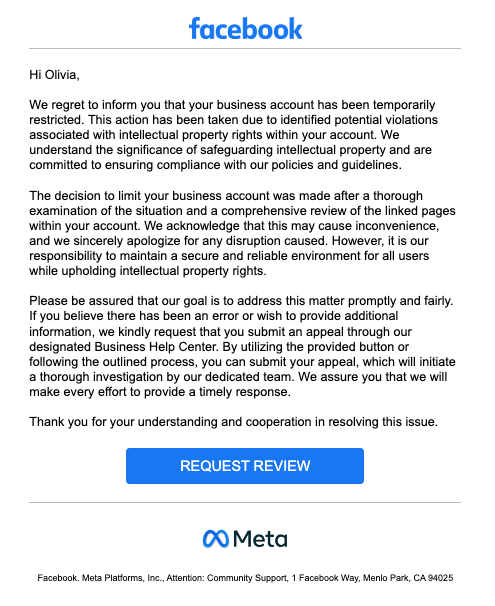
Quick note: Sometimes the appeal button has a coding error and does not display on the App; try logging in using a web browser on a computer for this button to appear. In most cases, the Desktop interface will display the appeal button more fully than the mobile application.
5.2. Case of a restricted Facebook account
If you can still browse Facebook but are banned from liking, commenting, or running ads, check the penalty by:
- Going to Profile > Clicking the 3-dot icon (...) > Selecting Account Status.
- Or going to Settings & Privacy > Help & Support > Support Inbox to see the reason for the violation and submit an appeal directly from here.
Checking the correct Account Status or Support Inbox section will help you accurately determine the violation status and send the appeal to the right place, instead of performing the wrong action that prolongs the handling process.
6. 5-step process to recover a suspended account
When a Facebook account is suspended, staying calm and following the correct process is the determining factor for recovery. Below are the 5 steps you should follow in order:
Step 1: Prepare verification documents before submitting an appeal
- Have an ID card or Passport ready with the full name and date of birth exactly matching the information on the account.
- Ensure the document is valid and the information is not blurred.
Take a very clear photo of the document, without glare or shadows, clearly showing the 4 corners of the card so Facebook's AI system (bot) can approve it faster.
Step 2: Use official appeal links
After preparing the documents, access the correct official support channel:
- Click directly on the Request Review / Appeal button on the suspension notification screen.
- If you suspect the account was hacked leading to suspension, visit Facebook's official compromised account report page to perform the recovery and re-secure the account.
Using the correct official form helps avoid being flagged for unusual behavior.
Step 3: Write an explanation (Appeal text)
When filling out the form, maintain a polite, honest, and concise attitude, get straight to the point, and absolutely do not attack the support team. You should use English to make the handling process smoother.
Step 4: Monitor the registered email and phone number
After submitting the appeal form, you need to actively monitor for a response:
- Regularly check the email linked to the account (remember to check the Spam/Junk folder).
- Ensure the registered phone number is still active to receive the OTP code.
In many cases, the account has been reopened but the user does not complete the next verification step, causing the account to be switched to a permanently locked state.
Step 5: Patiently wait for a response (Do not spam forms)
Meta's average processing time is from 24 - 48 hours. Some complex cases can extend up to 3 - 7 days. Absolutely do not submit forms continuously because the system will mark you as spam and permanently refuse support.
Getting a suspended Facebook account back does not only depend on luck but also on how you execute the correct process. Preparing complete documents, sending the appeal to the right channel, and carefully monitoring the response will significantly increase the successful unlock rate.
Especially, if the screen displays a countdown timer, immediately see the guide on how to recover when a Facebook account is disabled for 30 days.
7. What to do if you don't see the request review button?
Many users fall into a situation where their account is locked but they absolutely do not see the request review button to submit an appeal. This often makes many people rush to create a new account or do it the wrong way, making the situation worse. If you encounter this case, you should handle it in the following directions:
- Do not create a new account immediately: Creating a new account right on the old device and Wifi network will be scanned for IP by the AI and continue to lock the new account. Before creating a new account, you should learn how to create multiple Facebook accounts correctly to avoid being locked by association.
- Change the environment: Try logging into the account on another device or using a different 4G/Wifi network to see if the button appears.
- Check the linked Instagram: This is an extremely common error. Log into the Instagram account linked to that Facebook. It is highly likely that the IG account violated a policy, leading to the Facebook account being locked by association, and the appeal button is actually located within the Instagram app.
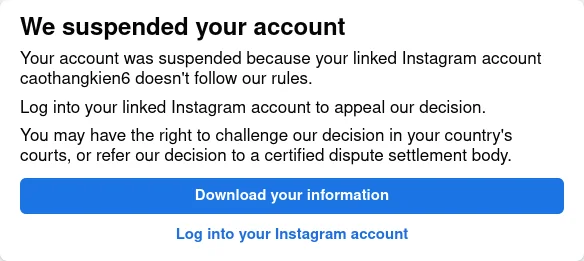
Not seeing the Request Review button does not mean you completely lose the right to appeal. The important thing is to check the exact cause, avoid rushing to create a new account, and review the linked Instagram. Handling it in the right direction will help you increase your chances of unlocking instead of making the situation worse.
8. How to minimize the risk of account suspension in the future
A successful appeal only solves the immediate problem. To prevent a suspended Facebook account from happening again, you should build a risk prevention process right from the start. Below are important principles to apply.
8.1. Stabilize the login environment (IP & Device)
Facebook's security system evaluates account risks based on IP addresses, browser fingerprints, and device history. Changing environments too frequently will be considered abnormal. Therefore, you should:
- Not log into one account in multiple countries/provinces in too short a time.
- Not continuously change IPs between sessions.
- Avoid using free proxies or public proxies because these IPs are usually already on the high-risk list.
Stability in the login environment helps the account build a better trust history with the system.
8.2. Isolate environments when managing multiple accounts
If your job requires operating multiple ad accounts and managing multiple Fanpages, you should not:
- Log into all accounts on the same regular Chrome browser.
- Use a single IP address for all accounts.
- This makes it easy for the system to evaluate the accounts as directly linked to each other, thereby increasing the risk of mass bans when one account encounters an issue.
If you must manage multiple accounts, you should use the Hidemyacc antidetect browser.
Instead of operating in a single browser environment, Hidemyacc allows you to create a series of separate browser profiles on the same computer. Each profile will act as a completely new computer or phone device, with an independent set of hardware parameters, browser fingerprint (when attached with a proxy), and IP address. Thanks to this mechanism, each account is isolated as if it were operating on different devices, helping to minimize the risk of associated locks and increasing safety when managing multiple accounts simultaneously.
You can refer to the guide on How to manage multiple social media accounts without getting banned to minimize the risk of associated locks.
8.3. Set up two-factor authentication (2FA)
Turn on two-factor authentication using dedicated authenticator apps (Google Authenticator, Authy, Microsoft Authenticator...). Do not rely solely on SMS messages because telecommunication networks sometimes have errors. 2FA security is the strongest shield to help you avoid having your account hacked and unjustly suspended.
8.4. Smart delegation
An important principle when managing a Facebook system is not to concentrate all admin rights and ad accounts in a single place.
- Set up at least 2 admins (or backup accounts) for important fanpages and groups.
- Do not keep all ad accounts in a single Business Manager. Distribute access rights reasonably instead of letting one account hold full control.
- Regularly review and remove violating ad accounts to avoid affecting the overall trust level of the system.
Reasonable delegation helps limit risks when one account encounters an issue, while ensuring the Fanpage and ad system continue to operate stably. To build a stronger defense for the entire business ecosystem, you should learn more about how to avoid being banned on Facebook Business to minimize the risk of interrupting ad and admin activities.
9. Conclusion
A suspended Facebook account is not always permanently lost. If you correctly identify the cause and follow the appeal process properly, you still have a chance to recover the account.
More importantly, adjust your usage habits to avoid repeating violations. Building a safe login environment and rationally controlling your behavior will help minimize the risk of your Facebook account being suspended in the future.
10. FAQ
1. Is it normal for "Facebook suspended my account" to happen without prior warning?
Yes. Facebook's AI system can automatically suspend an account immediately upon detecting unusual behavior (like being hacked, using spam tools) to protect user data, even without prior warning.
2. Can a permanently disabled Facebook account be recovered?
The chance of recovery is very low. However, if you have clear evidence that the account was hacked or mistakenly suspended by Meta, you can still submit an appeal through the dedicated support links for compromised cases to be reviewed.
3. Are photos and messages lost when suspended?
During the suspension period, data such as photos, posts, and messages are usually just temporarily hidden, not completely deleted. You can still recover them upon a successful unlock. However, if the account transitions to a permanently disabled state, the data may be unrecoverable.
4. Does a suspended Facebook account affect Instagram?
Possibly. If your Facebook and Instagram accounts are linked together in Meta's Accounts Center, violating and being suspended on one platform will directly lead to the other account being locked by association.
5. Should I create a new account right after being locked?
No. You absolutely must not create a new account on the same device or the same IP address that was just suspended. The AI system will save the hardware and IP information, thereby continuing to flag abnormalities and locking your new account as well.
6. How long is a Facebook account suspended?
The suspension time depends on the severity of the violation. It can last from 24-72 hours for minor offenses, or 7–30 days for cases requiring the account to be held for identity verification. If you do not submit an appeal on time, the account will be permanently disabled.
7. Why is my Facebook account suspended even though I didn't violate anything?
Many cases of "unjust" locks stem from login environment errors: You change IP continuously, log in on a strange device, or use poor quality public proxies. This makes the security system evaluate the account as having high risk signs and automatically lock it for protection.






