A website you need to access is blocked. Your company network filters certain pages, your school Wi-Fi restricts access, or the content is only available in another region. You do not want to install additional software and only need to access the website temporarily.
That is where a web proxy can be useful. Proxyium is one such service that works directly through a browser, but your traffic still passes through a third-party server. This raises an important question: Is Proxyium safe?
This guide explains how Proxyium works, what information a proxy can potentially access, whether using Proxyium is legal, how to use it safely and which alternatives you can consider.
1. What is Proxyium?
Proxyium is a free web proxy that works directly through a browser. Instead of connecting to a website directly, you enter its URL into Proxyium. The Proxyium server then sends the request to the target website and returns the content to your browser.
You do not need to install an application, create an account or change your device settings to use the basic web proxy.
1.1. What is Proxyium used for?
Proxyium is mainly useful when you need quick access to a website through an intermediary server. Common uses include:
- Accessing websites blocked by a local network.
- Viewing some region-restricted content.
- Hiding your IP address from the destination website.
- Accessing websites without installing additional software.
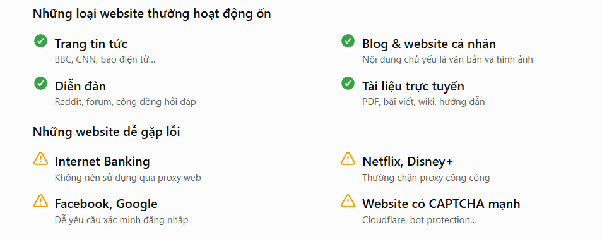
Some types of websites tend to work better through a web proxy than others.
Websites that usually work well:
- News websites: BBC, CNN and other online newspapers.
- Blogs and personal websites: Pages that mainly contain text and images.
- Forums: Reddit, discussion forums and online communities.
- Online documentation: Wikis, guides and other text-based resources.
Other websites are more likely to experience problems because they use stricter security systems or require more complex browser functions.
Websites that may not work properly:
- Internet banking: Sensitive financial services should not be accessed through a web proxy.
- Netflix and Disney+: Streaming platforms often detect and block public proxy IPs.
- Facebook and Google: These services may trigger additional verification when they detect unusual connections.
- Websites with strong CAPTCHA or bot protection: These systems can identify and restrict proxy traffic.
The reason is that these platforms do not only check your IP address. They can also analyze cookies, login sessions, browser characteristics and other security signals.
1.2. How does Proxyium work?
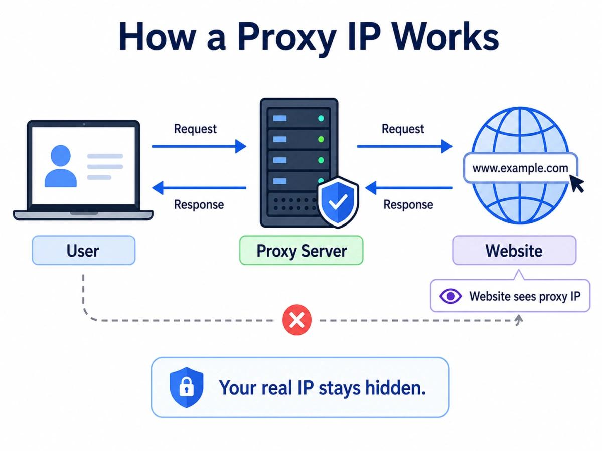
The basic connection can be represented as:
When you enter a URL into Proxyium, your browser sends the request to the Proxyium server first. The server then connects to the target website, receives the requested content and sends it back to your browser.
This means each party in the connection can see different information:
- The destination website: It generally sees the IP address of the Proxyium server instead of your direct IP address.
- Your ISP or network administrator: They can see that your device is connecting to Proxyium. With an HTTPS connection, the content inside the encrypted connection is protected from the network.
- Proxyium: Your requests pass through its servers, so the service can technically process the traffic required to retrieve and return the requested content.
This is an important point when considering whether Proxyium is safe. A proxy can hide your IP from the destination website, but it also introduces a third party between you and that website.
Proxyium is designed for browser-based access rather than complete device protection. It does not protect traffic from every application on your device, scan downloaded files for malware or replace security software.
1.3. Is Proxyium a VPN?
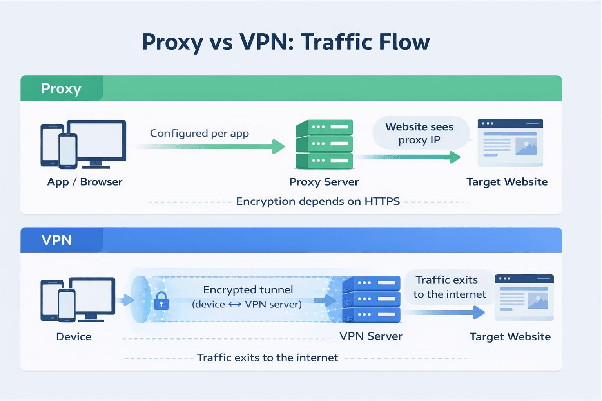
No. Proxyium and a VPN can both change the IP address visible to a website, but they operate at different levels.
A web proxy mainly handles traffic that passes through the proxy service, while a VPN can route traffic from multiple applications on your device.
| Criteria | Web proxy such as Proxyium | VPN |
|---|---|---|
| Scope | Browser | Entire device |
| Installation | No application required | Usually requires an application |
| Traffic | Browser-based traffic | Traffic from multiple applications |
| Main use | Quick website access | Regular connections |
| Cost | Can be free | Mostly paid |
If you only need to open a website quickly, a web proxy is more convenient. If you need broader protection across your device, a VPN is more suitable.
Learn more: What Is a VPN? Why Should You Use a VPN to Protect Your Personal Information?
2. Is Proxyium free?
Proxyium provides a free web proxy that you can access directly from a browser without installing an application or creating an account.
For basic tasks, the free version can be enough. You can enter a URL, start browsing and leave without setting up additional software.
However, free access does not necessarily mean there are no limitations. Server availability, connection speed, advertising and access to certain websites can vary over time.
The important point is that being free does not automatically make a proxy unsafe. When evaluating a service, privacy practices and security are more important than whether you pay for it.
3. Is Proxyium safe and legal to use?
The answer depends on how you use the service and what information you send through it. Proxyium can be suitable for ordinary browsing, but it should not be treated as a complete privacy or security solution.
The following points help explain the main safety and legal considerations.
3.1. Does Proxyium hide your IP?
Yes. When you access a website through Proxyium, the destination website generally sees the IP address of the Proxyium server instead of your direct IP address.
This can be useful when you want to prevent the destination website from seeing your normal public IP address. However, hiding your IP does not mean that your entire online identity is hidden.
Your ISP or network administrator can still see that your device is connecting to Proxyium. Websites can also use other signals to recognize your browser or identify a returning session.
Therefore, IP masking should be viewed as one privacy feature rather than complete anonymity.
3.2. Can Proxyium see your data?
A web proxy sits between your browser and the destination website. Because Proxyium needs to receive and forward your requests, the service can technically process traffic that passes through its servers.
The type of information involved depends on the connection and the website you access. Technical information associated with a request may be processed along with the content required to retrieve a webpage.
HTTPS is also important. When you connect to an HTTPS website, the connection between your browser and the website is encrypted. However, you are still relying on a third-party proxy to process and forward the request.
For this reason, you should avoid entering sensitive information through a web proxy unless you trust the service and understand its privacy practices.
3.3. Does Proxyium keep logs?
Logging is another important factor when evaluating a proxy service. A proxy provider may collect information such as connection details, IP addresses or usage-related data, depending on its policies and technical setup.
Before using Proxyium for sensitive activities, you should pay attention to whether the service:
- Collects users' IP addresses.
- Records browsing history or connection logs.
- Specifies how long collected information is retained.
- Shares collected information with third parties.
These practices can change over time, so they should be checked against the provider's current privacy information before relying on the service for sensitive activities.
3.4. Is Proxyium completely anonymous?
No. Changing your IP address does not make you completely anonymous online.
A website can use other signals to recognize your browser or connect different sessions. Common examples include:
- Browser fingerprint: Information such as your operating system, browser version, screen resolution and other browser characteristics.
- Cookies: Stored data that can connect a new session with previous activity.
- WebRTC: Depending on your browser configuration, WebRTC may create connections that do not follow the same path as the proxy.
These signals mean that hiding your IP address is only one part of protecting your online privacy.
Learn more:
- What Is Browser Fingerprinting? How to Block Browser Fingerprinting
- What Is WebRTC? How It Works and Its Benefits
3.5. What are the risks of using a proxy site?
A proxy site introduces an additional party into your connection, so there are several risks to consider.
The main concerns include:
- Third-party data exposure: Your requests pass through the proxy server.
- Shared IP reputation: Public proxy IPs can be shared by many users and may already be blocked by some websites.
- Website detection: Websites can identify proxy traffic and require additional verification or deny access.
- Browser tracking: Cookies and fingerprinting can still provide information about your session.
- Fake proxy websites: Unofficial proxy pages can expose you to malicious downloads, redirects or other unwanted content.
These risks become more important when a proxy is used for sensitive accounts, financial information or other private activities.
3.6. Is Proxyium legal to use?
Using a proxy is generally not illegal simply because it changes the IP address used to access a website. However, the legality of a particular activity depends on local laws and how the proxy is used.
For example, using Proxyium to access an ordinary website does not automatically make the activity unlawful. However, using a proxy for fraud, unauthorized access or other illegal activities does not make those activities legal.
You should also consider the rules of the network and website you are accessing. A school or workplace may restrict proxy services even if using one is not prohibited by law.
The same principle applies to residential proxies. A residential proxy is not inherently illegal, but its legality can depend on how the IP addresses are obtained and how the service is used.
3.7. Can Proxyium be traced?
Using a proxy does not make online activity impossible to trace. A proxy changes the IP address visible to the destination website, but other information may still exist.
Depending on the service, this can include connection records, browser information, cookies and other technical data. Legal requests may also affect what information a provider can disclose.
Therefore, a proxy should be viewed as a way to route your connection through another server, not as a guarantee that your activity can never be associated with you.
4. Pros and cons of Proxyium
Proxyium is convenient for simple browsing, but its limitations become more important when you use it for sensitive or long-term activities.
Pros
Proxyium has several advantages for people who only need temporary access to a website:
- Free: You can use the basic web proxy without a subscription.
- No installation: It works directly through a browser.
- No account required: You can use it without creating a separate account.
- Easy to use: Enter a URL and start browsing.
- Hides your IP from the destination website: The website generally sees the proxy server's IP.
These features make Proxyium suitable for quick and simple browsing.
Cons
There are also several limitations to consider before relying on Proxyium for more sensitive activities:
- Does not protect the entire device: Only traffic routed through the web proxy is handled by Proxyium.
- Does not provide complete anonymity: Cookies, browser fingerprints and other signals can still identify a session.
- Shared proxy IPs may be blocked: Public proxy addresses can have a poor reputation with some websites.
- Not suitable for sensitive accounts: Banking, payment and important work accounts should not be accessed through a web proxy.
- Speed can vary: Your connection has to pass through an additional server.
Overall, Proxyium is better suited to quick, low-risk browsing than activities that require stronger privacy or security.
5. How to access and use Proxyium
Using Proxyium does not require complicated technical knowledge. The basic process involves opening the service, entering the website URL and choosing a proxy server.
Before starting, make sure you are using the legitimate Proxyium website rather than an unofficial copy.
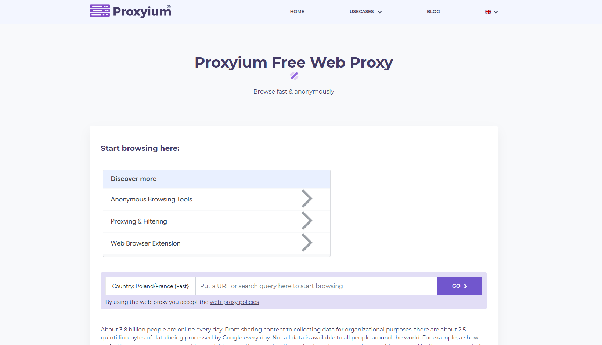
5.1. Access the official Proxyium website
The official domain is proxyium.com. Entering the domain directly into the browser is preferable to accessing the service through advertisements or unknown links.
Before using the service, check for a few basic warning signs:
- A domain name that looks similar but contains spelling changes or unusual characters.
- A request to install unfamiliar software or browser extensions.
- A request for unnecessary personal or payment information.
- Repeated redirects to unrelated websites.
- A browser warning about the connection.
- A website with obvious errors or missing information.
These checks only take a few seconds and can help reduce the risk of using a fake proxy website.
5.2. Enter the website URL
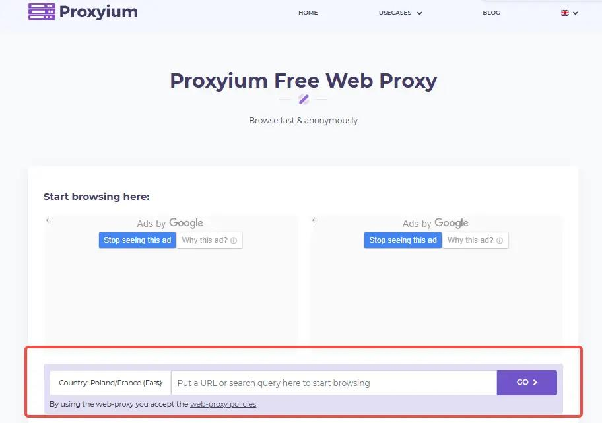
After opening Proxyium, enter the URL of the website you want to access into the provided field.
For better accuracy, use the complete URL instead of entering only the website name. This is particularly useful when you want to access a specific page.
Check the URL once before starting the connection to make sure there are no missing or incorrect characters.
5.3. Choose a proxy server
Proxyium provides server location options that you can select before accessing the website. The appropriate location depends on your purpose.
If speed is the priority, choose a server that is relatively close to your location. If you need to access region-specific content, choose a server in the relevant region.
If the website loads slowly or does not respond, trying another available server may help.
Image: Proxyium's server location selection interface.
Server locations and availability may change over time, so the options shown on Proxyium may not always remain the same.
5.4. Start browsing
After entering the URL and selecting a server, start the connection to load the website through Proxyium.
You can continue browsing through links that remain within the proxy session. However, if you open a new browser tab and enter a URL directly into the address bar, that connection will not automatically go through Proxyium.
Some websites may also fail to work properly through a web proxy. Pages that rely heavily on JavaScript, pop-ups, downloads or advanced security checks are more likely to experience compatibility problems.
5.5. Proxyium is not working: what should you do?
If a website does not load correctly through Proxyium, the problem may come from the proxy server, the URL or the website itself. The following table covers some common situations.
| Problem | Possible cause | What to try |
|---|---|---|
| Page stays blank or keeps loading | Proxy server is overloaded | Try another server |
| Website cannot be found | Incorrect or incomplete URL | Check and re-enter the URL |
| Page layout is broken | Website is not fully compatible with the proxy | Try another server or access method |
| Anonymous proxy detected | Website blocks proxy traffic | Try another legitimate access method |
| Connection is slow | Proxy server has many users | Try another server |
If Proxyium itself cannot be opened while other websites work normally, the service may be blocked by the network you are using. In that case, changing settings inside Proxyium may not solve the problem.
6. How to use Proxyium safely
Using a proxy safely is less about changing a particular setting and more about limiting the type of information you send through the service.
The following practices can help reduce unnecessary risks:
- Do not log into sensitive accounts.
- Do not enter payment information.
- Check that the destination website uses HTTPS.
- Do not download files from unknown sources.
- Consider using a private browsing window on shared devices.
- Close the proxy session after use, especially on public or shared computers.
- Follow the rules of your school, workplace or network.
These precautions make Proxyium more appropriate for ordinary browsing while reducing the risks associated with sending sensitive information through a third-party service.
7. Is Proxyium suitable for managing multiple accounts?
Proxyium is not designed for long-term management of multiple accounts. The main limitation is that changing the IP address alone does not create a separate browser environment for each account.
Platforms can compare multiple signals, including browser fingerprints, cookies, device information and IP addresses. Public proxy IPs may also be shared by many users, which can increase the chance of verification or restrictions.
For legitimate multi-account management, separating browser environments is more useful than relying only on IP changes.
Using separate browser profiles for multiple accounts
An antidetect browser such as Hidemyacc can create separate browser profiles for different accounts. Each profile can have its own browser environment and proxy configuration.
A basic setup can follow these steps:
- Create a separate profile: Use one browser profile for each account.
- Configure the environment: Keep the profile settings consistent between sessions.
- Assign a proxy: Use an appropriate proxy for each profile instead of sharing one connection.
- Check the connection: Verify the IP, timezone and language settings before use.
- Use the correct profile: Open the same profile whenever you access its corresponding account.
The main difference is that Proxyium focuses on routing browser traffic through a proxy, while a dedicated multi-profile browser focuses on keeping different browser environments separated.
8. What are some alternatives to Proxyium?
Proxyium is only one option for browser-based proxy access. Depending on your needs, you can choose another free web proxy, a VPN or a dedicated proxy service.
8.1. Free web proxy alternatives
If you only need a simple browser-based proxy, several alternatives are worth considering:
- CroxyProxy: A browser-based proxy that can handle websites containing video and scripts.
- Hide.me Proxy: A free web proxy with several available server locations.
- ProxySite: A simple browser-based proxy that does not require software installation.
- BlockAway: Another web proxy designed to provide browser-based access to websites.
These services can be convenient for temporary browsing, but the same precautions should apply. You should avoid entering sensitive credentials or payment information through a free public proxy.
8.2. Paid VPN alternatives
If the free tools above do not provide enough security for your needs, for example, if you are concerned about connection logs, need more stable server locations or require a solution for more sensitive tasks, consider switching to a paid service instead of relying on a free proxy.
Some commonly considered options include:
- NordVPN: Suitable for users who need VPN protection across their devices and access to multiple server locations.
- Proton VPN: Designed for users who prioritize privacy and transparency.
- Surfshark: Supports multiple device connections under the same plan.
- Hide.me Premium: Offers a wider range of servers and features compared with its free web proxy.
The main difference is that paid VPN services encrypt connections at the device level, while residential proxies provide dedicated or less-shared IP addresses. Free web proxies, on the other hand, mainly handle traffic within the browser. Therefore, paid solutions may be more suitable for regular connections or account-related tasks, while a free web proxy remains a simpler option for quickly opening a blocked website and leaving afterward.
You can also read Hidemyacc's Proxy vs VPN guide to learn more about the differences between these two types of services.
Related articles:
- Storm Proxies Residential Proxy Review
- GoProxy Review 2026: Is It Worth Using for Residential Proxies?
- PrivateProxy Review: Explore Performance and Features
- Proxy vs VPN: Key Differences You Should Know
8.3. What about residential proxies?
Residential proxies use IP addresses associated with residential networks rather than typical data center addresses. They are often used when a residential IP is required for a particular legitimate use case.
However, residential proxies are not automatically safer simply because their IP addresses are residential. You should still consider the provider's practices, how the IPs are sourced and whether your intended use follows applicable laws and the target website's rules.
For a deeper comparison between proxy and VPN services, you can also refer to Hidemyacc's Proxy vs VPN guide to learn more about the differences between these two types of services.
9. Conclusion
So, is Proxyium safe? For basic browsing, Proxyium can be a convenient option when you need to access a website without installing additional software. It can hide your IP address from the destination website, but it does not provide complete anonymity or protect your entire device.
The safest approach is to keep your use limited to low-risk browsing. Avoid banking, payment information and important account logins through a web proxy. Remember that changing your IP does not eliminate browser fingerprinting, cookies or other tracking signals.
If you need device-wide protection, a VPN may be more suitable. For legitimate multi-account management, separating browser profiles and proxy connections is a more appropriate approach than relying on a web proxy alone.
10. FAQ
Is Proxyium safe to use?
Proxyium can be suitable for basic, low-risk browsing, but it should not be treated as a complete privacy or security solution. Avoid using it for banking, payment information or other sensitive accounts.
How do I get past anonymous proxy detected?
This message usually means that the destination website has recognized the connection as coming from a proxy or another anonymizing service. You can try another available server, but some websites may block public proxy traffic regardless of which server you choose.
What are the risks of using a proxy site?
The main risks include sending traffic through a third-party server, using shared IP addresses that may be blocked, exposing browsing-related information to the proxy provider and encountering fake or malicious proxy websites.
Can a proxy see my data?
A proxy can technically process traffic that passes through its servers. HTTPS protects the connection to an HTTPS website, but you should still avoid sending sensitive information through a proxy service you do not fully trust.
Can Proxyium be traced?
Using a proxy does not make your activity impossible to trace. Depending on available logs, browser information and applicable legal processes, activity may still be associated with a user.
Is Proxyium safe for streaming?
Proxyium may work with some streaming websites, but major platforms often detect and block public proxy IP addresses. Connection speed and compatibility can also vary between servers.
Can I use Proxyium on my phone?
Yes. Proxyium works through a web browser, so you can access it from a smartphone without installing a dedicated application. Only browsing activity routed through the proxy uses the Proxyium connection.
Is residential proxy illegal?
No, not inherently. Residential proxies are not automatically illegal simply because they use residential IP addresses. Legality depends on how the IPs are sourced, where you are located and how the proxy is used.
What are some alternatives to Proxyium?
Free alternatives include CroxyProxy, Hide.me Proxy, ProxySite and BlockAway. If you need device-wide coverage, you can consider a VPN such as NordVPN, Proton VPN, Surfshark or Hide.me Premium.