LinkedIn's security algorithms have become increasingly stringent, making account automation and farming more hazardous than ever. In this landscape, a LinkedIn proxy serves as an essential digital shield, allowing users to remain anonymous and mask their IP addresses safely. It provides the mandatory infrastructure needed to operate multiple independent LinkedIn accounts from a single workstation without triggering automated platform detection. Choosing the wrong proxy type, however, carries just as much risk as operating without one. This guide analyzes residential, mobile 4G/5G, and static ISP proxies, detailing the recommended configuration procedures for 2026.
1. Why do you need a proxy for LinkedIn?
LinkedIn maintains one of the strictest security perimeters and firewall systems among modern social networks. Unlike platforms with broader tolerances, LinkedIn aggressively monitors incoming IP connections for anomalies. Four primary operational requirements make proxies indispensable:
1.1. Managing multiple accounts
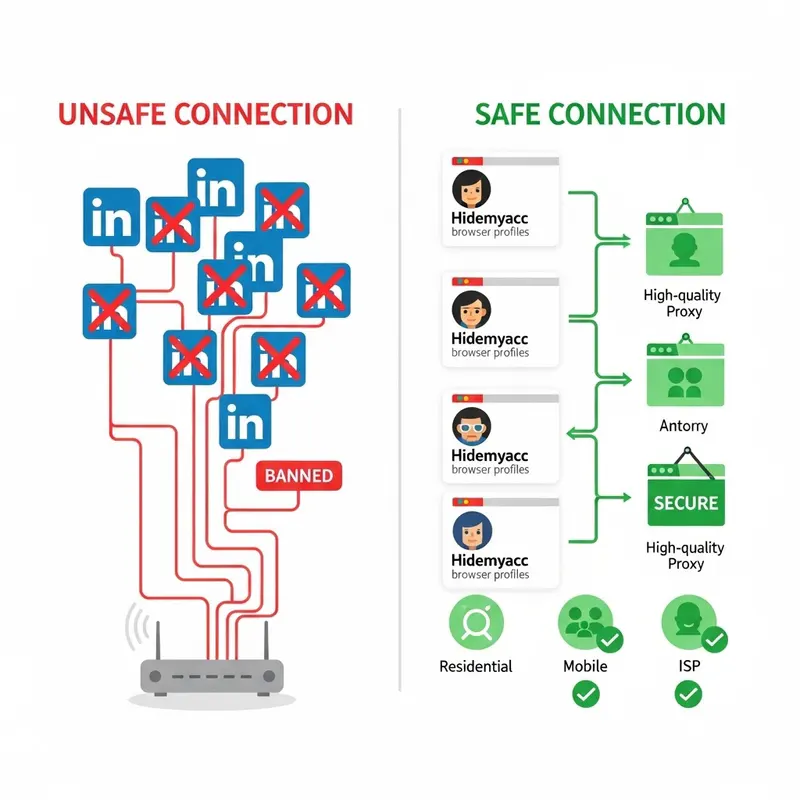
LinkedIn strictly enforces a single real-person policy per account. Authenticating multiple profiles through an identical IP address—such as standard residential or corporate office Wi-Fi—immediately flags suspicious activity. If one profile receives a restriction, all connected profiles sharing that network footprint face simultaneous link-bans.
Why use a proxy?
Assigning an independent IP address to each unique user profile establishes the following technical safeguards:
- Clean network environment: Instead of relying on a shared IP address susceptible to blacklisting, dedicated proxies provide isolated network identifiers unassociated with other accounts.
- Preventing data crosstalk: Pairing proxies with an antidetect browser isolates session data, browser cookies, and local storage completely. A penalty on one account remains contained without compromising adjacent profiles.
- Maintaining session consistency: Assigning a persistent IP to a specific account prevents erratic geographical jumps within brief timeframes—a major fraud indicator tracked closely by LinkedIn.
This configuration serves as a foundational step in how to manage multiple LinkedIn accounts safely without bans, ensuring sustainable, long-term system growth.
1.2. Safe task automation
Automation platforms such as Linked Helper, Expandi, and Phantombuster significantly accelerate lead generation, yet they generate request volumes far exceeding human manual capacity.
Platform detection mechanics:
The security system evaluates more than just frontend user behavior; it inspects origin IP addresses. When a single IP routes requests across multiple accounts dispatching hundreds of simultaneous connection requests or Direct Messages, security heuristics trigger bulk account suspensions.The role of proxies:
Proxies function as a necessary routing layer:- Traffic distribution: Rather than channeling all actions through a single pipe, proxies route each profile through an independent network gateway.
- Origin masking: Requests appear as genuine, individual users connecting from distinct geographic points rather than a centralized automation rig.
This structural separation minimizes platform bot detection and shields account networks from coordinated bans.
1.3. High-volume data scraping
LinkedIn applies strict commercial use limits to the volume of public profiles viewable per day. Bypassing these thresholds to collect candidate information or sales leads using a single connection results in instant IP blocks or continuous CAPTCHA challenges.
Conducting large-scale data harvesting demands rotating residential proxies. By switching IP addresses per request or session, data scrapers collect public directory information continuously without interruption.
>>> Recommended reading:
- Explore LinkedIn Scraping: Best practices and pitfalls to avoid
- LinkedIn account restricted: Causes and recovery steps
1.4. Bypassing geographic restrictions
Platform job listings, local business directories, and sponsored content vary by territory. Managing outreach or recruiting for North American or European markets from an overseas location creates operational hurdles due to localized feed sorting. Proxies allow administrators to simulate presence in any target region, ensuring accurate ad verification, candidate filtering, and lead discovery.
2. Not all proxies are equal: Classifying LinkedIn proxies
Deploying the wrong proxy architecture remains the primary reason accounts encounter restrictions upon login. The following breakdown outlines the core categories:
2.1. Residential proxies
Residential proxies route traffic through genuine consumer internet service providers (such as Comcast, AT&T, Verizon, or Vodafone) assigned to residential physical locations.
- Characteristics: Outgoing requests appear identical to legitimate home internet traffic.
- Primary use case: Large-scale data scraping and broad automated outreach. Dynamic rotating configurations cycle IP pools to avoid hitting request rate limits.
This class strikes an optimal balance between cost and operational scale, particularly for data-gathering operations requiring frequent identity rotation.
2.2. Static ISP proxies
Often confused with datacenter proxies, static ISP proxies combine the throughput speeds of enterprise hosting servers with the network trust score of residential consumer IPs.
- Characteristics: The designated IP address remains fixed (static) across long-term billing periods, providing uninterrupted session ownership.
- Relevance for LinkedIn: Frequent IP switching during standard account operations triggers verification requests. Static ISP addresses preserve stable session logs, making them the standard for nurturing executive profiles and long-term sales accounts.
For dedicated brand development or managing primary client profiles, static ISP proxies offer the required network permanence.
2.3. Mobile proxies (4G/5G)
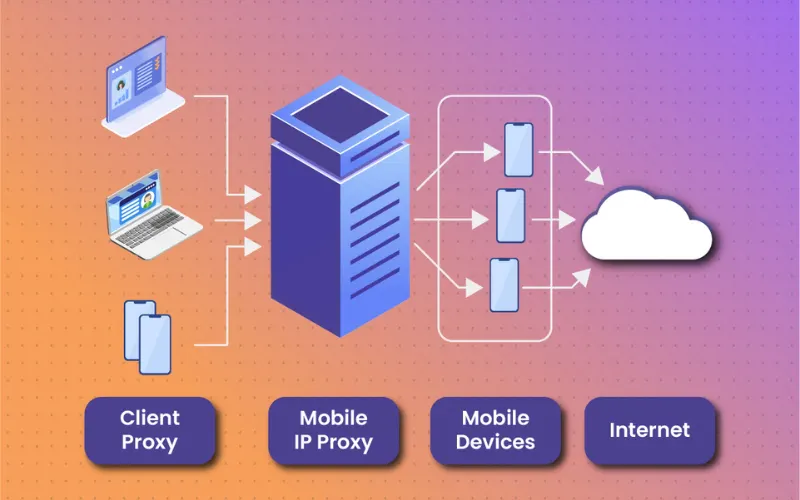
Mobile proxies route network packets through cellular base stations and actual mobile data modems running 4G or 5G connections.
- Characteristics: Utilizing Carrier-Grade NAT (CGNAT) network architecture, thousands of genuine cellular devices share the same public IP address simultaneously. Platforms avoid blacklisting these pool addresses because doing so disconnects legitimate mobile subscribers.
- Primary use case: High-value corporate profiles, newly registered accounts undergoing initial warm-up, or accounts with prior security checkpoints. They carry the highest price point among proxy categories.
Despite higher bandwidth costs, their elevated trust scores make mobile proxies ideal for protecting priority business assets.
2.4. Datacenter proxies
Datacenter proxies originate from commercial cloud data centers, including AWS, Google Cloud, DigitalOcean, and Microsoft Azure.
Warning: These should not be used for LinkedIn operations. Their hosting subnets are publicly indexed on platform blacklists. Connecting to LinkedIn accounts through datacenter IPs leads to immediate account flagging and irreversible account termination.
3. Review of the top 10 LinkedIn proxies for 2026
Selecting a verified, reputable proxy vendor ensures stable connections and reduces operational overhead. Below is an evaluation of the leading providers on the market.
3.1. Comparison overview
|
Provider |
Best for |
Proxy type |
Geo-Targeting |
Pricing starts from |
Success rate |
|
Bright Data |
Enterprise Scraping |
Resi, Mobile, ISP |
City, Zip, ISP |
$0.9/IP |
99.95% |
|
IPRoyal |
Budget & Beginners |
Residential, ISP |
Country, City |
$1.75/GB |
99.7% |
|
SOAX |
Precise Targeting |
Mobile, ISP, Resi |
City, Carrier |
$0.32/GB |
99.55% |
|
Decodo |
Value for Money |
Resi, Mobile, DC |
City, State |
$0.2/IP |
99.47% |
|
Proxy-Seller |
Individual Accounts |
Dedicated ISP/IPv4 |
Country, City |
$0.75/IP |
99% |
|
Oxylabs |
Large Scale Business |
Resi, Mobile, DC |
ASN, Zip, City |
$0.5/1K results |
99.95% |
|
NetNut |
High Speed |
Static ISP, Resi |
Country, City |
$0.45 |
99.99% |
|
HydraProxy |
Mobile Automation |
Mobile 4G, Resi |
US locations |
$2.5/GB |
98% |
|
ProxyEmpire |
Rollover Data |
Resi, Mobile |
Country, Region |
$0.35/GB |
99.56% |
|
Infatica |
Corporate Ethics |
Resi, Mobile, DC |
Country, City |
$0.3/GB |
98.5% |
3.2. Detailed vendor analysis
Bright Data
Bright Data (formerly Luminati) maintains a prominent market footprint in enterprise data infrastructure, serving large commercial organizations.
- Key features: Advanced open-source Proxy Manager and native unblocking tools configured to handle web security barriers.
- IP Pool: Over 72 million IP addresses globally.
- Supported locations: Worldwide coverage across 195 countries with city-level targeting.
- Proxy types: Static and rotating residential, ISP, datacenter, and mobile proxies.
- Protocols: HTTP, HTTPS, and SOCKS5.
- Free trial: Not provided for standard signups.
- Pricing: From $0.9/IP or structured monthly bandwidth commitments.
- Customer support: 24/7 ticketing support and dedicated account management.
IPRoyal
IPRoyal emphasizes transparently sourced, ethical residential IPs, serving individual marketing professionals and smaller teams.
- Key features: Non-expiring bandwidth options, allowing purchases to roll over indefinitely.
- IP Pool: Over 8 million IP addresses.
- Supported locations: Global coverage spanning 195 countries.
- Proxy types: Focused primarily on rotating residential and static ISP connections.
- Protocols: HTTP, HTTPS, and SOCKS5.
- Free trial: No free trial; accessible low-cost pilot packages available.
- Pricing: From $1.75/GB.
- Customer support: 24/7 live chat and community Discord channels.
SOAX
SOAX provides high-purity proxy pools maintained through strict automated node filtering.
- Key features: Deep filtering down to specific telecom carriers and metropolitan city boundaries.
- IP Pool: Over 8.5 million active IPs.
- Supported locations: Comprehensive worldwide targeting.
- Proxy types: Rotating residential, mobile, and ISP proxies.
- Protocols: HTTP, HTTPS, and SOCKS5.
- Free trial: Paid trial plan at $1.99.
- Pricing: Starting at $0.32/GB.
- Customer support: Responsive live chat integration.
Decodo
Decodo offers balanced price-to-performance options designed for agencies and independent marketing specialists.
- Key features: Native management integration for multi-profile systems; compatible with common automation tools.
- IP Pool: Over 40 million residential nodes.
- Supported locations: 195+ international territories.
- Proxy types: Residential, mobile, datacenter, and dedicated ISP options.
- Protocols: HTTP, HTTPS, and SOCKS5.
- Free trial: Available upon request.
- Pricing: Starting around $0.2/IP.
- Customer support: 24/7 live assistance.
Proxy-Seller
Proxy-Seller specializes in individually dedicated, clean proxy allocations, making it cost-effective for managing small clusters of 1 to 5 accounts.
- Key features: Flexible rental terms (from weekly up to annual durations) through an intuitive ordering dashboard.
- IP Pool: Unlisted total pool; dedicated coverage in 50+ countries.
- Supported locations: Broad presence across North America, Europe, and Asia-Pacific.
- Proxy types: Dedicated IPv4/IPv6 (ISP and Datacenter) alongside mobile proxies.
- Protocols: HTTP, HTTPS, and SOCKS5.
- Free trial: None.
- Pricing: Starting from $0.75/IP.
- Customer support: 24/7 technical assistance and configuration support.
Oxylabs
Oxylabs provides enterprise-grade network infrastructure geared toward institutional crawling operations.
- Key features: Proprietary scraping routing designed to mimic organic user behavior patterns.
- IP Pool: Over 100 million residential addresses.
- Supported locations: Global regional availability.
- Proxy types: Rotating and static residential, mobile, and datacenter proxies.
- Protocols: HTTP, HTTPS, and SOCKS5.
- Free trial: Corporate testing packages available upon business validation.
- Pricing: Tiered options from $0.5 per 1,000 successful results.
- Customer support: Dedicated technical account managers.
NetNut
NetNut interfaces directly with global telecom ISP backbones via DiViNetworks rather than relying on peer-to-peer sharing systems, reducing latency.
- Key features: Low-latency routing architecture tailored for high-speed connection stability.
- IP Pool: Over 52 million addresses.
- Supported locations: Worldwide geographic distribution.
- Proxy types: Specialized in static ISP allocations and rotating residential nodes.
- Protocols: HTTP, HTTPS, and SOCKS5.
- Free trial: 7-day initial trial available.
- Pricing: Entry-level packages from $0.45.
- Customer support: Technical support via ticketing, Skype, and Telegram.
HydraProxy
HydraProxy specializes in mobile proxies, with a focus on North American infrastructure.
- Key features: Granular rotation configurations without restrictive thread bandwidth limits.
- IP Pool: 5+ million mobile IPs.
- Supported locations: United States and key European territories.
- Proxy types: 4G/5G mobile alongside residential proxy packages.
- Protocols: HTTP, HTTPS, and SOCKS5.
- Free trial: 24-hour refund window.
- Pricing: Packages starting at $2.5/GB.
- Customer support: Direct email and portal messaging support.
ProxyEmpire
ProxyEmpire provides residential and mobile proxies featuring automated data rollover.
- Key features: Unused data allowances roll over to the subsequent billing cycle rather than resetting.
- IP Pool: Exceeds 9 million nodes.
- Supported locations: 170+ global countries.
- Proxy types: Residential and mobile proxy networks.
- Protocols: HTTP, HTTPS, and SOCKS5.
- Free trial: Paid testing packages from $1.97.
- Pricing: Starting at $0.35/GB.
- Customer support: Live chat.
Infatica
Infatica manages compliant residential network pools, catering to compliance-conscious enterprise clients.
- Key features: Automated real-time removal of flagged or degraded IP addresses from default delivery pools.
- IP Pool: Over 10 million IP addresses.
- Supported locations: Over 100 geographic locations.
- Proxy types: Residential, datacenter, and mobile connectivity.
- Protocols: HTTP, HTTPS, and SOCKS5.
- Free trial: Paid introductory trials.
- Pricing: From $0.3/GB.
- Customer support: Technical ticketing system.
3.3. Recommendation: Which LinkedIn proxy should you choose?
To simplify the selection process, consider these technical recommendations based on specific deployment goals:
For high-scale scraping: Bright Data.
Enterprise extraction workflows benefit from high infrastructure throughput and reliable session recovery rates across massive request pipelines.
For multi-account management: Proxy-Seller (Static ISP) or SOAX.
Long-term profile nurturing requires consistent static IP assignments. Static ISP allocations preserve identity continuity, avoiding security checkpoints triggered by IP hopping.
For high-frequency automation: ProxyEmpire or HydraProxy (Mobile Proxies).
Mobile 4G/5G carriers share dynamic CGNAT pools. The platform handles mobile endpoints with lower suspicion, making them ideal for safe automation alongside LinkedIn automation tools.
4. Core technical criteria when purchasing LinkedIn proxies
To deploy infrastructure compatible with LinkedIn's security rules without wasting budget, evaluate the following four technical metrics before purchase:
4.1. IP pool volume and freshness
A larger, regularly refreshed IP pool reduces the likelihood of acquiring tainted addresses flagged by prior spam campaigns.
- The importance of pool scale: Providers maintaining millions of residential addresses deliver higher connection success rates, as larger pools minimize repeat assignments of heavily utilized IPs.
- Risks of constrained pools: Utilizing providers with small pools frequently leads to address reuse. This risks running multiple accounts through an IP that already carries abuse records.
Tip: Verify the active node count in your target geographic region rather than relying exclusively on total global pool claims.
4.2. Geographic targeting precision
LinkedIn tracks geographical coherence between user activity and profile parameters. A profile indicating employment in London logging in via Manchester network ranges triggers automated identity checks.
- Targeting granularity: A reliable provider should allow filtering down to metropolitan city or specific ISP levels.
- Routing stability: Ensure proxy sessions maintain geographic stability without routing hops to alternate countries mid-session.
- Recommendation: Align the proxy's physical location with the geographic location configured on the LinkedIn profile.
Maintaining strict parity between the profile location and the network route prevents routine connection reviews from escalating into manual ID requests.
4.3. Session persistence and rotation options
Different tasks require different rotation models: scraping requires frequent IP changes, while messaging demands stable sessions.
- Sticky sessions: Maintaining continuous proxy sessions for 10 to 30 minutes (or longer) is necessary for manual interaction, outreach, and newsfeed navigation to avoid being flagged for concurrent logins.
- Per-request rotation: Changing IPs with each outgoing request suits distributed public data collection, where persistent authentication is not required.
Warning: Avoid rapid IP rotation (under 1 minute) while maintaining active authenticated user sessions.
4.4. IP reputation and delivery success rate
Trust metrics quantify a proxy's ability to clear platform firewalls without triggering CAPTCHA challenges.
- Trust classification: Residential and mobile IP spaces naturally maintain higher baseline trust scores compared to commercial hosting networks.
- Performance baseline: Target providers documenting consistent success rates exceeding 95% against LinkedIn's web servers to prevent connection drops.
Verification: Before binding an IP address to a profile, check its reputation and blacklist status using analytical diagnostic tools such as IPLeak or Whoer.
5. Safe configuration guide: How professionals use LinkedIn proxies
Acquiring clean proxies covers only part of the operational baseline. The remaining factor lies in how those proxies are configured. Binding a proxy directly to a standard Chrome or Firefox browser still leaves digital fingerprint traces that can expose the account.
Below is the four-step setup procedure used to maintain isolated account environments:
5.1. Step 1: Pair with Antidetect browser Hidemyacc
LinkedIn does not rely solely on IP telemetry. Its security models evaluate complete browser fingerprints, including operating system structures, system font libraries, screen aspect ratios, WebGL renderers, and Canvas hashes.
Resolving this requires an isolated environment via the Antidetect browser Hidemyacc. This setup provides clean runtime containers that standard browsers cannot replicate:
- Total environment isolation: Each generated profile functions as an independent, isolated hardware container. Cookies, indexed databases, and session caches never cross between accounts, preventing multi-account link-bans.
- Fingerprint simulation: Hidemyacc generates natural operating parameters (User-Agent, audio contexts, hardware concurrency) that blend into organic user distributions rather than flagging as emulator scripts.
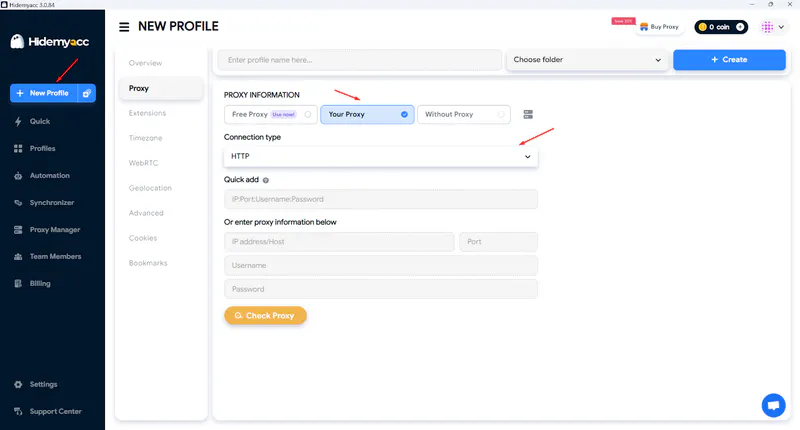
- Dedicated proxy binding: Rather than relying on manual browser proxy extensions, Hidemyacc allows you to bind specific IP parameters directly to distinct profiles, maintaining network consistency throughout the profile lifecycle.
Combining Hidemyacc with high-reputation proxies creates clean environments, simulates natural hardware fingerprints, and prevents cross-account association.
5.2. Step 2: Synchronize browser fingerprint parameters
The primary requirement when configuring proxy connections is total data consistency. Browser parameters must match the characteristics of the connected proxy address.
- System timezone: Using an IP routed through New York while your system clock remains set to UTC+7 creates a clear mismatch that triggers automated security flags. Set the browser's virtual timezone to match the IP's physical location.
- WebRTC leaks: Unrestricted WebRTC requests expose local network interfaces despite active proxy tunnels. Ensure WebRTC handling is set to disabled or configured to mirror the external proxy IP.
- Interface language: Configure browser language headers to align with the proxy's geographic region. An account routed via France, for instance, should prioritize French or English locales over mismatched foreign character sets.
- Geographic location: Enable GPS simulation features to align latitude and longitude coordinates with the incoming IP block.
Maintaining strict parity across all environmental telemetry points prevents automated systems from detecting configuration conflicts.
>>> Configuration mismatches frequently prompt identity verification checkpoints. For resolution steps, see: Trouble verifying LinkedIn account? Detailed troubleshooting guide
5.3. Step 3: Account warm-up protocol
Important: Avoid high-volume interactions immediately after switching network environments. Fresh environments require a gradual LinkedIn account warm-up routine to establish baseline trust.
Initial 7-day schedule for new IPs:
- Days 1–2: Log in, browse the feed for 5–10 minutes to generate session cookies, and review content. Do not send connection requests or direct messages.
- Days 3–5: Perform low-friction actions: like several industry posts, follow official company pages, and make minor updates to profile summary details.
- Days 6–7: Begin sending 1 to 3 manual connection requests daily to relevant 2nd-degree connections.
This steady ramp-up establishes organic session histories on the new IP block, keeping the account below anomaly detection thresholds.
5.4. Step 4: Operating within safe account thresholds
Sustainable account operations require staying well within platform safety limits. Based on current system baselines, observe the following operational parameters:
- Connection invitations: Limit outbound invitations to 20–30 per day on standard free accounts.
- Direct messages: Cap cold outreach volume. Rapid message bursts without established contact histories frequently trigger spam reports.
- Automation pacing: When running automation scripts, implement randomized execution delays. Pausing 30 to 60 seconds between sequential actions simulates human operational patterns.
Regardless of infrastructure quality, observing standard usage thresholds and human-like timing protects accounts from automated spam flags.
>>> Expanding connection and messaging limits safely often requires an upgraded tier. Review current options: How much is a LinkedIn Premium account? Cost, features, and benefits breakdown
6. Common operational errors leading to account bans
Even with clean proxy infrastructure and antidetect browsers, improper usage patterns can still lead to account penalties. Avoid these five common mistakes:
6.1. Relying on public, free proxy lists
Attempting to cut operational costs by using free public proxies introduces significant risks:
- The mistake: Sourcing open proxy lists from public internet forums to handle platform traffic.
- The consequence: Public proxies are almost universally blacklisted on security firewalls due to historic abuse. Sharing an IP range with automated spam bots can trigger account bans within minutes of login.
- The fix: Use dedicated, commercially secured proxies with verified routing provenance to guarantee clean network histories.
Avoid risking valuable account equity for marginal infrastructure savings. Dedicated, clean IP access is an essential requirement for stable multi-account setups.
>>> For recovery steps following restrictions from flagged proxies, see: LinkedIn account restricted: Causes and troubleshooting
6.2. Rapid, erratic IP switches across devices
Security logging tracks geographical distance between consecutive authentication events:
- The mistake: Accessing a profile via a domestic mobile connection while concurrently running automated software bound to an overseas proxy.
- The consequence: This triggers automated impossible travel flags. Physical users cannot transition across distant international borders within minutes, making this an immediate fraud trigger.
- The fix: Maintain consistent geographic routing for each account. Use the designated regional proxy across all sessions, or log out of mobile devices while automated tools are running.
Maintaining network consistency prevents unnecessary account audits and keeps profile operations stable.
6.3. Over-automating interactions
Clean IP infrastructure cannot protect accounts that exhibit clearly non-human behavioral patterns:
- The mistake: Dispatching 100 connection invitations within an hour or sending identical message templates to cold lists in rapid bursts.
- The consequence: Platform monitoring relies on pattern recognition. Even on pristine residential IPs, rigid, high-velocity actions trigger automated spam restrictions.
- The fix: Use randomized pacing delays, vary workflow sequences, and personalize outreach copy with variable merge tags.
Safe automation depends on mimicking organic, randomized human interaction rhythms.
6.4. Unaddressed WebRTC data leaks
Browser architecture vulnerabilities can inadvertently expose local networks past the active proxy tunnel:
- The mistake: Routing traffic through a proxy while leaving the browser's WebRTC protocol exposed without local address masking.
- The consequence: WebRTC requests can leak the physical router IP past the proxy, exposing the true connection origin and undermining the proxy setup entirely.
- The fix: Use purpose-built antidetect environments like Hidemyacc, which automatically disable or spoof WebRTC data to match the active proxy endpoint.
Isolating network interface metadata prevents unintentional IP leaks from compromising your accounts.

6.5. Poor outreach targeting and low acceptance rates
Platform monitoring incorporates user feedback alongside automated technical metrics:
- The mistake: Broadcasting connection requests to irrelevant audiences or using incomplete, unoptimized profiles lacking verifiable work histories and profile photos.
- The consequence: When recipients frequently select "I don't know this person" or flag messages as spam, monitoring systems review the account's historical IP logs and browser fingerprint data.
- The fix: Build comprehensive, professional profile collateral and target well-defined, relevant audiences before initiating outreach.
Maintaining high acceptance rates and professional profile standards reinforces account trust across automated systems.
>>> To build initial profile trust, review: Get more LinkedIn followers: 5 effective organic strategies
7. Conclusion
Operating sustainable LinkedIn workflows relies on three technical pillars: high-reputation proxies, environment isolation via the Hidemyacc antidetect browser, and measured, organic usage habits. Neglecting any of these elements leaves accounts exposed to automated security flags.
Evaluate the providers in the comparison above, select a proxy tier suited to your specific operations, and implement properly isolated environments to protect your LinkedIn workflows.
8. FAQ
1. Can LinkedIn detect when I am using a proxy?
The platform readily detects low-quality connections, particularly datacenter hosting blocks. However, routing traffic through residential or mobile proxies within an antidetect browser makes connection requests appear identical to genuine consumer web traffic, avoiding automated flags.
2. What is the best proxy type for LinkedIn automation?
Static ISP proxies are the standard choice for ongoing account management and direct outreach because they provide a stable, persistent residential IP. For high-volume public scraping, dynamic rotating residential proxies are preferred.
3. Is it safe to use free proxies on LinkedIn?
No. Free public proxies are almost universally cataloged on platform blacklists due to prior abuse. Routing authenticated traffic through them frequently results in immediate account restrictions.
4. How many LinkedIn accounts can be operated per proxy?
The standard operational ratio is 1:1 (one unique proxy assigned to one account). Sharing single IP allocations across multiple profiles links their operational histories, risking simultaneous group bans if one is restricted.
5. Why did my account get restricted despite using a proxy?
Proxies mask network addresses, but they do not address browser fingerprint tracking. Restrictions can stem from Canvas/WebGL fingerprint mismatches, WebRTC network leaks, excessive interaction velocity, or inheriting a previously abused IP. Pairing clean proxies with Hidemyacc resolves the underlying fingerprint factors.
6. Can a standard VPN replace a proxy for multi-account management?
Standard commercial VPNs route connections through shared commercial datacenter pools utilized by thousands of concurrent subscribers, making their subnets easy to flag. Dedicated residential and ISP proxies provide isolated, reputable endpoints far better suited for multi-account workflows.
7. Do proxies reduce automation throughput speeds?
Enterprise-grade network providers (such as Bright Data or NetNut) maintain low-latency connections that have minimal impact on execution speeds. Mobile proxies may exhibit slightly higher latency due to cellular network routing, but they offer significantly higher trust scores in return.