PAN network may be a concept you have heard of but do not really understand. IfIf you're looking for the answer to "What is a PAN network?" and want to know how it works in everyday life, this article is for you. In this article, let's explore with Antidetect Browser Hidemyacc the definition, features, benefits, disadvantages, practical applications and differences of PAN network compared to other types of networks.
1. What is PAN network?
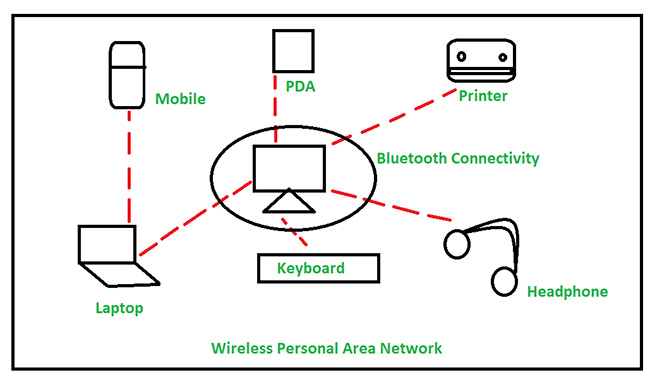
A PAN, or Personal Area Network, is a type of network designed to connect personal devices within a short range, typically less than 10 meters. It is an ideal solution for connecting devices such as smartphones, tablets, wireless headphones, or smartwatches without the need for complex infrastructure like a LAN or WAN.
PANs began to appear in the late 20th century, when wireless technologies such as Bluetooth and Infrared (infrared rays) were born. Thomas G. Zimmerman, a researcher at IBM, is credited with pioneering the development of this concept in the 1990s.
Since then, the PAN network has continuously evolved, becoming an indispensable part of the modern technology ecosystem, especially with the development of the Internet of Things (IoT) and smart devices.
2. Types of connections in PAN network
PANs support two main types of connections: wireless and wired. Here are details about the common connection types that fall into each category:
2.1 Wireless connection
Wireless connectivity is the most popular method in PANs, allowing devices to communicate without cables. Some typical wireless technologies include:
- Bluetooth: The most popular technology, used to connect personal devices such as headphones, phones or speakers within a range of less than 10 meters.
- Wi-Fi Direct: Allows direct connection between devices without going through a router.
- NFC (Near Field Communication): Operates at extremely short distances (a few centimeters), suitable for contactless payments or fast data transmission.
- ZigBee: Often used in the Internet of Things (IoT) and smart homes, connecting many devices with low energy consumption.
- Infrared: Used in remote controls or older devices, although less common today.
>>> What are MAC Addresses and how to change it?
2.2 Wired connection
In addition to wireless connections, PAN networks also support wired connections, which are often used when high speed and stability in data transmission are required. Common types of wired connections include:
- USB: The most familiar type of wired connection in a PAN. Users can use a USB cable to connect phones, tablets, or computers together to transfer data, charge batteries, or connect to peripheral devices such as printers, mice, and keyboards.
- FireWire: Although no longer popular, FireWire is still a high-speed wired connection option, especially useful for transferring audio and video data between devices like camcorders and computers.
Both types of connections have their own advantages, depending on the specific needs of the user in the PAN network.
3. What are the advantages and disadvantages of PAN network?
3.1 Benefits of PAN network
Easy connection: PAN allows for fast data transfer between personal devices without complicated configuration. For example, you can connect a Bluetooth headset to your phone in seconds to listen to music or take a call.
High Mobility: Just turn on the device and pair, no cables or large infrastructure required. Suitable for travel, from home to the park or office.
Low Power Consumption: Many PAN technologies like Bluetooth Low Energy (BLE) or ZigBee are designed to consume very little power, extending battery life for compact devices like smartwatches or wireless headphones.
3.2 Disadvantages of PAN network
Limited Range: With a maximum distance of only 10 meters, PAN networks are not suitable for long-range connection needs. If you go out of range, the connection will be dropped immediately.
Lower data transfer speeds: Compared to LANs (which can go up to 1 Gbps) or WANs (which depend on internet bandwidth), PANs typically have lower speeds. For example, Bluetooth 5.0 only goes up to 2 Mbps, which is fine for audio or small data but not ideal for high-quality video.
Device compatibility issues: A Bluetooth 4.0 headset may not work well with a Bluetooth 5.0 phone. Some older devices do not support modern PAN technologies like NFC or ZigBee.
Read more:
- Internet infrastructure: What it is and why it matters
- VPS Hosting Explained: What it is and how it works
- What is WebRTC? How browsers handle real-time communication
- Understanding DNS: Types, Security, and How to Prevent DNS Leaks
- What is Port in networking? Functions and how to classify them correctly
4. Practical applications of PAN network
PAN (Personal Area Network) brings many practical utilities, supporting users in different aspects of modern life.
4.1 In daily life
PAN makes life more convenient by connecting personal devices such as wireless headphones, portable speakers or smart watches to your phone without the need for cables. This provides a comfortable, flexible and easy experience. In addition, data synchronization between your phone and computer is fast, allowing you to share files, images or data with just a few simple steps.
4.2 In IoT technology
PAN network plays an important role in connecting and controlling smart home devices such as lights, air conditioners or security systems. Thanks to that, you can manage your home remotely, creating a modern and comfortable living environment. Moreover, PAN network is also applied in health care with devices such as heart rate monitors or health watches, helping you monitor and improve your health effectively.
4.3 In the working environment
PAN network supports connecting peripheral devices such as printers, scanners or projectors to computers, contributing to improving work efficiency. This connection not only saves time but also facilitates office activities, providing a flexible and modern working space.
In general, PAN network is not only a connection technology but also a solution to make our life and work easier and more efficient.
PAN is a simple yet powerful solution for connecting personal devices within a small range. With benefits such as mobility, low power consumption and easy connectivity, it has become an indispensable part of modern life.
However, limited range and lower speeds are also factors you need to consider. Hopefully, the above article from Hidemyacc has helped you understand “What is PAN Network?” and how it works. If you want to learn more about this technology, leave a question below!
>>>SEE MORE: What is WLAN ? Are WLAN and WiFi the same?
>>> Fixing the 'Network Blocking Encrypted DNS Traffic' Warning on iOS: A Step-by-Step Guide