Amazon error 2063 is an issue that occurs when the system cannot process a transaction to purchase or rent content. The causes are usually related to payment methods, account settings, or network connections. In this article, let's explore with Hidemyacc what Amazon error 2063 is, the causes behind it, and effective ways to fix it to restore your transactions quickly.
1. What is Amazon error 2063?
Before exploring the causes and fixes, you need to understand exactly what Amazon error 2063 is and why it appears when users make a payment or rent content on Prime Video.
1.1. Concept
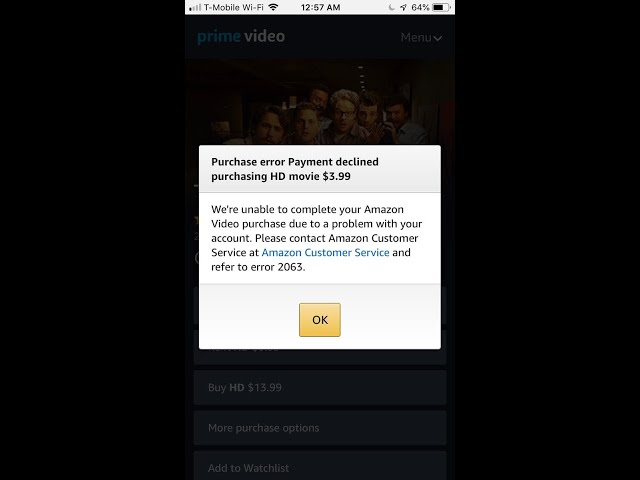
Amazon error 2063 is a technical error code displayed directly on the Amazon Prime Video platform. This error code appears when the Amazon system cannot successfully process a transaction to purchase or rent content on Prime Video.
When Amazon error 2063 occurs, the user payment process is blocked, resulting in the transaction failing to complete, and the video you want to watch will completely fail to play. This error message usually stems from the Amazon system being unable to verify the validity of the payment method you provided, or the server experiencing an interruption while processing transaction data.
1.2. Signs that you are experiencing Amazon error 2063
To accurately identify if you are encountering Amazon error 2063, you can look for the following clear signs while operating on the Prime Video app or website:
- The screen directly displays a message accompanied by the Amazon error 2063 code.
- Cannot complete the transaction to buy or rent a video, and the content cannot be played despite making the payment.
- The Prime Video platform constantly asks you to check or update your payment method.
- The transaction is declined even though the account is still logged in and functioning normally.
These signs indicate that the system is having trouble processing payments or verifying account information.
1.3. Is Amazon error 2063 serious?
You do not need to worry too much because Amazon error 2063 is absolutely not a serious system error affecting your account data or security.
In most actual cases, this issue only appears due to problems related to the payment method verification step or because the network connection does not ensure geographical consistency. Users can completely fix this situation themselves quickly. The most basic and effective troubleshooting actions are usually updating the payment card information, turning off background VPN software, or simply trying the transaction again on a different device.
2. When does Amazon error 2063 usually appear?
Users do not always encounter errors while using Amazon. In many cases, the issue only appears when performing certain actions related to digital content or payments. Here are some times when the error often occurs:
- When a user has just updated or changed to a new payment method directly in the account management section.
- When a user uses tools that change network IP addresses like VPNs, Proxies, or accesses with an IP completely different from the account registered geographical area.
- When the Amazon system is verifying payment information for the digital content you want to buy or rent.
- When you use a shared account or Family Account plan but your profile has restricted purchasing rights from the primary manager.
- When the platform system detects unusual signs during the transaction processing and automatically blocks it for safety. In many cases of suspected heavy fraud transactions, this is also the core reason explaining why your Amazon account is locked temporarily.
Understanding the common situations that cause Amazon error 2063 to appear will help users identify the problem faster and choose the appropriate solution.
3. Causes of Amazon error 2063
To completely resolve Amazon error 2063, understanding the root cause is extremely important. Below are the main factors that frequently lead to payment interruptions on Prime Video:
3.1. Invalid payment method
This is the most common reason why transactions on Amazon cannot be completed. When the system cannot verify the card information or detects mismatched payment data, the transaction is declined. Card-related issues typically include:
- International Visa or Mastercard payment cards have passed their expiration date but have not been updated on the system.
- The information printed on the card or the Billing Address declared on Amazon is entirely different from the actual data at the bank.
- The available balance in the account or the remaining credit limit is insufficient to perform the payment transaction for digital content.
When these problems occur, the system may display Amazon error 2063 to notify you that the transaction cannot be processed.
3.2. Incorrect 1-Click Payment settings
Amazon uses the 1-Click Purchase mechanism to process transactions related to buying or renting movies on Prime Video. This helps the purchase or rental of content happen quickly, but it also requires the default payment method to be set up correctly.
If the default payment method in this section is invalid or unverified, the system may reject the transaction and display an error code.
3.3. Using a VPN or Proxy
Amazon applies many copyright policies for each region. Therefore, if the system detects that the access IP address does not match the region of the account or the payment method, the transaction might be blocked. Using a VPN or Proxy sometimes causes Amazon to identify the user as accessing from a different country, leading to Amazon error 2063 when making a payment.
3.4. Data and system errors
Besides payment-related causes, errors can also stem from the data on the user device:
- Web browser Cache and Cookies data that is corrupted or too old will cause interruptions in the secure data exchange process with the Amazon server.
- Errors can sometimes arise directly from the Amazon server or because the system of an intermediary payment processing partner is under periodic maintenance.
These factors can disrupt the data exchange process between the device and the Amazon system, making it impossible to complete the transaction.
4. How to fix Amazon error 2063 quickly
When encountering an error during payment or accessing content, users do not need to worry too much because most cases can be handled with a few simple checking steps. Identifying the correct cause will help fix Amazon error 2063 faster and avoid interrupting the service usage process.
4.1. Check and update your payment method
First, you should double-check the payment method added to your Amazon account. If the card information is incorrect or the card is expired, the system cannot complete the transaction. You should ensure that:
- The payment card is still within its validity period.
- The card information and billing address are entered correctly.
- The card supports international payments if you are using services from abroad.
If needed, you can add a new payment method and try the transaction again.
4.2. Check 1-Click Payment settings
If the default payment method in 1-Click Payment has a problem, Amazon may not be able to process digital content transactions. You should recheck this setting in your Amazon account by:
- Accessing Account Settings → 1-Click Settings.
- Checking if 1-Click Purchase is turned on for digital content.
- Ensuring a default payment method is selected for 1-Click transactions.
- If there are multiple cards in the account, try re-selecting the default card for 1-Click Purchase.
After updating the settings, try the transaction again to see if Amazon error 2063 still appears.
4.3. Check network connection and access location
In some cases, the error can appear when the Amazon system detects a difference between the access IP address and the account region. This often happens when users use a VPN, Proxy, or a network connection with an unstable geographic location. You can turn off the VPN on Windows following these steps:
- Press Windows + I to open Settings.
- Select Network & Internet in the settings menu.
- Scroll down and click on the VPN section.
- Find the VPN connection currently in use, click on the expand arrow.
- Select Remove or Disconnect to turn off the VPN.
Additionally, you can also check Country/Region Settings in your Amazon account to ensure the region information is set up accurately. Ensuring a suitable network connection and access location can help reduce the chances of the system blocking the transaction and minimize the occurrence of Amazon error 2063.
Many users, especially sellers, often have the habit of turning on a VPN to check product display locations or apply Amazon SEO tips. However, when switching to personal entertainment purposes on Prime Video, remember to turn off these IP changing tools so the system does not block the transaction. Ensuring the right network connection and access location will help minimize Amazon error 2063.
4.4. Disable Proxy in network settings
If a Proxy is enabled in the system, Amazon can detect an unusual IP address and decline the transaction. This sometimes leads to Amazon error 2063 when users try to buy or rent content.
You can turn off Proxy on Windows with these steps:
- Press Windows + I to open Settings.
- Select Network & Internet.
- Click on the Proxy section.
- Turn off the Use a proxy server option.
After turning off the Proxy, try accessing Amazon Prime Video again and repeat the transaction.
4.5. Temporarily disable Windows Defender Firewall
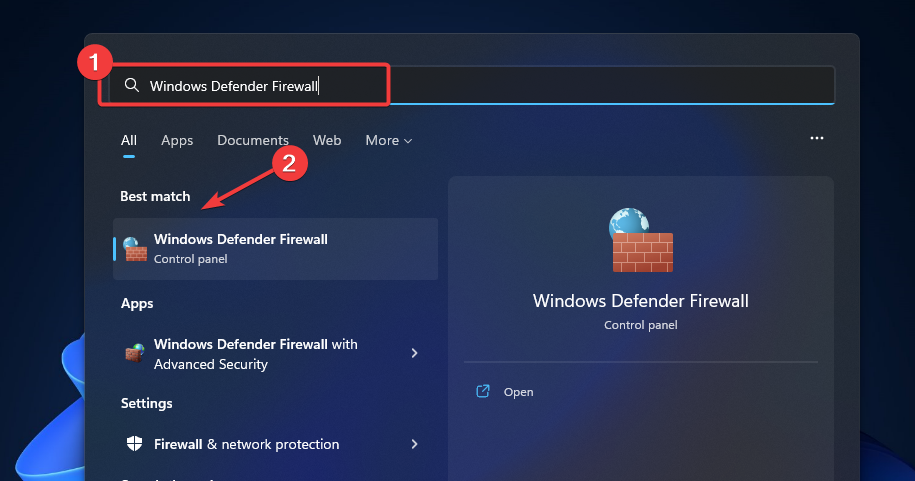
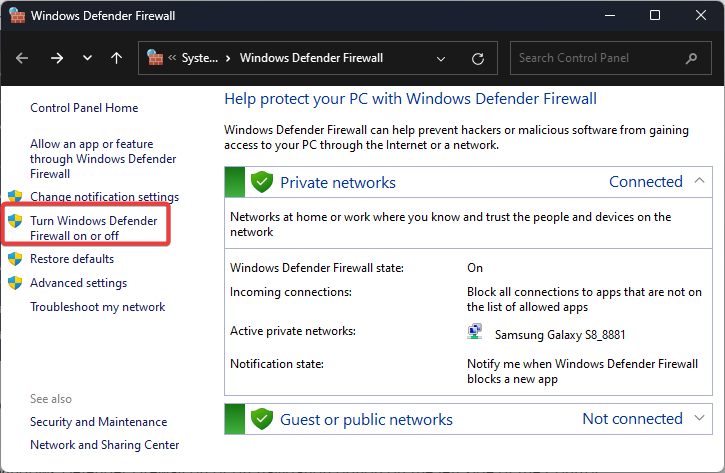
In some rare cases, the system firewall might block the connection between the browser and the Amazon server. This can cause the transaction processing to be interrupted. You can try temporarily disabling Windows Defender Firewall to check:
-
Click on the Windows icon on the taskbar, type Windows Defender Firewall into the search box
-
On the left control panel, select Turn Windows Defender Firewall on or off.
-
Select Turn off Windows Defender Firewall.
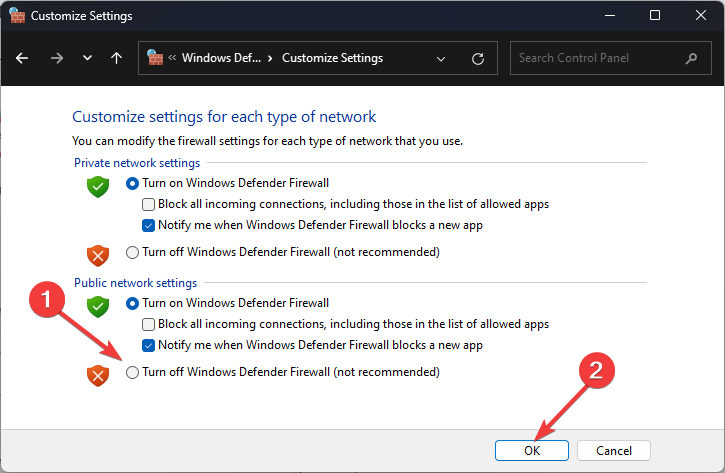
After checking, remember to turn the firewall back on to ensure system safety.
4.6. Clear browser and device data
Temporary data like cache and cookies can sometimes cause conflicts when Amazon processes a transaction. When this data is corrupted or too old, the browser may send inaccurate information to the system, thereby leading to Amazon error 2063.
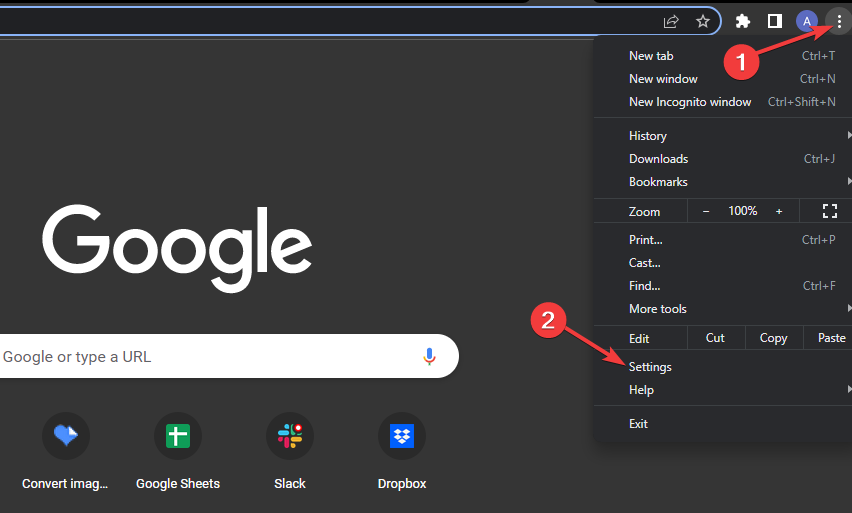
You can try clearing cache and cookies on Chrome with the following steps:
-
Open Chrome and click on the Menu icon (three vertical dots) in the top right corner of the screen, then select Settings.
-
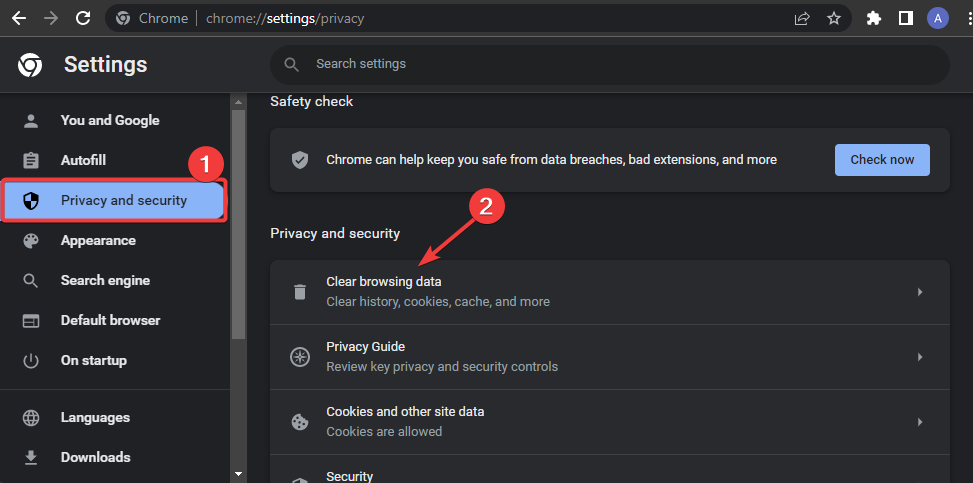
Select Privacy and security on the left menu, then click Clear browsing data.
-
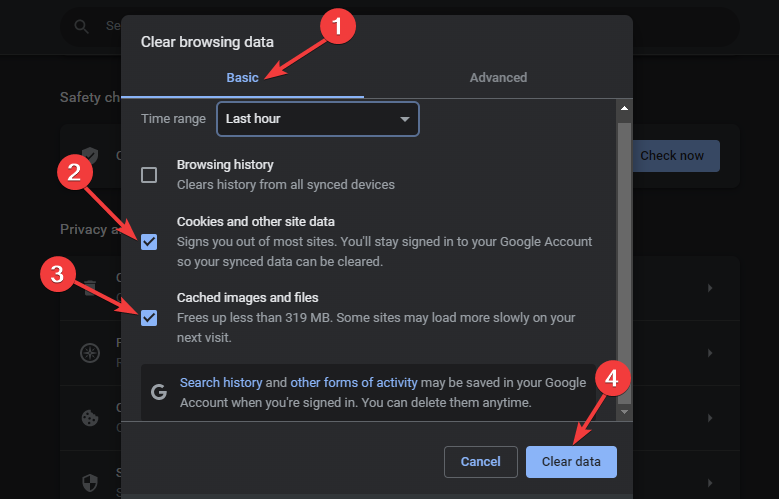
In the Basic tab, check the boxes for Cookies and other site data and Cached images and files. Click Clear data to wipe the browsing data.
Once completed, open Amazon Prime again and try the transaction one more time. Additionally, you can also try accessing Amazon using a different browser or device to see if the error stems from the software you are currently using. If the transaction works normally on another device, the error likely comes from your browser or current system. Furthermore, if your browser has installed too many seller support extensions, typically plugins belonging to the Amazon SEO tools suite, try temporarily turning them off to see if that resolves the conflict.
4.7. Check the Digital Orders section
In some rare cases, the transaction to buy or rent a movie on Prime Video might be hanging in the system instead of being completely canceled. When this happens, you can recheck the Digital Orders section in your Amazon account to view the order status. If the system displays a Retry Payment option, you can try paying again to complete the transaction.
4.8. Check system server status
Sometimes the reason a transaction is declined does not lie with the user account or device but comes from a temporary Amazon system failure. Large-scale server issues not only disrupt your movie rental process but sometimes also halt the entire platform ecosystem, from shopping to the reporting systems of Amazon PPC advertising campaigns.
In this case, you can:
- Check the Amazon system status on service tracking sites.
- See if many other users are also experiencing similar errors.
- Try performing the transaction again after some time when the system has stabilized.
If the error originates from the server side, users usually just need to wait for the system to restore normal operations.
4.9. Contact Amazon support
If you have tried all the above methods but Amazon error 2063 still persists, you should directly contact Amazon support for a more detailed check. Through channels like live chat, email, or the help center, support staff can review your account status, payment methods, and related transactions to determine the specific cause. From there, they will guide you through the necessary steps to fix the error and complete the transaction.
5. How to avoid Amazon error 2063 in the future
Although Amazon error 2063 can be fixed in multiple ways, proactively preventing it from the start will help minimize the chance of encountering this issue again while using the service. Some simple habits in managing your account and devices can help transactions on Amazon run more stably.
5.1. Proactively manage payment information
Payment information is a crucial factor directly affecting Amazon transaction processing capabilities. Therefore, users should regularly check and update the payment methods in their accounts.
Some actions to perform include:
- Always update a valid payment method in your Amazon account.
- Periodically check the card expiration date to avoid declined transactions.
- Ensure the billing address (Billing Address) matches the bank information.
Maintaining accurate payment information will significantly reduce the risk of facing Amazon error 2063 when making a transaction. This habit is also an extremely important preparation step if you are aiming for a business direction and want to find out what Amazon FBA is to set up a professional storefront right from the start.
5.2. Comply with regional regulations
Amazon applies many policies related to content copyright per country. If the system detects that the access IP address does not match the account region, the transaction can be blocked. To minimize this risk, you should:
- Limit the use of a VPN when performing transactions to buy or rent content on Prime Video.
- Ensure the country in the account settings aligns with the payment method.
- Check content purchasing rights if you are using a family account (Family Account).
Properly complying with regional regulations will make it easier for the Amazon system to verify transactions and reduce the risk of encountering Amazon error 2063 when buying or renting content.
5.3. Perform periodic browser maintenance
Temporary browser data can accumulate over time and cause conflicts when accessing online services. Periodically cleaning data will help the system run more stably. You should maintain the habit of:
- Clearing browser cache and cookies periodically.
- Updating the browser to the latest version.
- Limiting the installation of too many unnecessary extensions that could cause data conflicts.
These simple steps not only help avoid Amazon error 2063 but also improve performance when using online services in general.
In addition to technical errors during payment, many users also encounter issues when managing multiple accounts on the Amazon platform. If you are operating multiple stores, please refer to the detailed guide on how to open multiple Amazon seller accounts to avoid policy violations and limit system-related errors.
6. Conclusion
Amazon error 2063 usually occurs when the system cannot process or verify a transaction to buy or rent content on Prime Video. Common causes relate to payment methods, account settings, or network connections.
In most cases, you can fix the error by double-checking the payment information, turning off the VPN, clearing the browser cache, or trying the transaction on a different device. Knowing the causes will help you fix Amazon error 2063 quickly and minimize interruptions when using the service.
Besides experiencing entertainment content, if you are looking for startup opportunities on online platforms, do not miss these articles to begin your professional selling journey: E-commerce business ideas
7. FAQ
1. What does Amazon error 2063 mean?
Amazon error 2063 is an error that occurs when Amazon Prime Video cannot process a payment transaction when a user attempts to buy or rent content. This error is usually related to payment method verification or account settings.
2. Does Amazon error 2063 affect my Amazon account?
Amazon error 2063 does not directly affect your Amazon account. It is just an error related to the payment processing step when buying or renting content on Prime Video.
3. Why does Amazon Prime Video show error 2063 even when the card still has money?
Even if the card has funds, the error can still occur if the payment information does not match, the card is expired, the billing address is wrong, or the Amazon system fails to verify the transaction.
4. Is a VPN the main cause of Amazon error 2063?
A VPN can cause this error because Amazon detects an IP address outside the account region, causing the system to decline the payment transaction.
5. What is the fastest way to fix Amazon error 2063?
The fastest way is to check and update your payment method, turn off your VPN if you are using one, and try the transaction again on a different browser or device.
6. Should I delete the Prime Video app to fix this error?
Deleting and reinstalling the app can help clear error data or cache, but in many cases, error 2063 still requires you to check your payment method or account settings.
7. When do I really need to contact Amazon support?
You should contact Amazon support if you have checked your payment method, turned off the VPN, and tried the troubleshooting methods but the error still persists.