Owning a professional email address plays a crucial role in building credibility and increasing inbox placement rates. However, instead of spending months warming up a new system, many businesses choose to purchase email domains with an existing operational history to save time and optimize campaign efficiency. This article provides a detailed evaluation of the top reputable platforms to buy email domains, making it easy for users to compare and select the right service. Additionally, it offers vital insights into risks, security, and the quality-check workflow before and after transactions.
1. What is buying an email domain?
Buying an email domain means owning email addresses associated with an organization's custom domain name (e.g., [email protected]) rather than using public email services. This is essential for ensuring high deliverability, establishing brand authority, and giving businesses full control over their communication infrastructure.

1.1. How does a custom email domain differ from Gmail?
The primary difference between these two types of email lies in their intended use cases and system customizability. Here are the two most fundamental distinctions that users should know:
- Gmail: This is a free service with low daily sending limits. When you use Gmail to reach out to many new clients simultaneously, messages are easily blocked by systems and routed straight to the spam folder.
- Email Domain: This is a paid service that allows users to customize internal technical parameters. This setup supports much higher sending volumes and helps messages land directly in the recipient's main inbox.
In short, Gmail is best suited for daily personal communication, whereas for businesses looking to scale operations and launch mass email outreach, a custom email domain is a mandatory solution.
1.2. What are fresh, aged, and warmed emails?
In the current market, providers typically categorize email accounts into three main types based on their age and usage history. These types are defined as follows:
- Brand new email (Fresh mail): These are accounts linked to newly registered domains that have never sent or received any messages. Buyers must take the time to send emails gradually each day to build authority before full deployment.
- Long-standing email (Aged mail): These are accounts connected to domains that have existed for several months or years without any policy violations. Because they have established age, receiving servers trust them more. For this reason, many professionals look for reliable providers to buy old Gmail accounts to bypass the initial setup cycle.
- Pre-warmed email (Warmed mail): These are aged accounts that the seller has continuously nurtured using automated software to send and receive emails daily over a long period. This infrastructure possesses high sender reputation, allowing you to run high-volume campaigns immediately upon purchase.
Understanding the characteristics of these three email types will help you choose the right product that aligns with your budget and project timeline.
1.3. Common formats when purchasing email domains
Rather than offering a single cookie-cutter account option, the market segments services into different formats to match specific project requirements. When exploring vendors, you will frequently encounter the following four transactional formats:
- Monthly mailbox rentals: Users pay a recurring subscription fee for dedicated storage and a standalone email sending system, which is ideal for long-term business models.
- Disposable emails: These are temporary accounts that exist for only a few minutes or hours to receive software activation OTP codes, after which the mailbox is automatically deleted.
- Self-managed custom domains: The buyer registers an independent domain name and manually configures the entire mail server infrastructure to send emails exactly as desired.
- Catch-all domains: This is a special mechanism that automatically captures all incoming emails sent to any username prefix under that shared domain, making it highly efficient for aggregating data in one place.
Users simply need to choose a format based on whether their goal is client outreach or automation workflows, preventing unnecessary spending on redundant features.
1.4. Why do many people choose to buy email domains instead of creating them manually?
While it is entirely possible to build an email infrastructure from scratch, most professional digital marketers prefer buying because of the practical advantages. Specifically, purchasing through dedicated services offers two major benefits:
-
Saves time and manual effort: Manual setup requires advanced technical expertise and weeks of gradual sending to build mailbox trust. Today, instead of doing this manually, users can leverage an automated Gmail account creator tool to rapidly acquire large volumes of accounts for work. This method gives you an instant, standard-compliant system to use right away while maintaining security standards.
-
Leverages built-in authority: The age and trust scores of an older domain cannot be replicated overnight. By purchasing an existing domain, you bypass stringent anti-spam filters, ensuring safer deliverability from day one.
Despite higher upfront costs, this approach significantly cuts down deployment time and mitigates technical execution risks.
2. Where to buy email domains: A comprehensive list
The email acquisition market is vast, featuring hundreds of different providers. However, each platform caters to a completely distinct use case. Defining your requirements and choosing the right source will optimize your costs and prevent account suspensions. Below is a detailed breakdown of the most reputable sources categorized by function.
2.1. Buying temporary email domains
Temporary mail consists of randomized email addresses generated by a system that exist for a very short duration, usually from a few minutes to a few hours. Once that window closes, the entire inbox and its contents are permanently deleted without leaving a trace. Below are the details of platforms offering this service.
|
Platform |
Type Offered |
Pros |
Cons |
Reference Pricing |
|
Temp Mail |
Fresh mail |
Instant generation, no registration required, fast domain switching, good for OTPs. |
Domains are blacklisted by many large sites, low security, unsuitable for long-term use. |
Free (Premium paid version available) |
|
10 Minute Mail |
Fresh mail |
Incredibly fast and straightforward, self-destructs in 10 minutes for zero footprint. |
Lifespan is too brief, cannot be used if you need to access the inbox later. |
Free |
|
Guerrilla Mail |
Fresh mail, limited catch-all |
Allows custom mailbox prefixes, retains emails longer than most competitors. |
Low domain authority, outdated UI, inconsistent inbox delivery. |
Free |
|
Mail.tm |
Fresh mail |
Includes a free API, ideal for automation scripts or generating multiple accounts at once. |
Domains easily trigger blacklists if used for spam; lacks high reliability. |
Free (Premium paid version available) |
|
YOPmail |
Fresh mail, catch-all |
No signup needed, multiple unique subdomains available, inbox persists for a fair duration. |
Inboxes are essentially public; anyone can view contents, resulting in very low privacy. |
Free |
This suite of services is particularly ideal for users who need a quick, disposable address to receive an account activation code for trial services without exposing personal details.
2.2. Buying email domains on marketplaces & forums
If your project requires high volumes of older accounts for mass email distribution, tech forums and secondary market hubs are your best options. Here, you can source email domains from individual vendors at rates significantly below retail market averages.
|
Platform |
Type Offered |
Pros |
Cons |
Reference Pricing |
|
BlackHatWorld |
Aged mail, fresh mail, catch-all |
Most affordable rates, vast selection of vendors, featuring real community reviews. |
High risk, inconsistent quality, requires thorough vendor vetting before purchase. |
From $1 to $10 depending on type |
|
Fiverr |
Aged accounts, domain sourcing |
Escrow system protects buyer funds, easy to browse sellers, wide price spectrum. |
Not specialized in email infrastructure; quality depends entirely on the freelancer. |
From $5 to over $100 |
|
AccsMarket |
Aged Gmail, bulk fresh Gmails |
Extremely cheap, supporting instant bulk buys categorized clearly by creation year. |
Resold personal accounts prone to suspensions; violates Google TOS. |
From $0.01 to $2 based on creation year |
|
PlayerUp |
Aged Gmail and Outlook |
Secure middleman payment protection, clear seller trust ratings visible. |
Resold assets face high automated sweep risks, leading to potential account loss. |
Varies by individual merchant |
|
|
Sourcing & review communities |
Unbiased feedback from real users, great for uncovering top-tier vendors via discussions. |
Lacks built-in buyer escrow; users must handle transactions and assume all risks. |
Subject to direct negotiation |
The primary benefit of these hubs is the massive volume and diversity of accounts available. On the flip side, transaction risks are high and automated ban waves are common, making it critical to understand why Google accounts get suspended so you can protect your investment.
2.3. Professional email domain providers
To establish long-term enterprise credibility or execute professional corporate outreach campaigns, investing in official domain registrars and specialized email hosting hosts is the safest route. These infrastructures guarantee premium security and uptime metrics.
|
Platform |
Type Offered |
Pros |
Cons |
Reference Pricing |
|
Google Workspace |
New domains, business Gmail |
Highest inbox delivery rates, absolute authority, rich suite of integrated productivity tools. |
Costly when scaling up large mailbox counts, does not offer pre-aged domains. |
From $6/month (Around $2.50/month via authorized resellers like LeadsMonky) |
|
Microsoft 365 |
New domains, business Outlook |
Excellent inbox placement for B2B target groups, includes Teams and SharePoint integration. |
Premium pricing tier, setup and server configuration are more complex than Google. |
From $6 per user/month |
|
Namecheap Private Email |
New domains, private inbox, catch-all |
Most affordable official choice, includes free lifetime WHOIS privacy, 24/7 support. |
Shared server hosting means neighbor activities can impact your sender reputation if they spam. |
From $0.99/month |
|
Zoho Mail |
New domains, private inbox, catch-all |
Offers a free tier for up to 5 mailboxes, premium upgrades are highly cost-effective. |
Free version restricted to webmail; cannot bridge to external mail sending applications. |
Free for 5 users or starting from $1/month |
|
IONOS |
New domains, hosting, free domain |
Cheapest entries for real inboxes, bundle includes a free domain name for the first year. |
Low storage capacity at 2GB, slower support response times, fewer power features. |
From $1/month |
Securing an official business email structure from the start requires a bit more investment, but it forms the sturdiest foundation for commercial operations. You will never have to worry about sudden data loss or important client messages landing in the junk folder.
2.4. Managed email domains for cold email
Finally, this category represents tailored infrastructure solutions designed for sales teams that need to deploy thousands of cold outreach emails daily. Instead of dealing with tedious manual domain configurations, these automated ecosystems handle everything from registration to warm-up routines.
|
Platform |
Type Offered |
Pros |
Cons |
Reference Pricing |
|
Mailforge |
New domains, shared server hosting, catch-all |
Most budget-friendly software solution, automates DNS provisioning, fast deployment. |
Shared infrastructure format prevents direct IP reputation governance. |
Lowest in class, billed per inbox and scales based on advanced operational tiers. |
|
Zapmail |
New domains, Google & Outlook business inboxes |
Accounts pre-warmed for 12 weeks, fully provisioned in 10 minutes, direct Instantly/Smartlead integration. |
Outlook options can experience disconnects, users cannot manage IP ranges. |
Around $2.50 per inbox/month, with scalable volume tiers for enterprises. |
|
Primeforge |
New domains, Google & Outlook business inboxes |
Utilizes clean US-based IP pools, automates all security layers, full domain ownership, ready in 30 minutes. |
Higher price point compared to entry-level alternatives like Zapmail or Mailforge. |
Billed per mailbox; domains average $14/year alongside custom upgrade modules. |
|
Infraforge |
New domains, private hosting with dedicated IPs |
Provides dedicated IP addresses, giving users complete DNS configuration control with zero per-inbox caps. |
Requires a steeper learning curve and technical background to configure successfully. |
Flat-rate pricing tiers from entry levels to high-volume Premium bundles. |
|
ScaledMail |
New domains, bulk Google & Outlook setups |
Full hands-off turnkey execution from A to Z, delivering a complete operational stack within 4 days. |
Restricts custom domain name selections; offers less granular technical control. |
From $45/month for a 48-inbox starter tier, scaling up for enterprise-grade volumes. |
These services dramatically eliminate cold email configuration bottlenecks. By automating the technical overhead, you can channel your focus into writing high-converting copy rather than debugging server records.
3. Should you buy a fresh or a pre-owned email domain?
Once you understand the available sources, the next step is choosing the historical background of your accounts. Deciding between a pristine, fresh domain or a pre-owned alternative directly dictates your budget efficiency and timeline. Below is an analytical breakdown to align your purchase with your operational needs.
3.1. When should you use fresh mail (new domains)?
Fresh email represents the safest and most budget-friendly path for starting out. However, this model yields the best returns when you satisfy the following conditions:
- Operational Criteria: Your focus is long-term organic brand building, restricted to internal communications or nurtured client retention tracking. There is zero immediate requirement to launch high-volume promotional outreach. Additionally, you operate on a lean budget and can allocate 4 to 8 weeks to ramp up inbox reputation systematically.
- Ideal Target Audience: This framework is perfectly tailored for small businesses, online boutique stores, or early-stage startups establishing their digital footprints.
Manually establishing sender trust on a fresh domain requires time upfront, but it ensures an exceptionally stable and secure communication pipeline over the long haul.
3.2. When should you use aged mail (pre-owned domains)?
Unlike fresh alternatives, aged email domains provide a significant speed advantage due to their established history. You should consider investing in this tier under the following scenarios:
- Operational Criteria: Campaigns must launch immediately to cold lists with zero ramp-up windows. This approach is also highly effective for affiliate marketing models to distribute risk, or for SEO backlink outreach where high inbox placement rates are required from day one.
- Ideal Target Audience: This serves as an invaluable asset for marketing agencies, outbound sales teams, and media buyers who need rapid performance metrics.
Opting to buy email domains with existing age is the most secure shortcut to ensure your sales pitches hit the main inbox instead of getting caught by email filters.
3.3. Are pre-warmed emails (warmed mail) worth the investment?
Pre-warmed emails represent the premium tier of aged accounts. To evaluate if this premium option warrants the financial investment, consider these core elements:
- Core Mechanism: These are aged domains that providers have nurtured using automated interaction engines to simulate regular daily sending and receiving. This authentic user behavior builds maximum trust with email clients prior to account hand-off.
- Market Valuation: Due to the extensive maintenance overhead and resources required to preserve daily interaction loops, these accounts command a 2x to 5x price premium over fresh variants.
- When to Buy: You should pull the trigger if your campaign timelines are urgent, requiring instant large-scale output. It is also ideal if you prefer avoiding manual warm-up errors that could lead to immediate permanent suspensions.
- When to Pass: If your growth plan is gradual, organic, and you possess the internal tools to run automated warm-up sequences yourself, saving this budget allocation is wiser.
Ultimately, authentic warmed email is a high-value asset that saves immense time, provided you buy from verified suppliers. Purchasing cheap alternatives built on synthetic, low-grade interaction metrics will fail when matched against modern security filters.
4. Core use cases that require buying email domains
Acquiring dedicated email architecture extends beyond cosmetic branding; it resolves complex technical challenges in digital outreach. In what specific situations should a business invest in buying email domains to achieve optimal results? Here are six widespread use cases where this solution proves essential.
4.1. Guest post and link-building outreach
Link-building campaigns in SEO require continuous outreach to webmasters to pitch collaborations. Buying dedicated domains makes this workflow significantly more secure and efficient.
- The Core Need: Utilizing secondary domains insulates your primary corporate brand domain from spam complaints or negative flags that can occur during high-volume outreach campaigns.
- Mail Type & Strategy: Aged domains or thoroughly conditioned fresh domains are best. Set up a completely standalone domain name variation, ensuring it never overlaps with your company's daily operational emails.
- Key Variable: Response success rates depend on the historical reputation of the domain you deploy and how much value your pitch offers the recipient.
In summary, separating link-building outreach from your core company domain protects daily corporate communication channels and simplifies response tracking across campaigns.
4.2. Cold sales outreach
Reaching out to cold audiences via email can generate substantial revenue, but it carries a high risk of account suspension. This is where independent email systems become critical.
- The Core Need: Free email providers cap daily outbound sending at 500 messages and will suspend accounts instantly if they detect repetitive promotional pitches.
- Mail Type & Strategy: Aged domains or pre-warmed instances are recommended to leverage built-in trust scores. For large operations, opt for managed infrastructure bundles to split volume across multiple rotating mailboxes.
- Compliance Standards: Ensure full compliance with regional international anti-spam laws (like CAN-SPAM or GDPR) when targeting overseas markets to avoid legal issues.
To ensure long-term outbound campaign success, you need both resilient technical infrastructure and strict adherence to email compliance regulations to preserve brand reputation.
4.3. Affiliate marketing
For professional affiliate marketers, custom email domains are practically a prerequisite to join top-tier networks.
- The Core Need: Many premium affiliate networks require publishers to register with custom domain emails associated with an active niche web property before approving applications.
- Mail Type & Strategy: Standard fresh configurations or catch-all tracking setups are completely sufficient. The best practice is to distribute campaigns across separate domains to streamline tracking notifications.
By assigning unique domains to specific promotion channels, you can accurately track performance and manage affiliate payouts across various networks.
4.4. Social media account farming
Building and managing a large network of social media profiles requires an extensive volume of individual email addresses to receive security verification codes. Buying specialized email services solves this challenge.
- The Core Need: Farming and maintaining multiple social media profiles requires distinct email identities to handle registration steps and verification codes during verification checks.
- Mail Type to Deploy: Utilize catch-all domains to consolidate security responses into one dashboard, or leverage disposable short-term email configurations to optimize costs.
- Crucial Consideration: Modern social networks employ advanced analytics and can flag patterns if numerous accounts share an identical domain suffix. Blend diverse domain roots to mitigate footprint risks.
Distributing registrations across varied domain suffixes extends account longevity and prevents bulk automated flags on your profile networks.
You might also like:
- How to manage multiple social media accounts without getting banned.
- A step-by-step guide to create Gmail accounts without phone number verification.
4.5. E-commerce store management
Operating multiple e-commerce store accounts involves managing a heavy stream of operational notifications daily. A professional email setup mitigates account relationship risks effectively.
- The Core Need: Seller nodes on premium marketplaces require standalone, reliable emails to keep merchant accounts active and catch critical operational warnings instantly.
- Mail Type to Deploy: Deploy self-configured custom domains equipped with full archival storage to maintain comprehensive transaction logs.
- Architecture: Map every distinct digital storefront to its own isolated custom email domain to prevent cross-account tracking logs.
Isolating each e-commerce store with its own independent email address is key to mitigating cross-contamination risks across your merchant assets.
4.6. Automation tools and bulk account creation
When using automation software to generate and maintain thousands of accounts, manual account creation is impossible. Buying domains in bulk eliminates this manual overhead.
- The Core Need: This setup feeds bulk account registration engines, allowing software to scale without hitting sign-up caps.
- Mail Type & Strategy: Implement catch-all domain architecture to capture all incoming mail. Connect this stack to automation scripts to read and extract verification codes instantly.
- Precaution: Regularly review the terms of service of target networks to ensure alignment and prevent infrastructure bans.
Combining catch-all email routing with automated tools optimizes workflows while reducing operational overhead and labor costs.
5. How to check email domain quality before buying
Quality vetting is a mandatory phase when you buy email domains, particularly on the secondary market. Selecting a domain with a poor sender score or historical spam flags will cause your marketing campaigns to fail immediately, wasting your budget. Here are six essential technical steps to complete before finalizing any payment.
5.1. Blacklist screening
The first and most critical step is ensuring the domain name has not been blacklisted by global cybersecurity organizations due to historical abuses.
- The Core Need: Domains previously misused for spam distributions often remain blacklisted on global databases, even after changing hands.
- Execution Method: Run the domain through online lookup diagnostic engines like MXToolbox or Spamhaus to check global records.
- Analyzing Results: If a domain flags on major global blocklists, walk away and choose another option. Minor, localized database entries can occasionally be resolved post-purchase.
Vetting blacklist histories early filters out toxic domain inventory, saving configuration time during subsequent infrastructure setups.
5.2. Verifying Mail Exchanger (MX) records
To ensure an email identity can send and receive messages seamlessly, server delivery configurations must be verified.
- The Core Need: MX records instruct internet servers where to route incoming mail. If configured incorrectly, your accounts will fail to receive inbound messages.
- Execution Method: Use web-based lookup tools to run a fast DNS lookup on your domain's technical configuration.
- Analyzing Results: For pre-owned domains sold as turn-key ready, the lookup must return active, valid server endpoints to prove operational health.
Ensuring stable mail exchange records is a prerequisite to guarantee your business never misses critical responses from prospective clients.
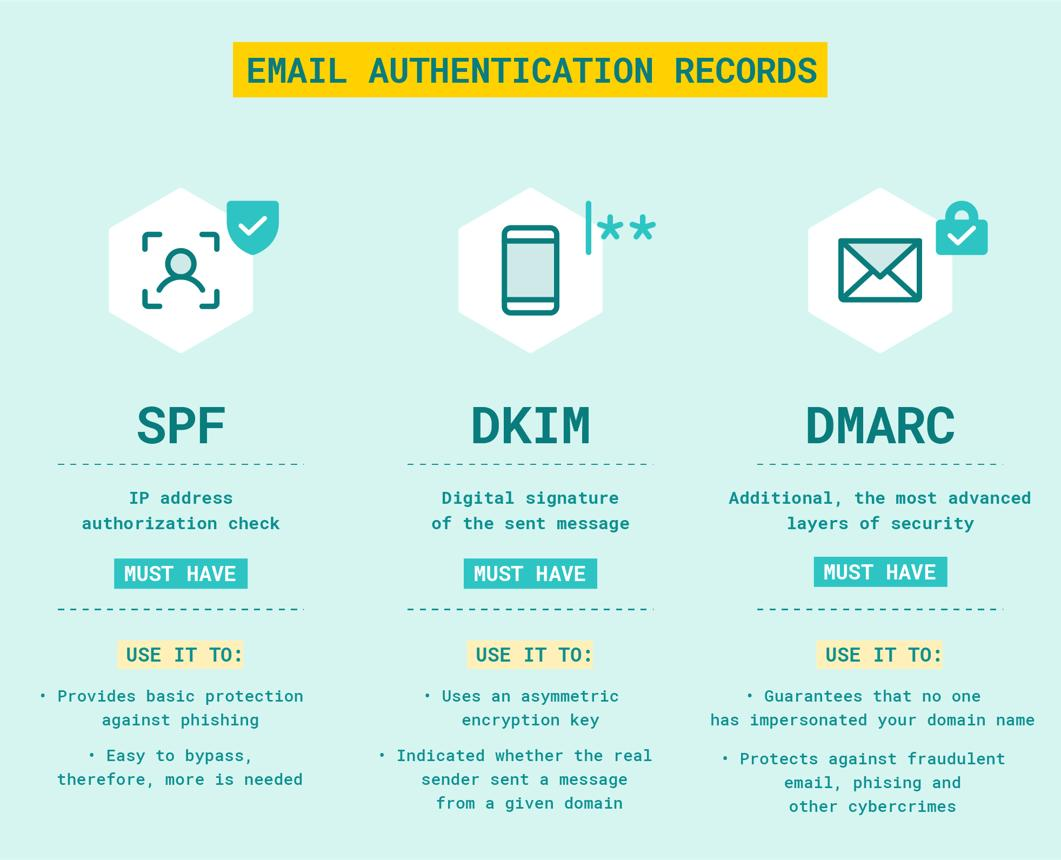
5.3. Verifying the security trio: SPF, DKIM, and DMARC
The standard security protocol—consisting of SPF, DKIM, and DMARC—acts as a critical shield to clear security checks from incoming mail servers. Missing parameters will cause your spam rates to spike. When auditing, use validation engines to check these three components:
- SPF Records: This public record authorizes specific IP addresses allowed to send emails on your domain's behalf, preventing spoofing flags.
- DKIM Keys: This cryptographic signature is attached to headers to prove the message content remained unaltered during transit across networks.
- DMARC Policies: This directive instructs receiving servers how to handle messages that fail either SPF or DKIM checks.
Generally, fresh domains sourced from premier tier-1 registrars come with standard templates pre-configured. Conversely, if you purchase aged assets from open forums or marketplaces, you must manually rebuild these records to secure your outbound delivery channels.
5.4. Testing inbox placement rates
Once foundational setups are complete, testing actual message delivery pathways is essential to evaluate infrastructure performance.
- The Core Need: This step quantifies what percentage of outbound emails land in the primary inbox versus alternative folders before launching campaigns.
- Execution Method: Send test messages to target seeds across leading providers (Gmail, Outlook, Yahoo) using optimization trackers like GlockApps or Mail Tester.
- Analyzing Results: Run these tests only after verifying all security records. If primary placement indicators drop below 80 percent, review your infrastructure configurations or extend the warm-up period.
Running live delivery trials provides objective data, allowing you to optimize delivery settings before launching bulk outreach campaigns.
5.5. Auditing domain age and content history
A domain's historical usage patterns directly shape its sender reputation with search engines and receiving email servers.
- The Core Need: Mail clients accord higher trust metrics to mature domains with a consistent history of clean, legitimate content.
- Execution Method: Query initial registration timelines via WHOIS lookups, then inspect historical web variations using digital archives like the Wayback Machine.
- Analyzing Results: Ideal candidates show histories as standard corporate web properties. Avoid domains linked to link farms, gambling platforms, adult content, or unauthorized pharmaceutical retail.
Vetting content history helps you avoid buying domains that carry hidden, systemic penalties from major email providers.
5.6. Analyzing backlink profiles and advertising history
Some domains display clean surface metrics but carry hidden liabilities from past policy violations.
- The Core Need: Domains historically used for low-grade backlink schemes or non-compliant ad campaigns can carry shadow bans that impact delivery.
- Execution Method: Audit incoming link structures using advanced SEO platforms like Ahrefs or Semrush, and cross-reference active history charts across ad networks.
- Analyzing Results: Pass on options showing sudden spikes in low-quality foreign backlinks or histories of banned product promotions to avoid immediate account restrictions.
Thoroughly vetting ad histories and backlink profiles is your final safeguard to ensure you acquire clean, high-performing domain assets for long-term campaigns.
6. Common mistakes when buying email domains
When procuring and managing custom email configurations, many beginners make fundamental mistakes that stall their campaigns. Identifying these pitfalls helps protect your budget and ensures system stability. Here are five widespread mistakes to avoid.
6.1. Falling for ultra-cheap email assets
It is tempting to pick bottom-dollar offers online to minimize upfront infrastructure investments.
- The Structural Reality: Budget-tier offerings usually rely on degraded, low-reputation shared IP pools, lack clear usage logs, and omit critical security records like SPF, DKIM, or DMARC.
- The Direct Consequence: Operating without these authentication layers drives up spam placement rates, flags filters, and causes rapid domain bans—wasting your initial capital.
- Recommended Benchmarks: High-quality, clean aged domains typically start around €50 or higher; verify cheaper options thoroughly before purchasing.
Opting for low-grade infrastructure introduces significant operational risks; investing in clean, secure configurations is much safer for your business activities.
6.2. Overloading a single domain with high volume
In a rush to scale campaigns, operators often route all outbound message volume through one single address.
- Technical Constraints: Spiking outbound volumes from a single domain over short windows degrades sender scores quickly, triggering bulk server blocks.
- Safe Operational Limits: Maintain daily caps between 30 to 50 messages per inbox for newer domains, scaling up gradually over time.
- The Solution: Distribute outreach volume across secondary domains and rotate active inboxes to balance server loads.
Adhering to daily sending caps preserves your domain's sender score over the long run across all your projects.
To design a resilient email architecture that complies with platform guidelines, understand the policies governing how many Gmail accounts one user can own online.
6.3. Skipping the mandatory warm-up phase
Many operators launch high-volume outreach campaigns immediately upon receiving their accounts, bypassing any warm-up protocols.
- Filtering Triggers: Flooding networks with high volume from unconditioned domains flags automated security triggers on Google or Microsoft, causing immediate account blocks.
- Mandatory Procedure: Run a structured warm-up routine for at least 2 to 4 weeks for new domains to establish baseline reputation metrics.
- Tool Ecosystem: Leverage automated warm-up services like Warmup Inbox or Mailwarm, or use built-in conditioning modules featured within Mailforge or Maildoso ecosystems.
Patience during the initial validation window establishes a clean history with receiving mail servers, boosting delivery rates over time.
6.4. Relying on poor-quality shared mailboxes
Shared server hosting plans are budget-friendly but introduce cross-user reputation risks to your email campaigns.
- Operational Risks: On shared infrastructures, your sender reputation is tied to the activities of neighboring accounts sharing that same IP pool.
- The Contamination Factor: If an adjacent account on your server distributes spam, the entire IP range can face blocklist flags, routing your legitimate emails to the junk folder.
- Expert Recommendation: Partner with providers that offer dedicated IP allocations or clear, transparent reputation monitoring tools to protect your delivery channels.
To protect your long-term campaign delivery from external user behavior, investing in dedicated IP assignments is highly recommended.
6.5. Failing to isolate domains by use case
A serious operational mistake is consolidation—grouping all corporate communications under one single domain architecture.
- The Operational Threat: Routing core operations, cold outreach, and automated scripts through a single domain exposes your primary brand asset to suspension risks if any single channel faces spam complaints.
- Core Isolation Rule: Dedicate your primary root domain exclusively to core operations, and purchase separate secondary domains for outbound outreach and account management workflows.
- Standard Blueprint Model: Retain your core identity (e.g., company.com) for daily corporate use, and secure variations like getcompany.com or trycompany.com for outbound campaigns.
Isolating domain functions creates secure operational firewalls, safeguarding your core business communication channels from technical disruptions.
You might also like:
- A step-by-step guide to recovering a suspended Google Ads account effectively.
- Advanced optimization strategies to improve ad campaign performance and drive conversion rates.
7. Conclusion
An email domain is more than just a digital address; it is the core infrastructure that dictates your brand's sender reputation and inbox delivery rates.
Align your choices with your specific operational goals: choose fresh domains for long-term brand building, or opt for aged assets if you need immediate delivery performance for outreach or SEO campaigns. Prioritize established vendors that offer transparent pricing models and fast technical support. Avoid ultra-cheap plans that cut corners on infrastructure quality, as low inbox placement rates will undermine your campaign efficiency.
Begin by defining your exact use case, select the right category of providers, and perform all necessary quality checks before finalizing your purchase.
8. FAQ
1. Is it safe to buy email domains?
It is entirely safe provided you purchase through reputable vendors with transparent security and refund policies. To secure your investment, update all account passwords, enable two-factor authentication (2FA), and verify recovery details immediately upon account hand-off.
2. What is the main difference between aged and fresh emails?
Fresh emails are brand-new accounts with empty usage histories. They are highly affordable but require a 4 to 8-week warm-up period to avoid quick automated suspensions. Aged emails are mature accounts with built-in authority across spam filters; they command higher price points but allow you to launch outreach campaigns immediately.
3. Do custom email domains trigger spam filters easily?
A custom domain simply provides the infrastructure; inbox delivery depends entirely on your sending behavior. If security records are misconfigured, daily limits are breached, or copy triggers spam filters, messages will still land in the junk folder.
4. Should I purchase pre-warmed emails?
Investing in pre-warmed emails is highly recommended if you are launching urgent, high-volume campaigns and want to avoid technical setup errors that lead to account suspensions. You can skip this premium tier if your campaign growth is gradual and you have the internal tools to manage automated warm-up scripts yourself.
5. How many inboxes should I host on a single domain?
The safest benchmark is to maintain 2 to 3 active inboxes per secondary domain to preserve optimal sender scores. If your outreach requires higher volume, distribute your campaigns across multiple unique domain variations and rotate active mailboxes.
6. Which type of email domain is best for SEO backlink outreach?
Aged domains with established histories and clean backlink profiles are best for SEO link-building outreach. Using trusted domains maximizes primary inbox delivery rates when reaching out to webmasters, boosting response and collaboration rates.