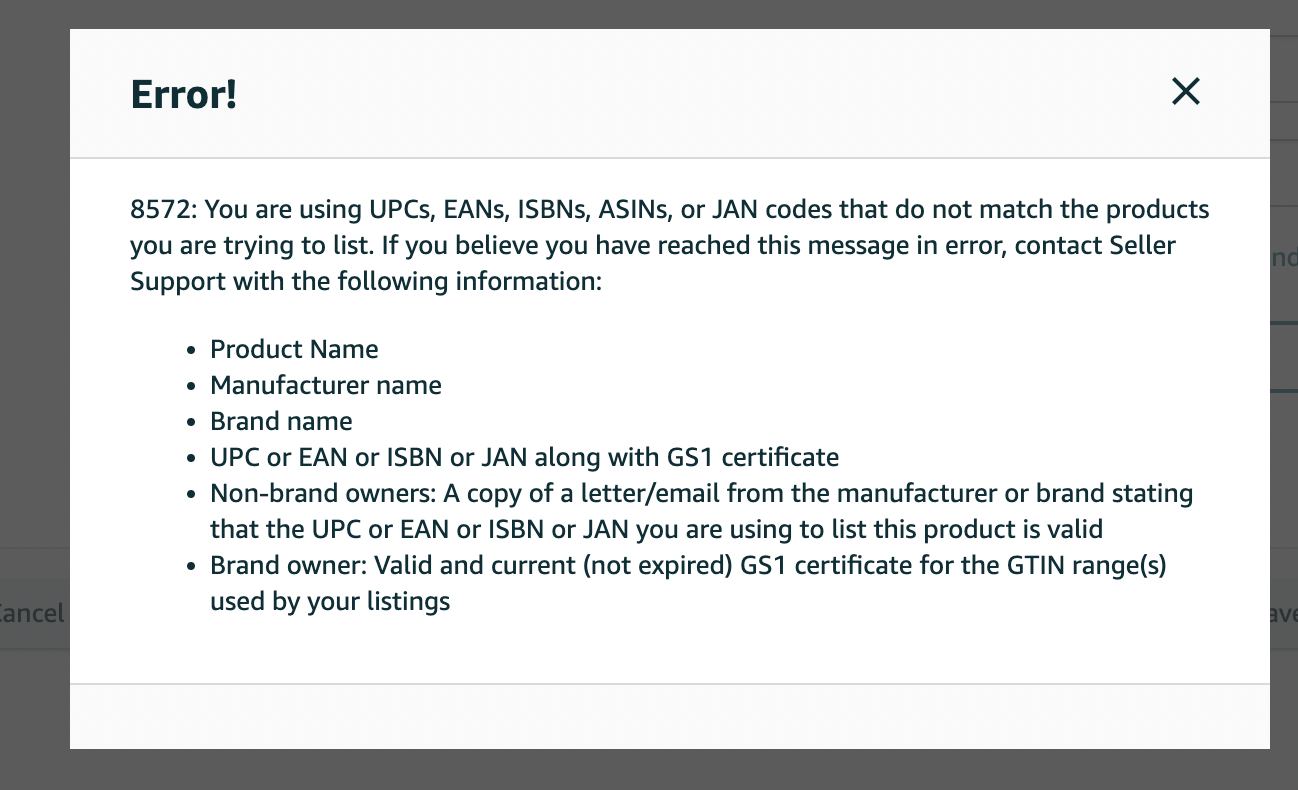
Error 8572 Amazon typically occurs when you are uploading or updating a product listing, but the system prevents you from completing the process, even when all required information has been entered. This issue can interrupt your listing workflow, cause confusion, and directly affect your business performance if not resolved promptly.
So, what exactly is error 8572 Amazon, what causes it, and how can you fix it without negatively impacting your account or selling activities? The content below will help you understand the issue clearly and resolve it effectively.
1. What is error 8572 Amazon?
Error 8572 Amazon occurs when the product identifier you provide such as a UPC, EAN, or ISBN does not match the ASIN data in Amazon’s system. As a result, Amazon will reject the product listing or update to prevent inaccurate or misleading information.
Amazon relies on these product identifiers to cross-check with its internal database as well as standardized systems like GS1 to verify authenticity and validity. If any mismatch or irregularity is detected, the system will trigger error 8572.
In simple terms, every product on Amazon has a unique “identity code”. If you use an incorrect code or one that doesn’t correspond to the product or brand, your listing will not be accepted. This error commonly appears when creating new listings or editing existing ones, especially for branded products or items that require strict verification.
Read more: 30+ Ecommerce business ideas to start in 2026 (Low risk, high growth)
2. Causes of error 8572 Amazon
To fully resolve the Amazon error 8572, it’s essential to understand its root causes. In most cases, this error is directly related to product data mismatches within Amazon’s system especially involving product identifiers. Below are the most common causes:
- UPC/EAN does not match the ASIN: You are using a product code that already exists on Amazon but is associated with different product information. The system detects this as a conflict and rejects the listing.
- Invalid GTIN or not registered with GS1: If the code was purchased from a third party or is not officially registered with GS1, Amazon cannot verify it and will treat it as invalid.
- Duplicate or previously used UPC: Another seller may have already used that UPC for a different product, preventing you from reusing it.
- Incorrect brand information (Brand Registry issues): If you assign a product to a registered brand but the GTIN does not belong to that brand, Amazon will reject it due to data inconsistency.
- Data entry errors when creating a listing: Even small mistakes such as typos, missing digits, or incorrect formatting can cause the listing to be denied.
Overall, regardless of the specific cause, the core issue behind the Amazon error 8572 is inconsistency between the product identifier and Amazon’s database. That’s why carefully verifying your product data from the beginning is crucial.
Learn more: Amazon error 2063: causes and detailed fixes
3. How to fix error 8572 Amazon
When encountering the Amazon error 8572, many sellers tend to retry multiple times without success. Instead, you should follow a clear, step-by-step approach to identify the root cause and resolve the issue more efficiently:
- Verify your GTIN: Make sure the code you are using is valid and ideally registered with GS1 to avoid rejection.
- Search the UPC on Amazon: Look up the product code directly on Amazon to check whether it has already been used or is associated with a different product.
- Align product information: Ensure that key elements such as brand name, product title, and GTIN are fully consistent to prevent data conflicts.
- Avoid using major brands without authorization: If you don’t own the brand, assigning your product to a well-known brand may lead to immediate rejection by Amazon.
- Prepare supporting documents: This includes GS1 certificates, product images with visible barcodes, and brand-related information in case Amazon requires verification.
- Contact Seller Support: If you’ve tried all the above steps and the issue persists, open a case with Amazon and provide complete documentation for assistance.
In summary, resolving the Amazon error 8572 is most effective when you follow a structured process: verify, identify, and fix the exact cause rather than relying on repeated trial and error.
Read more: Can you use PayPal on Amazon? 5 Easy workarounds explained
4. How to prevent error 8572 Amazon
Compared to fixing issues after they occur, preventing the error 8572 Amazon from the start can save you significant time and effort. To do this, you should establish a clear product listing process and follow these best practices:
- Use UPC codes from official sources: Always prioritize purchasing codes from GS1 to ensure they are verified and accepted by Amazon.
- Standardize product data before listing: Carefully review key elements such as GTIN, brand, category, and formatting to minimize errors.
- Monitor your UPCs regularly: Proactively search your codes on Amazon to detect duplicates or misuse early.
- Understand Brand Registry requirements: If you are enrolled in Amazon Brand Registry, make sure you fully understand GTIN requirements to avoid rejection.
In short, by standardizing your workflow and maintaining strict control over product data from the beginning, you can significantly reduce the chances of encountering the error 8572 Amazon again during the listing process.
Additionally, you can find more articles related to Amazon here:
- Why is your Amazon account locked? 3 tips to unlock it
- Best Proxy Providers for Amazon: Scale up your revenue with multiple accounts
- Open multiple Amazon seller accounts: How does it work?
5. Conclusion
The error 8572 Amazon is quite common is quite common, but it can be resolved effectively if you understand its root causes. In most cases, it is related to product identifiers and data mismatches, so carefully verifying your information from the beginning can save you a significant amount of time.
Instead of relying on repeated trial and error, take a systematic approach: verify your codes, check for conflicts, and strictly follow Amazon’s policies. When everything is set up correctly from the start, your product listing process will be faster, smoother, and more stable.
6. FAQ
1. What is the error 8572 Amazon?
The error 8572 Amazon occurs when product identifiers (UPC, EAN, GTIN, etc.) do not match the data in Amazon’s system.2. Why does a valid GTIN still trigger the error 8572 Amazon?
Because Amazon also verifies data through Brand Registry, not just GS1.3. Should I buy UPC codes from third-party sellers?
No. These codes are often not accepted by Amazon and may lead to errors.4. What is GS1, and is it required?
GS1 is the global organization that issues GTINs. It is almost mandatory if you want stable and compliant listings on Amazon.5. What should I do if someone else is using my UPC?
You should contact Seller Support and provide proof of ownership of the code.6. Can I list products without a GTIN?
Yes, if you successfully apply for a GTIN exemption from Amazon.