Facebook Marketplace is a powerful platform for local buying and selling, but unexpected bans can disrupt your experience. If you're wondering how to get unbanned from Facebook Marketplace, you're not alone. This article will walk you through the common reasons behind account restrictions, offer proven steps to recover access, and share best practices to avoid future bans while growing your presence on Marketplace.
1. Why Facebook Marketplace banned you?
If your account has been restricted, it’s usually because Facebook detected a violation of its policies. Below are the most frequent reasons that lead to a Marketplace ban.
1.1. Violating Facebook’s commerce policies
Facebook has strict Commerce Policies that outline what can and cannot be sold on Marketplace. If your listings include prohibited items, your account may face restrictions.
Some common violations include:
- Selling weapons, drugs, alcohol, or tobacco products
- Listing counterfeit goods or misrepresenting branded items
- Posting adult content, services, or gambling-related offers
- Selling recalled or unsafe products, such as expired cosmetics or unapproved supplements
Even if your product is legitimate, failing to follow category-specific rules can lead to restrictions. For example, selling pets is generally not allowed unless using approved adoption services.
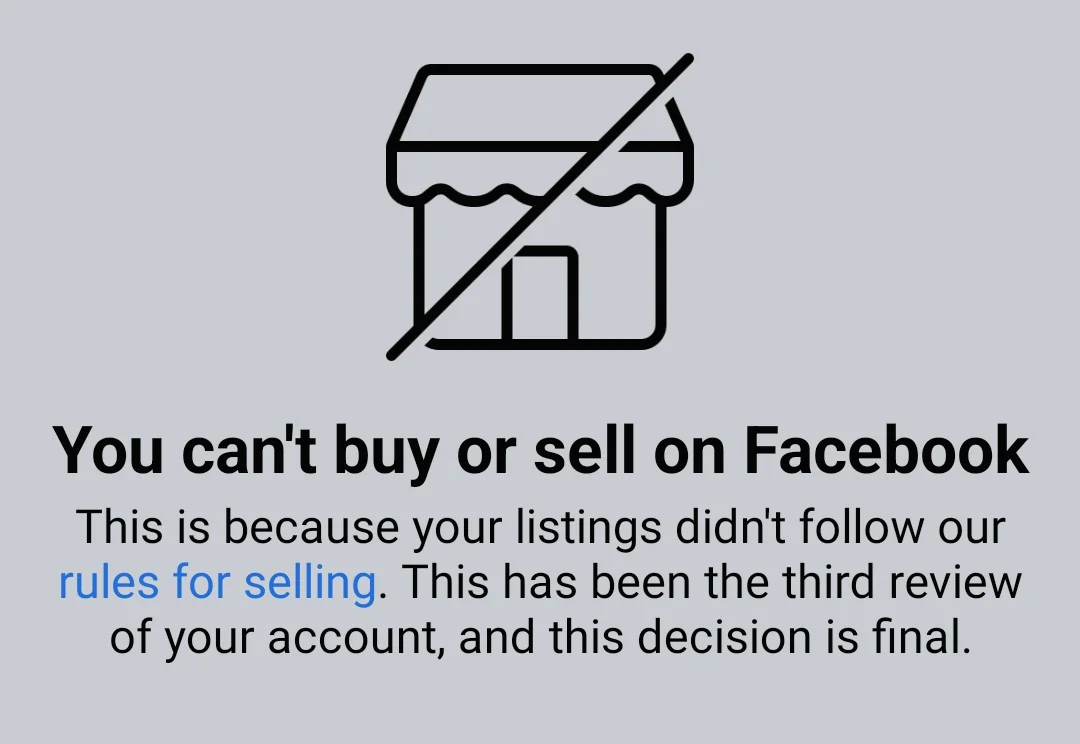
To avoid this, always review Facebook’s Commerce Policies before listing an item. If a listing is removed, read Facebook’s explanation carefully to understand what rule was violated.
1.2. Breaching Facebook’s community standards
Facebook’s Community Standards govern user behavior, and violating these guidelines can result in a Marketplace ban. Even if your listings comply with Commerce Policies, your interactions on the platform may still cause issues.
Some behaviors that trigger bans include:
- Posting hate speech, offensive language, or inappropriate images
- Using misleading product descriptions to deceive buyers
- Engaging in harassment or abusive communication with customers
- Attempting fraudulent transactions
Facebook relies on user reports and AI moderation to enforce these standards. If your account is repeatedly flagged, it may be permanently restricted from Marketplace.
To prevent this, always maintain professionalism, communicate transparently, and provide clear product descriptions. Misleading content not only hurts your credibility but also increases the risk of account suspension.
1.3. Spamming or overposting listings
Facebook has spam filters to prevent Marketplace from being flooded with repetitive listings. If you post too frequently or use automation tools to mass-list products, your account could be flagged.
Common spam-related violations include:
- Posting duplicate listings multiple times a day
- Copy-pasting the same product descriptions across different categories
- Using third-party tools to automate listing creation
Facebook aims to ensure a fair marketplace for all users by limiting spam-like activity. If your account has been restricted due to this, try spacing out your posts and ensuring each listing is unique with slight variations in wording and images.
1.4. Receiving too many reports from other users
Even if you believe you’re following the rules, negative feedback from buyers and sellers can trigger account bans. Facebook takes user reports seriously, and repeated complaints can result in restrictions.
Some reasons people might report your listings include:
- Selling defective or fake products
- Misleading pricing or hidden fees
- Not delivering products as promised
- Scamming buyers through fake payment requests
To avoid this, focus on customer satisfaction. Be honest about your products, set fair prices, and respond to inquiries politely. Building a good reputation on Marketplace will reduce the likelihood of getting reported.
1.5. Suspicious account activity or fake information
Facebook monitors account activity for suspicious behavior. If your account shows signs of fraud, it may be restricted from Marketplace.
Some activities that raise red flags include:
- Using VPNs or proxy servers to access Marketplace from different locations
- Creating multiple accounts to post more listings
- Frequent IP address changes, making it appear as though different people are using the same account
If Facebook believes you’re engaging in fraudulent behavior, they may ask for ID verification or restrict your Marketplace access. The best way to prevent this is to use a real, trusted Facebook account and avoid suspicious login patterns.
1.6. Payment or delivery issues
If you've had payment disputes or issues related to order fulfillment, Facebook may ban you from using Marketplace. This usually happens if:
- A high number of refund requests or chargebacks are reported
- You fail to deliver products after receiving payment
- Facebook detects scam-like behavior in financial transactions
To avoid this, ensure all transactions are transparent and secure. Use trusted payment methods, provide tracking information, and communicate with buyers about any delays.
2. How to check if you were banned from Facebook Marketplace?
If you think your Marketplace access has been restricted, you can follow these steps to confirm:
2.1. Check for a notification in your Facebook account
Facebook usually sends a message explaining why your account was banned. To find it:
- Go to the Facebook app
- Tap Menu > Help & Support > Support Inbox
- Look for a message regarding your Marketplace restriction
If Facebook removed a specific listing, they may provide details about which rule was violated.
2.2. Try accessing Facebook Marketplace
If the Marketplace icon is missing, your access is likely restricted.If you receive a message saying your account is not eligible, you may have been banned.
2.3. Check your account status in the Facebook Help Center
Visit Facebook’s Help Center and navigate to Account Status to see if any restrictions apply.
2.4. Login from a different device
Sometimes, technical issues may prevent Marketplace access on a specific device. Try logging in from another device to rule out this possibility.
3. How to get unbanned from Facebook Marketplace?
Facebook Marketplace can ban accounts for many of the reasons listed above. If you believe your ban was unfair or made by mistake, you can appeal to Facebook. Follow these steps to get unbanned from Facebook Marketplace.
Step 1: Submit an appeal to Facebook
Facebook allows users to appeal bans, particularly if they believe the restriction was unfair. To request a review:
- Go to Facebook Help Center > Marketplace Appeal Form
- Explain why you believe the ban was a mistake
- Attach screenshots or supporting documents if applicable
Step 2: Remove problematic listings
If Facebook has removed a specific listing, delete similar items to prevent further restrictions.
Step 3: Verify your identity if requested
Facebook may ask for ID verification if they suspect fraudulent activity. Submitting a government-issued ID can help restore your access.
Step 4: Wait for Facebook’s response
Appeals typically take 24-72 hours, but in some cases, it may take longer.
If your appeal is denied, consider using a different account to access Marketplace—but be cautious, as creating multiple accounts can lead to further restrictions.
>>> Read more:
- How to manage multiple social media accounts without getting banned
- How to create multiple Facebook accounts: A practical guide
- Disabled Facebook ads account and how to fix it
- How to rent Facebook advertising accounts safely (Step-by-Step)
- 7 Steps to How to create a Facebook ad campaign effectively
4. Ways to avoid bans from Facebook Marketplace?
To avoid getting banned again, it's essential to follow Facebook’s guidelines and adopt responsible selling practices. Below are some practices you can follow to manage multiple Facebook Marketplace without being banned.
- Follow Facebook’s commerce policies: Always check Facebook’s rules before listing items. Selling prohibited products or misrepresenting listings can lead to immediate restrictions, so staying informed about policy updates is crucial.
- Post listings responsibly: Avoid duplicate posts and excessive automated listing creation. Ensuring each listing is unique and spaced out appropriately reduces the risk of being flagged.
- Build a trustworthy seller profile: Maintain positive interactions with buyers and deliver items as promised. Ensuring each listing is unique and spaced out appropriately reduces the risk of being flagged.
- Use secure payment methods: Avoid suspicious transactions that could raise red flags. Sellers should avoid high-risk payment methods and ensure clear communication with buyers regarding payment and delivery terms.
- Use trustworthy proxy with antidetect browser: Although Facebook does not restrict the creation and management of a large number of Facebook accounts connected to Marketplace, if you use multiple Facebook accounts, it is essential to use an antidetect browser with a proxy to create a clean environment.
5. How Hidemyacc help you bypass Facebook Marketplace bans?
If you rely on Facebook Marketplace for selling and need to manage multiple accounts safely, Hidemyacc is the best solution. Hidemyacc is an antidetect browser that helps sellers create and manage multiple Marketplace accounts without getting banned.
Combine the antidetect browser Hidemyacc with a proxy to create a clean and isolated working environment for each Facebook account. You can also customize a unique browser fingerprint for each account. Hidemyacc recommends suitable proxy providers in the Facebook proxy article.

Additionally, you can optimize Hidemyacc’s automation feature to manage accounts effectively. You can customize your own scripts using three options:
- Drag and drop available commands
- Record real actions on a website
- Import pre-coded scripts
Moreover, Hidemyacc provides many pre-made scripts that you can use, such as auto-login, logout, interaction, account warming, and more.

By using Hidemyacc, you can protect your accounts, prevent restrictions, and scale your business safely on Facebook Marketplace.
6. Conclusion
By following the steps outlined in this guide, you can learn how to get unbanned from Facebook Marketplace and ensure that your account remains in good standing. Remember, abiding by Facebook’s policies and avoiding risky behaviors is key to keeping your account safe from future bans. Take action now to get back to selling, and follow best practices to protect your Marketplace presence moving forward.
Related content: