Trading normally but suddenly your PayPal account locked, unable to log in, cannot withdraw money, or even have the balance held? This is not an uncommon situation for online sellers, freelancers, or those who frequently receive international payments. The cause usually comes from the PayPal system detecting unusual signs such as strange logins, continuous network address changes, sudden transaction increases, or the account not completing verification but having high-risk activities.
In this case, it is important to correctly identify the reason why the account is locked to handle it in the right direction. In the article below, Hidemyacc will provide a detailed A-Z guide on how to unlock safely and quickly, while revealing secrets to help you completely prevent this situation from repeating in the future.
1. What is PayPal account locked? Identifying signs
Before finding a way to handle it, you need to clearly understand what a locked PayPal account actually is and how to know if you are experiencing a normal login error or are truly limited by the system. Distinguishing correctly from the beginning will help you avoid handling it in the wrong direction and save a lot of time.
1.1. Definition:
PayPal account locked is a state of temporarily blocking access or limiting some functions on your account. At that time, you may not be able to log in, send money, withdraw money, or continue to pay as usual.
However, users need to clearly distinguish two states that we often call locked to have an appropriate handling direction:
-
Locked: Usually related to technical or security errors such as entering the wrong password too many times, mismatched security questions, or suspected unauthorized intrusion by strangers.
-
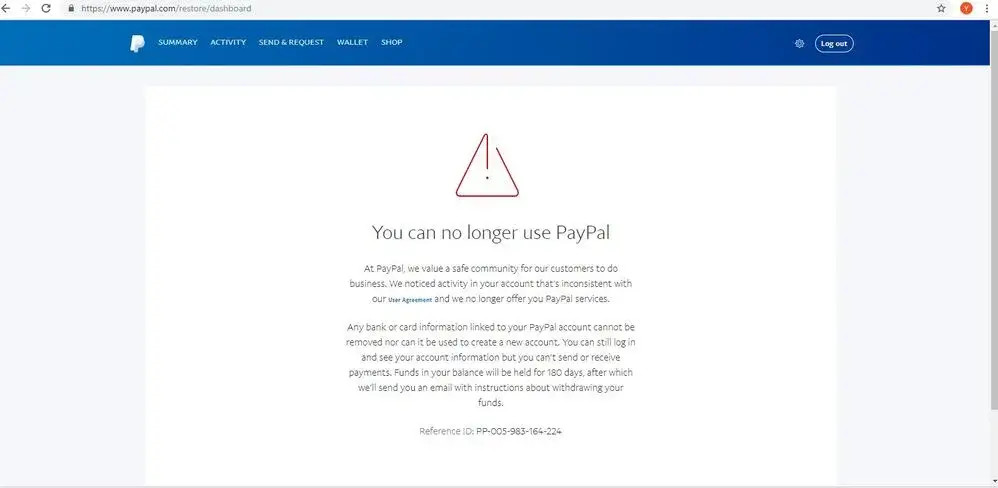
Limited: This is a more serious state, occurring when PayPal detects that the account shows signs of violating user policies, suspected money laundering, or high-risk transactions.
Identifying exactly what state your account is in will help you prepare mentally and take corresponding verification steps most effectively.
1.2. Identifying signs:
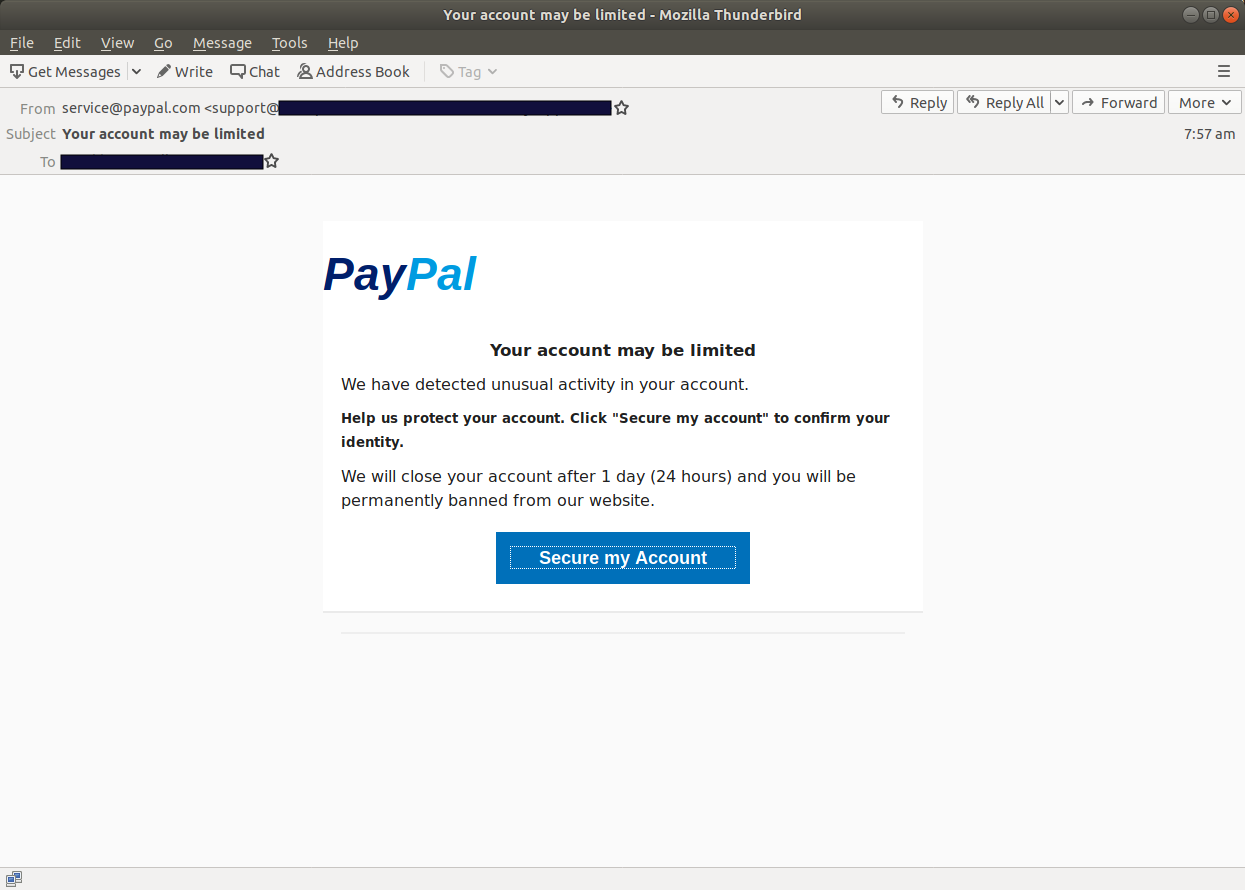
When encountering an incident, many people often rush to find a way to handle it immediately but forget to check the authenticity of the notification, leading to the risk of information theft by hackers. Below are signs to help you clearly distinguish between official information from PayPal and sophisticated phishing scams rampant today:
- Real signs: You cannot log in even though you entered the correct password and username; a red error message or warning banner appears right on the login screen; receive a detailed explanatory email from the only official address [email protected].
- Phishing scams: Fake emails often come from strange sender addresses with random character strings; email content plays on panic and forces users to click on a strange link to verify; especially requiring you to pay a certain fee to unlock the account.
In short, to ensure safety, you should absolutely not click on any strange links but proactively access the official PayPal website or application directly to check the account status.
2. Common levels of a locked PayPal account
To have the most accurate and effective handling direction, you need to determine what level your account is at. Depending on the nature of each incident, PayPal will apply different control measures, specifically as follows:
2.1. Account Hold
This is considered the mildest level that most online business people, especially those who just started doing dropshipping, often encounter due to continuous cash flow.
In this case, your money is usually held for 21 days or will be released by the system as soon as you provide successful shipping tracking information for that order. If your sales process is transparent and has sufficient evidence, cash flow will soon circulate again after the verification process is complete.
2.2. Account Limited
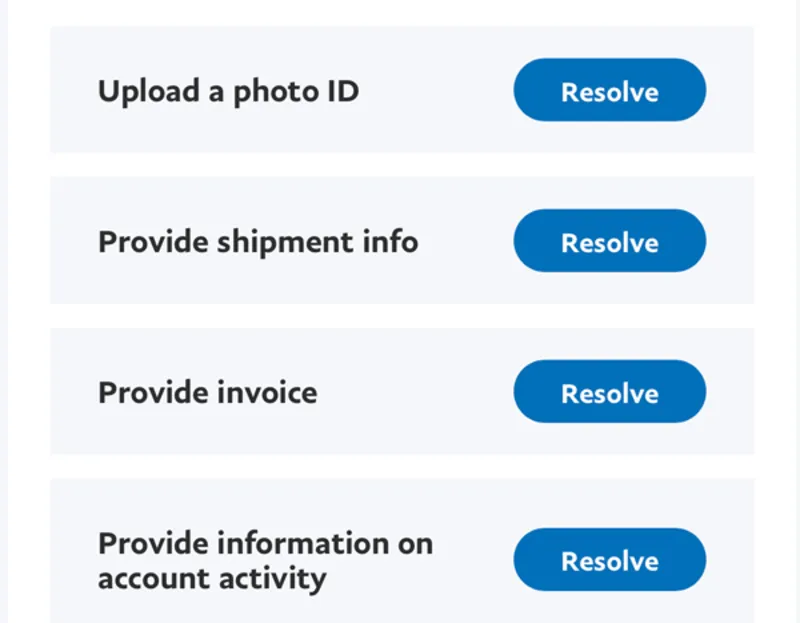
When an account shows signs of policy violation or higher potential risks, PayPal will switch to a state of limiting important features to protect the system. At this time, your account will be restricted from key features like sending or withdrawing money, and you are required to perform identity or invoice verification requests at the Resolution Center to prove the legality of the account.
Preparing a complete profile and explaining promptly is the key to helping you quickly restore all your rights at this level.
2.3. Permanent Limitation 180 days
This is considered the heaviest penalty for anyone using this payment gateway when the PayPal account locked permanently and almost impossible to recover. At this level, your account will be completely disabled, and the existing balance inside will be held for 180 days before being allowed to withdraw to a bank. When falling into this frozen state, many people are so worried about personal data that they seek to delete their PayPal account immediately, but in reality, the system will not allow you to arbitrarily close the account when there is a dispute or limitation.
In case of falling into this situation, many sellers often have to proactively prepare backup payment methods to avoid work disruption. If you need to expand options for receiving international payments, you can refer to Payoneer alternatives or open a Stripe account to build a more stable payment system for business operations.
Clearly classifying levels from light to heavy as above helps you accurately position your current status, thereby preparing the necessary mindset and resources to handle the incident most effectively.
3. Reasons why your PayPal account is locked?
To maintain cash flow stability, understanding the control standards of the system is extremely important. PayPal operates on extremely strict automated algorithms, where any deviant behavior can cause the account to be suspended immediately. Below are the main groups of causes that you need to pay special attention to:
3.1. Basic security reasons:
One of the most common causes stems from personal operations to protect ownership. Specifically, the account will be temporarily locked if you enter the wrong password or answer security questions incorrectly too many times in a row.
This is PayPal self-defense mechanism to prevent password guessing from bad guys or automated attacks aiming to hijack user assets. Therefore, you need to be extremely careful when logging in and remember the established security information.
3.2. Suspicious Activity:
In addition to personal operational errors, the system also closely monitors abnormal login behaviors. To ensure account safety, PayPal will lock or limit if detecting the following signs:
- Logging in from many different devices continuously in a short time.
- IP addresses change suddenly or those IP addresses belong to countries blacklisted for cybersecurity.
These actions are often misunderstood by PayPal algorithms as the account being stolen or committing remote fraud, leading to the immediate activation of a security lock command.
3.3. Business risks & Unusual transactions:
This is the most complex group of causes, directly related to cash flow activities and seller reputation on the platform. Transactions will be considered risky and lead to account limitation if they fall into the following cases:
- Receiving an unusually large amount of money compared to the previous average transaction history without a clear explanation.
- The account continuously has customers making complaint requests Dispute or refund requests via bank Chargeback at a rate exceeding the safe threshold.
- E-commerce business of items in the prohibited category or products violating trademark copyrights, fake and counterfeit goods.
- Using a newly created account to make rushed receiving and transferring transactions without passing the necessary reliability-building phase with the system. Besides, not understanding the rules of large platforms, such as confusion about paying with PayPal on Amazon policies, can also easily lead to transaction streams being suspected by the system.
Grasping and proactively avoiding these core causes will help you build a safer operating process, thereby minimizing risks that disrupt business operations.
4. Detailed guide on how to unlock when a PayPal account is locked
When discovering a disabled account, the first thing you need to do is stay calm to perform unlocking steps accurately. Depending on the reason the system temporarily paused your activity, we will have specific processing procedures as follows:
4.1. Locked due to wrong password/login error:
Sometimes the reason a PayPal account locked only stems from simple technical incidents or personal information memory errors. To fix this situation, you should follow these steps sequentially:
- First, clear all cache and cookies on the browser you are using to ensure no old conflicting data remains.
- Next, at the login interface, select Forgot Password.
- Finally, perform identity verification steps through a security code sent to the registered Email or Phone number to set a new password.
This is the automated and fastest method to help you regain access immediately for low-level security errors.
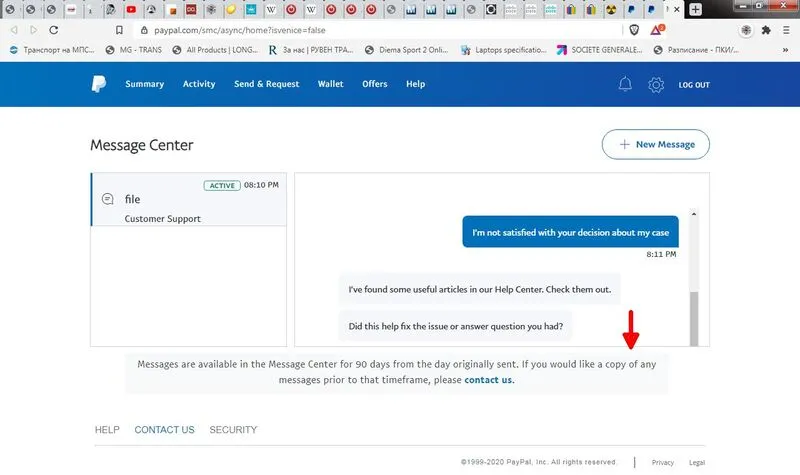
4.2. Limited account handled via Resolution Center:
For more complex cases related to policy violations or suspected risks, you need to perform a professional explanatory process through PayPal system. This process includes 3 steps:
- Step 1: Log into the account and access the Resolution Center directly.
- Step 2: Carefully review the specific requests provided by PayPal, then start gathering and preparing a very detailed explanatory profile.
- Step 3: Upload transparent documents exactly as required so PayPal control department has a basis for approval.
Accuracy and honesty in the explanatory profile are deciding factors to help PayPal quickly remove limitation orders for your account.
4.3. Call Support directly (Fastest way)
If the online document submission process is slow and affects business cash flow, directly talking to PayPal support staff will be the most optimal solution. You can refer to the execution sequence as follows:
- Access the contact section to get a One-time passcode to help support staff identify your account faster when starting the call.
- Contact directly via PayPal official support hotline number (remember to check working hours to avoid waiting time).
- Prepare an exchange script in advance, focusing on clearly explaining the situation and affirming the transparency of transactions to request an immediate unlock.
Thorough preparation of both information and mindset before picking up the phone will help the conversation go smoothly, thereby increasing the rate of the account being restored right after the call ends.
5. What documents are needed to unlock PayPal?
For the verification process to go smoothly and increase the success rate when requesting an unlock, preparing a complete, clear profile is a prerequisite factor. Depending on specific requirements in the Resolution Center, you will need to provide the following basic document groups:
5.1. Proof of Identity:
This is the most important step for PayPal to confirm you are the legal owner of the account. To perform identity verification, you can use one of the following identification documents:
- National Identity Card or Citizen Identity Card.
- Valid Passport.
- Official Driver License.
Note: all image information on documents must be clear, not overexposed, and especially must completely match the full name and date of birth information you registered on the PayPal account.
5.2. Proof of Address:
Besides personal identity, PayPal also needs to verify your residential address to ensure geographic transparency of users. Commonly accepted documents include:
- Electricity, water bills, or Internet bills.
- Credit card statement or bank account statement showing the address.
For the profile to have the highest legal value in the eyes of the censorship department, you need to ensure these documents must be issued within the last 3 to 6 months up to the time of submitting the request.
5.3. Proof of Business:
For cases where the account is locked due to buying and selling activities or large cash flows, providing business proof is a mandatory step to explain financial origins. You need to prepare related documents including:
- Import invoices from suppliers to prove product origins. If you are running an AliExpress dropshipping model or selling Print on Demand products, proactively ask the manufacturing workshop or partner platform to issue purchase invoices with your name.
- Proof of successful delivery including bill of lading codes.
- Bank statements clearly showing transactions related to cash flow on PayPal.
Providing complete and transparent business documents not only helps unlock the account faster but also helps build long-term credibility for you on this payment platform.
6. How to prevent PayPal from being locked in the future?
Instead of waiting until an incident occurs to find a way to salvage it, proactively building a safe usage roadmap will help you protect your cash flow and business sustainably. Below are the most effective risk prevention strategies you should apply right from today to prevent your PayPal account locked:
6.1. Follow the account farming process:
For newly established accounts, building trust with PayPal control system is a step that cannot be skipped for stable account development:
- Gradually increase transaction volume naturally over time instead of generating large sales immediately.
- Absolutely avoid receiving or withdrawing money in a rush right after the account has just been successfully activated.
Patience in the early stages will help you have a clean activity history. Even if work demands require you to own multiple PayPal accounts to easily manage capital, strictly following this farming process for each account ensures stability and avoids the risk of being noticed by the system.
6.2. Customer Service management:
An account with a high satisfaction rate and few complaints will always be in PayPal safe group. To maintain this credibility index, you need to focus maximally on operations and buyer care:
- Always maintain a good customer care attitude and respond to inquiries quickly to resolve conflicts right from the earliest stage.
- Provide complete bill of lading code information for each order to make the delivery process transparent, thereby minimizing complaint requests or refund demands from banks.
Being proactive in service not only helps you retain customers but is also a step to protect the account from sudden limitation orders due to suspected fraud.
6.3. Use Hidemyacc antidetect browser:
If you are managing a large number of accounts, manually configuring step by step will surely be very time-consuming and easily lead to risks. Using Hidemyacc antidetect browser is the key to protecting the account array and moving towards professional e-commerce automation:
- Manage browser hardware parameters: The software allows you to create thousands of profiles with independent system parameters, helping to avoid suspicious activity errors when farming multiple accounts on the same device.
- Absolutely separate working environment: Each account operates in a separate and clean space, helping you manage centrally without ever having to worry about duplicate data issues or being swept jointly causing mass account deaths.
- Integrate checker and clean proxy connection: The tool helps you maintain a separate network address for each profile, ensuring the login status is always safe and not marked as a violation by PayPal security system.
For those operating large account systems, a centralized management tool like Hidemyacc will help save time and minimize configuration errors, bringing absolute safety against strict control algorithms from PayPal.
7. Conclusion
The situation of PayPal account locked is a permanent risk for anyone participating in business on this payment platform, but this incident is completely solvable if you master the removal process and prepare a transparent profile. Understanding security principles and proactively applying preventive measures not only helps you protect assets but also ensures business operations always run smoothly and sustainably.
To optimize the management and protection process of your PayPal account most effectively, experience Hidemyacc browser today. This is a leading technology solution to help you operate the account system safely, professionally, and completely eliminate worries about joint sweeps from the system.
8. FAQ
1. How long does it take for PayPal to unlock an account?
Processing time usually takes from 24 hours to 7 business days depending on the complexity of the profile and the types of documents you provide.
2. Should I create a new PayPal account when the old one is locked?
Absolutely not. PayPal will scan information and IP addresses; if they detect you intentionally creating a new account to evade, the new account will also be locked immediately. Focus on unlocking the current account.
3. What will happen to the money in a locked PayPal account?
Your money will be placed on hold until the verification process is complete. In the worst case of Permanent Limit, you usually have to wait 180 days before you can withdraw the remaining balance to a bank.
4. Why is a newly created PayPal account locked immediately?
The cause is usually PayPal automated security system becoming suspicious when seeing a new account immediately generating large transactions, changing IPs continuously, or you logging in on a device/IP that was previously blacklisted.
5. Can I continue to receive money when my PayPal account is locked?
It depends on the lockdown level. However, typically the system will pause all transactions (including receiving, transferring, and withdrawing money) until you complete the identity verification process.