
Managing multiple application accounts or running Android software without using a physical phone is becoming a necessity for many users. Android Cloud Phone emerged as a solution allowing you to own virtual Android devices running entirely on the cloud, controlled remotely via browsers or applications. The article below analyzes in detail the operational mechanism, popular types of services, and setup instructions for you to start using it effectively.
1. What is an Android Cloud Phone?
An Android Cloud Phone is a virtual Android device deployed on a cloud server system. Instead of using a real phone, you will control this Android device remotely through a browser or a specialized application.
All operations, such as opening applications, logging into accounts, or installing software, are performed on the virtual Android device. Users only receive images streamed directly from the server back to their devices.
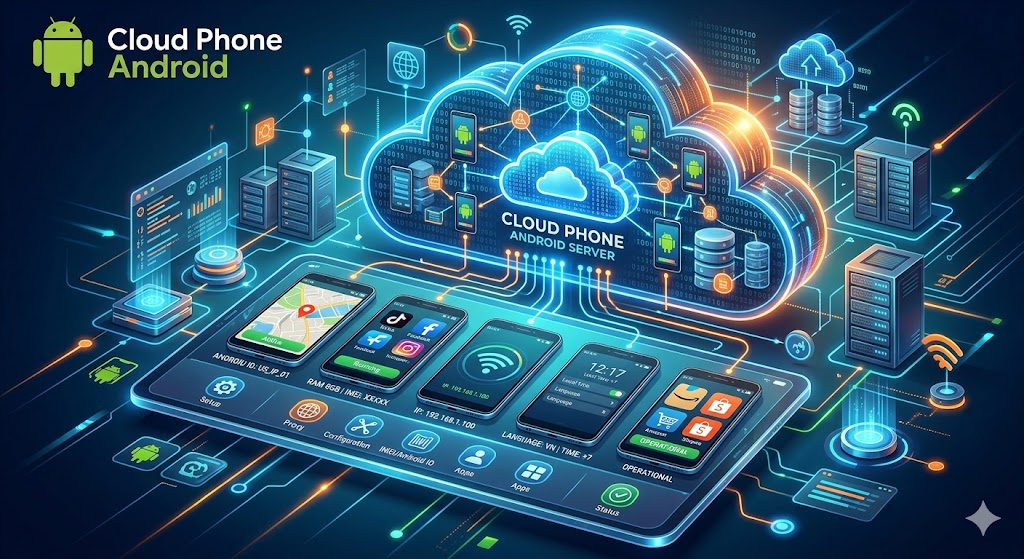
To make it easier to visualize, the operational process usually takes place as follows:
- You open a browser on your computer.
- You connect to the virtual Android device on the cloud.
- The Android screen is streamed back to the browser in real time.
- Mouse or keyboard operations are sent back to the server.
- The server processes the request and responds with the results instantly.
All data, applications, and accounts are stored on the server instead of your device.
Main features of Android Cloud Phone:
Android Cloud Phone is designed to simulate the experience of using a real phone. Therefore, users can perform most familiar tasks on the Android environment. Some common features include:
- Installing and running Android applications like a real phone
- Remote control via browsers or applications
- Customizing hardware parameters: IMEI, Android ID, time zone, language
- Assigning a separate IP to each virtual device
- Running multiple devices simultaneously from a single management interface
How does Android Cloud Phone differ from similar solutions?
Many people often confuse Android Cloud Phone with emulators or Android VPS. However, these are different solutions.
- Android Emulator: An Android emulator operates directly on the user's computer. All resources such as RAM, CPU, and hard drive are taken from the device currently in use.
- Physical Android Phone: This is the real phone that people still use every day. To expand the scale, you need to buy more devices and perform regular hardware maintenance.
- Android VPS: Android VPS also operates on a remote server, but users must install, configure, and manage the Android operating system by themselves. The customization level is higher, but it requires more technical knowledge.
These exact characteristics have made Android Cloud Phone the choice of many users when they need to expand their scale without investing too much in physical hardware. So, what benefits does Android Cloud Phone bring? Let's find out in the next section.
2. Why do you need to use an Android Cloud Phone?
Android Cloud Phone is increasingly used due to its cost-saving capabilities and flexible scalability. Some outstanding benefits include:
- No hardware investment required, helping save costs on purchasing and maintaining multiple real devices
- Running multiple virtual devices simultaneously, suitable when needing to manage mass application accounts at the same time
- Access from anywhere with just an internet connection without carrying the device with you
- Isolated environments help each virtual device operate independently regarding hardware and applications, reducing the risk of accounts being linked
Thanks to these significant advantages, people can optimize work efficiency while saving maximum operating costs. However, you should note that when accessing websites on that same device, browser parameters can still be detected by the system.
3. Popular types of Android Cloud Phones
Depending on needs and technical levels, people can choose one of the three popular forms of services below.
3.1. Dedicated Cloud Phone Services
With this form, the provider sets up virtual Android devices on their servers. You only need to register an account, select a configuration, and start using it immediately without installing a proxy or performing further technical configurations. The management interface is usually intuitive, supporting opening multiple virtual devices at the same time from a single dashboard.
The service has the advantage of quick deployment and supporting multiple devices simultaneously. The disadvantage of this type is the low customization of hardware identification parameters and heavy reliance on the provider. Therefore, this solution is suitable for beginners or those who need quick deployment without wasting time on configuration.
3.2. Android VPS
This is a virtual server that users rent and install the Android operating system on by themselves. Unlike dedicated services, the provider only rents out the server infrastructure, while the entire installation and system configuration are done by you, from choosing the Android version, installing applications, to customizing hardware parameters like IMEI, Android ID, or time zone.
This option brings the advantage of deep customization and control over the device environment. However, the disadvantage is that it requires high technical knowledge to operate. This model will be suitable for technical users who need total control over the device environment or have special requirements that dedicated services cannot fulfill.
3.3. Cloud Phone Integrated into Account Management Platforms
Some multi-account management platforms now do not just provide browsers but integrate virtual Android devices directly into the same system. You can manage both browser profiles and virtual mobile devices from a single dashboard, without switching back and forth between different tools.
This solution has the advantage of being highly convenient because there is no need to switch between multiple tools. However, the disadvantage is that it usually comes with a service package, resulting in higher costs. This model is intended for people who are using a multi-account management platform and want to expand to virtual mobile devices without managing a third-party tool.
Quick Comparison Table:
To have an overview, you can refer to the comparison table of solutions below.
| Criteria | Dedicated Service | Android VPS | Integrated Platform | Emulator |
|---|---|---|---|---|
| Ease of use | High | Low | Medium | Medium |
| Parameter customization | Low | High | Medium | Low |
| Initial cost | Low | Medium | High | Free |
| Suitable when | Quick deployment | High control needed | Centralized management | Light testing |
Each type of Android Cloud Phone has its own advantages and disadvantages. Choosing which solution will depend on the usage needs, budget, and level of control you desire.
4. Common mistakes when using an Android Cloud Phone
During operation, users can easily make basic mistakes that lead to account suspensions or reduced work efficiency. You should pay attention to the following common mistakes for effective prevention:
-
Using multiple virtual devices with the same IP address: When you run a fleet of cloud phones on the same network connection, major systems will easily detect abnormal traffic flows originating from a single source. This leads to the risk of all your accounts being swept and blocked simultaneously.
-
Not customizing identification parameters: Every conventional phone has unique identifiers such as IMEI or Android ID. If you keep the default parameters of the cloud phone provider, the virtual devices will have identical configurations. Platforms will recognize this as an emulation system and link accounts together for processing.
-
Choosing a service with high latency: Selecting providers with unstable servers will cause lag and slow response when operating. This significantly reduces your working speed and efficiency.
-
Skipping the account warm-up step: Logging a new account into a device and immediately performing high-frequency, continuous operations will trigger the platform's security systems. This behavior is flagged as abnormal robot activity.
Actively avoiding these errors will keep your accounts safe and help the system operate more smoothly. You should carefully check the configuration and maintain a natural operational process to achieve the highest work efficiency.
5. Guide to setting up and using an Android Cloud Phone
After choosing the right service, the next step is to set up the virtual Android device properly to ensure stable usage. Below are the basic steps to help you start using Android Cloud Phone more effectively.
5.1. Basic Setup Steps
Setting up an Android Cloud Phone is not too complicated. You can start with the following steps:
- Step 1: Choose a cloud phone service suitable for your needs: First, find and choose a reputable provider that fits your budget and work purposes. If you don't know which one to choose, you can review the suggestions and detailed comparison table in Section 3.
- Step 2: Register an account and choose a device configuration: Proceed to create an account on the service's website. Then, select hardware parameters for the virtual machine including RAM capacity, storage capacity, and Android version to ensure best compatibility with the applications you intend to install.
- Step 3: Configure a separate IP address for each virtual device: This is an extremely crucial step. You need to gán each virtual phone a clean and separate IP address. This is like granting each machine an independent network connection, helping accounts avoid being affected or blocked in chains if an incident accidentally occurs.
- Step 4: Customize hardware identification parameters: If supported by the service, you should alter core parameters such as: IMEI code, Android ID, time zone, and system language.
- Step 5: Install applications and start activities with increasing intensity: Now you can download the necessary applications to the machine (via APK files or the Google Play Store) and log into your accounts. You should start interacting with a gradually increasing frequency to build initial trust, avoiding frantic operations that make the system suspicious.
Just completing the above 5 basic steps means you have successfully set up a solid virtual phone setup for work by yourself. However, in many work cases, if you find renting and maintaining a cloud phone system too bulky, there is a much more compact alternative right below.
5.2. Use Hidemyacc to emulate Android devices without a cloud phone
In reality, Android Cloud Phone is only truly necessary when you have a need to install and operate Android applications directly inside the virtual machine. But if your work mainly involves operations on web browsers, yet you still want websites or platforms to recognize you as using an Android phone, then choosing the antidetect browser Hidemyacc will be a more suitable solution.
Instead of maintaining a bulky cloud phone system, Hidemyacc supports emulating the Chrome browser on nearly 600 popular Android device models from brands like Samsung, OPPO, Huawei, Xiaomi, and Realme. Consequently, websites and platforms will recognize your profile as accessing from a real mobile device, while you can still operate on a computer. This feature is currently integrated directly from the Base package onwards for you to easily experience.
Below are the basic setup steps to start using Hidemyacc for this case:
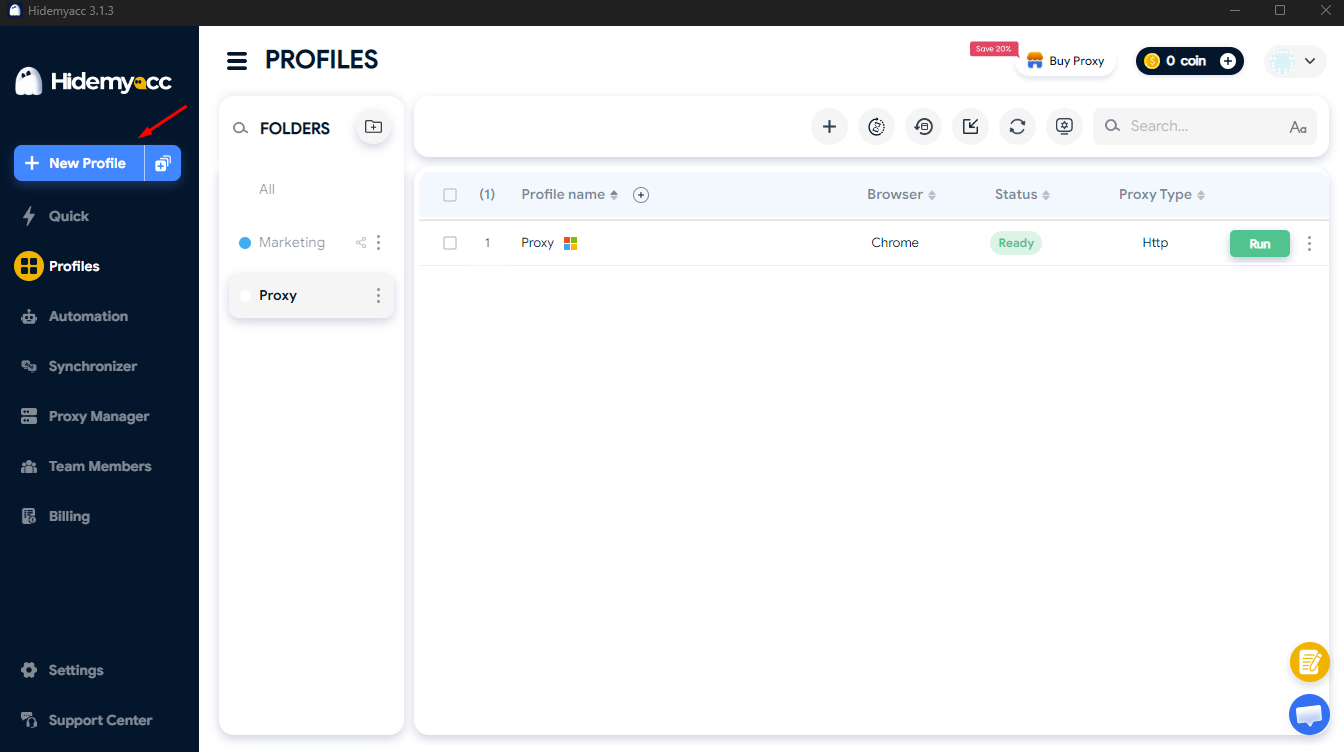
- Step 1: Open Hidemyacc and select New Profile to create a new profile.
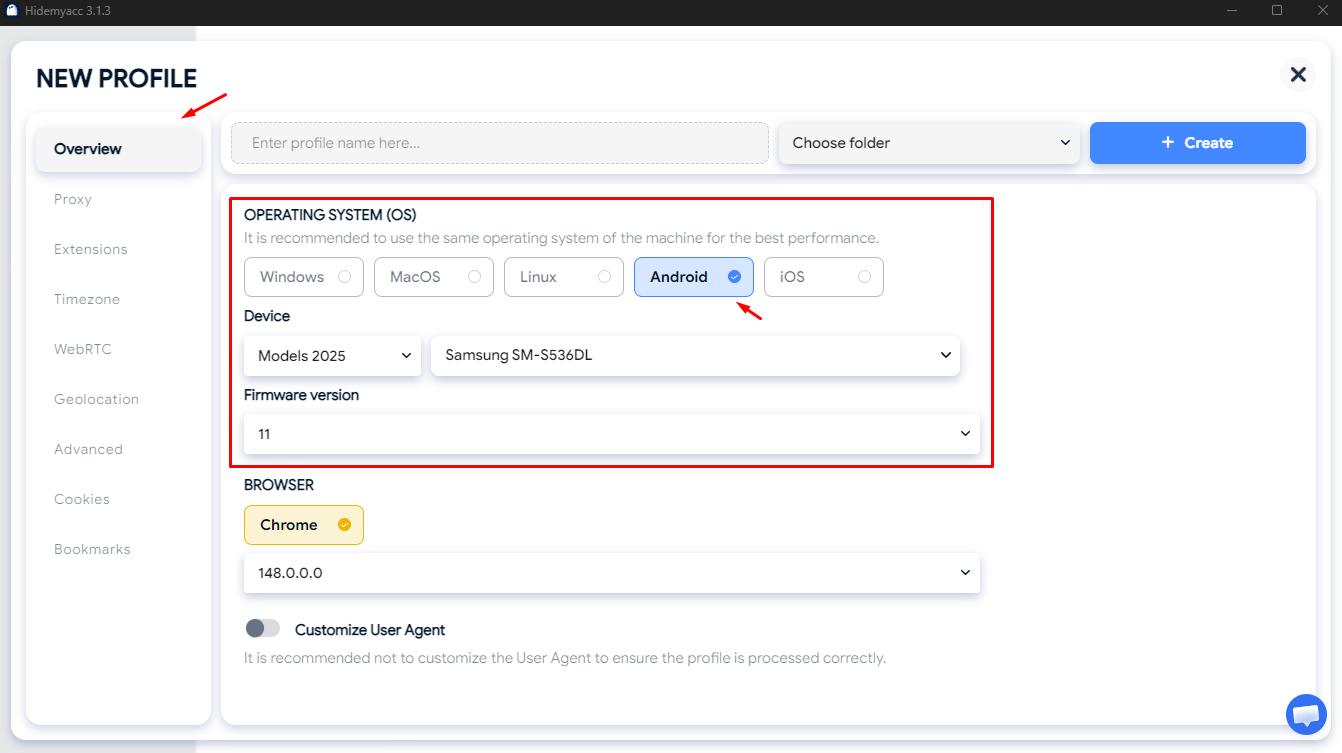
- Step 2: In the Overview section, select Android and choose the appropriate version.
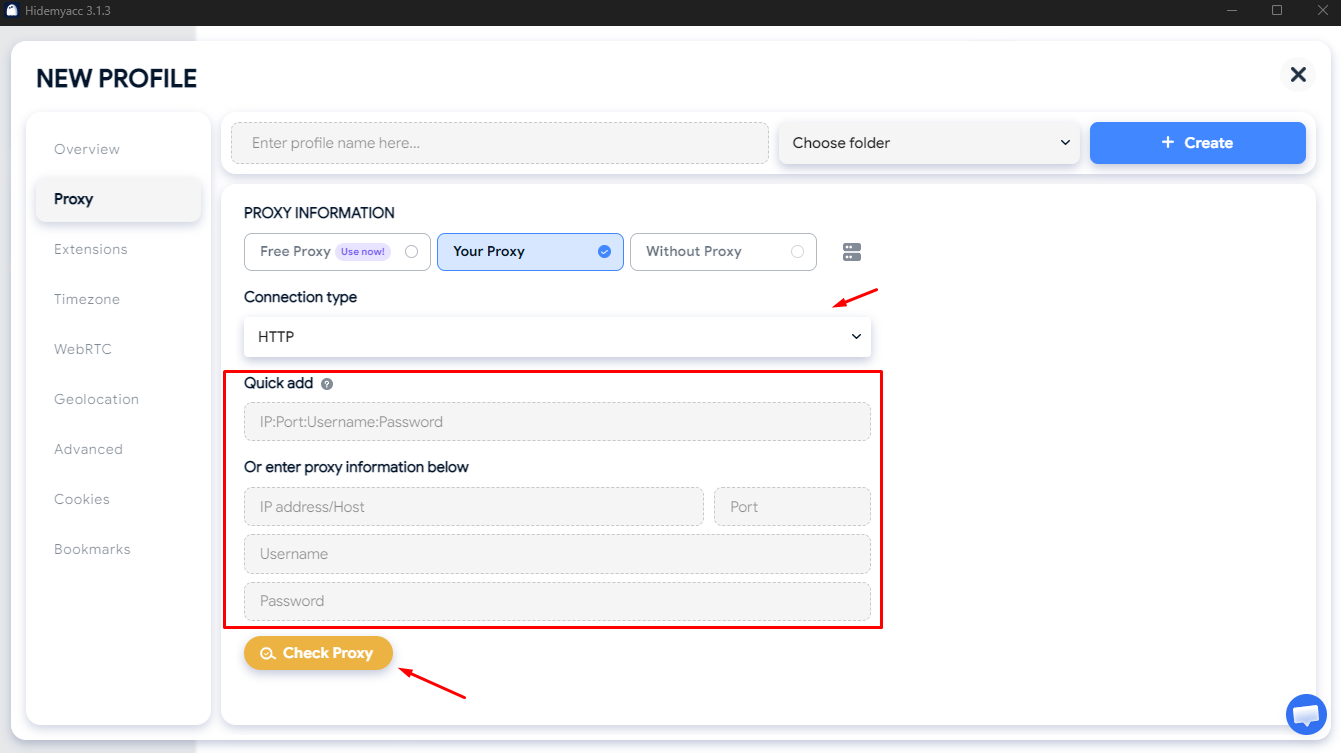
- Step 3: Switch to the Proxy tab, select HTTP, HTTPS, or SOCKS5 protocol. After that, enter the IP, Port, Username, and Password information provided by the proxy provider. Finally, click Check Proxy to confirm the connection.
- Step 4: Click Create to save the profile, then click Run to start. Each account only uses a single unique profile, do not switch to another profile.
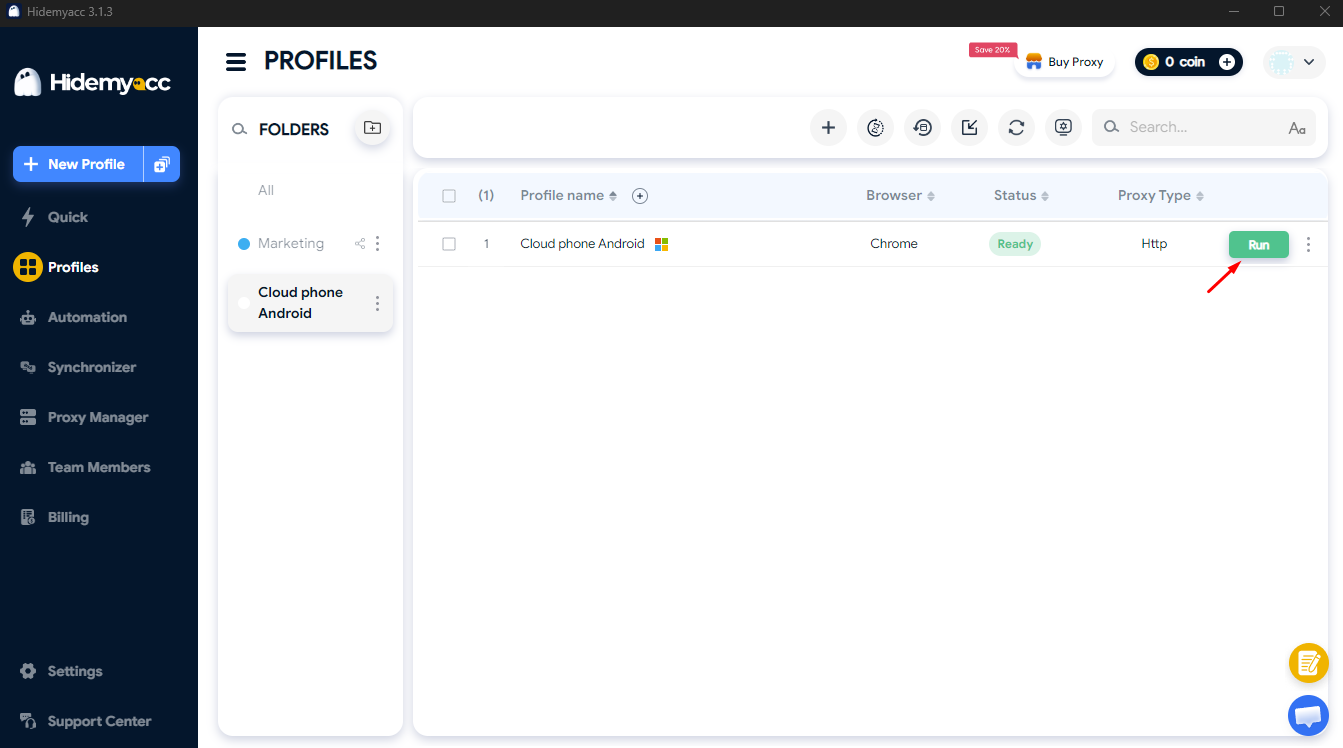
Depending on the purpose of use, you can choose Android Cloud Phone or a device emulation solution on browsers. Selecting the right tool from the start will make the account management and working process simpler, more stable, and more cost-effective.
If you are not sure which protocol to choose, you can refer to:
HTTP/HTTPS Proxy vs SOCKS Proxy: Which one should you use?
6. Important notes when choosing an Android Cloud Phone service
Currently, there are many Android Cloud Phone providers with various prices and features. However, not every service is suitable for your needs. Before subscribing to a long-term plan, take time to evaluate some important factors below:
-
Latency and connection speed: The experience of using a cloud phone heavily relies on response speed. If latency is too high, operations like opening apps, scrolling screens, or typing data will be delayed and cause frustration during work. Therefore, you should prioritize providers that offer trials or hourly subscriptions to check connection quality before purchasing a long-term plan.
-
Server location: The distance between the server and the account's operational area also affects speed and stability. The closer the server is to the target location, the lower the latency, resulting in a smoother user experience.
-
Ability to customize identification parameters: Not all cloud phone services allow changing IMEI, Android ID, time zone, or language. Meanwhile, these are parameters that help create devices with unique characteristics instead of using identical default configurations. If you need to manage multiple accounts, check if the provider supports customizing these parameters.
-
Billing methods: Some providers charge by the hour, by the month, or by the number of devices. You should choose a package suitable for your usage frequency to optimize costs.
-
Ability to create multiple independent devices: If you have long-term plans or manage many accounts, prioritize services that allow creating additional devices easily when demand increases.
-
Security policies: Since all applications and data are stored on the provider's server, you should thoroughly understand their security measures and prioritize services with a good reputation on the market.
Instead of only focusing on the price, you should simultaneously consider performance, scalability, and security to choose the most suitable Android Cloud Phone service.
7. Conclusion
Android Cloud Phone is a suitable solution for those who need to operate Android applications or manage multiple devices without investing in physical phones. Depending on usage needs, you can choose dedicated cloud phone services, Android VPS, or integrated platforms to achieve the best results.
If you mainly work on browsers and only need websites to recognize you as an Android device, solutions like Hidemyacc will be a lighter and more cost-effective choice. The important thing is to identify the correct needs to select the appropriate solution and effectively exploit the benefits that Android Cloud Phone brings.
You may be interested in:
What is a Cloud Browser? A Guide to Cloud BrowsersWhat is a Virtual Browser? Comparison with Conventional Browsers
8. FAQ
1. How does Android Cloud Phone differ from an Android emulator on a computer?
An emulator runs locally on a computer, consuming the user's RAM and CPU, making it unsuitable for running multiple devices simultaneously. Android Cloud Phone runs on a cloud server, requiring users to only have a browser for remote control, while hardware resources are handled by the provider.
2. Can using an Android Cloud Phone be detected by social media platforms?
It can be detected if multiple virtual devices share the same IP address or have identical hardware identification parameters. To reduce risks, it is necessary to assign a separate IP to each device and customize parameters such as IMEI and Android ID. Combining this with independent browser profiles will increase the protection level when accessing the web.
3. What computer configuration is required to use an Android Cloud Phone?
A powerful configuration is not needed because all processing takes place on the cloud server. Users only need a device with a browser and a stable internet connection, with a minimum speed of about 10 Mbps for smooth screen streaming.
4. Can I install every Android application on a cloud phone?
Most Android applications can be installed and run. Some applications that check for real devices (device attestation) or require Google Play Protect may have restricted functions. It is advisable to check with your chosen cloud phone service before subscribing to a long-term plan.
5. What is the average cost of renting an Android Cloud Phone?
Costs vary by provider and device configuration. Dedicated services usually range from 5–20 USD/month per device, while Android VPS has higher prices due to manual configuration requirements. It is recommended to choose hourly packages to try before switching to monthly plans.
6. Is an Android Cloud Phone legal?
Using a virtual Android device on the cloud itself is legal. Legal issues only arise if used to violate the platform's terms (e.g., creating fake accounts, spamming). Users need to ensure compliance with each platform's policies by themselves.





