Vision browser has gained attention among users seeking an antidetect tool to manage multiple accounts on a single physical workstation. However, a feature list alone cannot prove how profiles perform in live environments, whether fingerprints stay consistent over time, or how proxy integration impacts workflow efficiency. This hands-on review focuses on direct testing observations—from user interface layout and profile generation to rigorous browser environment leak tests. By evaluating these benchmarks, you can determine whether Vision browser meets your operational requirements and identify key constraints before buying.
1. What is Vision browser?
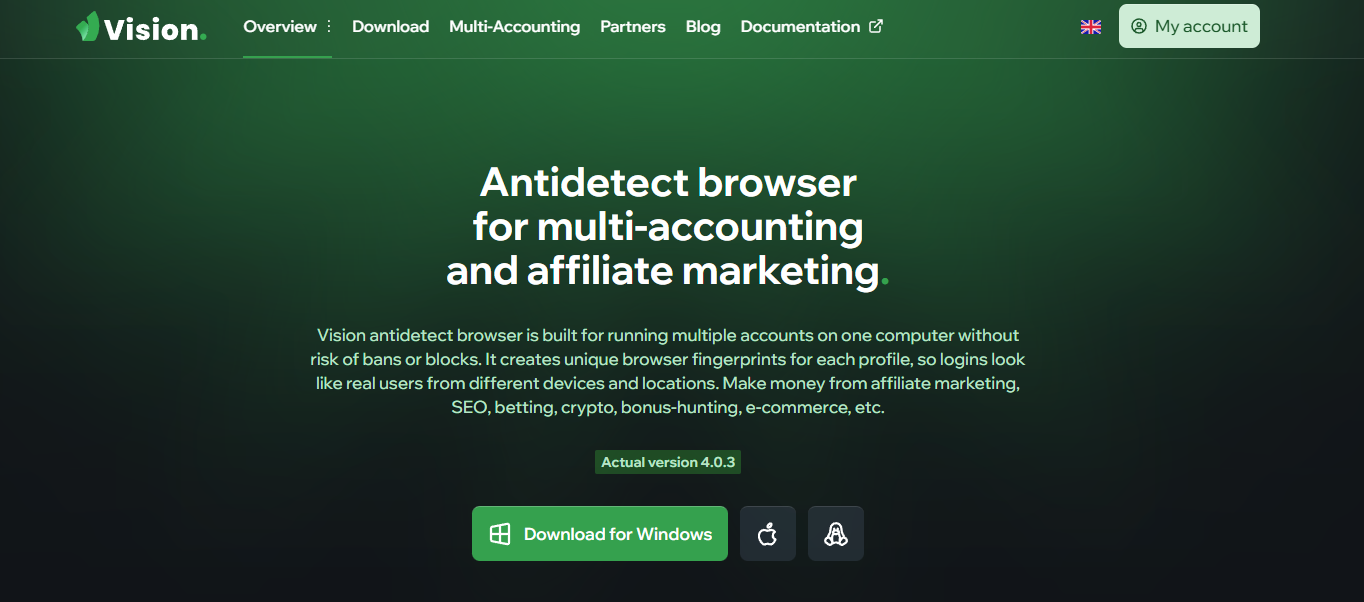
Vision browser is a Chromium-based antidetect browser built to deploy and maintain isolated browser profiles on a single machine. Each profile stores independent cookies, session caches, digital fingerprints, and proxy configurations, allowing operators to run multi-account operations without cross-profile contamination.
Beyond standard parameter emulation, Vision advertises a multi-profile Synchronizer tool, an X-Token API for profile automation, and direct driver compatibility with Puppeteer, Playwright, and Selenium. Consequently, the software caters to both manual account operators and technical teams deploying automated pipelines.
Vision also supports cross-platform deployment across Windows, macOS, Linux, and Android, accommodating distributed teams running diverse hardware environments.
2. Key Features of Vision browser
Vision focuses primarily on browser profile isolation while offering peripheral utilities designed to support growing account setups.
| Specification | Details |
|---|---|
| Tested Version | Vision Browser 4.0.3 (x86_64), browser core 154.0.8037.58 |
| Profile Provisioning | Folders, status markers, tags, notes, cookie imports, batch profile generation, and custom imports |
| Supported Profile OS | Windows, macOS, Linux, Android |
| Fingerprint Control | Smart mode, New fingerprint randomization, Canvas, WebGL, Audio, Client Rects, and hardware configurations |
| Proxy Protocols | HTTP, HTTPS, SOCKS5, SSH |
| UDP Support | Vision provides a Proxify QUIC toggle for SOCKS5; not verified in live testing |
| Automation | X-Token API access with developer documentation; not benchmarked via live script runs |
| Human Typing Simulation | Adjustable typing speeds with dedicated 2FA input modes |
| Free Trial | 4-day duration, activation required via Telegram |
These technical specifications indicate that Vision prioritizes profile organization and programmatic extensibility. However, listed features do not always reflect real-world performance, making direct testing essential.
3. Vision browser Pricing Plans
Vision offers 6 subscription packages segmented by profile capacities and team seat allowances. Pricing observed during testing is structured as follows:
| Plan | Monthly Rate | Profile Allowance | Included Users |
|---|---|---|---|
| Micro | $29 | 50 | No team collaboration support |
| Base | $79 | 150 | 2 users |
| Standard | $129 | 300 | 2 users |
| Pro | $189 | 500 | 4 users |
| Max | $289 | 1,000 | 4 users |
| Ultra | $389 | 1,500 | 5 users |
Vision provides a 20% discount on 6-month commitments and a 30% discount on 12-month prepayments. Pricing scales up based on profile caps and included team seats.
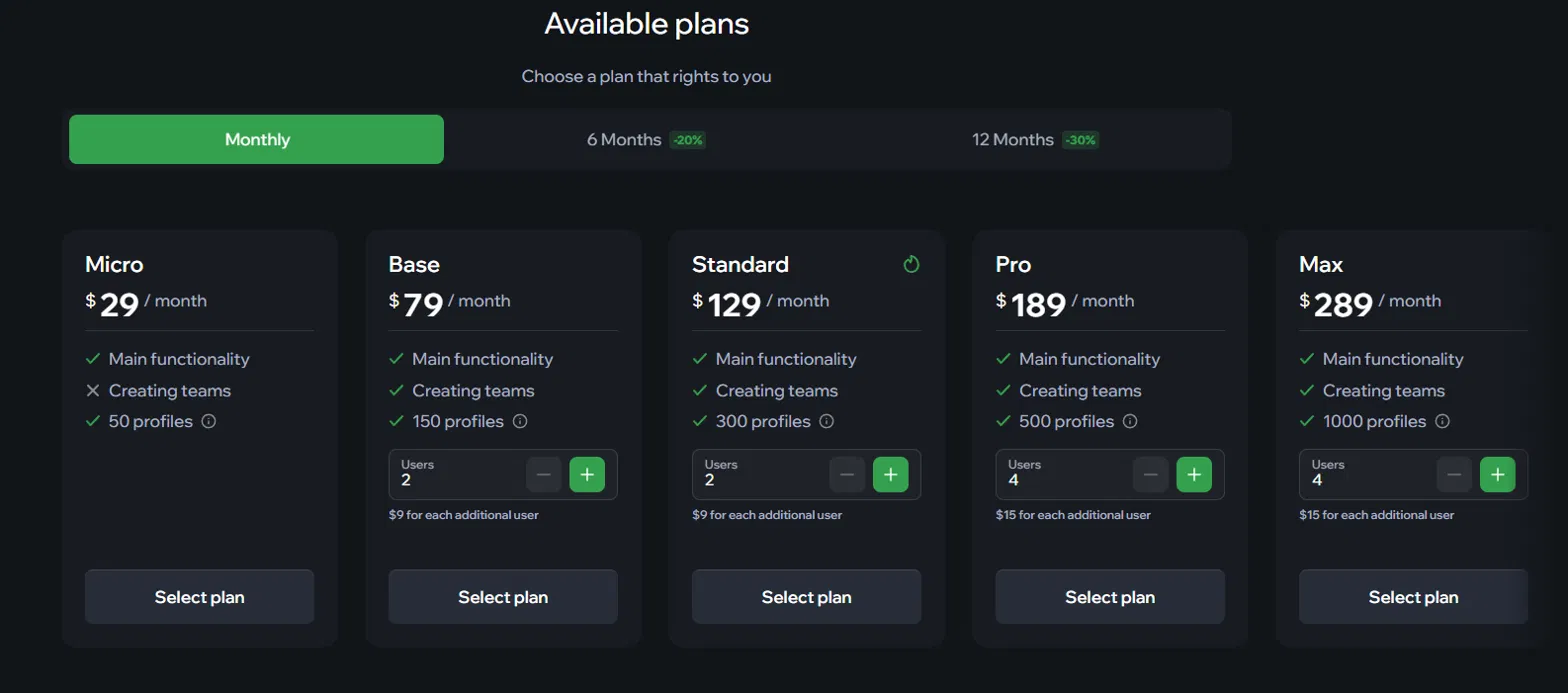
The entry-level Micro plan costs $29/month for 50 profiles and excludes team collaboration features. Higher-tier plans expand profile volumes and grant additional user seats. When teams exceed the seat limit included in their tier, Vision charges an add-on fee per additional seat.
Vision does not offer a permanent free package. The evaluation trial runs for 4 days and requires account linking via Telegram.
For solo operators running fewer than 50 profiles, the $29/month plan provides an accessible entry point. However, as profile counts scale and team seats are added, subscription costs increase steadily. Evaluating your profile requirements and team size is critical before selecting a tier.
4. Hands-on Performance Evaluation
Testing Context: All live benchmark evaluations were conducted on Windows 11 using Vision version 4.0.3, operating under an active 4-day trial account linked via Telegram.
Two distinct proxy configurations were evaluated side by side: a local profile operating without proxies (using a direct residential connection in Vietnam), and a second profile paired with a static US SOCKS5 datacenter proxy sourced from proxy.cc located in Wilmington, Delaware.
In addition, an automatic rotating residential HTTP proxy was tested separately. Because its IP rotated continuously throughout the test session, data from this proxy was used strictly to observe CAPTCHA behavior rather than for primary fingerprint verification.
The trial tier limits capacity to 10 profiles and 3 user invitations, so resource consumption benchmarks were measured across 1 to 2 concurrent profile instances rather than mass concurrency.
4.1 Profile Generation and Setup Testing
Creating Profiles
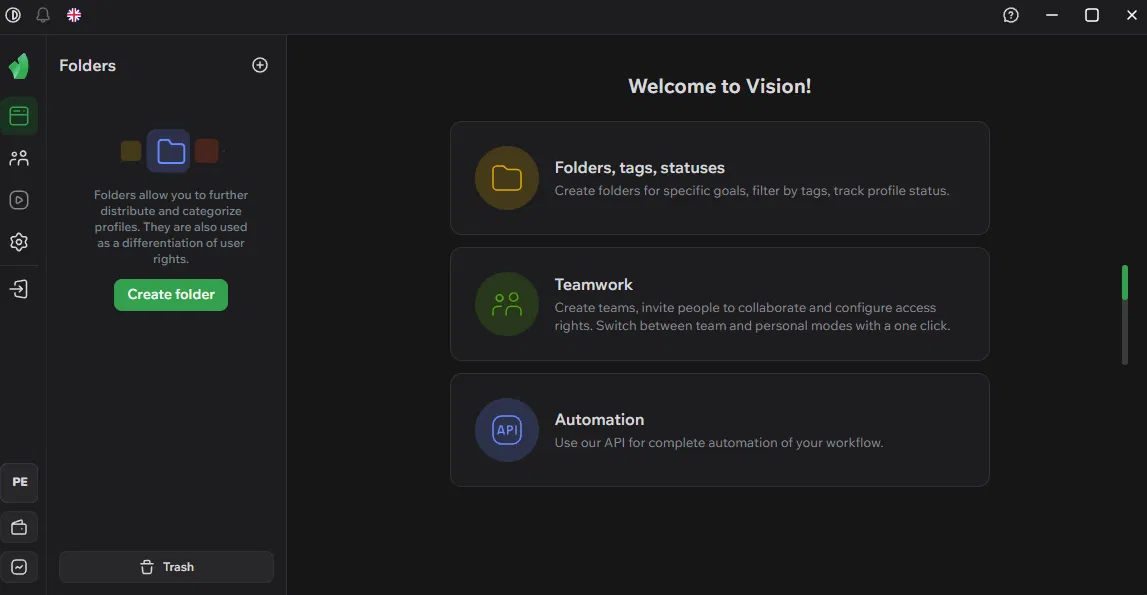
Upon initial launch, Vision's Welcome screen highlights three primary modules: Folders/tags/statuses, Teamwork, and Automation. This structure indicates that profile categorization, team collaboration, and automated pipelines are core product priorities.
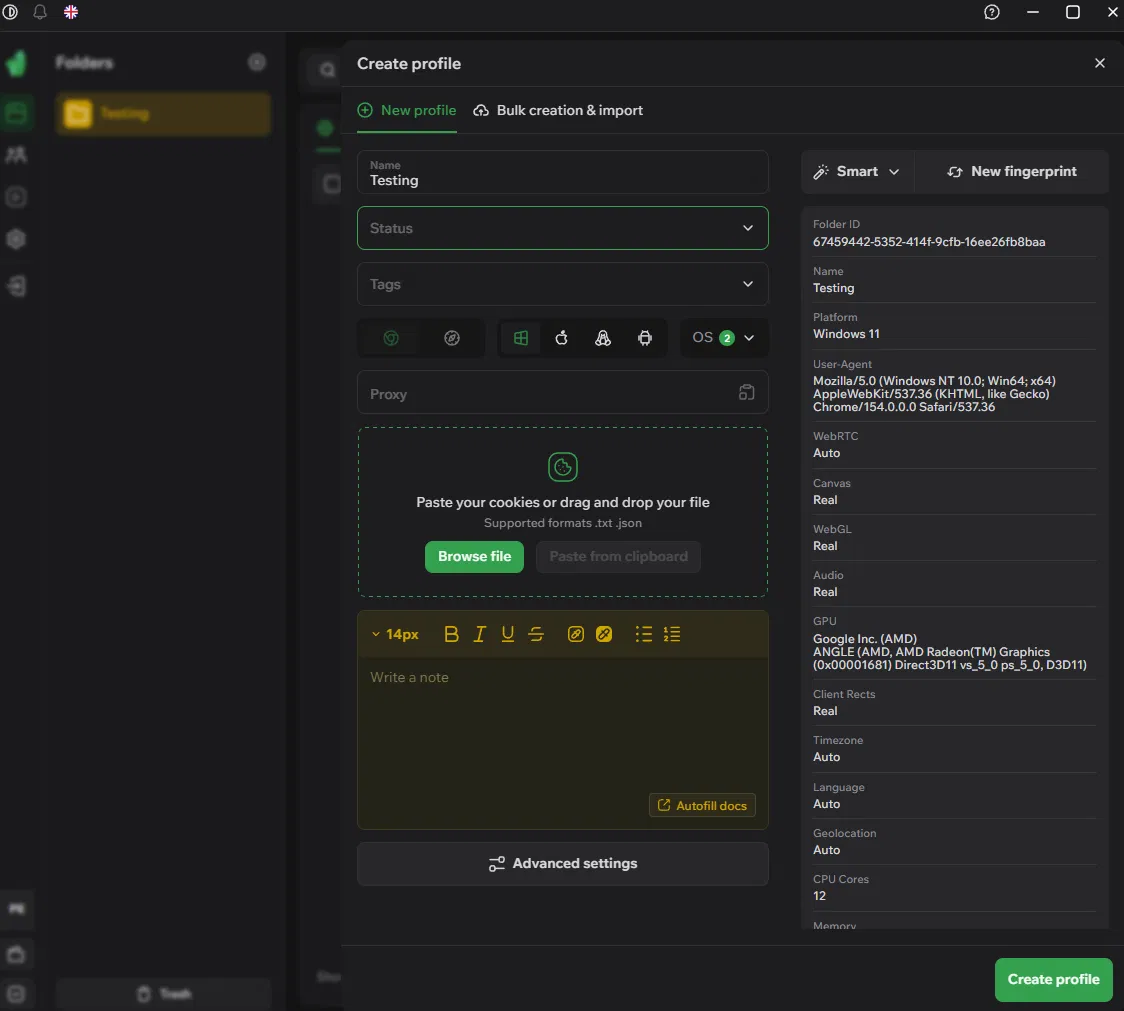
Vision requires users to create an organizational folder before generating a profile. Once created, users simply enter a profile title to finalize basic setup. Metadata tags, status markers, proxy credentials, and cookie packages can be added as needed.
Supported profile operating systems include Windows, macOS, Linux, and Android. The browser core displays the standard Chrome icon alongside an additional unidentified secondary core indicator.
Under default Smart generation mode, the right-hand panel populates system parameters as soon as a profile title is entered, generating:
- Windows 11 OS identifier
- Chrome core build 154
- AMD Radeon GPU rendering engine
- 12 CPU core topology
- 16 GB RAM allocation
- 1536 × 864 screen resolution
- FaceCam 300 hardware video device
Users can click New fingerprint to randomize parameters instantly. Advanced configuration tabs provide additional fingerprint toggles, though live benchmark data was not recorded for those specific adjustments during this run.
Notably, proxy settings are integrated directly into the profile creation workflow. Vision supports four connection protocols: HTTP, HTTPS, SOCKS5, and SSH.
Learn more: HTTP/HTTPS Proxy vs SOCKS Proxy: Which should you use?
During our benchmark, Vision did not offer a Get free proxy utility or an integrated free proxy pool. Users must source proxies externally and import connection credentials manually.
When launching a profile, Vision's default New Tab page lists profile name, folder, local system time, detected IP address, physical location, OS, and language, accompanied by an Identity Protected — Fingerprint consistent indicator.
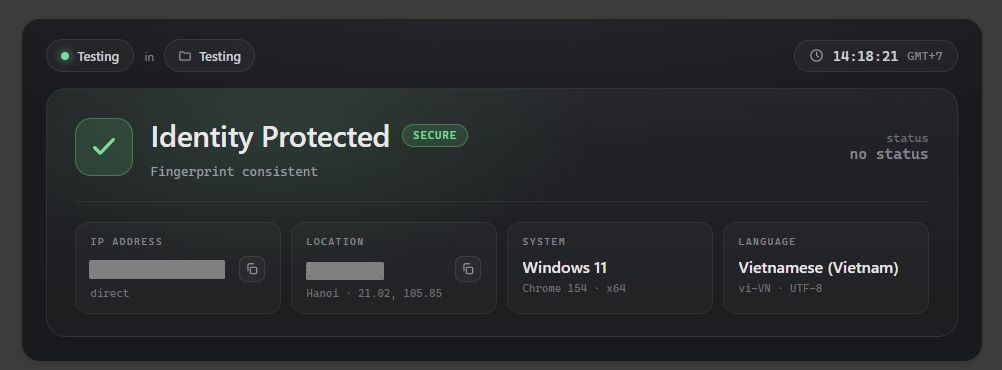
This assessment is generated internally by Vision. Independent audits using Browserleaks, Iphey, and IPFighter were subsequently performed to cross-examine these assertions.
4.2 Fingerprint and Anti-Detection Benchmark
Each proxy configuration was deployed inside an isolated profile and run through benchmark suites: Browserleaks, Iphey, and IPFighter. Browserleaks was utilized specifically to audit WebRTC endpoints, DNS routing, and TCP/IP stack signals.
Auditing on Fingerprint Verification Suites
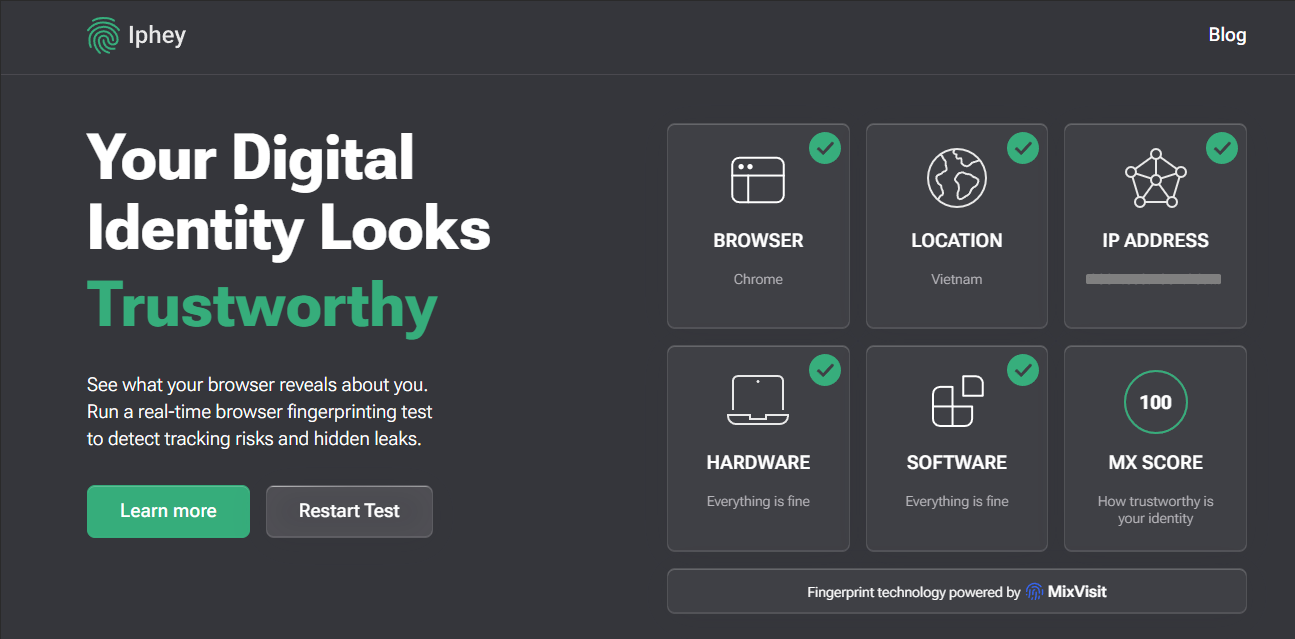
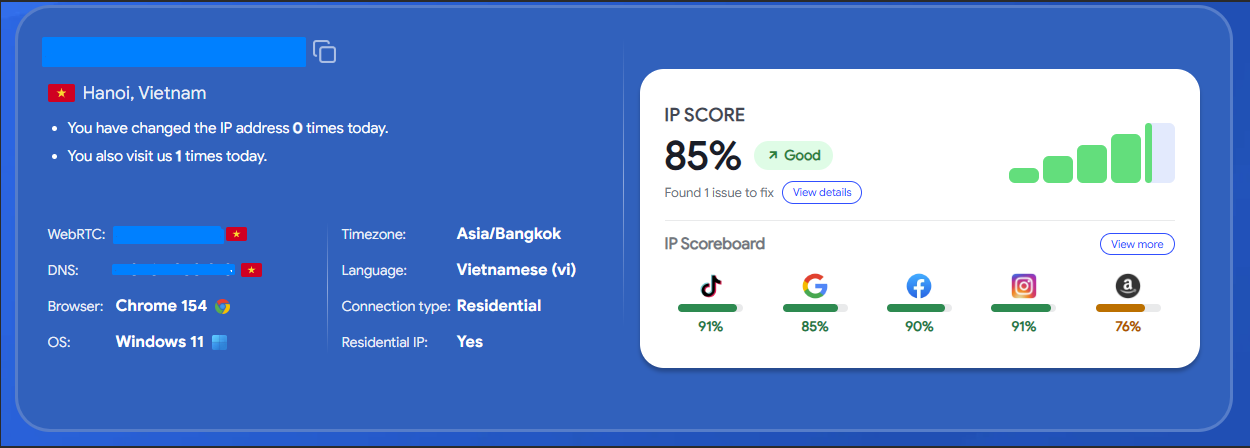
Operating without proxies, testing suites verified environment parameters matching the profile setup: Windows 11, Chrome 154, and a physical location in Vietnam. Iphey awarded a rating of Trustworthy, MX Score 100, while IPFighter scored the environment at 85% Good.
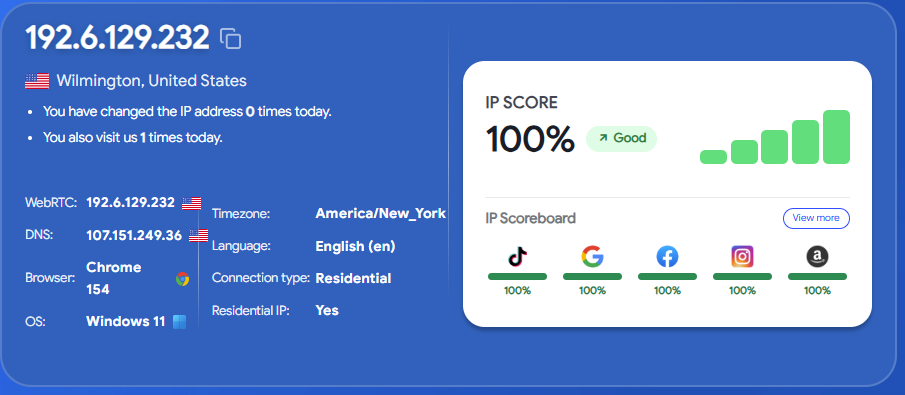
When switching to the static US SOCKS5 proxy, IPFighter returned a 100% Good rating, showing zero mismatch warnings across timezone, language headers, or WebRTC lookups. Individual target platform compatibility ratings for TikTok, Google, Facebook, Instagram, and Amazon all reached 100%.
Parameter Consistency Check
Across both runs, profile declarations for Windows 11 and Chrome 154 remained consistent throughout active sessions and across manual page reloads.
WebRTC Leak Evaluation
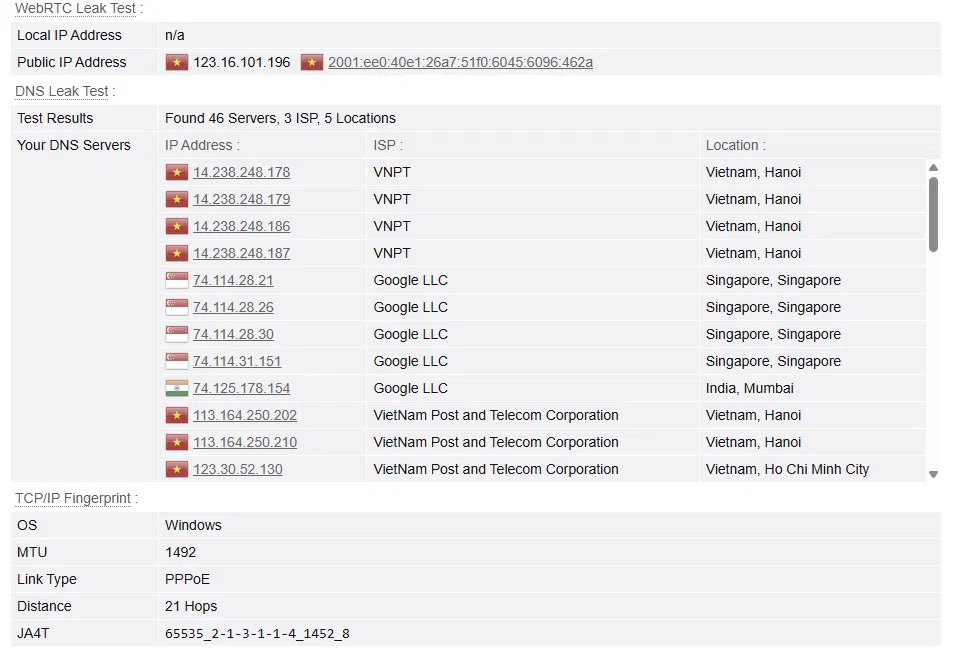
Both proxy states returned Local IP Address: n/a on Browserleaks, confirming zero local LAN IP leaks. When using the SOCKS5 proxy, the IP returned by WebRTC matched the public exit IP of the proxy.
Timezone and Geolocation Accuracy
Profile Timezone, Language, and Geolocation were set to Auto. Under direct connection, parameters remained at GMT+7 and vi-VN. Once routed through the US proxy, parameters updated automatically to GMT-4 and en-US matching the assigned IP.
These results confirm that Vision synchronizes location-dependent parameters reliably. Switching proxies alters the reported IP while updating corresponding timezone and language headers.
However, an anomaly appeared at the TCP/IP stack layer. Despite the profile declaring a Windows 11 operating system, Browserleaks' TCP/IP Fingerprint classified the OS as Android, with the Link Type flagged as Ethernet or modem. This Android misclassification occurred on both proxied sessions (the US SOCKS5 and the rotating HTTP proxy), but did not appear during direct, unproxied testing.
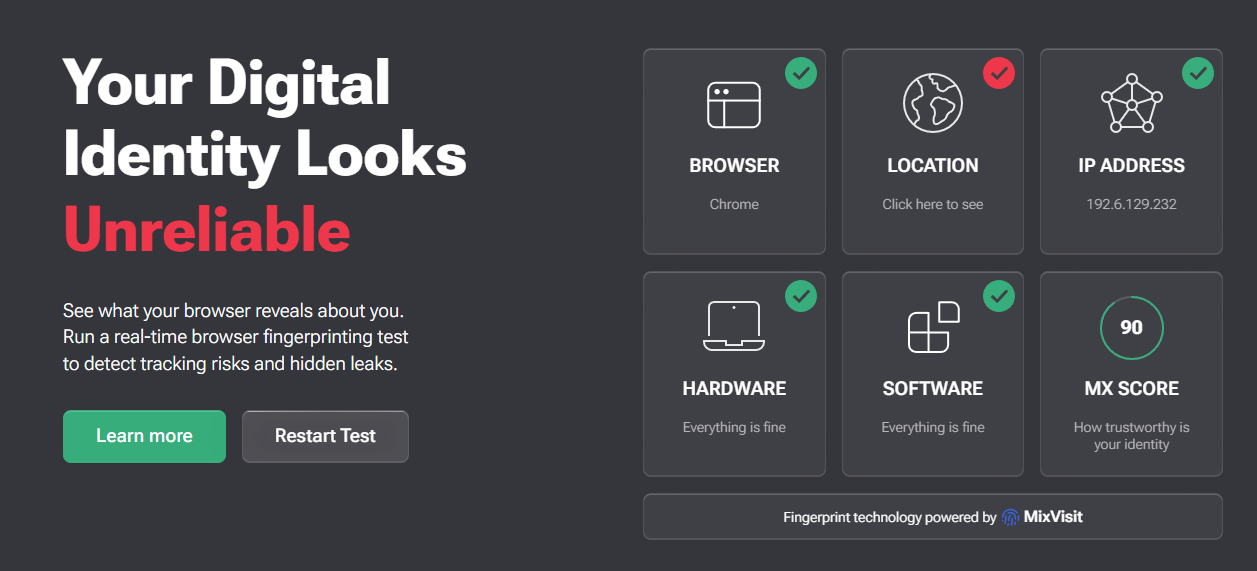
Iphey also reported contradictory results when routed through the US proxy: security status shifted to Unreliable, the Location module was flagged in red, and the MX Score dropped to 90. Detailed inspection showed Iphey identified an America/Chicago timezone, whereas the profile and IPFighter both reported America/New_York. This confirms that IP geolocation and timezone lookups can vary between detection databases.
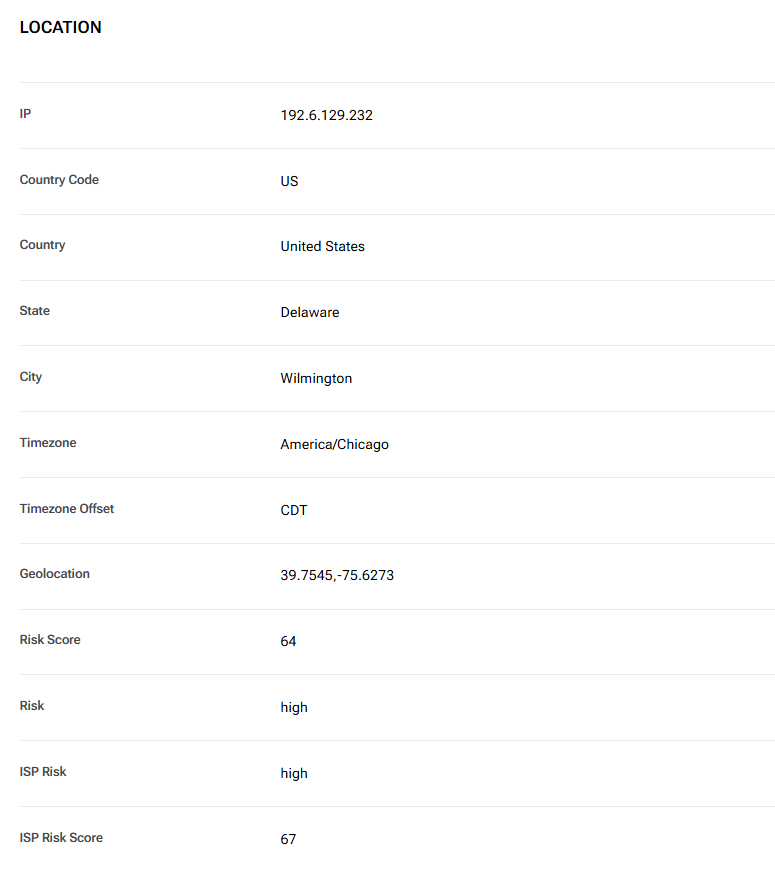
Fingerprint Test Summary
| Evaluation Category | Direct Connection (No Proxy) | US SOCKS5 Proxy |
|---|---|---|
| IPFighter Rating | 85% Good | 100% Good |
| Blacklist Flags | 3/10 | 2/10 |
| Timezone/Geo Matching | Matched, GMT+7, vi-VN | Matched, GMT-4, en-US |
| WebRTC Leak Status | No local IP exposed | No local IP exposed, public IP matched |
| Iphey Rating | Trustworthy, MX 100 | Unreliable, Location flagged red, MX 90 |
| TCP/IP Stack Evaluation | Normal, Windows OS detected | Anomaly: Detected as Android OS |
In summary, Vision maintains consistent core fingerprint parameters across reloads and synchronizes timezones and languages to match assigned proxies. Key considerations include the TCP/IP stack misidentifying Windows profiles as Android when proxies are attached, alongside geographic variances reported by Iphey.
4.3 Proxy Compatibility and Website Accessibility
Two distinct proxies were evaluated: a static US datacenter SOCKS5 proxy from proxy.cc, and a rotating residential HTTP proxy.
Both credentials imported cleanly into Vision's setup form and established connections without error. Upon saving, the interface updated location and timezone parameters to match the detected exit node.
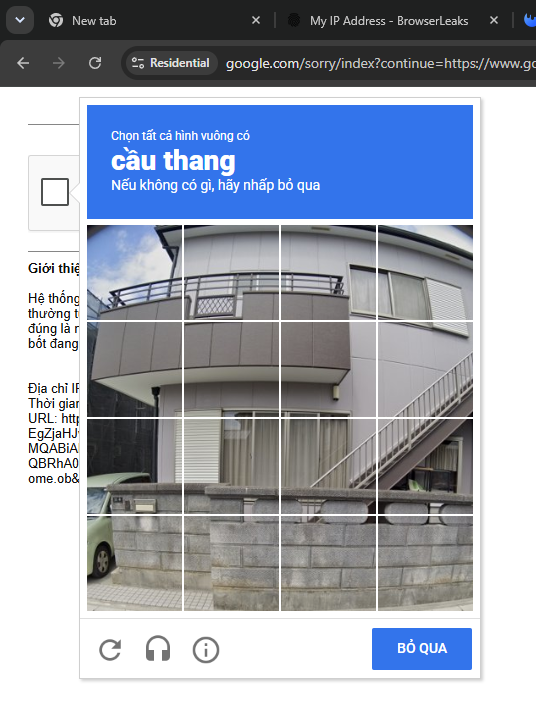
When searching Google through the rotating residential HTTP proxy, the engine displayed image-selection CAPTCHAs requiring 3 verification attempts. Under the static SOCKS5 proxy, neither Google nor TikTok triggered CAPTCHA challenges during testing.
Etsy was accessed via the static SOCKS5 proxy without difficulty, loading cleanly without CAPTCHAs or hanging network requests.
Regarding UDP routing, Vision includes a Proxify QUIC toggle for UDP-capable SOCKS5 proxies. While this setting was enabled during testing, Cloudflare trace returned an HTTP/2 protocol handshake, leaving active UDP/QUIC routing unconfirmed in this benchmark.
Between the two proxy types, the static SOCKS5 connection delivered more stable access to Google, TikTok, and Etsy. While the rotating HTTP proxy encountered CAPTCHAs on Google, this cannot be attributed solely to Vision, as the proxies differed in protocol, IP type, and rotation mechanics.
4.4 Automation and RPA Capabilities
Vision provides an X-Token API and supports connecting running profiles to Puppeteer, Playwright, and Selenium via Chrome DevTools Protocol (CDP).
Vision's API handles profile lifecycle management, such as starting, stopping, creating, and deleting profiles. Once an instance is running, external automation frameworks connect to drive in-page interactions.
In desktop build 4.0.3, the X-Token generation panel and documentation links are accessible. However, because live scripts were not run during testing, this assessment confirms Vision's automation architecture and supported tools without evaluating execution reliability.
4.5 Synchronizer Tooling
According to official documentation, Vision's Synchronizer allows operators to designate a primary profile that mirrors mouse clicks, keystrokes, and scroll actions across other active profile windows, with support for adding new windows to running sessions.
However, the Synchronizer tool was absent in desktop build 4.0.3 throughout our testing. It could not be located on the primary navigation menu, multi-profile action bars, or within Settings.
Consequently, live benchmarks could not be completed for the Synchronizer on this release. Teams relying heavily on window action mirroring should confirm its availability with Vision's support.
4.6 Team Collaboration Features
Vision supports team collaboration starting on the Base tier. Base and Standard include 2 seats, Pro and Max include 4 seats, and Ultra provides 5 seats. Additional seats incur an added monthly cost.
The trial tier tested displayed a 3-seat invitation limit, confirming that team management interfaces are enabled during evaluation.
Because team invitations and permissions were not tested within active multi-user workflows, this review notes seat allocations and pricing tiers without evaluating permission controls.
4.7 Performance and Resource Consumption
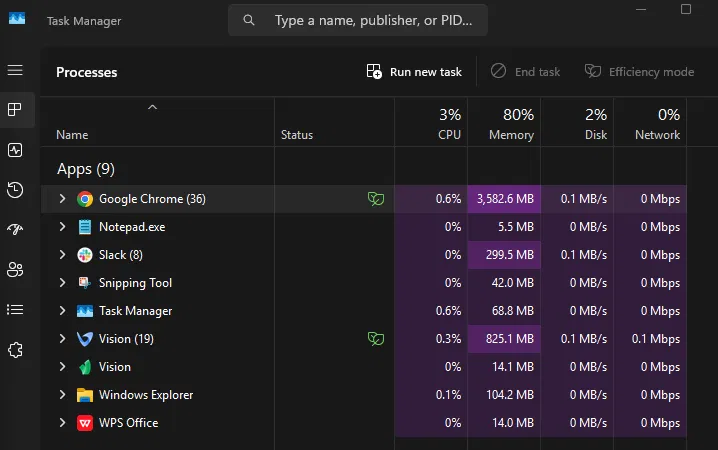
RAM consumption was measured using Windows Task Manager across three benchmark points, filtering strictly for active Vision process groups:
| Active Profile State | Vision Memory Allocation (RAM) |
|---|---|
| 0 profiles (application console only) | 13.8 MB |
| 1 active profile (5 tabs open) | ~825.1 MB |
| 2 active profiles | ~903 MB |
Running a single profile with 5 open tabs consumed approximately 825.1 MB of RAM across Vision process trees. Launching a second profile increased total allocation to roughly 903 MB, an incremental gain of about 78 MB.
This shows that memory consumption does not scale linearly by fixed blocks per profile. However, because tab counts and active processes differed between the two checkpoints, this 78 MB delta should not be treated as a universal per-profile baseline.
At ~825 MB for one profile running 5 tabs, hardware memory overhead is a practical consideration when deploying dozens of instances on RAM-constrained machines. When planning hardware capacity, calculate total concurrent tabs and background applications rather than profile counts alone.
4.8 Additional Advanced Features
Beyond the core modules evaluated, Vision includes several options within Settings.
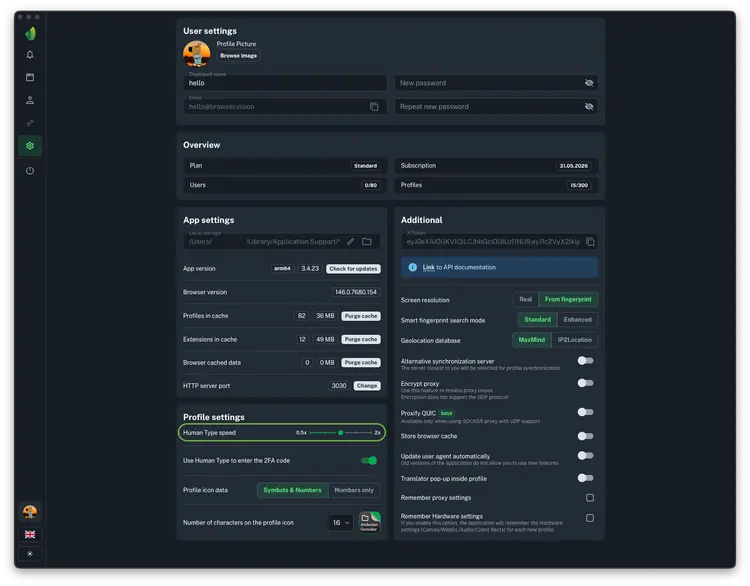
The Extended features tab contains settings for rendering native versus fingerprint resolutions, choosing between MaxMind and IP2Location geolocation databases, toggling automated User-Agent updates, saving hardware presets for new profiles, and managing Proxify QUIC.
The Profile settings panel includes a Human Type typing speed regulator (0.5x to 2x), dedicated 2FA input modes, Passkey authentication support, and local network port masking (such as ports 3389 and 5900) to hide remote access tools from web scripts.
These settings offer useful customization for workflows requiring deeper control over fingerprints, geolocation databases, or keystroke pacing. Features not tested in live workflows are excluded from operational conclusions.
5. Vision browser Evaluation and Final Assessment
Testing showed that Vision handles profile creation and proxy assignment smoothly. Fingerprints populate immediately during setup, timezones and languages synchronize with assigned proxies, and WebRTC lookups revealed no local IP leaks during testing.
Operational constraints remain around advanced modules. API automation was evaluated only at the interface level, the Synchronizer was absent in the tested build, and team features were reviewed strictly by seat allowances. As a result, these modules cannot be evaluated with the same certainty as directly tested features.
| Advantages | Limitations |
|---|---|
| Timezone, language headers, and WebRTC synchronized accurately to proxies | No permanent free plan; trial is limited to 4 days |
| Fast profile setup requiring only a profile title | Trial activation requires linking a personal Telegram account |
| Supports HTTP, HTTPS, SOCKS5, and SSH protocols | Synchronizer utility was absent in tested build 4.0.3 |
| Includes API access with Puppeteer, Playwright, and Selenium support | Automation was not verified via live script runs |
| Extensive advanced configuration toggles for technical operators | TCP/IP stack misclassified Windows as Android under proxy; Iphey flagged Location |
These findings demonstrate that Vision provides a capable foundation for multi-profile management, though suitability depends on whether your workflows require basic isolation or advanced automation tooling.
7. Hidemyacc: A Scalable Alternative to Vision
If Vision does not align with your operational requirements, antidetect browser Hidemyacc serves as a capable alternative for teams managing multiple profiles, custom browser fingerprints, and dedicated proxies across isolated environments. Both platforms focus on isolating accounts into independent browser profiles rather than managing them within standard browser windows.
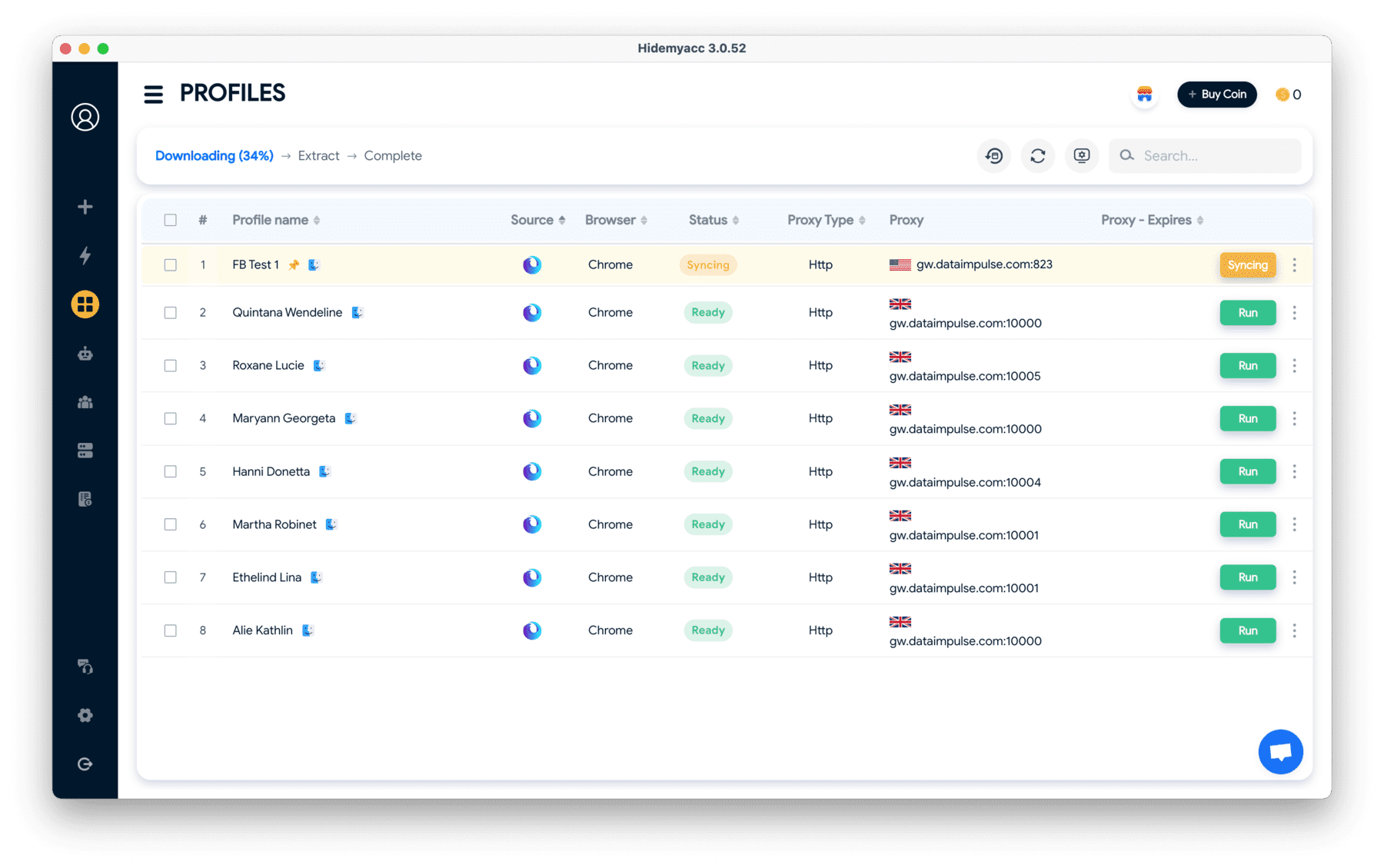
Hidemyacc provides comparable core profile management capabilities while adding several distinct operational tools:
- Granular Fingerprint Controls: Configure system parameters including OS, browser versions, resolutions, timezones, language headers, Canvas, WebGL , and hardware signals per profile.
- Integrated Proxy Management: Bind dedicated proxies to individual profiles and manage them centrally using Proxy Manager.
- Team Collaboration: Use Share Profile to transfer environments between team members without exposing master account credentials, backed by sub-accounts with role-based access permissions.
- Magic Link Migration: Transfer and import profile environments directly from other antidetect tools using URL links, streamlining software migration.
- Dual Automation Engine: Built-in visual no-code RPA builders for repetitive browser tasks, alongside local API endpoints for Puppeteer and Selenium script integration.
- Action Synchronizer: Mirror mouse clicks, keystrokes, and navigation across multiple open profile windows simultaneously from a designated master window.
Quick Comparison: Vision browser vs. Hidemyacc
| Criteria | Vision browser | Hidemyacc |
|---|---|---|
| Starting Price | $29/month, 50 profiles | $10/month, scaling down to $5/month on annual billing |
| Free Trial | 4 days, mandatory Telegram link required | 7 days, no credit card or third-party app linking required |
| Mobile Emulation | Android only | Both Android and iOS emulation from Base tier ($49/month) |
| Built-in Free Proxies | No, users must purchase proxies externally | Yes, available in-app from Base tier ($49/month) |
| Proxy Protocol Support | HTTP, HTTPS, SOCKS5, SSH | HTTP, SOCKS4, SOCKS5, SSH |
| No-Code Automation | No, limited to API integration for developers | Yes, visual drag-and-drop workflow builder with action recording included |
| Code-Based Automation | API for Puppeteer, Playwright, Selenium | Comprehensive API for Selenium, Puppeteer, and Playwright |
| Profile Migration | Basic import utility requiring pre-formatted data schemas | Magic Link, direct transfer from competing antidetect browsers |
| Team Collaboration | From Base ($79/month), extra seats cost $9–$15/user | From Team tier ($99/month), sub-accounts included with plans |
| Synchronizer | Documented, but absent in tested desktop build | Integrated and functional |
| Operating System Support | Windows, macOS, Linux | Windows, macOS (Linux client in active development) |
Table 1: Cost Comparison by Operational Scale (monthly rates; figures in parentheses reflect monthly cost under annual billing)
| Operational Requirement | Vision | Hidemyacc |
|---|---|---|
| Solo operator (~100 profiles) | $79 ($55), Base tier (150 profiles) | $49 ($25), Base tier (100 profiles) |
| 5-user team (300 profiles) | $156: Standard $129 (2 users) + 3 extra users × $9 | $104: Team $99 (3 free sub-accounts) + 1 extra user × $5 |
| 6-user agency (1,000 profiles) | $319: Max $289 (4 users) + 2 extra users × $15 | $199: Business $199 (5 free sub-accounts included) |
| Additional seat cost | $9 to $15 per user | $5 per user ($3 under annual billing) |
| Annual Prepayment Discount | 30% discount | 50% discount |
Across standard operational scales, Hidemyacc provides greater cost efficiency than Vision, with the pricing gap widening as team sizes increase. For a 100-profile setup, Hidemyacc costs $30 less per month, dropping to $25/month on annual billing—less than half of Vision's cost. For a 6-user agency running 1,000 profiles, Hidemyacc saves $120 monthly (over $1,400 annually), as the Business plan includes 5 sub-accounts whereas Vision charges an extra $15 per seat beyond its tier limit.
Two primary elements drive this cost difference: a 50% discount on annual billing (versus Vision's 30%) and lower add-on seat pricing of $5/user. For solo operators running 40 to 50 profiles on monthly billing, Vision's Micro plan ($29 for 50 profiles) provides a viable option. For most other operational needs, particularly team workflows, Hidemyacc offers higher value.
Table 2: Feature Matrix
| Criteria | Vision | Hidemyacc |
|---|---|---|
| Mobile Fingerprint Emulation | Android only | Android and iOS, available from Base tier |
| Built-in Free Proxy Pool | No, external proxy purchase required | Yes, available from Base tier |
| Visual No-Code Automation | No visual workflow builder | Yes: drag-and-drop, task recording, and pre-built scripts on all tiers |
| Code-Based Automation | API integration | CDP and API support for Puppeteer and Selenium |
| Cross-Browser Migration | Basic manual import utility | Magic Link and bulk profile imports |
| Synchronizer Tool | Documented, absent in test build | Fully integrated and functional |
| Browser Core Engine | Chromium | Chromium-based custom core |
| Host Operating Systems | Windows, macOS, Linux | Windows, macOS (Linux version coming soon) |
| Trial Period | 4 days | 7 days |
The primary operational difference lies in out-of-the-box plan inclusions. From its $49 Base plan, Hidemyacc includes iOS fingerprints, free proxy access, and visual no-code automation. With Vision, proxies must be sourced externally, iOS fingerprints are unavailable, and automation requires coding knowledge. As a result, the total cost of ownership with Vision often exceeds the subscription price alone.
No-code automation is valuable for non-programmers: operators can record tasks once and replay them across multiple profiles or build visual command chains—capabilities Vision does not offer. Magic Link also enables profile transfers from other antidetect tools using a simple URL, simplifying software migration.
Vision maintains an advantage for teams requiring immediate native Linux host support or specialized desktop environments. For mainstream multi-account management across Windows and macOS, Hidemyacc delivers broader functionality at lower total price points.
Across core needs—profiles, fingerprinting, proxy handling, automation, and team collaboration—Hidemyacc covers the same core use cases as Vision, with differences centered around feature execution and platform tooling.
Vision fits workflows focused primarily on browser profile isolation, Synchronizer utilities, and API automation. Meanwhile, teams requiring mobile device fingerprints, visual no-code automation, or streamlined profile migration will find Hidemyacc more suitable.
8. Conclusion
Vision focuses primarily on browser profile management, proxy integration, and extensible workflows via API or Synchronizer tooling. Across our tests, core features such as profile creation, parameter customization, and SOCKS5 proxy integration performed as intended.
However, test results revealed several inconsistencies, notably around TCP/IP stack classification, location identification on Iphey, and compatibility ratings on IPFighter. Advanced features like API automation, Synchronizer, teamwork, 2FA, and Passkeys were evaluated at the interface level or through documentation, requiring further verification in production workflows.
When evaluating Vision, weigh your profile volume, team size, and automation needs against these test results. The 4-day trial provides an opportunity to validate mission-critical workflows before committing to a paid plan.
9. FAQ
1. Does Vision browser offer a free trial?
Yes. The evaluation trial tested runs for 4 days and requires Telegram account verification for activation.
2. Which proxy protocols are supported by Vision browser?
Vision supports HTTP, HTTPS, SOCKS5, and SSH protocols. Live tests utilized a static SOCKS5 proxy to audit IP, WebRTC, and DNS routing.
3. Does Vision browser support automation?
Yes. Vision provides an X-Token API and documentation for connecting active profiles to Puppeteer, Playwright, and Selenium. Live script execution was not benchmarked during this test.
4. Does Vision browser support team collaboration?
Yes, on tiers supporting teamwork. Included user allocations vary by plan, with additional seats incurring an extra monthly fee.
5. Does Vision browser have a permanent free plan?
Vision does not offer a permanent free tier. The entry-level paid plan is Micro, priced at $29/month for 50 profiles.