An antidetect browser may offer many fingerprint and proxy options, but that alone is not enough to guarantee effective account management. With 1browser, hands-on proxy and fingerprint tests reveal some noteworthy points, as well as a few issues that may affect the user experience. This review goes deep into the test results, profile management, and standout features to assess whether 1browser is truly worth considering in 2026.
1. What is 1browser?
1browser is an antidetect browser built on Chromium, with an interface similar to Chrome. Users can create multiple browser profiles, each with its own fingerprint and proxy settings. This setup suits people who need to manage multiple online accounts without sharing all of their browser data.
A notable point about 1browser is that it integrates several proxy types right inside the app. Users can choose Free proxy, Resident, Mobile, Datacenter, Static residential (ISP), Free Tor proxy, User proxy, or No proxy. However, having an option in the interface does not mean every proxy type works reliably or is included in the free plan.
1browser also advertises automation tools via an API, the Chrome DevTools Protocol (CDP), a Node.js SDK, and MCP for AI agents. The developer is listed as Gobrowser LLC, based in Florida, USA. According to the developer, the software supports Windows, macOS, Linux, and Android. In this review, the team directly tested the Windows version; the Android app and automation scripts were not tested in practice.
2. 1browser specifications and key features
The team used 1browser version 153.0.0.88, built on Chromium 153.0.8010.27. The table below separates features that were tested in the interface from those only confirmed through documentation.
| Item | Details |
|---|---|
| Tested version | 1Browser 153.0.0.88, Chromium 153.0.8010.27, 64-bit |
| Profile creation | Enter a name, choose a theme color, and click Done |
| Profile operating system | No option to manually choose an OS in the tested interface |
| Fingerprint customization | Includes resolution, CPU threads, device memory, timezone, location, language, WebRTC, DNS over HTTPS, Canvas, WebGL, and Audio noise |
| GPU | Auto-generated per profile, no manual selection option |
| Proxy | 8 options in the interface |
| Self-purchased proxy | HTTP tested; SOCKS5 not tested |
| Built-in proxy | Free proxy available; Resident, Mobile, and Datacenter require data allowance |
| Automation | Has an API page, Swagger, CDP, Node.js SDK, and MCP; no scripts were actually run |
| Running multiple profiles | Yes, each profile opens in its own window |
| Device sync | Advertised on the pricing page; real sync on Android not tested |
| Team collaboration | No member or profile-sharing feature found in the tested version |
| Free plan | 5 profiles, per the app and the Pricing page that were checked |
3. 1browser pricing
According to 1browser's official Pricing page, the published plans are Free, Basic, and Custom. Basic and Custom prices are lower when billed annually.
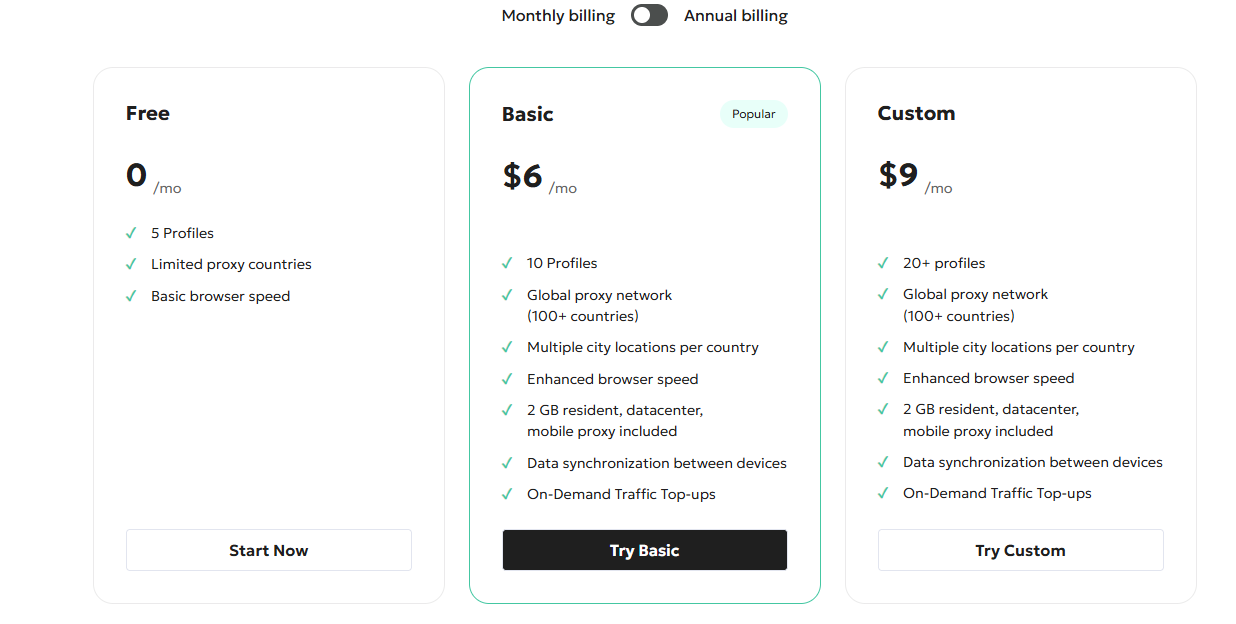
1browser has three main pricing plans. The Free plan costs nothing and supports 5 profiles, but limits proxy countries and uses basic browser speed. The Basic plan costs $6/month for 10 profiles, while the Custom plan costs $9/month for 20 or more profiles. Both paid plans include 2 GB of residential, datacenter, and mobile proxy data, a proxy network in 100+ countries, a choice of many cities in each country, and data sync across devices. Users can also buy extra data when needed. If billed annually, Basic drops to $5/month and Custom to $7/month.
Proxy costs in use
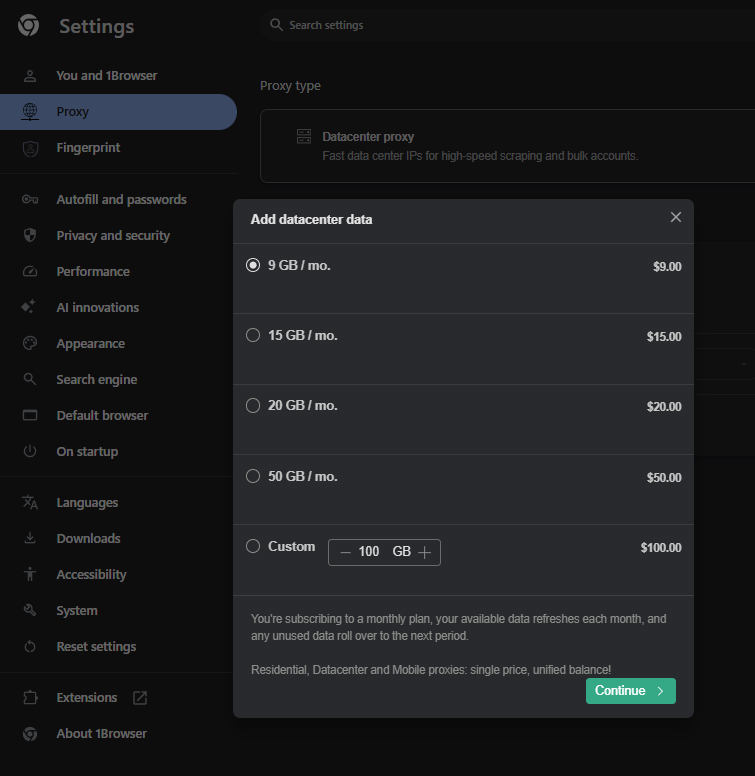
Beyond the data included in paid plans, 1browser lets you buy extra data through the Add data section. According to information recorded in the app, the price is $1/GB/month. Unused data rolls over to the next period, based on what was displayed during testing.
| Data | Price per month |
|---|---|
| 9 GB | $9 |
| 15 GB | $15 |
| 20 GB | $20 |
| 50 GB | $50 |
| 100 GB | $100 |
Resident, Mobile, and Datacenter share the same data balance. For example, if you manage 10 profiles and each consumes about 1 GB of proxy data per month, the additional data cost would be around $10/month, not including the software subscription fee.
One thing to note: the 1browser homepage once advertised 10 free profiles, while the Pricing page and the app in this test both showed 5 profiles. This review uses the 5-profile limit confirmed in the app.
For people managing only a few accounts, the Free plan may be enough to get familiar with creating profiles. If you need residential, mobile, or datacenter proxies, you will need to factor in data costs and check which proxy types are available in your target country.
4. Hands-on experience: 1browser review
The tests below focus on factors that directly affect how 1browser is used, from creating profiles and checking fingerprints to proxy connections, automation, and resource consumption. The results only reflect the configurations tested and do not represent every proxy type or device.
4.1. Test setup
This 1browser review was carried out on Windows 11, using 1Browser 153.0.0.88 with Chromium 153.0.8010.27.
| Item | Configuration |
|---|---|
| Test machine OS | Windows 11 |
| CPU | AMD Ryzen 7 5825U, 16 threads |
| RAM | 16 GB installed, Windows reports 12.9 GB available |
| GPU | Integrated AMD Radeon Graphics |
| Software plan | Free, 5 profiles |
| First proxy | Free US proxy |
| Second proxy | HTTP User proxy, using an externally purchased US mobile proxy |
| Additional proxy | Free Tor proxy |
The tests use Iphey, IPFighter, Browserleaks, and Google to check the fingerprint, IP information, WebRTC, and CAPTCHAs. The team did not test a direct connection without a proxy, SOCKS5 proxies, paid residential proxies, 1browser's built-in mobile and datacenter proxies, the Android app, or the team features.
Therefore, the results below reflect the configurations tested and do not represent every proxy type or every device.
4.2. Creating a browser profile
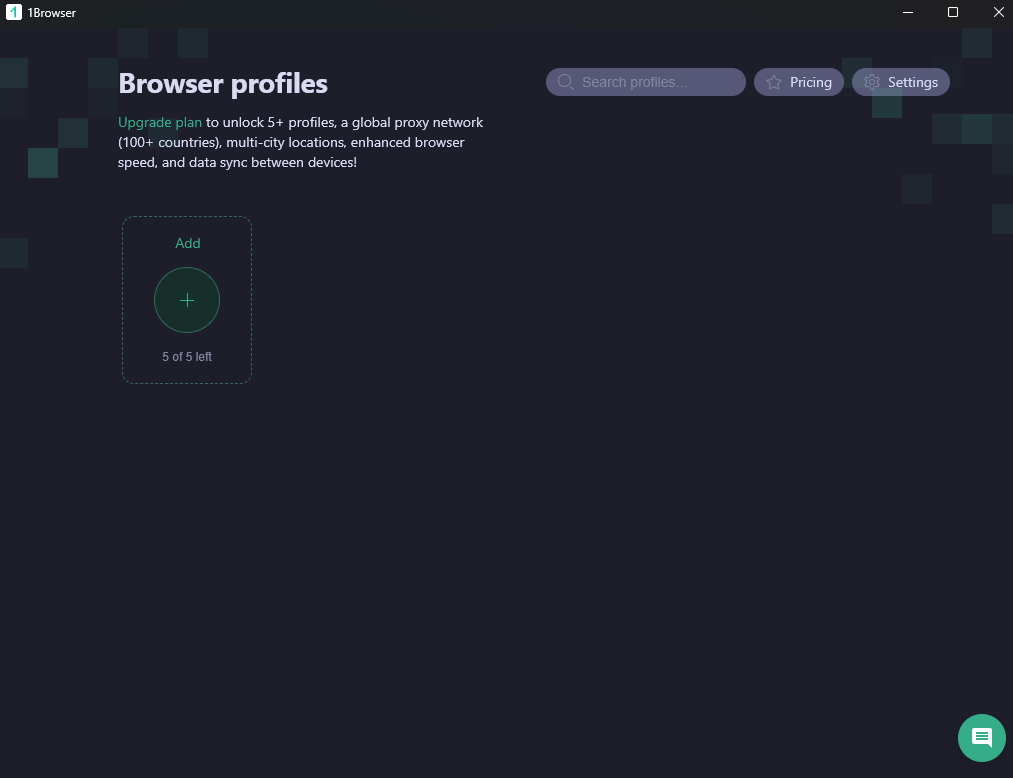
Creating a profile in 1browser is fairly simple. From the Browser profiles screen, users click Add, enter a profile name or label, choose a theme color, then click Done. There is no need to create a folder first or go through a long fingerprint configuration form.
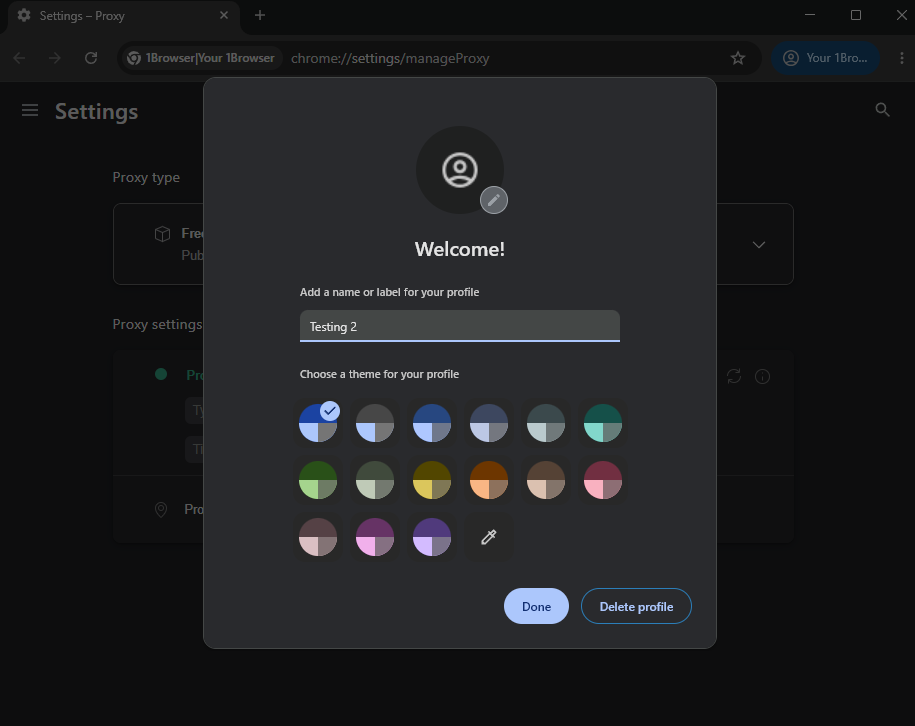
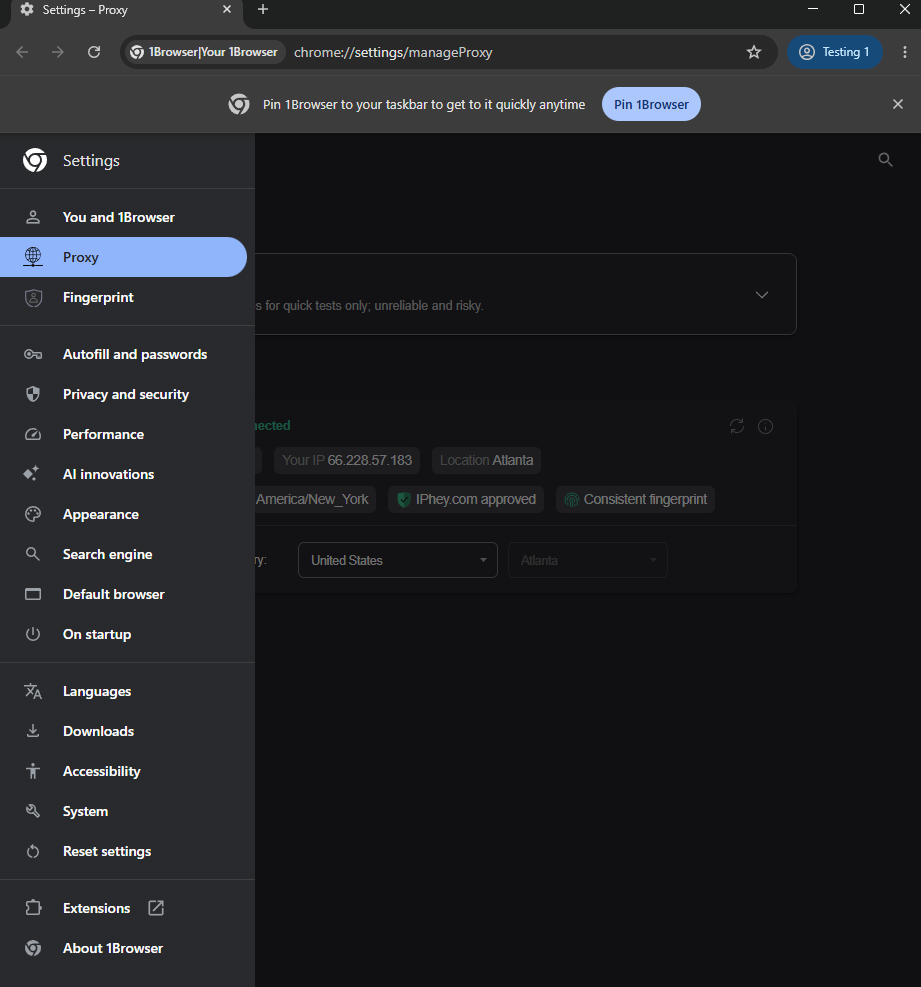
Once finished, the app opens a Chrome-like browser window. Proxy and fingerprint settings sit in separate sections of Settings, accessible via the profile name menu in the top-right corner.
This layout makes it easy for newcomers to get started. However, if you want to configure the fingerprint from the very beginning, you need to open the settings after creating the profile rather than completing everything in a single form.
Recorded results:
- Profiles are created with a name and theme color.
- No New fingerprint button in the profile creation form.
- There is an Update fingerprint button in the Fingerprint section.
- Multiple profiles can be opened and switched between using the Other profiles menu.
- The Settings interface includes 1browser's own settings as well as items inherited from Chrome.
4.3. Fingerprint and anti-detection testing
To evaluate 1browser's fingerprint recognition, the test used two configurations: the built-in Free Proxy, and an external HTTP proxy combined with a purchased US mobile proxy. Results were checked using Iphey, IPFighter, BrowserLeaks, and Zardaxt's TCP/IP analysis tool. Both configurations used the same fingerprint settings in 1browser but differed in proxy type and IP address.
4.3.1. Fingerprint configuration in 1browser
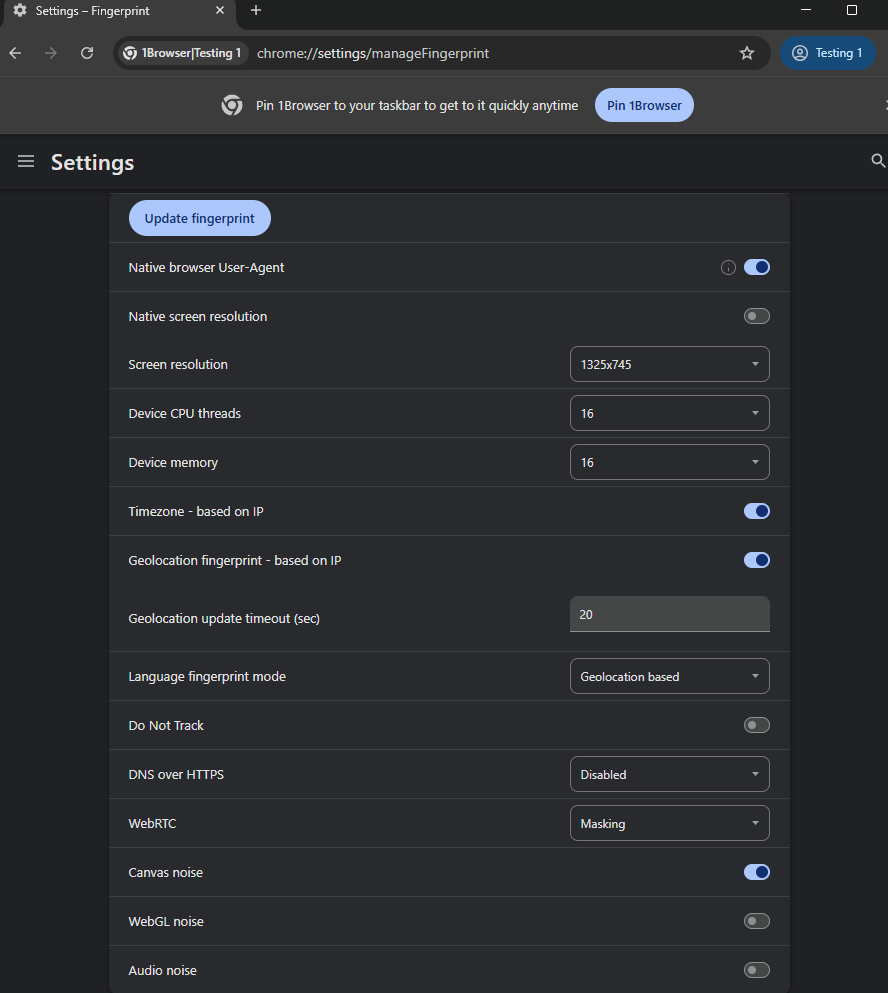
After creating a profile, users can adjust fingerprint parameters in Settings. In this test, some noteworthy settings included:
| Parameter | Recorded value |
|---|---|
| Native browser User-Agent | On |
| Screen resolution | 1325 × 745 |
| Native screen resolution | Off |
| Device CPU threads | 16 |
| Device memory | 16 |
| Timezone and Geolocation | Based on IP, on |
| Geolocation update timeout | 20 seconds |
| Language fingerprint mode | Geolocation based |
| Do Not Track | Off |
| DNS over HTTPS | Disabled |
| WebRTC | Masking |
| Canvas noise | On |
| WebGL noise | Off |
| Audio noise | Off |
These settings let users adjust some fingerprint components such as screen resolution, timezone, language, WebRTC, and Canvas fingerprint. However, the tested interface does not allow manually choosing the operating system or GPU. This is a notable limitation if users want detailed control over profile parameters directly within the app.
4.3.2. Iphey and IPFighter results
The two configurations were tested separately to see how the tools evaluate IP information and fingerprints. The table below summarizes the main results from Iphey and IPFighter.
| Item | Free US proxy | US mobile user proxy |
|---|---|---|
| IP | 66.228.57.183 | 75.214.111.141 |
| Location per the app | Atlanta | Farmingdale |
| Location per IPFighter | Not recorded | Brooklyn |
| Iphey | Trustworthy | Trustworthy |
| MX score | 100 | 100 |
| IPFighter | 75%, Needs improvement | 90%, Good |
| Blacklist | 3/10 | 2/10 |
| Connection type per IPFighter | Datacenter | Residential |
| Residential IP | No | Yes |
| ISP | Akamai | Per test results |
| WebRTC | Browserleaks reports No Leak | IPFighter reports WebRTC matches the proxy IP |
| Timezone | America/New_York | America/New_York |
| Language | en-US | English |
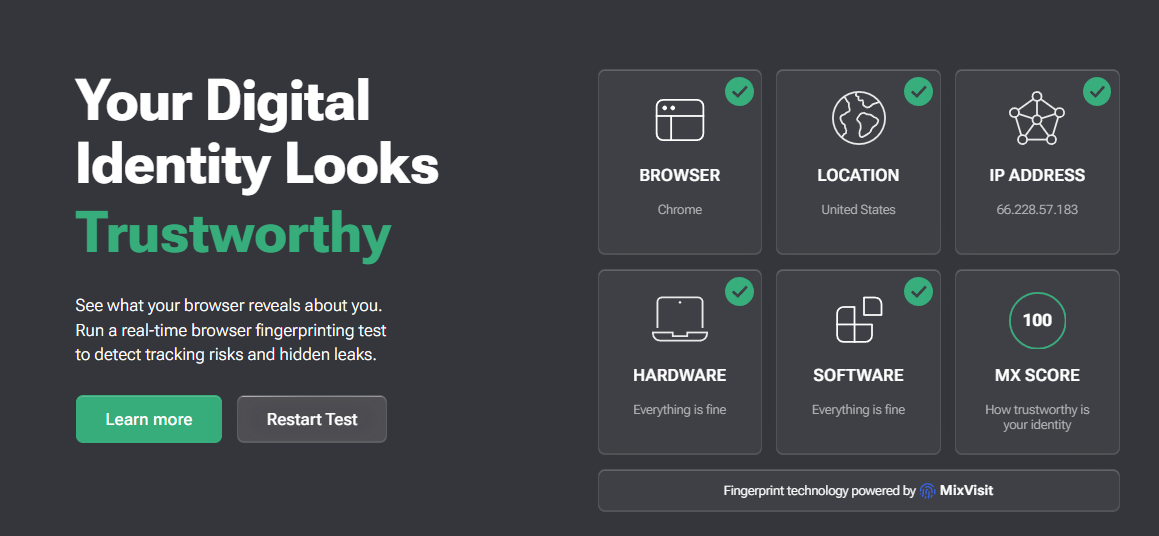
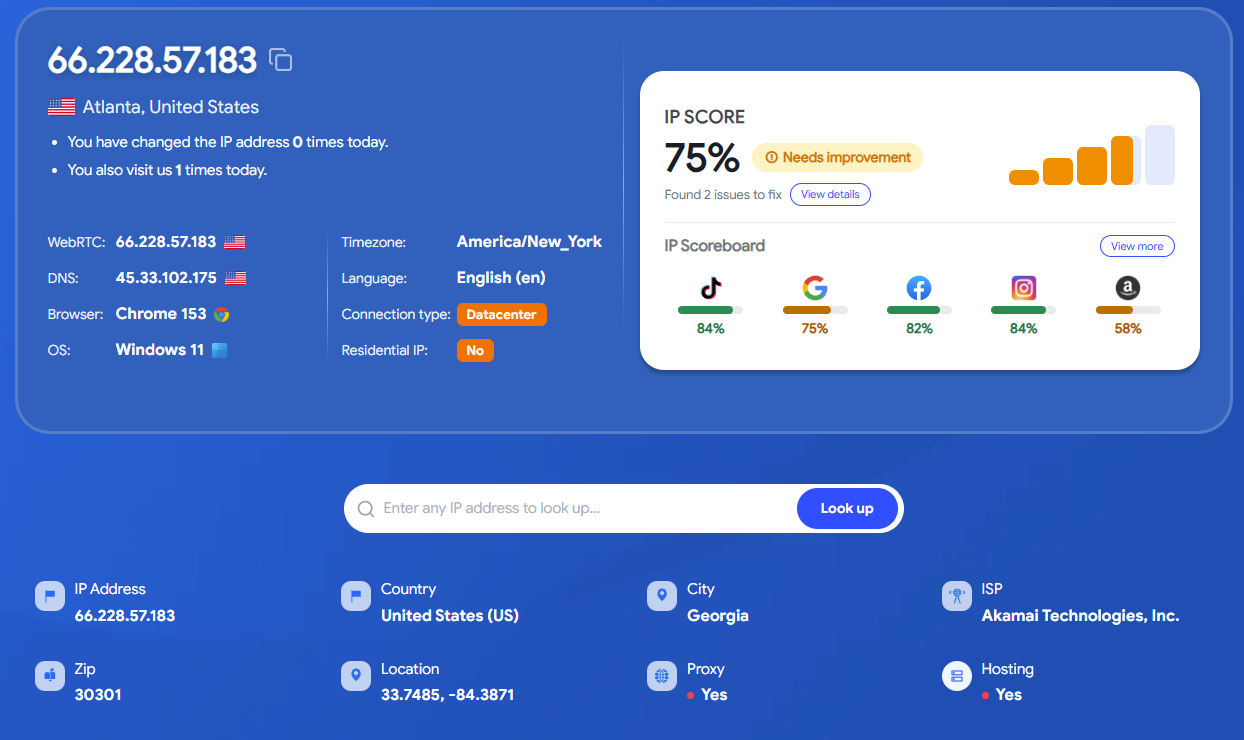
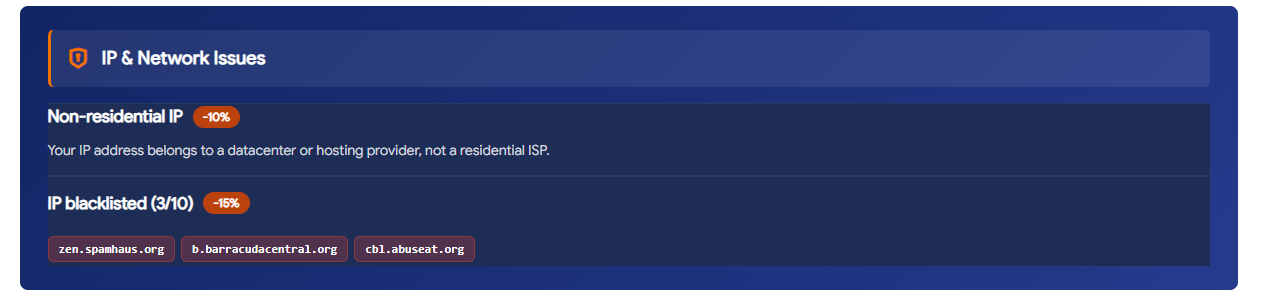
With the Free Proxy, Iphey rated the configuration Trustworthy with an MX score of 100. However, IPFighter gave only 75%, rated Needs improvement, identified the IP as datacenter, and recorded the address in 3 of the 10 blacklists checked. This shows that a positive score from one tool does not mean the configuration will achieve the same result on other tools.
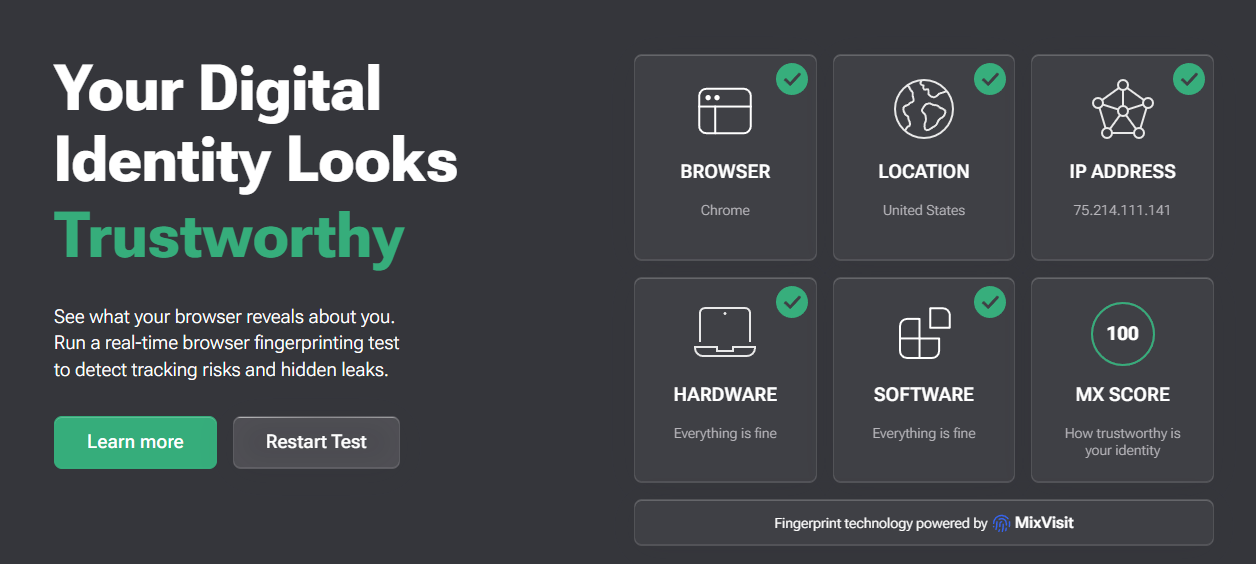
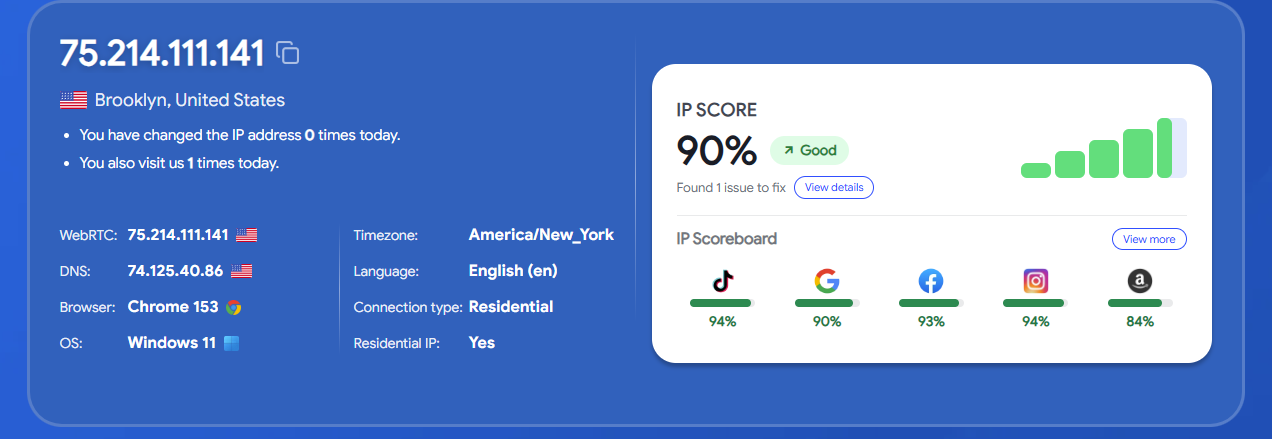

When switching to the external US mobile proxy, Iphey again rated the configuration Trustworthy with an MX score of 100. IPFighter gave 90%, rated Good, identified the connection as residential, and recorded 2 of 10 blacklists. In this run, IPFighter also reported that WebRTC matched the proxy IP.
Compared with the Free Proxy, the configuration using the external mobile proxy achieved a better IPFighter result. However, the two runs used different IP addresses and proxy types, so the difference cannot be fully attributed to 1browser's fingerprint handling. IP quality and connection characteristics can also affect the results.
4.3.3. TCP/IP layer mismatch
Besides the information the browser provides through JavaScript, the team used Zardaxt to check OS signals at the TCP/IP layer. Although the test machine runs Windows 11 and the JavaScript parameters are consistent with Windows, the results suggested several other possibilities.
| Detected operating system | Free US Proxy | US mobile user proxy |
|---|---|---|
| Android | 57% | 62% |
| Linux | 50% | 48% |
| macOS | Not recorded | 32% |
| iOS | Not recorded | 31% |
| Windows | 25% | 20% |
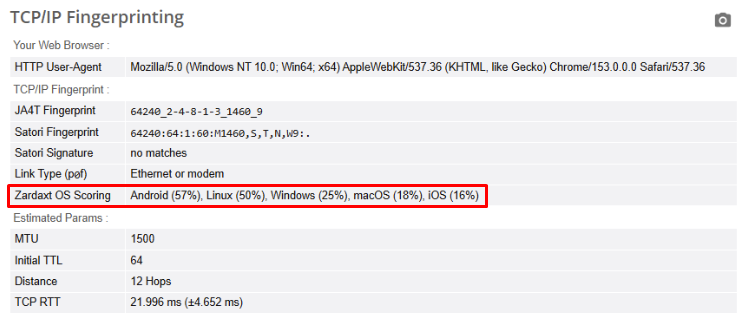
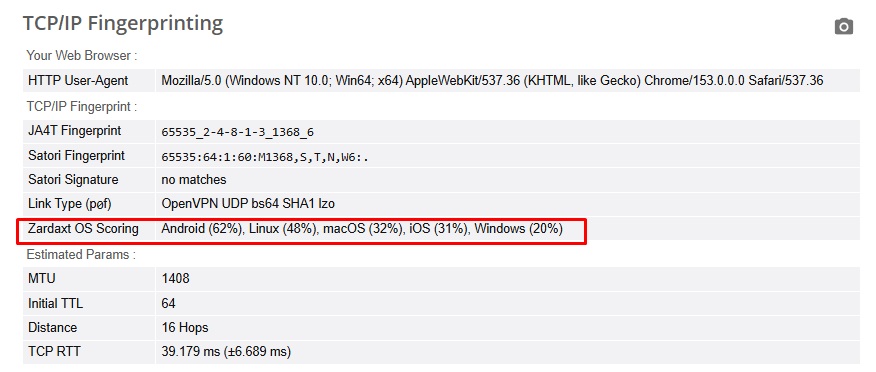
The results show that the OS signals at the TCP/IP layer do not fully match the machine's actual operating system. However, traffic in both runs went through a proxy, so it is not yet possible to determine whether the difference originates from the browser, the proxy, or intermediate network infrastructure. This data is therefore a sign that warrants further consideration, but it is not enough on its own to draw a conclusion about 1browser's anti-detection capability.
4.3.4. GPU and WebGL
In the test, the profile Testing 1 displayed Intel UHD Graphics 730, while Testing 2 displayed AMD Radeon RX 7600 XT. Both differ from the integrated AMD Radeon Graphics GPU on the actual machine. The tested interface also has no option to manually choose a GPU, so the team could not determine the cause of this difference.
The WebGL results recorded different WebGL Report Hash values between the two profiles, while the WebGL Image Hash was identical, with a value starting with C81BC7CC.
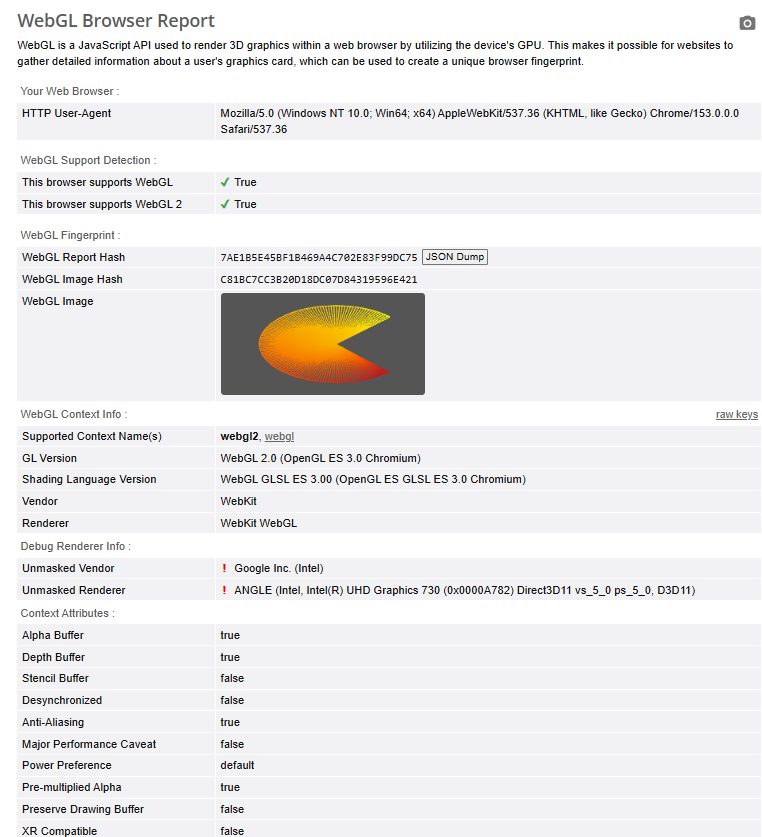
WebGL results in the profiles
Since WebGL noise was off in both configurations, the team cannot conclude how enabling this option would change the hash values. The current results reflect only what was recorded in the tested configuration and are not enough to fully assess the software's WebGL handling.
Overall, 1browser provides basic fingerprint adjustment options, but the test results still show differences between testing tools, especially in IP information, OS signals, and GPU. The external mobile proxy scored higher on IPFighter than the Free Proxy in the two configurations tested, but the available data is not enough to claim 1browser's anti-detection capability in every situation. A more reliable assessment would require testing more profiles, proxy types, and connection conditions.
4.4. Proxy and website access testing
Proxy integration is one of the most notable points of 1browser. Users can choose the proxy type directly in Settings instead of entering connection details for every profile.
However, real-world experience varies significantly between proxy types. In the test, the Free proxy connected but hit a CAPTCHA on Google, while the externally purchased HTTP mobile proxy allowed normal searching.
4.4.1. Results by proxy type
| Proxy type | Test result |
|---|---|
| Free proxy | Connected, US selected; the city selection box is locked. The IP was identified by IPFighter as datacenter, blacklisted 3/10, and triggered a CAPTCHA on the very first Google search. |
| Resident | Returned the error An unexpected error occurred while connecting to the proxy, Available data 0 bytes. The cause could not be determined beyond the available-data message. |
| Mobile | Not tested with paid data. |
| Datacenter | Not tested with paid data. |
| Static residential (ISP) | Not tested. |
| Free Tor proxy | Connected in two attempts, but the IP and Tor status results were not entirely consistent. |
| User proxy HTTP | Connected successfully with the purchased US mobile proxy; IPFighter scored 90% and Google did not request a CAPTCHA in this attempt. |
| No proxy | Not tested. |
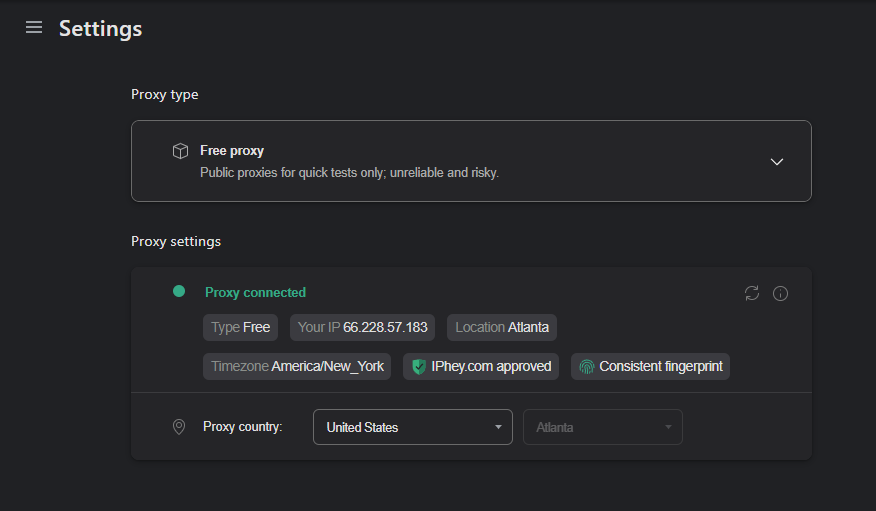
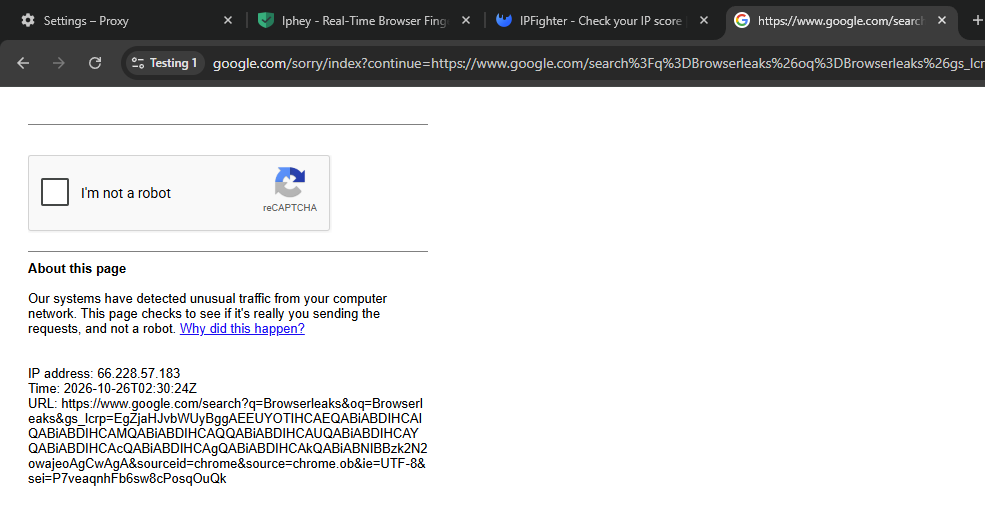
In the Free Proxy test, a successful connection did not mean smooth website access. Google requested a CAPTCHA on the very first search. This result is also consistent with the data in section 4.3, where IPFighter identified the IP as datacenter and recorded a 3/10 blacklist. However, a single check is not enough to conclude that the Free Proxy always triggers a CAPTCHA on Google or other websites.
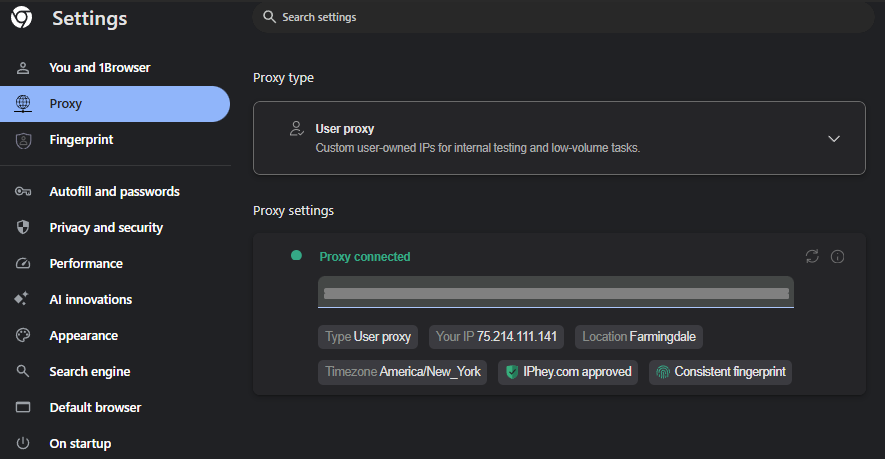
With the HTTP User Proxy using a purchased US mobile proxy, the connection succeeded and Google did not request a CAPTCHA in this attempt. IPFighter also scored this configuration 90%. Compared with the Free Proxy, Google access was smoother under the conditions tested.
For the Resident, Mobile, Datacenter, and Static residential (ISP) proxy types, the current data is not enough to assess connectivity and website access. For the Resident error specifically, the message mentions 0 bytes of available data, but there is no evidence confirming this is the only reason the connection failed.
4.4.2. Experience with the Free Tor proxy
The Free Tor proxy gave two different results across two attempts.
In the first attempt, the app reported IP 51.15.60.84 in Amsterdam, while the Tor Project page showed IP 204.8.96.189. After that, the connection switched back to the regular Free proxy with IP 66.228.57.183 and the Tor page reported You are not using Tor.
In the second attempt, the app showed IP 147.90.234.63 in New York, while the Tor Project page recorded IP 23.129.64.194 and confirmed Tor was in use. The connection did not switch over during the few minutes it was monitored.
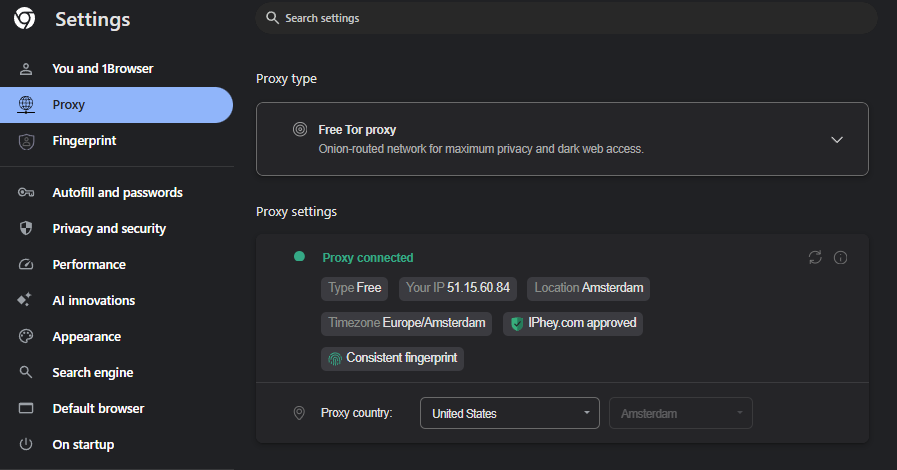
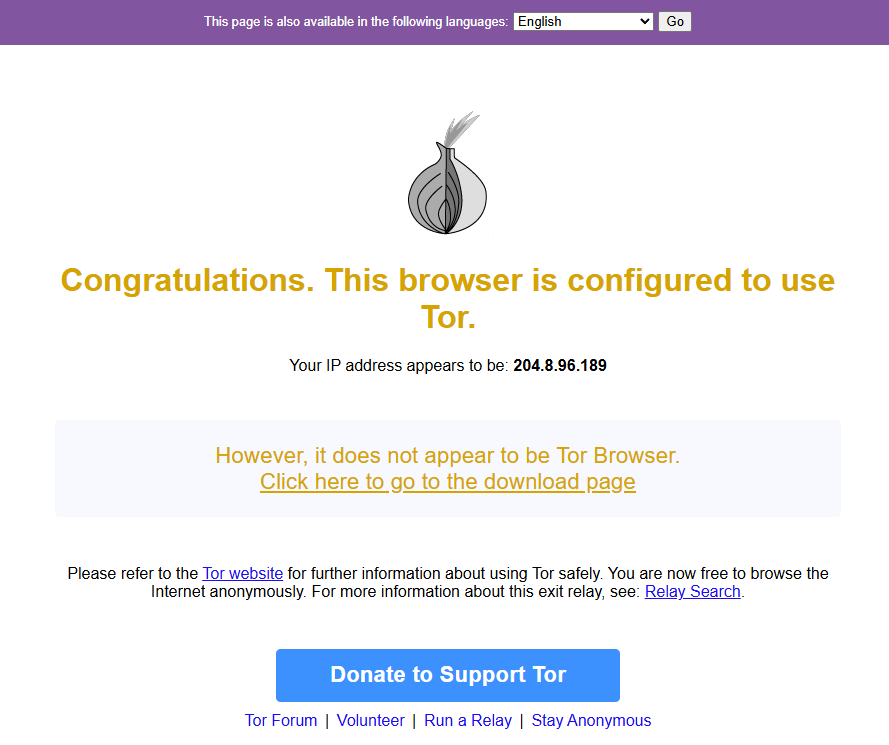
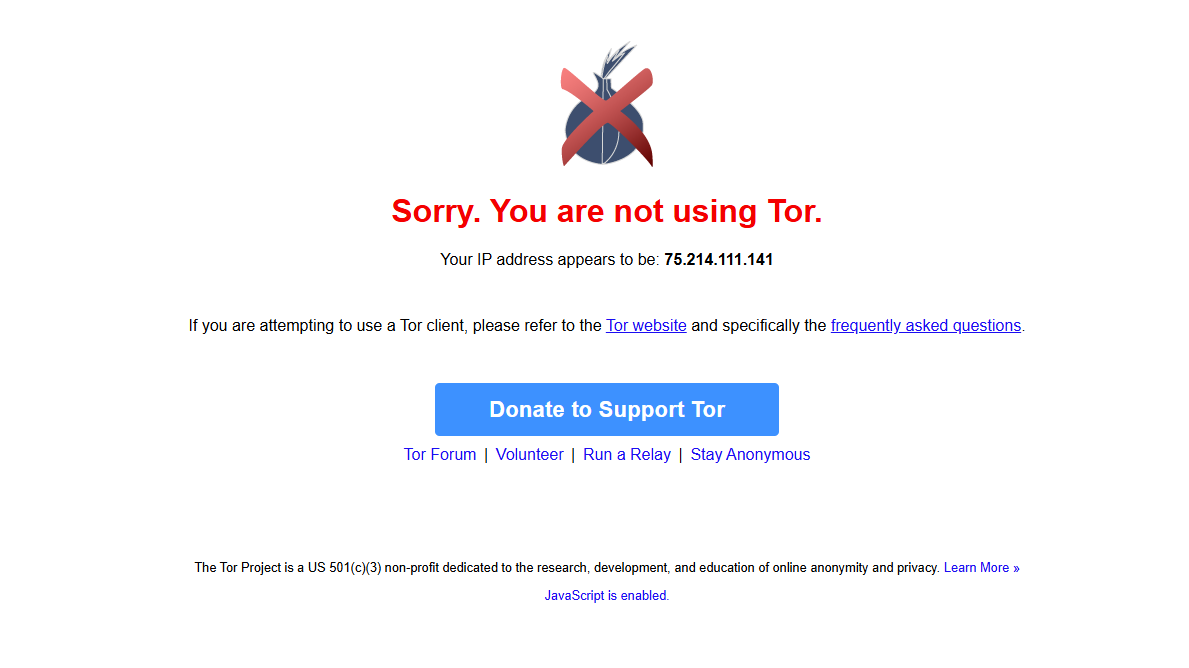
Both attempts showed the message it does not appear to be Tor Browser. This is not evidence that the Tor connection failed, because the browser in use is a Chromium-based Chrome, not Tor Browser.
From these two attempts, it can be confirmed that the Free Tor proxy connected, but its stability has not been demonstrated. The team also could not determine why the IP shown in the app differed from the IP recorded by the Tor Project page.
4.4.3. Proxy data and points to check further
1browser provides proxies by data volume and lets you share the balance across the supported paid proxy types. So, beyond connectivity, users need to consider how much data is consumed when running many profiles.
In this test, the team has no reliable download speed or latency measurements to compare across proxy types. Therefore, it cannot be concluded whether 1browser's built-in proxies are faster or slower than proxies bought from external providers.
If you need to use proxies for regular work, you should check connection speed, actual IP location, CAPTCHA frequency, and data consumption on your target websites before buying more data.
Overall, 1browser lets you configure and connect proxies right inside the app, but real-world results differ across the options tested. The Free Proxy connected but hit a CAPTCHA on Google, while the external mobile proxy accessed Google more smoothly in the test. The Free Tor Proxy also connected, but its stability has not been fully verified. These results only reflect the configurations tested and do not represent all of 1browser's proxy services.
4.5. Automation and API
1browser has a dedicated API page in the app, which lets you create a developer token and access documentation. The interface also provides links to Browser Automation Docs, 1browser MCP, the MCP package on npm, and the Swagger API.
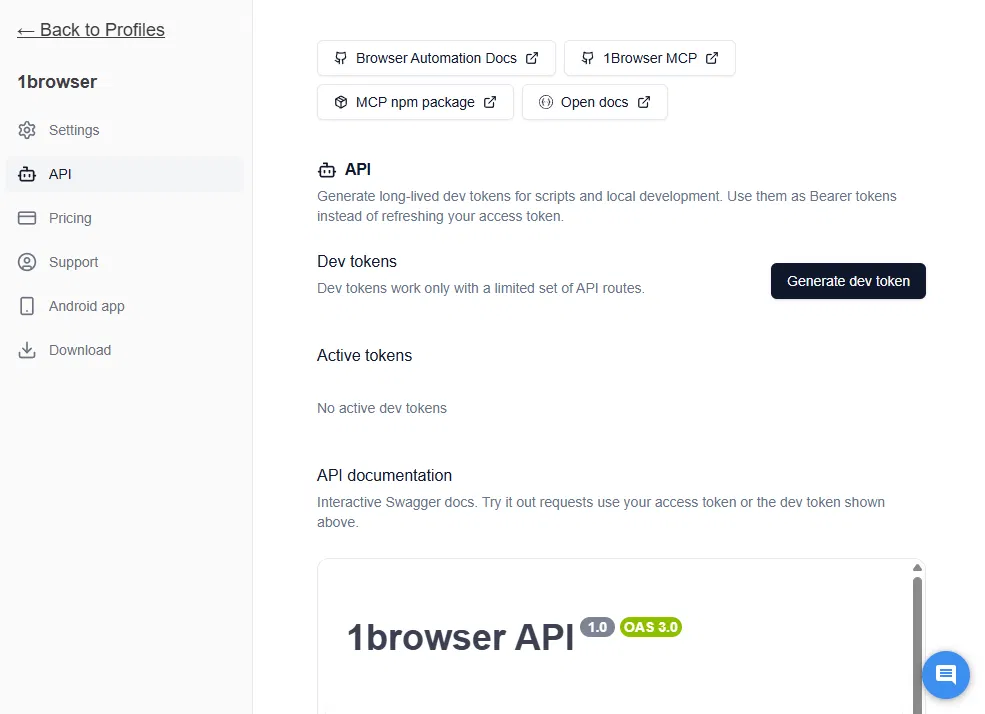
The Swagger documentation for 1browser API 1.0 describes endpoint groups related to users, proxies, profiles, profile lists, settings, and analytics. However, in the documentation that was checked, the team did not find an endpoint to open or close a profile.
The 1browser README on GitHub describes proprietary CDP methods and a Node.js SDK for managing the profile lifecycle, along with guidance on integrating with AI coding agents.
In this review, the team did not run any scripts in practice. The observations are therefore based only on the app interface and the documentation that was checked. There is no basis to conclude anything about execution time, stability, or compatibility with specific automation libraries.
Notable points:
- Has an interface for creating developer tokens and Swagger API documentation.
- Has documentation on CDP, the Node.js SDK, and MCP.
- Script execution in practice has not been verified.
- No no-code automation tool was found in the tested interface.
4.6. Device sync and Synchronizer
1browser has information about data sync between devices on its pricing page and introduces an Android app. However, it is necessary to distinguish profile data sync from Synchronizer, which allows controlling multiple windows and syncing actions across profiles.
In the test, the team did not find a tool for syncing actions across multiple windows in the profile menu, Settings, or the profile management page.
The Android app was also not installed and tested in practice. Therefore, the ability to open the same profile on a phone, keep cookies, and maintain login sessions should only be described as a feature announced by the developer, not a result tested in this review.
4.7. Team collaboration
In the 1browser version that was checked, the team did not find a member management, profile sharing, or permission section in Settings, the profile menu, or the profile management page.
The Pricing page also does not state the number of team members in the Free, Basic, and Custom plans. Team collaboration capability is therefore unconfirmed within the scope of this review. That does not mean 1browser does not support this feature at all in other plans or configurations.
If you need multiple people to use and manage a set of profiles, you should verify profile sharing and permissions directly with the provider before choosing a long-term plan.
4.8. RAM usage and performance
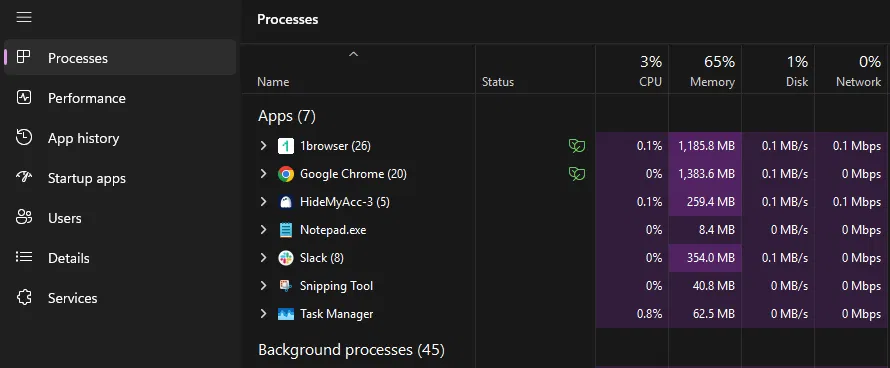
The team used Task Manager on Windows 11 to monitor the RAM of 1browser processes. Results were recorded in two states with different numbers of tabs.
| State | RAM of the 1browser process group | Notes |
|---|---|---|
| One profile, one Settings tab | 292.4 MB | 9 processes |
| Two profiles open, multiple tabs | 1,185.8 MB | 26 processes, tab count not fixed |
With two profiles open, the app used about 1.2 GB of RAM. However, because the number of tabs was not fixed between the two measurements, the results cannot be used to directly compare performance per profile or against other browsers.
For a more accurate conclusion, the measurement would need to be repeated with one profile with five tabs and two profiles with five tabs each, while closing unrelated browsers and apps.
In the test, 1browser still allowed multiple profiles to be opened at the same time, each in its own window. When the Free proxy was selected, the test profiles received different IPs. This is an observation within the configuration tested, not a guarantee that every proxy type provides a separate IP for each profile.
4.9. Other advanced features
Besides the parts that were tested, 1browser also has Settings items inherited from Chrome, such as Memory Saver, Preload pages, and various performance and privacy settings. The team did not evaluate each of these settings in depth because they are not features unique to 1browser.
The team also did not run a DRM test to confirm the ability to play copyright-protected content. Although this feature is mentioned in the product information, the review should not draw a conclusion about compatibility without a direct test result.
According to the official Release notes, version 153.0.0.88 was released on October 21, 2026. Recent updates mention improved proxy stability, proxy-based geolocation handling, and adjustments to how profiles are transferred between devices.
5. 1browser evaluation after testing
Based on the tests, 1browser's strengths are its simple profile creation process, many proxy options, and the ability to customize some fingerprint parameters. The Free plan allows five profiles, while the Basic plan starts at $5/month when billed annually and includes 2 GB of proxy data.
However, the test results also reveal some limitations in fingerprint, IP quality, and proxy stability. Features for teamwork, action syncing, and automation also were not fully verified within the scope of this review.
5.1. Pros
1browser's notable strengths center on profile setup, proxy choice, and upfront cost:
- Fast profile creation: You can create a profile by entering a name and choosing a theme color, with no need for many setup steps.
- Multiple built-in proxy options: The interface offers eight options, including Free proxy, Resident, Mobile, Datacenter, Static residential, Free Tor, User proxy, and No proxy.
- Fingerprint customization: You can adjust resolution, CPU threads, device memory, timezone, language, and some noise options.
- Good results in some test categories: Iphey rated both tested configurations Trustworthy with MX 100. Browserleaks also did not clearly detect a WebRTC leak in the Free proxy test.
- Free plan and proxy included with paid plans: The Free plan supports five profiles. The Basic plan costs $5/month when billed annually and includes 2 GB of proxy data.
These strengths make 1browser worth considering if you need to start at low cost, want simple profile creation, and want to try several proxy types in the same app. Even so, good fingerprint results on some tools do not mean every configuration will work reliably on the target platforms.
5.2. Cons
Alongside the strengths, 1browser still has some limitations to weigh when using it to manage multiple accounts:
- Limited fingerprint customization: The GPU on both test profiles differed from the AMD Radeon Graphics GPU on the actual machine. This shows that the profile's GPU configuration does not match the device used for testing.
- Fingerprint inconsistent across detection layers: Both configurations had OS detection results at the TCP/IP layer leaning toward Android or Linux, while JavaScript declared Windows. This mismatch can reduce the consistency of device information when a profile is inspected across multiple layers.
- Free proxy has IP quality limitations: The US proxy was identified as datacenter, appeared in 3 of the 10 blacklists checked, and hit a CAPTCHA on the very first Google search. Therefore, the free IP in this test did not adequately serve tasks that need stable IP quality and fewer verification requests.
- Uneven proxy stability: Resident returned a connection error when no data was available, and the Free Tor proxy gave different results across two attempts. Users need to check data balance and connectivity before putting a proxy into a regular workflow.
The limitations above suggest you should check IP quality, fingerprint consistency, and proxy stability before making 1browser part of your main workflow. For needs such as member permissions, action syncing across profiles, or automation through a visual interface, verify the software's support rather than assuming these features do not exist.
6. When should you choose Hidemyacc over 1browser?
1browser suits people who need to create profiles quickly, use built-in proxies, and manage profiles across multiple devices. If you need more tools to manage profile data, assign permissions to members, or automate repetitive actions, you can consider the Hidemyacc antidetect browser. Beyond basic features such as creating separate profiles and customizing fingerprints, Hidemyacc adds Proxy Manager, profile sharing, data recovery, and Synchronizer.
The difference is not about which tool has more basic features, but how each supports day-to-day work. 1browser focuses on long-term stored profiles, built-in proxies, device sync, and connecting to automation tools through an API. Hidemyacc adds more utilities for profile management, team collaboration, and building scripts through a visual interface.
6.1. Profile management and automation features
6.1.1. Fingerprint customization and device configuration
1browser supports fingerprint customizations such as Canvas, WebGL, CPU, RAM, fonts, screen resolution, and timezone. However, control over some hardware parameters is limited; for example, the GPU was auto-generated in the test rather than allowing manual selection.
Hidemyacc provides more detailed configuration options, including:
- Browser information: Language, screen resolution.
- Hardware parameters: Hardware Concurrency (CPU threads), Device Memory, MAC address.
- Graphics fingerprint: Mask Canvas, WebGL Image, WebGL Metadata, GPU vendor information (Vendor), and graphics renderer (Renderer).
- Audio fingerprint: Audio Context.
- Media device information: Mask Media Devices, number of video inputs, audio inputs, and audio outputs.
- Web page geometry data: Client Rects.
- Additional configuration: Automatically set language by IP address, sync browser data to the cloud, and restore the most recent browser session.
With these options, Hidemyacc gives you control over many aspects of a profile configuration, from hardware parameters and graphics to audio and media devices. This is an advantage when you need to set up profiles with different configurations rather than only adjusting common fingerprint parameters.
6.1.2. Profile management and data recovery
1browser stores profiles long-term, keeping cookies, fingerprints, and the proxy tied to each profile. The product also supports data sync between devices, including continuing to use a profile on Android.
However, 1browser's data management toolkit is not published with the full set of utilities found in Hidemyacc. Hidemyacc supports profile duplication, cookie and bookmark import, folder creation from the Base plan, pinning profiles, transferring profiles via Magic Link, restoring deleted profiles within 24 hours, and recovering data from the 10 most recent working sessions.
These features are useful when you need to create profiles from existing configurations, move data from another browser, or recover a working session after an incident. If your need is simply to store profiles and sync between devices, 1browser can meet it; if you also need tools to transfer, organize, and recover data, Hidemyacc has a clearer advantage.
6.1.3. Profile sharing and member management
1browser supports profile sync between devices, but does not have a published set of profile sharing and member management features comparable to Hidemyacc.
Hidemyacc has Share Profile from the Base plan, letting you share profiles or folders with members without providing the main account's login credentials. The Base plan includes one free sub-account, Team has three, and Business has five; users can also buy additional sub-accounts subject to plan conditions.
For individual users, this difference may not matter much. But when managing client accounts or running many profiles as a team, Hidemyacc is more convenient thanks to its permission and profile handover capabilities. This is a practical advantage that 1browser's device sync feature does not replace.
6.1.4. Automation and Synchronizer
1browser provides API, CDP, and MCP according to its product documentation, which suits people who want to connect profiles to external automation tools or build workflows in code.
Hidemyacc also has API Access from the Base plan, so API is not a unique differentiator of 1browser. What Hidemyacc adds is a drag-and-drop script builder, action recording, script import, and Synchronizer to sync actions across multiple profiles.
If you need to integrate profiles with technical systems, both offer automation options through an API. If you want to build scripts through a visual interface or perform the same sequence of actions across multiple profiles, Hidemyacc has the advantage thanks to its no-code tools and Synchronizer. The two products have not been compared using the same real-world scenario, so you should not infer which tool has higher automation performance from a feature list alone.
6.1.5. Proxy management and proxy usage costs
1browser integrates residential, mobile, and datacenter proxies right inside the app, letting users choose the proxy type and country when configuring a profile. According to the Pricing page, the Basic and Custom plans include 2 GB of proxy data under plan conditions. However, available proxy data directly affects connectivity: in the test, the Resident proxy returned an error when data was at zero.
Hidemyacc also supports assigning a proxy to each profile, and has Proxy Manager for centralized proxy list management and Proxy Store for accessing offers from partner providers. The software also provides free proxies under each plan's conditions.
Hidemyacc's distinguishing point is its ability to manage multiple proxies in the same workspace and support organizing proxies for multiple profiles. However, IP quality still depends on the specific proxy, provider, and usage conditions, so it cannot be concluded that Hidemyacc's proxies are better from a feature list alone.
6.2. 1browser vs Hidemyacc comparison table
The two tools have similar basic functions, but differ in the utilities for profile management, collaboration, and automation. The table below focuses on the differences worth weighing when choosing.
| Criteria | 1browser | Hidemyacc |
|---|---|---|
| Fingerprint customization | Has Canvas, WebGL, CPU, RAM, fonts, resolution, and timezone; GPU was auto-generated in the test | Adds detailed options such as Hardware Concurrency, Device Memory, MAC Address, Audio Context, WebGL Image, WebGL Metadata, Vendor, Renderer, Client Rects, and Media Devices |
| Profile management | Long-term profile storage and sync across devices | Has profile duplication, cookie and bookmark import, profile pinning, folder creation from the Base plan, and profile transfer via Magic Link |
| Data recovery | Supports profile storage and sync | Can restore deleted profiles within 24 hours and data from the 10 most recent working sessions |
| Sharing and member management | Has device sync | Has Share Profile, plan-based sub-accounts, and activity history |
| Automation | API, CDP, and MCP per product documentation | Has API Access, drag-and-drop tools, action recording, script import, and Synchronizer |
| Proxy management | Integrates multiple proxy types into the profile creation flow | Has Proxy Manager, Proxy Store, and free proxies under plan conditions |
1browser suits needs such as creating profiles, using built-in proxies, and connecting to automation workflows via API. Hidemyacc has the advantage in tools for transferring and restoring profiles, sharing access, customizing device configuration, and building no-code scripts. These differences matter most when you manage many profiles or work with other members.
6.3. Cost by number of profiles
Judging by the subscription prices recorded in the test, 1browser has an advantage at small scale. Hidemyacc publishes plans with clear profile limits, from 5 profiles on the Mini plan to 1,000 profiles on the Business plan.
| Scale | 1browser | Hidemyacc |
|---|---|---|
| 5 profiles | Free, $0 per the test | Mini, $10/month |
| About 10 profiles | Basic, $6/month or $5/month billed annually per the test | Starter, $29/month for 30 profiles |
| 20 profiles | Custom, $9/month or $7/month billed annually per the test | Starter, $29/month for 30 profiles |
| 100 profiles | Current price and plan limit need confirming | Base, $49/month |
| 300 profiles | Contact the provider | Team, $99/month |
| 1,000 profiles | Contact the provider | Business, $199/month |
Note: The 1browser prices in the first three rows are data recorded at the time of testing and should not be treated as confirmed current quotes. Prices and profile limits need to be re-checked against the Pricing page before publishing. Hidemyacc prices in the table are published monthly prices, not including annual billing discounts.
At a scale of 5–20 profiles, 1browser has a subscription cost advantage. When you need 100 profiles or more, Hidemyacc has matching public plans for budgeting, while 1browser users need to confirm options with the provider.
However, a lower fee does not always mean a lower total operating cost. If your work requires profile sharing, member management, data recovery, or action syncing across multiple profiles, the features built into Hidemyacc can reduce the number of tools and actions you have to manage separately. Conversely, if you only need a few profiles, built-in proxies, and a simple workflow, 1browser is still worth considering.
7. Conclusion
1browser focuses on fast profile creation, basic fingerprint options, and proxies built right into the app. The Free plan with five profiles lets users try the software before paying, while Basic is relatively cheap at the 10-profile scale.
In the tests, Iphey rated both proxy configurations Trustworthy with MX 100, while IPFighter scored them 75% and 90% respectively. However, the TCP/IP layer mismatch, the auto-generated GPU that differs from the real machine, the CAPTCHA with the Free proxy, and the instability of the Free Tor proxy show that each configuration should be checked before being used for important work.
Therefore, 1browser is suitable to start with if you prioritize low cost, a simple profile creation process, and want to try built-in proxies. Use the Free plan to check IP quality, stability, and compatibility with your target websites before upgrading. If you need team management tools and deeper automation, compare it with other solutions based on the features you actually need.
8. FAQ
1. Does 1browser have a free plan?
Yes. According to the Pricing page and the app checked on October 26, 2026, the Free plan lets you create five profiles and use a Free proxy with country limits. Paid proxy types such as Resident, Mobile, and Datacenter require separate data.
2. Does 1browser have built-in proxies?
Yes. The interface has eight proxy options, including Free proxy, Resident, Mobile, Datacenter, Static residential, Free Tor, User proxy, and No proxy. According to information recorded in the app, paid proxy data costs $1/GB/month and is shared across Resident, Mobile, and Datacenter.
3. Does 1browser support automation?
1browser provides API, Swagger, CDP, a Node.js SDK, and MCP per the developer's documentation. However, the team did not run any scripts in practice, so it cannot confirm the performance or stability of the automation workflow. In the tested interface, the team also did not find a no-code automation tool.
4. Can 1browser be used on a phone?
The developer announces an Android app and the ability to sync profiles between devices. The team did not install the app to test cookie, login session, or proxy sync. So you should verify compatibility with your device before using it for primary work.
5. Does 1browser support teamwork?
In the app version that was checked, the team did not find features for adding members, sharing profiles, or assigning permissions. The pricing page also does not state the number of members for the Free, Basic, and Custom plans. If you need several people to use profiles together, contact the provider to confirm the features currently available.