MostLogin is an antidetect browser with a free plan of 5 profiles and a low starting price, suitable for people who want to try out a multi-account management tool. However, price and feature lists alone are not enough to judge real-world effectiveness. This MostLogin review records test results on Windows 11, covering the interface, fingerprint, proxy, API, Synchronizer, and RAM consumption. From there, you can determine whether the tool fits your needs and what to check before paying.
1. What is MostLogin?
MostLogin is a Chromium-based antidetect browser built to manage multiple browser profiles, each with its own fingerprint configuration and login session. The tool comes with its own core browser, MostChrome, and supports proxy setup, bulk profile management, permission-based profile sharing, and API integration.
Notable features include:
- Profile management: Create multiple browser profiles, organize them into folders, and configure each one separately.
- Fingerprint: Adjust parameters such as User-Agent, Canvas, WebGL, Audio, WebRTC, language, timezone, and screen size.
- Proxy: Supports HTTP, HTTPS, and SOCKS5 according to the documentation and product interface.
- API and MCP: Integrates with programming tools and code-based automation workflows.
- Synchronizer: Syncs certain actions across multiple browser windows.
- Cloud phone: Provides a cloud-based Android phone environment depending on the plan.
According to the official download page and support documentation, the desktop application supports Windows and macOS. Do not confuse the ability to create profiles that emulate another operating system with the ability to install the application on that operating system.
In this review, features are classified into three levels: actually used, observed in the interface or documentation, and unverified. This classification avoids equating a feature's presence in the software with that feature working reliably in practice.
2. MostLogin specifications and main features
The table below summarizes the information recorded while testing MostLogin v2.2.3 on Windows 11.
| Item | Details |
|---|---|
| Tested version | MostLogin v2.2.3, Windows 11, Starter (Free) plan |
| Browser core | MostChrome 142, 144, 146, 148, and 150; the actual UA reports Chrome 149 |
| Profile operating system | The form shows 5 icons, names not fully confirmed; Windows has versions 10 and 11 |
| Application operating system | Windows and macOS according to the download information checked |
| Profile creation | 5-tab form, Default folder, Quick create, Batch ops, Random fingerprint; the form was tested, Quick create and Batch ops were not tested |
| Fingerprint customization | Canvas, WebGL, Audio context, Client rects, Speech voices, Media device, WebRTC, Fonts, and other parameters; interface observed, measurement results in section 4.3 |
| Proxy protocols | HTTP, HTTPS, SOCKS5; HTTP tested, HTTPS and SOCKS5 not tested |
| Proxy configuration | Basic, API extraction, Added proxies, Dynamic IP, Auto-parsing, and Proxy rotate URL; Basic tested, other modes only viewed in the interface |
| Proxy management | Proxies, Dynamic IP proxy, Proxy provider hub, Free proxy giveaway; interface observed |
| Profile launch protection | 4 options checking for proxy errors, IP changes, country changes, and sync errors; observed, off by default |
| Local API | Defaults to 127.0.0.1:30898, authenticated via the Authorization header; interface and documentation viewed, API not called |
| MCP | Supports connecting to Claude Code, Codex, Cursor, and OpenCode according to the documentation; not tested in practice |
| Automation | Selenium, Playwright, and Puppeteer via CDP or driverPath according to the documentation; no scripts run |
| No-code automation (RPA) | Pricing table says Coming soon |
| Synchronizer | Syncs actions via the Console panel, with a Primary window and the Ctrl+Alt+K shortcut; partially tested |
| Team collaboration | Members, Roles & permissions, 7 permission groups; seat 3 USD/month; interface viewed, no members invited |
| Human-like typing | Slow, Normal, Fast, 50 ms delay, and the Ctrl+Alt+I shortcut; interface viewed |
| Profile migration | Dolphin{anty}, MoreLogin, and MultiLogin X via token or API; interface viewed, no migration run |
| Cloud phone | Android 12, 14, 15, and 16; Root access and ADB per the interface; not tested |
| Data & storage | Profile backup, sync, and Block options; many items locked on the Free plan |
| Free plan | Starter, 5 profiles, permanently free according to the information checked |
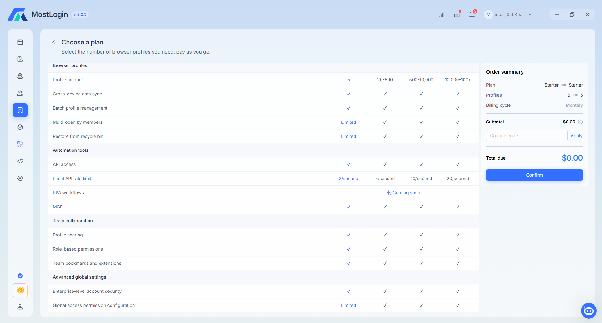
One thing to note is that the information in the application and on the pricing page is not fully consistent. For example, the profile ranges for Pro and Enterprise are displayed differently in the two places. Therefore, when buying a plan, you should check the number of profiles granted directly on the checkout screen.
3. MostLogin pricing 2026
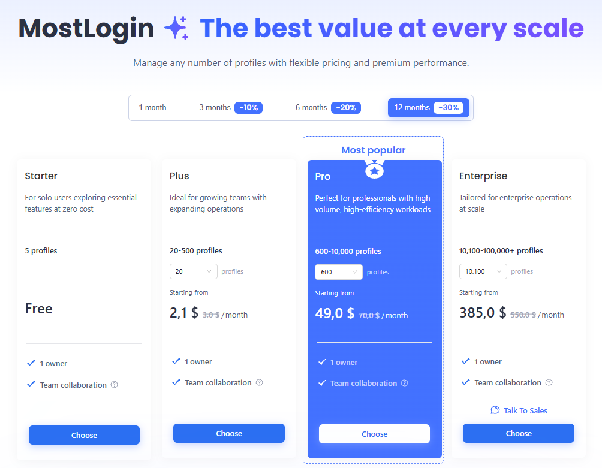
MostLogin uses a pricing model based on the number of profiles. Users can start with the free Starter plan, then increase the number of profiles as their needs grow.
3.1. Profile plans
The table below uses the public pricing recorded during research on October 27, 2026.
| Plan | Number of profiles | Monthly price | Monthly price when paying annually |
|---|---|---|---|
| Starter | 5 | Free | Free |
| Plus | 20–500 | From 3 USD | From 2.10 USD |
| Pro | 600–10,000 | From 70 USD | From 49 USD |
| Enterprise | 10,100–100,000+ | From 550 USD | From 385 USD |
A starting price does not mean that price applies across the entire profile range. The Plus, Pro, and Enterprise plans have costs that vary with the number of profiles selected.
MostLogin publishes discounts based on the billing cycle:
- 1-month payment: original price.
- 3-month payment: 10% off.
- 6-month payment: 20% off.
- 12-month payment: 30% off.
Note: The pricing table on the website says Pro starts from 600 profiles and Enterprise from 10,100 profiles. Meanwhile, the application interface showed a Pro range starting from 500 and an Enterprise range starting from 10,000 profiles. This is a discrepancy between the two sources, so it needs to be rechecked when choosing a plan.
3.2. Additional costs
Besides profile fees, users may have to pay extra for team members or cloud phones.
| Item | Recorded price | Notes |
|---|---|---|
| Team member seat | 3 USD/seat/month | The Free plan has 0 seats |
| Cloud phone | 25 USD/device/month | The pricing page has a 1 USD trial option |
| Hourly cloud phone | 0.10 USD/15 minutes, up to 1.60 USD/day | According to the official pricing page |
| Proxy | Purchased separately | The proxy giveaway is only for paying users according to the interface checked |
For hourly cloud phones, the environment cost may be charged separately depending on the configuration. Therefore, the 0.10 USD/15 minutes rate does not necessarily reflect the total usage cost.
3.3. Feature comparison across plans
| Feature | Starter | Plus | Pro | Enterprise |
|---|---|---|---|---|
| Number of profiles per pricing table | 5 | 20–500 | 600–10,000 | 10,100–100,000+ |
| Multi-device data sync | Yes | Yes | Yes | Yes |
| Bulk profile management | Yes | Yes | Yes | Yes |
| Multiple members opening simultaneously | Limited | Yes | Yes | Yes |
| Restore from trash | Limited | Yes | Yes | Yes |
| API access | Yes | Yes | Yes | Yes |
| Local API limit | 2 requests/second | 5 requests/second | 10 requests/second | 20 requests/second |
| RPA workflows | Coming soon | Coming soon | Coming soon | Coming soon |
| MCP | Yes | Yes | Yes | Yes |
| Profile sharing, permissions | Yes | Yes | Yes | Yes |
| Global access permission configuration | Limited | Yes | Yes | Yes |
According to the official pricing table, the main differences lie in the number of profiles, API limits, and some advanced management permissions. API and MCP can be used even on the free plan, but code-based automation still requires technical skills from the user.
The fully free Pioneer program ended on June 30, 2026, as recorded during research. Therefore, older articles mentioning this program may no longer reflect the current policy.
4. Hands-on MostLogin experience
Testing context
The test used Windows 11, MostLogin v2.2.3, the Starter (Free) plan, and the MostChrome 150 core. However, the actual User-Agent reported Chrome 149.
Two main configurations were used:
- A (Test-Direct): No proxy, connecting from a home IP, VNPT, residential type.
- B (Test-Direct-2): Using an HTTP residential proxy in New York, USA, ISP Charter/Spectrum.
- Additional test: One run using a rotating HTTP residential proxy to observe behavior when the IP changes mid-session.
The checking tools included Iphey, IPFighter, BrowserLeaks, and Zardaxt TCP/IP.
Out of testing scope: UDP/QUIC, SOCKS5, HTTPS, TikTok, Etsy, cloud phone, running API scripts, inviting members, migrating profiles from other platforms, and testing on real platforms.
4.1. Interface and layout
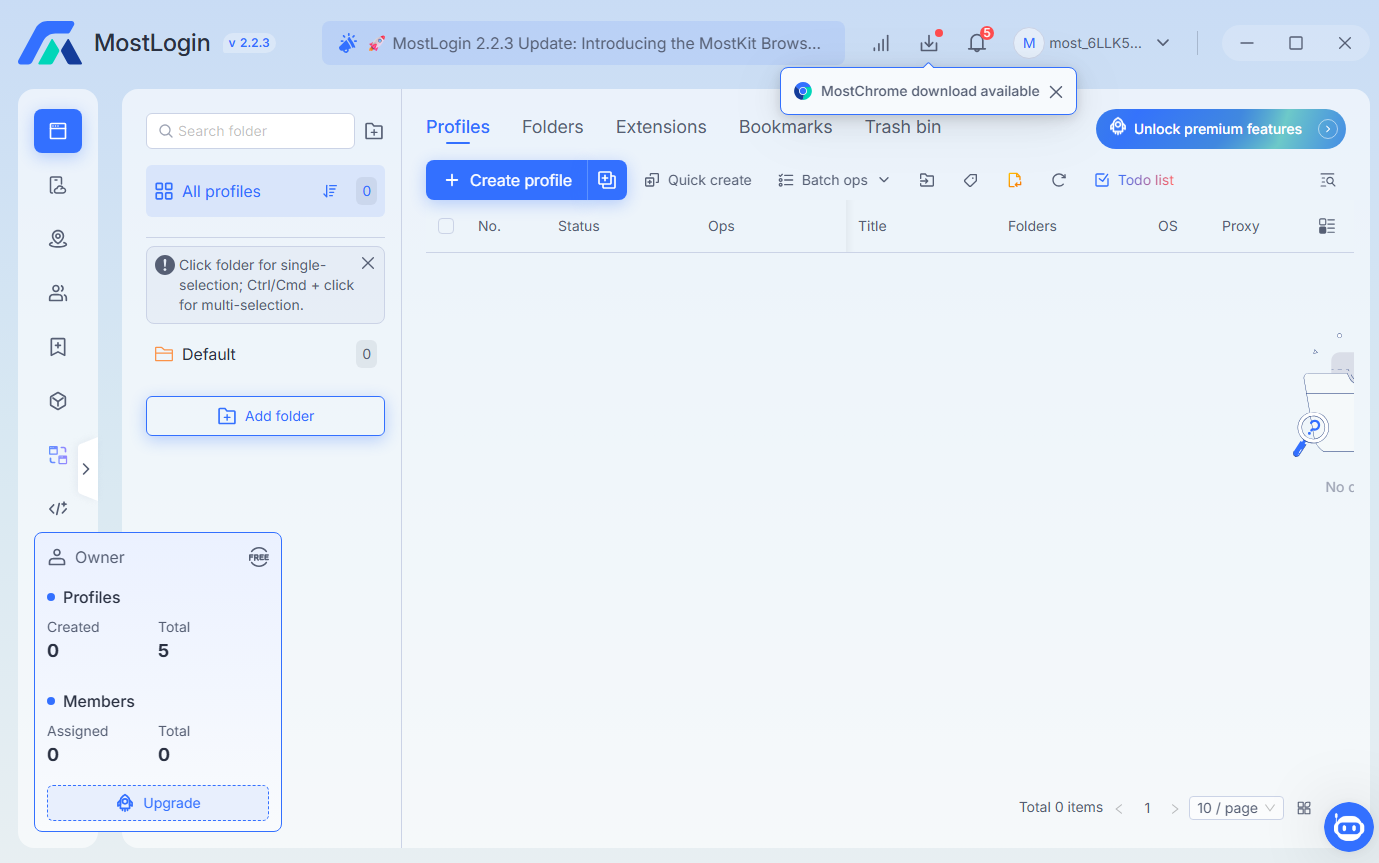
MostLogin uses a light-background interface with blue accents and a fairly consistent layout across pages. The left menu takes you to areas such as Profiles, Proxy, Team, API, and Settings. On the Profiles page, the list table shows status, actions, profile name, folder, operating system, and proxy. The profile creation form has 5 tabs, while the Overview panel beside it updates its parameters according to the choices you are making.
One convenience is that you can review the main parameters before saving a profile without switching through each tab. However, the interface also has quite a few sections such as Extensions, Bookmarks, Trash bin, Todo list, Cloud phone, and advanced features. For newcomers, getting familiar may take time, especially when many items are locked and come with upgrade buttons.
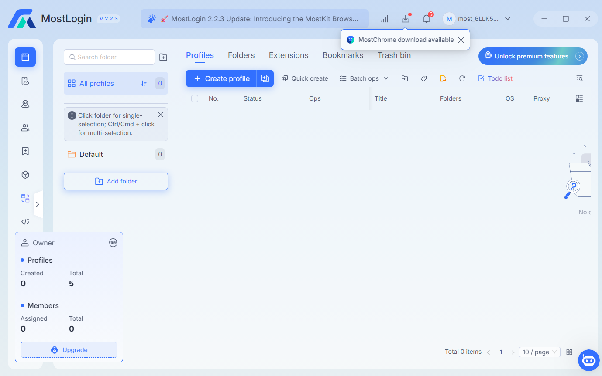
The most convenient point is that the Overview panel in the profile creation form lets you view parameters before saving without switching through each tab. However, there are quite a lot of modules, from proxy, team, and cloud phone to API and payment, so newcomers may need time to get used to them. Upgrade buttons and promotional content also appear in many places, so Free plan users frequently see upgrade invitations.
4.2. Creating a profile and setup
MostLogin's profile creation form is divided into 5 tabs: General, Proxy, Advanced, Fingerprint, and Preferences. You can choose the folder, operating system, browser version, proxy configuration, and fingerprint parameters all in the same form. The Default folder is created in advance; the operating system has 5 icons, with Windows selected by default. The Windows versions displayed are Windows 10 and Windows 11, and the core list includes MostChrome 150, 148, 146, 144, and 142.
In the Overview panel, MostLogin displays options such as Hardware noise for Canvas, WebGL, Audio context, Client rects, Speech voices, and Media device; WebRTC in Replace mode; language, timezone, and location based on the proxy; random Fonts; and a profile size of 1280 × 720. When two profiles were created, the system generated different hardware parameters: the first profile had a GTX 1060 GPU and 4 CPU threads, while the second had a GTX 1060 with Max-Q Design and 2 CPU threads. Device name and MAC are auto-generated, and Port Scan Protection is on per the observed configuration.
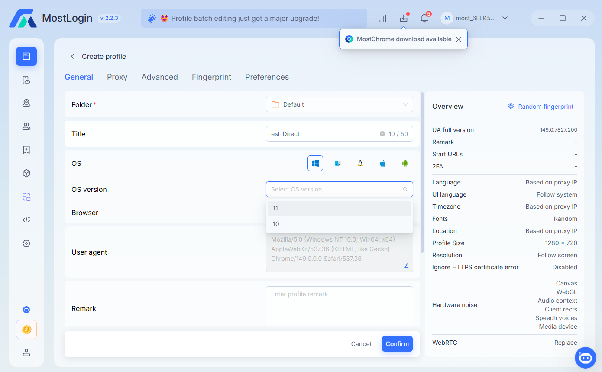
After clicking Confirm, the profile appears in the list immediately without needing to download the core at creation time. However, the test recorded an inconsistency between the selected core and the actual User-Agent. After using Random fingerprint, the full UA version changed from 150.0.7871.49 to 149.0.7827.114, while the Browser field still said MostChrome 150. When the two profiles were opened, both reported Chrome/149.
When launching a profile, MostLogin automatically opens an extra Console tab, showing IP information, location, time, fingerprint, and links to ToDetect and BrowserLeaks. This is a quick way to check the configuration after opening the browser, but the information should be cross-checked with independent tools rather than relying solely on the application's Console.
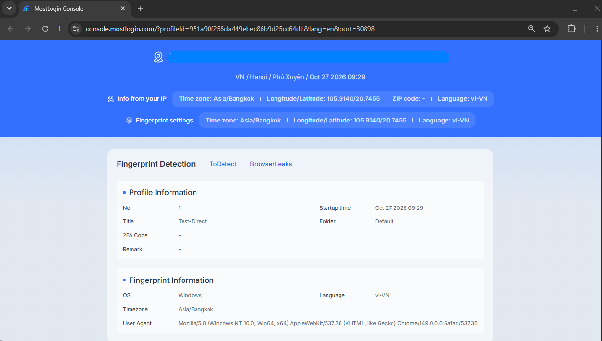
Overall, the profile creation process is fairly intuitive, with an Overview panel that helps you check before saving. One thing to note is that the core information and the User-Agent did not fully match in this test. If you use profiles for important work, you should recheck the User-Agent and browser parameters after creation, rather than assuming the core selection fully reflects the actual environment.
4.3. Fingerprint and anti-detection
To evaluate the fingerprint, the test used two configurations: A is a direct connection from a Vietnamese IP, while B uses a US HTTP residential proxy. Results from Iphey, IPFighter, BrowserLeaks, and Zardaxt TCP/IP show that some parameters are synchronized with the proxy, but there are still warnings worth considering.
Test results
| Category | A: No proxy, Vietnamese IP | B: US HTTP residential proxy |
|---|---|---|
| Iphey | Unreliable, MX 80, red Browser tag with a butterfly warning, green Location | Unreliable, MX 80, red Browser tag with a butterfly warning, green Location |
| IPFighter | 85% Good, 1 issue: blacklist 3/10 | 90% Good, 1 issue: blacklist 2/10 |
| Platform scores on IPFighter | TikTok 91, Instagram 91, Facebook 90, Google 85, Amazon 76 | TikTok 94, Instagram 94, Facebook 93, Google 90, Amazon 84 |
| IP type | Residential | Residential per IPFighter, Corporate/Business per BrowserLeaks |
| Timezone, language | Asia/Bangkok, vi-VN | America/New_York (EDT), en-US |
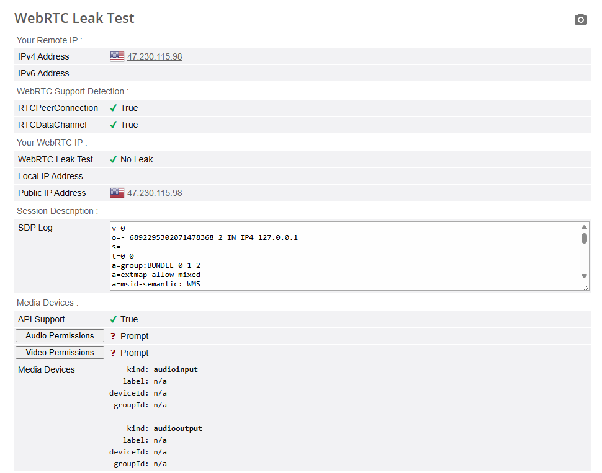
| WebRTC | No Leak, Local IP empty | No Leak, Local IP empty, Public IP matches the proxy IP |
| TCP/IP (Zardaxt) | Windows 52%, Android 22%, Linux 21%, iOS 14%, macOS 14%; TTL 128; PPPoE; RTT about 242 ms | Android 58%, Linux 44%, macOS 38%, iOS 37%, Windows 14%; TTL 64; RTT about 13 ms; Link Type mismatch |
| HTTP headers | Not recorded separately | Sec-CH-UA matches Chrome 149, platform Windows, mobile ?0, Accept-Language en-US |
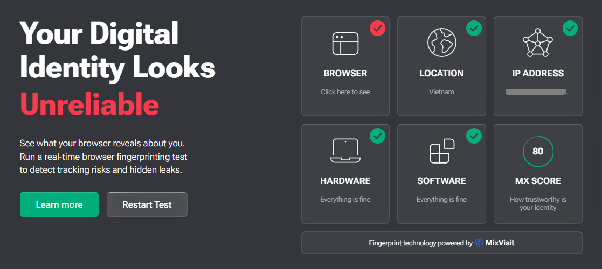
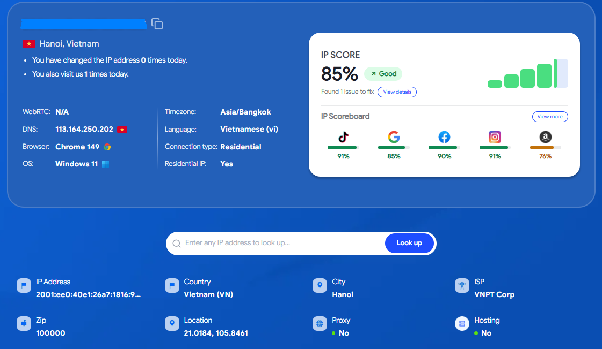
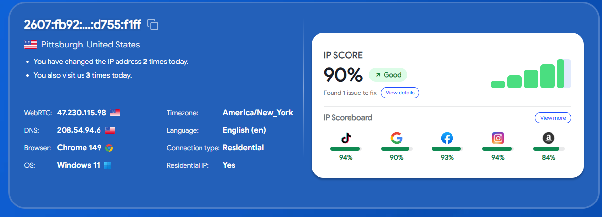
In configuration B, the timezone and language match the US proxy. WebRTC also reported no leaks in either configuration. However, Iphey consistently flagged butterfly, even without a proxy. When the page was reloaded in configuration A, the fingerprint hash, Client Rects, and SVG Computed Style changed, while Audio and WebGL stayed the same. The available data is not enough to determine the cause of the warning or to assert that these changes directly caused the Unreliable result.
IPFighter scored configuration B higher than configuration A, from 85% to 90% Good. Even so, the two configurations used different IP addresses, so the entire difference cannot be attributed to MostLogin's fingerprint. The lower blacklist level on the US IP may also have contributed to the score change.
The TCP/IP results show the Windows identification rate dropping from 52% in configuration A to 14% in configuration B. At the same time, configuration B has a TTL of 64 and an RTT of about 13 ms. These signs suggest the checking tool may be observing the network characteristics of the proxy server rather than only reflecting the computer running MostLogin. However, more testing with other proxy types and tools is needed to clearly identify the cause.
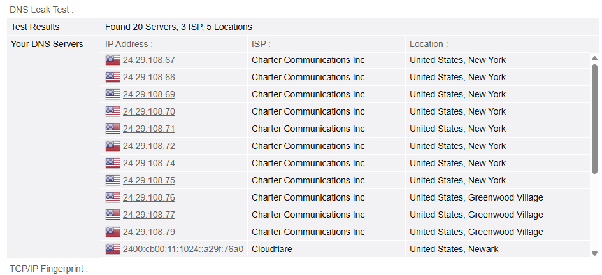
Another point to note is that BrowserLeaks recorded different WebGL Report Hash and Image Hash values between the two profiles, along with two GPU variants. With only two samples, this result merely shows that some WebGL values differ between profiles, and is not enough to conclude anything about anti-detection capability on real platforms.
The additional test with a rotating residential proxy also showed consistency risks. The Check proxy tool reported South Africa, the opened profile displayed Brazil, and IPFighter recorded Colombia. This time, Iphey scored MX 70 with a Location warning; IPFighter scored 35% Poor with 5 issues, including timezone, language, WebRTC, DNS, and blacklist 2/10.
This result shows that a rotating proxy can change the network location while the timezone and language stay as originally configured. If you need to maintain a stable working session, consider using an IP that stays the same throughout the session and recheck the network information after connecting. Even so, these results only reflect the tests performed and cannot be used to claim that MostLogin always passes or fails requirements on every website.
4.4. Proxy and website access
MostLogin has two proxy-related areas: the proxy setup within each profile and a separate proxy management page. In the profile form, you can choose Direct or Add proxy, then enter the connection information. The fields observed include the HTTP, HTTPS, or SOCKS5 protocol, Host, Account, Password, and Proxy rotate URL. The form also has Auto-parsing, a Rotate button, and an option to check the proxy server IP.
Image: Proxy form, with host, account, and password masked.
The separate proxy page has the tabs Proxies, Dynamic IP proxy, Proxy provider hub, and Free proxy giveaway. The Dynamic IP proxy area displays setup templates for 10 providers. The Proxy provider hub has filters for Residential, Datacenter, Mobile, ISP, and SOCKS5, along with promotional offers from partners. In the Starter plan tested, the Claim for FREE buttons in the giveaway area are locked.
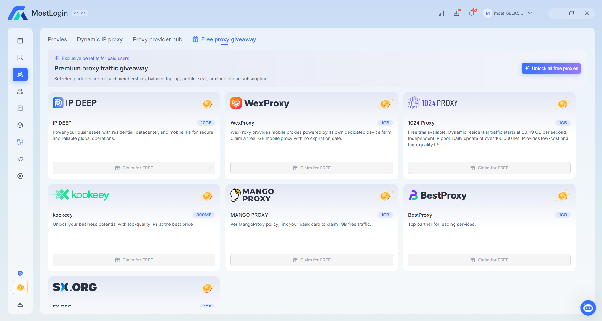
In Settings, Local proxy forwarding is set to Auto-detect. Proxy bypass has no pre-entered domains, and the IP checking channel is DB-IP. Profile preferences has four options to prevent opening a profile when the proxy has an error, the IP changes, the IP country changes, or sync fails. All four are off by default in the tested version.
As for usage results, the US proxy kept the same IP between the proxy check and when the profile was opened. Google also did not display a CAPTCHA in one trial visit. In contrast, the rotating proxy returned different locations at each checking step. HTTPS and SOCKS5 were not tested, nor was access to TikTok and Etsy.
MostLogin provides basic operations to import, check, and manage proxies. However, you need to distinguish a proxy management tool from a proxy provider service. The giveaway and provider hub sections are mainly places to showcase offers; their appearance in the application does not mean Free plan users can use free proxies. In addition, the profile-launch protection options are off by default and do not replace monitoring the connection throughout a session. One Google visit with no CAPTCHA is also not enough to conclude that the proxy always works stably.
4.5. Automation and API
MostLogin provides a Local API and MCP so users can integrate the browser with external tools. The Local API runs on port 30898 on the machine. The interface has an API key, requires confirmation to view the key, authenticates via the Authorization header, and offers options to revoke or refresh access. The Free plan still displays the API key area.
MCP has an /mcp endpoint, with setup instructions via prompt or JSON for Claude Code, Codex, Cursor, and OpenCode. The REST API documentation divides commands into the Folder, Profile, Browser, and Proxy groups, plus a Quit app command. The Browser group includes opening, closing, and closing all windows. The response when opening a profile can provide a CDP URL, HTTP URL, PID, and driverPath to connect automation tools.
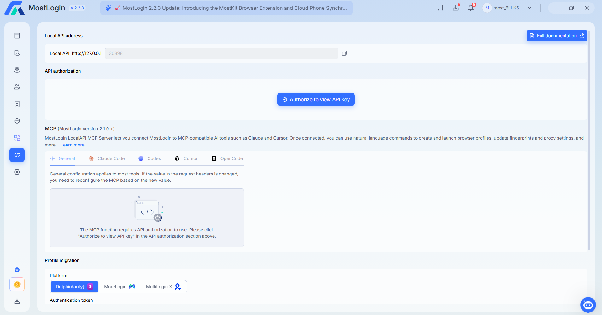
The documentation also mentions the ability to integrate Selenium, Playwright, and Puppeteer. The Local API limits are recorded as 2 requests/second on Starter, 5 on Plus, 10 on Pro, and 20 on Enterprise. Meanwhile, RPA workflows still display Coming soon on all plans in the pricing table checked. Some sample code blocks on the documentation page appeared empty when viewed; it could not be determined whether this is a content error or a page rendering issue.
MostLogin's strength is having API and MCP available for users with programming skills to build their own workflows. However, API automation does not mean a no-code tool. If you are not used to writing scripts, integration still takes setup time and error handling. The 2 requests/second limit on the Starter plan may also need to be factored in for workflows that call the API frequently. Since the test did not run scripts, no conclusion can be drawn about API stability or performance in real use.
4.6. Synchronizer
Synchronizer lets you sync certain actions across multiple profile windows. The feature's control panel sits in the Console panel, with Windows and Text tabs, a Window layout section, a Primary window selection, and the Ctrl+Alt+K shortcut.
In a controlled trial, typing into the address bar was synced to both windows. After pressing Enter, both opened a search page. When the two windows started with one tab, opening two more tabs in the main window also created all 4 tabs in the secondary window in the same order. When two tabs were closed, the secondary window also closed the corresponding tabs correctly.
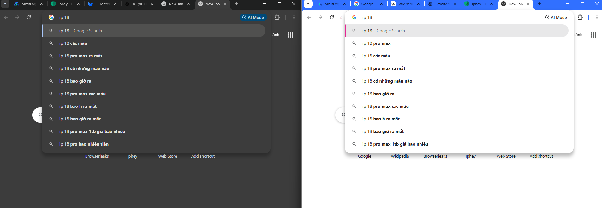
However, earlier trials recorded cases where the secondary window opened with missing tabs or closed the wrong tab when the initial number of tabs differed. The cause has not been determined. The Google results content also differed between the two profiles, latency was not measured, and scrolling and clicking on static pages were not tested.
Therefore, Synchronizer can support syncing typing and navigation in some situations, but there is not enough data to claim it works stably in every state. If you use it, you should bring the windows to the same set of tabs before enabling sync. This is a cautionary measure based on observed results, not a condition verified to completely resolve the tab misalignment issue.
4.7. Team and permissions
MostLogin's Team area has two main parts: Members and Roles & permissions. The member table displays role, data permissions, number of profiles, status, invitation date, and join date. The test account showed profile usage of 2/5. The Free plan has 0 seats, while additional seats are recorded at 3 USD/seat/month.
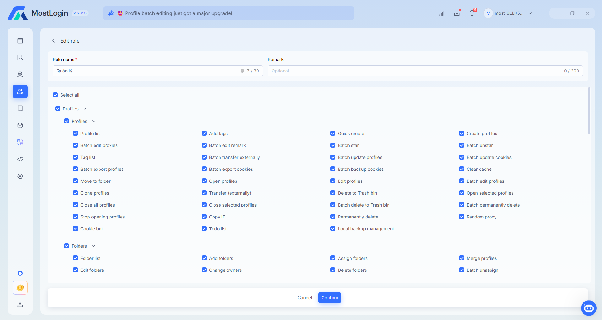
MostLogin allows creating, editing, and deleting roles. Role names are up to 30 characters and notes up to 200 characters. Permissions are divided into 7 groups: Profiles, Cloud phones, Proxies, Team, Settings, Logs, and API. The Profiles group alone has detailed permissions such as bulk proxy editing, transferring profiles out, exporting cookies, permanent deletion, Cookie bot, and local backup management.
The permission system is quite detailed, suitable for teams that need to restrict access by task. However, having team features does not mean the Free plan includes free members. At 3 USD/seat/month, you should add up member costs together with profile fees when comparing plans. The test did not invite members or try sharing profiles, so the real collaboration workflow cannot yet be evaluated.
4.8. RAM and performance
RAM was recorded using Task Manager on Windows 11, filtering processes with names related to MostLogin. Results vary with the number of open profiles, but the number of tabs was not the same in each measurement.
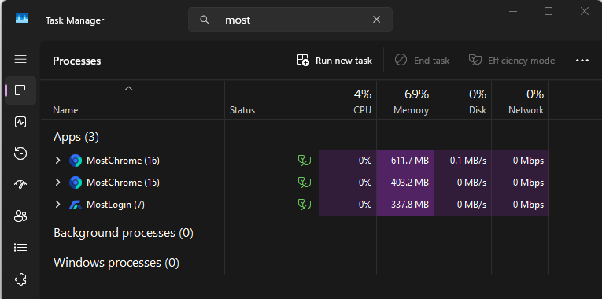
In these measurements, the MostChrome process used about 403–612 MB per observed profile. However, because the number of tabs was uneven, you should not treat this as a standard average RAM level per profile. The MostLogin application also used about 333 MB when no profile was open, but the way Task Manager groups processes may affect the total figures.
The current results are only suitable as an initial reference. For a more accurate comparison, measurements need to be repeated with the same number of tabs, page content, and extensions. Since no standardized measurement was performed, no conclusion can be drawn on whether MostLogin is lighter or heavier than other antidetect browsers.
4.9. Other features
Besides the features tested, MostLogin also has Human-like typing, Data & storage, Profile migration, and Cloud phone. Among them, Human-like typing lets you adjust text input speed with three levels: Slow, Normal, and Fast. However, the test did not evaluate how natural this behavior is.
MostLogin also provides options to back up profile data and block certain content such as images, videos, and popups. However, many Data & storage items are locked on the Free plan, so they could not be tested in practice.
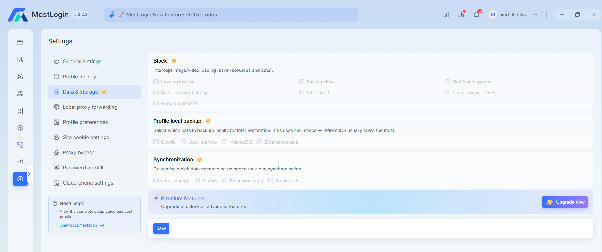
For Profile migration, the application displays options to transfer profiles from Dolphin{anty}, MoreLogin, and MultiLogin X. Cloud phone supports Android versions 12, 14, 15, and 16, at a recorded price of 25 USD/device/month. The test did not perform profile migration or create a cloud phone, so it cannot confirm how well they work or how complete the data is after migration.
These additional features expand MostLogin's profile management options, but how useful they are depends on the plan you use and your actual needs. If you need migration, data backup, or a cloud phone, you should check them directly before deciding to upgrade.
5. MostLogin assessment after the hands-on experience
After checking the interface, profiles, fingerprint, proxy, API, Synchronizer, and related features, MostLogin has some advantages in cost and customizability. However, the test results also show points that need further checking before long-term use.
5.1. Pros
MostLogin's notable points lie in its upfront cost, profile setup capabilities, and tools for users with integration needs:
- Permanent Free plan: Starter supports 5 profiles, suitable for getting familiar and checking features before paying.
- Intuitive profile setup: A consistent interface, with an Overview panel that updates parameters according to your choices, helping you check the configuration before saving.
- Relatively good US proxy results in the test: Timezone and language matched the proxy location, WebRTC did not leak, and IPFighter scored 90% Good.
- Local API and MCP on the Free plan: Users can explore integration with programming tools without upgrading. However, the test did not run an actual API or script.
- Detailed team permissions: The system has 7 permission groups, including profile, proxy, logs, and API. Even so, the processes for inviting members and sharing profiles were not tested.
- Profile migration options: The interface supports migrating from Dolphin{anty}, MoreLogin, and MultiLogin X, but the data migration results were not verified.
- Profile-launch protection switches: Users can set conditions related to proxy errors, IP changes, IP country, and sync. These options are off by default.
These points make MostLogin a choice worth considering if you want to start at low cost and need basic profile management tools. However, some advantages were only confirmed through the interface or within a limited testing scope, which is not enough to claim effectiveness in every situation.
5.2. Cons
The limitations worth noting mainly relate to fingerprint check results, automation capabilities, and features restricted on the free plan:
- Fingerprint still has warnings needing further checks: Iphey flagged butterfly in both configurations. When using a proxy, TCP/IP still identified an Android operating system, but the specific cause has not been determined.
- Rotating proxies may cause inconsistent information: When the IP changes mid-session, the timezone and language do not update to the new IP, making the check results less consistent.
- No no-code automation yet: RPA still shows Coming soon on all four plans. People who want visual automation cannot yet use this feature according to the interface checked.
- Synchronizer not stable in every test situation: Typing and navigation sync work, but tab sync was once misaligned when the two windows had different numbers of tabs.
- The Free plan limits some management needs: Starter has no member seats; the proxy giveaway and many Data & storage items are locked behind paid plans.
- The interface still has room for improvement: Upgrade buttons and promotional content appear in many places, while some Vietnamese labels are inconsistent with the interface language.
- Some information is not fully verified: A Linux version has not been confirmed, profile migration results have not been checked, and RAM has not been re-measured with a uniform number of tabs.
These limitations do not mean MostLogin is unusable, but they show that you should carefully check the features that matter for your work. In particular, results from fingerprint checking sites cannot replace testing on the target platform, and features that have not been run in practice should be considered unverified.
6. Hidemyacc: a MostLogin alternative worth considering
MostLogin has the advantage of a permanent Free plan and a low starting price, especially for individual users who only need a few profiles. However, if your needs go beyond creating and opening profiles to include automating actions, transferring data, managing proxies, and coordinating among multiple members, the Hidemyacc antidetect browser has an advantage in how well its workflow tools are integrated.
The difference is not in which tool lists more features. What matters is how many additional steps users have to build themselves to get the work done.
6.1. No-code automation and profile management
This is a notable difference between the two tools if you need to automate repetitive actions across many profiles.
MostLogin has a Local API, MCP, and the ability to integrate with frameworks like Selenium, Playwright, and Puppeteer. These tools suit users with programming knowledge or those already using their own automation systems. However, at the time of testing, MostLogin's pricing table still listed RPA workflows as Coming soon. That means users cannot yet treat built-in RPA as a finished feature based on currently published information.
The difference lies in how you get started: Hidemyacc lets you build scripts right in the interface without being required to write all the logic from scratch. This can reduce setup effort for newcomers or operations teams that need to standardize repetitive actions across many profiles. For complex workflows, users can still import scripts to extend customization. In addition, users can access ready-made scripts to start building workflows. These options are listed right in Hidemyacc's pricing table, including the Mini and Starter plans.
Hidemyacc's advantage is that users do not necessarily have to write all the code themselves to start automating. For agencies or teams operating many accounts, drag-and-drop and action-recording tools can shorten the script-building step, while imported scripts still meet deeper customization needs. This is a difference worth considering if you want to deploy automation within the software itself rather than connecting multiple tools on your own.
6.2. Transferring profiles with Magic Link
When switching to Hidemyacc, you do not necessarily have to recreate profiles from scratch. The Magic Link feature lets you obtain the browser fingerprint from an existing browser or another antidetect browser via a URL, simplifying the setup of a new profile.
This approach is especially useful when you need to move many working environments to Hidemyacc without wanting to configure each parameter manually. Besides Magic Link, Hidemyacc also supports profile import/export and importing cookies and bookmarks, depending on the features of the plan in use.
MostLogin also has a profile migration tool, but the documented process currently focuses on a few platforms such as Dolphin{anty}, MoreLogin, and MultiLogin X via token or API. Therefore, if your profile source is not on this integration list, you need to check for a suitable data transfer method before proceeding.
Magic Link makes Hidemyacc more flexible when creating profiles from other sources, but you should still try one profile before migrating in bulk. After transferring, check the fingerprint, cookies, bookmarks, and login status, because you should not assume all data is preserved.
6.3. Profile sharing, backup, and data recovery
For teams working together, the cost lies not only in the number of profiles but also in access permissions and the ability to recover when something goes wrong. Hidemyacc has options that serve both needs.
According to the official pricing table, the Base plan includes 1 free sub-account, Team has 3, and Business has 5; these plans allow adding unlimited paid sub-accounts. In addition, the Share plan costs 5 USD/month, intended for people who use shared profiles and folders, and cannot create new profiles.
Hidemyacc also provides two useful data management functions: recovering deleted profiles within 24 hours and recovering data from the 10 most recent working sessions. According to the company's description, session data may include cookies, history, and bookmarks. These options give users additional ways to handle accidentally deleted profiles or the need to return to a previous session state.
MostLogin also supports profile sharing and role-based permissions, but the Starter Free plan has no seats for members; additional seats are recorded at 3 USD/month. Therefore, if multiple people need to access and operate profiles, you should calculate the total member cost instead of only comparing base plan prices.
Hidemyacc is worth considering for teams that frequently share profiles or need integrated data recovery options. However, the current test did not directly check member invitations, profile sharing, or session recovery on Hidemyacc, so these benefits are presented based on features published by the company, not independent test results.
6.4. Proxy Manager and the integration ecosystem
Managing proxies for many profiles can become cumbersome if you have to track connection information in many places. Hidemyacc centralizes these operations through Proxy Manager, while also providing a Proxy Store where users can browse offers from partner proxy providers.
A noteworthy point is that free proxies are listed from the Base plan, along with proxy and profile management features in one system. This gives users additional options when starting to set up their environment, instead of having to find a separate proxy service from the very beginning. However, the right to use free proxies does not apply equally to all plans.
MostLogin also has a proxy management area, allowing you to assign proxies to profiles and check connections. In the trial, the proxy giveaway was not available on the Starter Free plan, so it should not be counted as a built-in benefit of the free plan.
Even so, a free proxy does not mean a proxy suitable for every purpose. Users still need to check the IP type, stability, location, and the target website's policies. Neither tool can guarantee that simply configuring a proxy means your account will not be restricted.
6.5. MostLogin vs Hidemyacc comparison table
The table below compares the public pricing and features recorded on the official pages. The fingerprint test result figures only apply to MostLogin under the conditions described, and are not a direct benchmark comparison between the two products.
| Criteria group | Criteria | Hidemyacc | MostLogin |
|---|---|---|---|
| Overview | Year launched | 2021 | 2021 |
| Country | Vietnam | Belarus | |
| Software installation OS | Windows, macOS | Windows, macOS | |
| Free trial | Yes, 7-day trial with 30 profiles | Has a free plan, with limited features | |
| Ease of use | Has profile management and visual automation tools | Needs evaluation through hands-on experience | |
| Target users | Individuals, small, medium, and large businesses | Individuals, small, medium, and large businesses | |
| Compatibility | Profile OS customization | Windows, macOS, Linux, Android, iOS | Windows, macOS, Android, iOS, Linux |
| Browser options | Chrome | Chrome | |
| Browser fingerprint customization | Yes | Yes | |
| User-Agent customization | Yes | Yes | |
| Mobile fingerprint | Yes | Yes | |
| Profile management | Quick Profile creation | Yes | Yes |
| Create multiple profiles at once | Yes | Yes | |
| Bulk profile import | Yes | No | |
| Profile import & export | Yes, depending on the plan | No | |
| Import cookies and bookmarks | Yes | Cookie import only | |
| Profile recovery trash | Yes, supports recovery within 24 hours | Yes | |
| Session backup | Yes, saves the 10 most recent sessions per the pricing table | Yes, up to 3 copies per profile | |
| Cloud data sync | Yes | Yes | |
| Activity history | Yes, tracks actions on profiles | Yes | |
| Proxy | Proxy management | Has Proxy Manager | Yes |
| Proxy store | Has Proxy Store with partner offers | Yes | |
| Free proxy | Yes, from the Base plan | Yes, from the Plus plan | |
| Team collaboration | Add members | Has sub-accounts by plan; Base has 1, Team has 3, Business has 5 free accounts | Members can be added, charged per seat |
| Profile sharing | Yes, from the Base plan | Yes | |
| Profile transfer with Magic Link | Can transfer from any antidetect browser | Can transfer profiles from Dolphin, MoreLogin, and MultiLogin X via token or API | |
| Automation | No-code automation | Has drag-and-drop tools and visual script creation | RPA workflows section shows Coming soon at the time of checking |
| Action recording | Yes | No | |
| Action sync across multiple profiles | Has Synchronizer | Has Synchronizer; tab misalignment was recorded during testing | |
| API | Yes, from the Base plan | Has Local API and MCP; limit of 2–20 requests/second depending on the plan | |
| Programming tool integration | Supports Puppeteer scripts and script import | Supports Selenium, Playwright, Puppeteer, and MCP per the information recorded | |
| Pricing and plans | Lowest paid plan | From 10 USD/month for 5 profiles | From 3 USD/month for 20 profiles per the information recorded |
| Free plan | No permanent free plan, has a 7-day trial | Has a free Starter plan with 5 profiles | |
| Long-term payment discounts | 20% off for 3-month payment, 30% off for 6-month payment, 50% off for annual payment per the pricing table | 10% off for 3-month payment, 20% off for 6-month payment, 30% off for annual payment per the information recorded | |
| Support and updates | Support channels | Live chat, Telegram, Facebook, email* | Telegram |
| Update frequency | Needs evaluation through version history | Needs evaluation through version history |
6.6. Cost comparison by scale
If you only consider profile prices, MostLogin has a clear advantage at small scale because users can start with 5 free profiles. When you need 20 profiles, the Plus plan starts from 3 USD/month, but the actual price depends on the quantity chosen.
Hidemyacc has plans with the following profile counts and public prices:
| Scale | Hidemyacc plan | Monthly price | Monthly price when paying annually |
|---|---|---|---|
| 5 profiles | Mini | 10 USD | 5 USD |
| 30 profiles | Starter | 29 USD | 15 USD |
| 100 profiles | Base | 49 USD | 25 USD |
| 300 profiles | Team | 99 USD | 49 USD |
| 1,000 profiles | Business | 199 USD | 99 USD |
Note: The annual prices are monthly-equivalent prices, not the amount paid for the whole year. When budgeting, you need to check the billing cycle and the discounts currently in effect.
For MostLogin, prices for the 100, 300, and 1,000-profile scales were not verified during testing, so there is not enough basis to compare total cost at these levels. Users need to check prices by profile count, and member costs if any, before making a decision.
Hidemyacc is more worth considering when your needs go beyond creating many profiles to include automation and team-based operations. No-code tools help build scripts without writing all the code yourself; Magic Link supports the profile transfer process; sharing and data recovery options make profile management more convenient; and Proxy Manager and Proxy Store help centralize proxy management. These features can reduce the time spent on setup, migration, and troubleshooting when operating many accounts. Therefore, although MostLogin has an upfront cost advantage thanks to its Free plan and low starting price, Hidemyacc may suit people who prioritize an integrated profile management toolset better.
7. Conclusion
MostLogin is an antidetect browser worth considering if you want to try managing multiple profiles with a low upfront cost. The permanently free Starter plan, API, and MCP are pluses, especially for individual users or those capable of building their own scripts.
However, the test results also noted some points requiring caution: the butterfly warning on Iphey, inconsistent TCP/IP results when using a proxy, tab misalignment in some Synchronizer runs, and the limits of the Free plan. Features such as cloud phone, migration, and API scripts were not directly verified, so stability cannot yet be assessed comprehensively.
If your goal is simply to start with a few profiles, MostLogin has the cost advantage. If your work demands no-code automation, convenient profile transfer, proxy management, and team-based data sharing, Hidemyacc is the choice to prioritize. These features can reduce setup effort and make the workflow more seamless.
Whichever tool you choose, try a small number of profiles first, test the proxy and your target websites, and compare the actual features against the plan before paying for the long term.
Read more: Top 10 antidetect browsers for managing multiple accounts
8. FAQ
1. Does MostLogin have a free plan?
Yes. The Starter plan is permanently free with 5 profiles according to the official pricing page. However, this plan has no free member seats and some advanced features are limited.
2. Which proxy protocols does MostLogin support?
MostLogin supports HTTP, HTTPS, and SOCKS5 according to the documentation and product interface. In the test, only HTTP was used directly; HTTPS and SOCKS5 were not verified.
3. Does MostLogin support automation and API?
Yes. MostLogin provides a Local API, MCP, and the ability to integrate with Selenium, Playwright, and Puppeteer according to the documentation. However, RPA workflows are still listed as Coming soon in the pricing table checked, so you should not mistake API automation for a ready-to-use no-code tool.
4. Does MostLogin support teamwork, and how are seats charged?
Yes. MostLogin supports profile sharing and role-based permissions. The Free plan has 0 seats, while additional seats are recorded at 3 USD/month. You should check the number of members allowed when choosing a plan.
5. Can MostLogin transfer profiles from other browsers?
Yes. MostLogin's documentation mentions transferring profiles from Dolphin{anty}, MoreLogin, and MultiLogin X via token or API. However, the data transferred may vary by source platform, so try one profile and check cookies, bookmarks, and extensions before migrating in bulk.