



Ever feel like your every move online is under a microscope? Security isn’t optional—it’s essential. An anonymous browser masks your digital fingerprint, keeping you untraceable and your data safe. Plus, we’ll reveal a game‑changing method to run multiple accounts on a single device without ever being detected.
1. Why do you need to use anonymous browsers?
An anonymous browser is designed to enhance user privacy and anonymity while browsing the internet. It helps conceal your online identity, location, and activities from being tracked by websites, advertisers, and other third parties.
- Avoid tracking by websites: Many websites track users' activities, such as the pages they visit, the links they click, and the products they view. This information is often used for targeted advertising or sold to third parties without your consent. By using an anonymous browser, you can browse safely and prevent websites from tracking your online behavior and collecting personal data about you.
- Avoid targeted advertising: Online tracking is commonly used to serve targeted advertisements based on users' interests and preferences. These ads can follow you across different websites, creating a feeling of constant monitoring. To minimize exposure to targeted advertising and maintain greater control over your online experience, browsing privately is essential.
- Keep multiple accounts safe: Many individuals have multiple accounts for various purposes, such as email, social media, banking, and shopping. Maintaining multiple accounts may be necessary, especially for those earning income online. However, websites and platforms often discourage users from having multiple accounts. By browsing anonymously, you can reduce the risk of websites detecting your multiple accounts and potentially suspending them.
In summary, using an anonymous browser helps protect your privacy, avoid targeted advertising, and keep multiple accounts safe from detection by websites. It enables you to browse the internet with greater anonymity and control over your online activities.
2. How do anonymous browsers keep you safe?
Common methods used for tracking users
Websites employ various methods to track users, and it's essential to understand these techniques to find solutions to stay safe online.
- Cookies
Cookies are used to remember you when you return to a website. They contain information about your online activities, allowing websites to remember your preferences and personalize your experience.
Read more about "Cookies": Internet Cookies: How does it work and is it dangerous to our online security?
- IP address
An IP address is a unique number that identifies a user's device online. Websites can use IP addresses to determine the location of your device, revealing your geolocation. If multiple accesses come from one IP address, it may raise suspicion, and the website may block it to prevent fraud.
If your IP address is blacklisted, you won't be able to access certain websites. Additionally, websites can use IP addresses to create targeted campaigns based on specific geolocations.
- Browser fingerprinting
Browser fingerprinting is a common method used to track users, yet many are unaware of it. While people may know that websites can collect IP addresses, they may not realize that websites can identify the device being used to access the site.
Browser fingerprinting includes various browser settings such as browser type, version, operating system, hardware concurrency, device memory, language, font, and screen resolution.
This information plays a crucial role in helping websites detect users, especially when managing multiple accounts on the same device. Even if you change your IP address, websites can still identify multiple accounts due to browser fingerprint parameters.
- Tracking pixels
Tracking pixels are small image files containing code that can track if you have opened an email or visited a website. The code is embedded within the image and is invisible to the user. When you interact with the email or website containing the pixels, the code executes and tracks your activity. Marketers then use this data to analyze visitor behavior and optimize their marketing strategies accordingly.
Tracking Pixel vs Cookies: What's the Difference? Read this article
How do anonymous browsers keep you safe?
Anonymous browsers employ various techniques to ensure user safety and protect privacy while browsing the internet. Here's how these browsers keep you safe:
- Encrypt the data: Many anonymous browsers utilize encryption protocols to secure internet traffic. This encryption prevents third parties, such as Internet Service Providers (ISPs) or malicious actors, from intercepting and accessing the data transmitted between your device and the websites you visit. By encrypting your data, anonymous browsers ensure that your online activities remain private and protected.
- Conceal IP address: Anonymous browsers can hide your IP address by routing internet traffic through proxy servers or Virtual Private Networks (VPNs), masking your real IP address. This makes it difficult for websites or online services to track your online activities based on your physical location. By concealing your IP address, anonymous browsers help maintain your anonymity and protect your privacy online.
- Block tracking cookies: Websites and advertisers often use tracking mechanisms such as cookies, pixels, and other tracking technologies to monitor users' browsing behavior. Anonymous browsers can block these tracking mechanisms, preventing websites and advertisers from tracking your online activities and collecting data about you without your consent. By blocking tracking mechanisms, anonymous browsers help preserve your online anonymity and enhance your privacy.
- Secure connection: Anonymous browsers use HTTPs protocol to encrypt the data exchanged between the user's device and websites, reducing the risk of data interception.
3. Anonymous browser vs Antidetect browser - Which is the difference?
Anonymous browsers and antidetect browsers are both used to enhance privacy when surfing the internet, but each type has its own strengths and features. Are you confused about which one to choose? Or are you considering the differences between these types? Let's find out in this part with Hidemyacc. But first, let's talk about the similarities between them.
Similarities
- Enhance privacy: Both anonymous browsers and antidetect browsers prioritize user privacy and security. They aim to protect users' online identities and prevent websites from tracking their online activities.
- Increase anonymity: Both anonymous browsers and antidetect browsers help users stay anonymous on the internet. While anonymous browsers hide users' IP addresses and route traffic through secure networks, antidetect browsers aim to change users' browser fingerprints and block tracking technologies.
- Flexibility: Users can create multiple accounts on the same device when using both antidetect and anonymous browsers. However, each type offers a different experience, which we will explore further in the next part.
Differences
Even though both anonymous browsers and antidetect browsers aim to enhance privacy and protect your online identity but each types have difference, especially in level of anonymity.
- Anonymous browsers
Typically achieve anonymity by routing internet traffic through private networks and encrypting data to secure transmission. They are suitable for those who want to enhance general privacy and security while browsing the web, protecting online identities and avoiding tracking across websites. However, managing multiple accounts on the same device using anonymous browsers may not provide high security.
- Whereas, antidetect browsers
Specifically designed to bypass website detection by changing browser fingerprints for each browser profile. Websites detect users based on browser fingerprints and IP addresses to identify suspicious behavior, such as managing multiple accounts on the same device. Antidetect browsers help users create multiple browsers with different sets of browser fingerprints, making it difficult for websites to track them. Additionally, antidetect browsers offer more features to improve user privacy and security beyond changing browser fingerprints.
In summary, both anonymous browsers and antidetect browsers enhance privacy, but they differ in their focus and functionality. Anonymous browsers prioritize anonymizing online activities, hiding IP addresses, and encrypting traffic, while antidetect browsers are used to avoid detection in specific contexts.
4. Antidetect browser Hidemyacc - The best solution to stay anonymous when browsing
If you search for the keyword "antidetect browser", you'll find numerous solutions on the search page. This indicates that there are many types of antidetect browsers available to choose from, each offering its own set of features and capabilities to protect your online identity and prevent website tracking.
When selecting the perfect tool for your needs, two main factors should be considered:
Firstly, the technology it employs must meet your demands. This includes its ability to bypass high-security websites, stay updated with the latest parameters, and offer convenient features to enhance your working experience.
Secondly, the price of the tool. While it's essential to consider affordability, it's equally important to ensure that the quality matches the price paid. After all, nobody wants to pay a hefty sum only to receive a subpar tool.
In this regard, Hidemyacc emerges as a standout choice. The Marco browser within Hidemyacc utilizes cutting-edge technology, enabling it to effectively bypass web checks that scrutinize browser fingerprints, such as IPhey or Pixelscan. Hidemyacc continually updates its database to stay synchronized with the latest configurations and settings prevalent in the market.
Moreover, Hidemyacc offers more than just changing browser fingerprint parameters for each browser profile. It also includes additional features such as:
- Sharing permissions to use profiles and folders without sharing passwords.
- Proxy Management to efficiently manage proxies.
- Creation of automation scripts with multiple options, including recording actual actions on websites, drag-and-drop functionality for existing commands, and code import.
- Access to discounted proxies from reputable providers through the Proxy Store.
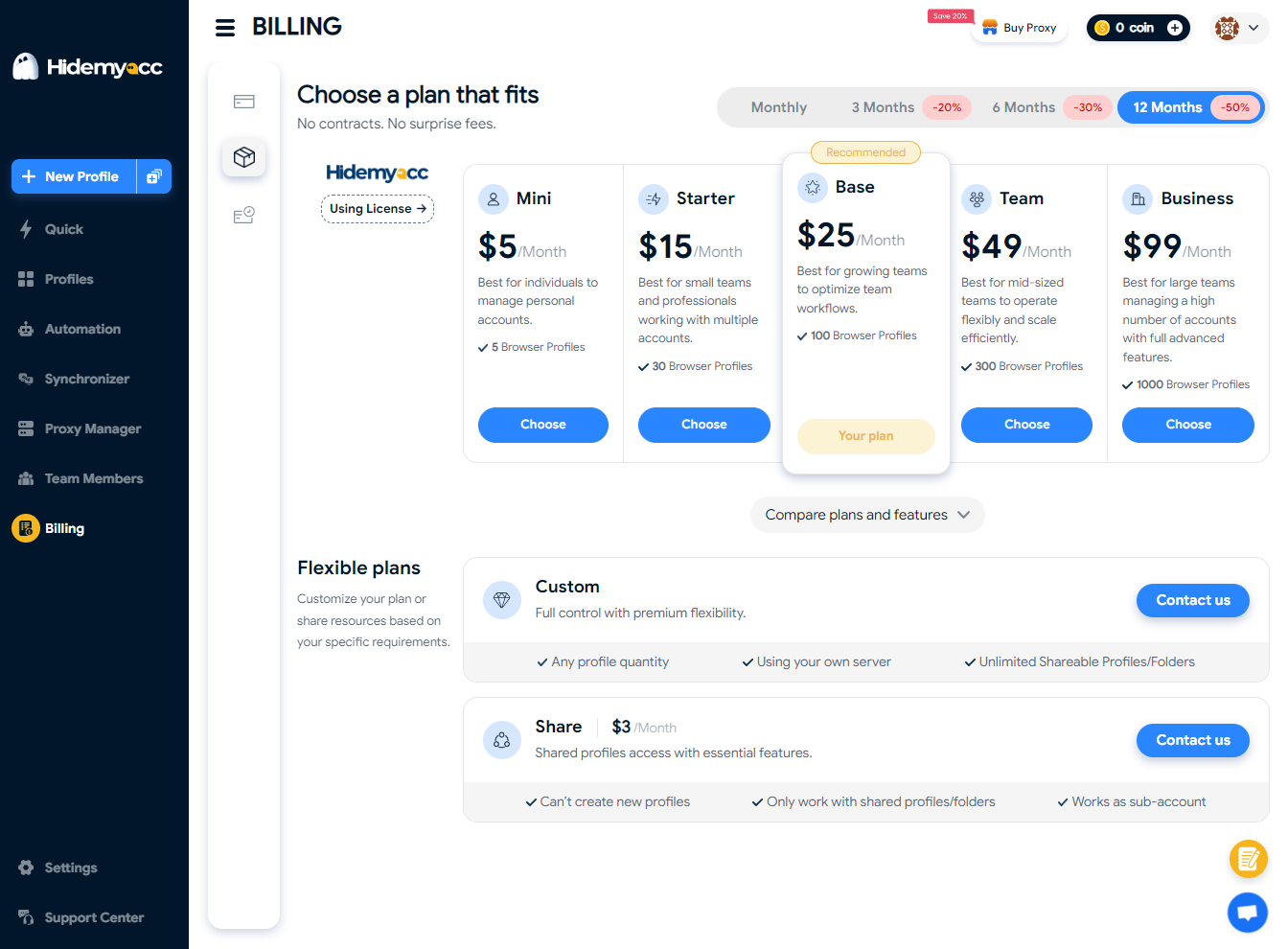
Hidemyacc provides users with five plan packages to choose from, with the lowest priced at $5 per month. This ensures that users have the flexibility to select a plan that best suits their budget and requirements.
Conclusion
Using an anonymous browser is indeed an effective way to enhance privacy while browsing the internet. However, when it comes to managing multiple accounts on the same device, an antidetect browser would be the preferred choice due to its enhanced privacy features and advanced technology.
Antidetect browsers like Hidemyacc offer a wide range of features specifically designed to help users create and manage multiple accounts securely. With its advanced privacy measures and cutting-edge technology, Hidemyacc provides users with the tools they need to keep their accounts safe while maintaining anonymity online.
Download Hidemyacc and start your 7-day trial to experience the benefits of effortlessly managing multiple accounts.
If you have any questions, comments, or suggestions, please don't hesitate to reach out to us via Telegram, Skype, or Facebook Messenger support. We're here to assist you.






