Many beginners confuse unblocked browsers with antidetect browsers because both can be used in scenarios involving website access. In reality, these two tools solve distinct problems: one focuses on accessing restricted content, while the other focuses on managing browser identity. This article provides a clear comparison between unblocked browsers and antidetect browsers to help you choose the right tool for your needs.
1. What is an unblocked browser?
An unblocked browser is not a specific browser brand like Chrome or Firefox. Instead, the term refers to browsers or services that help you access websites and content that are restricted within a particular network environment.
For example, you might be unable to access a website on your current network because it is blocked by local network filters or firewalls. In this scenario, an unblocked browser uses alternative routing to help you access the site.
1.1. How does an unblocked browser work?
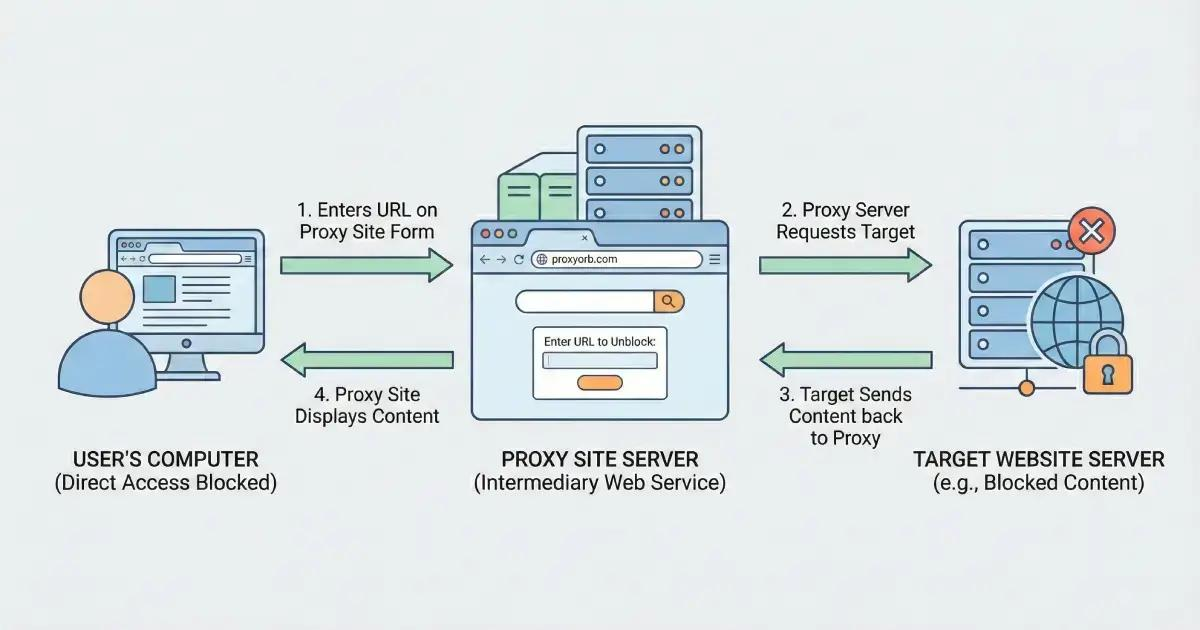
When you visit a website, connection requests travel from your device across the network to the destination web server. If your local network blocks the site or applies access restrictions, the request fails to complete normally.
Certain unblocked browser solutions route the connection through an intermediary server to alter the network path. Depending on the service, this intermediary server may utilize a proxy, a VPN, or a web proxy.
As a result, the destination website receives the request from an alternate IP address or network path rather than directly from your local network. This is why a website may be accessible through one connection while remaining restricted on another.
However, specific mechanics depend on the chosen service, as not all unblocked browsers use identical technologies.
1.2. What is an unblocked browser used for?
An unblocked browser primarily serves the need to access restricted websites or content.
Typical use cases include:
- Websites restricted on the current network: For instance, sites blocked by school, workplace, or public Wi-Fi firewalls.
- Content unavailable in your current environment: Content restricted by geographic region or local network policy.
- Requiring an alternative network route: Visiting a site without routing directly through the default local connection.
- Browsing in restricted environments: Suited for basic viewing needs without requiring complex profile management.
The key takeaway is that unblocked browsers focus strictly on accessibility. If you need to manage multiple accounts or isolate browser environments, this tool is not designed for that purpose.
1.3. Is an unblocked browser a VPN?
No. Unblocked browsers, proxies, and VPNs can all be used to facilitate website access, but they are not identical concepts.
A VPN establishes an encrypted network tunnel through a VPN server and routes your device's traffic through that connection. A proxy acts as an intermediary server between your browser and the website, while a web proxy lets you view pages through a web-based intermediary service.
Meanwhile, unblocked browser is a broad term describing any browser or service that facilitates access to restricted content. Therefore, an unblocked browser should not automatically be assumed to be a VPN or proxy.
Learn more: What is a VPN? Why should you use a VPN to protect personal information?
2. What is an antidetect browser?
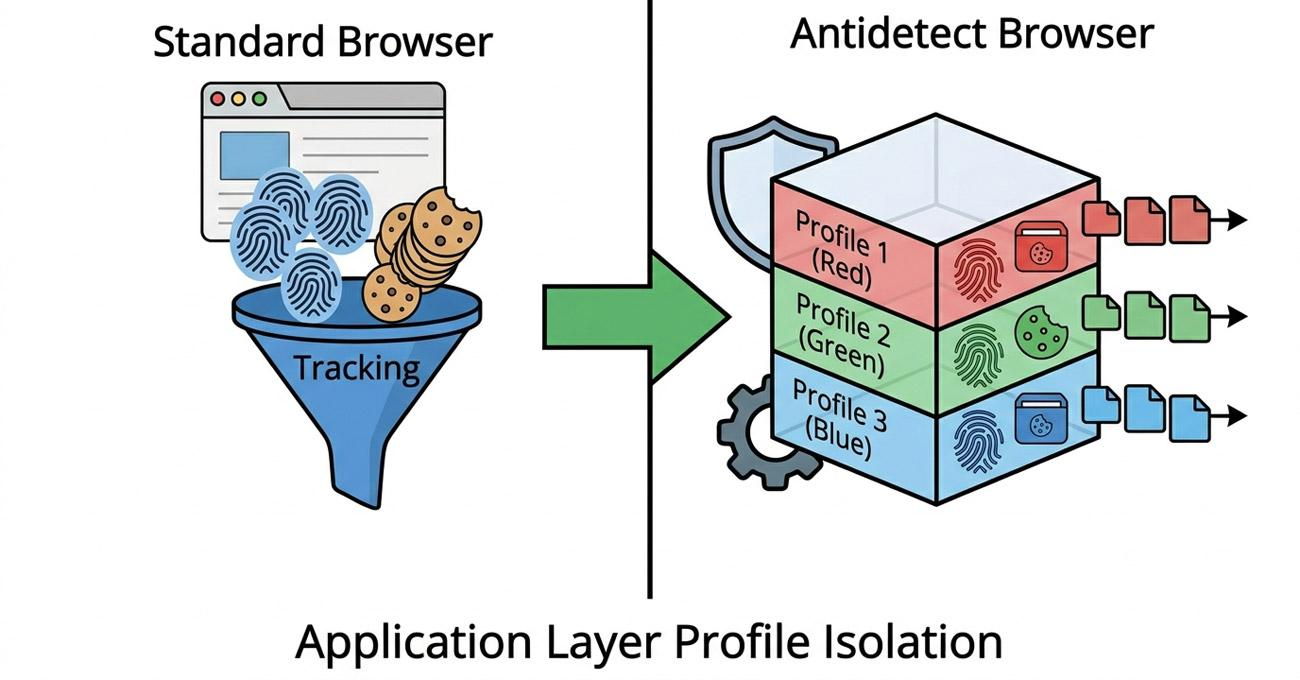
An antidetect browser is software designed to create and manage multiple isolated browser profiles. Each profile can be configured with unique identification parameters and isolated data, such as User-Agent, Canvas fingerprint, WebGL, WebRTC, screen resolution, timezone, and language.
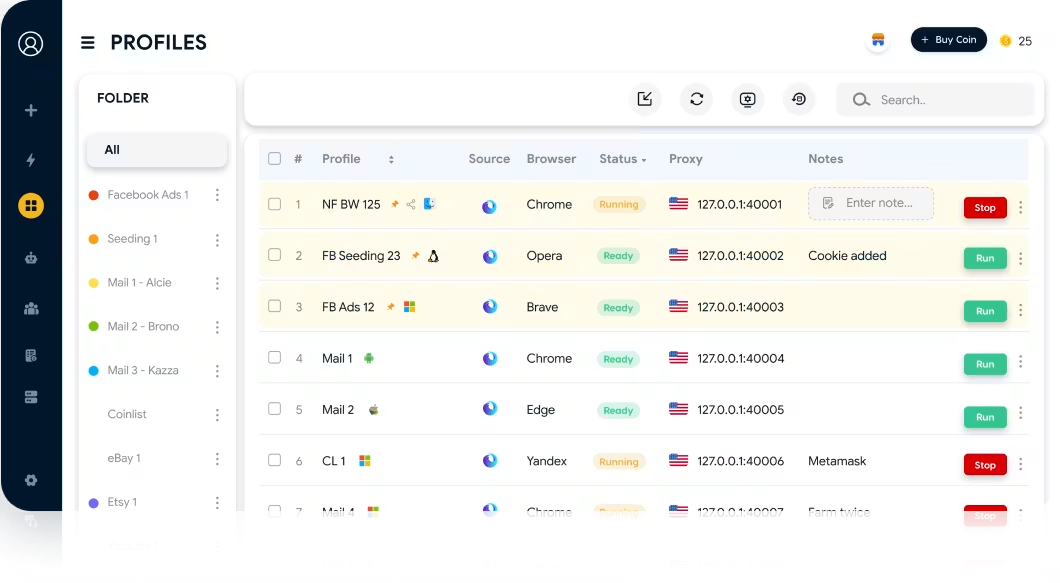
A leading example is the antidetect browser Hidemyacc, which enables creating standalone browser profiles, managing multiple accounts, and assigning dedicated proxies to each profile.
It is important to note that browser fingerprints are just one of many signals websites use to identify users. In addition to fingerprints, platforms evaluate IP addresses, cookies, account credentials, and behavioral patterns to assess each session across workflows.
To dive deeper into the core concepts, mechanisms, and components of antidetect browsers, check out our guide on what an antidetect browser is.
3. Quick comparison: unblocked browser vs antidetect browser
Unblocked browsers and antidetect browsers serve distinct purposes, even though both involve web access. The table below provides a quick side-by-side comparison based on core purpose, operation, account management, and browser customizability.
| Criteria | Unblocked Browser | Antidetect Browser |
|---|---|---|
| Primary Purpose | Facilitates access to restricted websites or content | Manages and isolates distinct browser environments |
| Problem Solved | Overcomes local network restrictions or firewall limits | Isolates browser environments and data between accounts/profiles |
| Browser Fingerprint | Not a primary focus | A core component customized per browser profile |
| Multi-Account Management | Not a core capability | Supports running multiple accounts via isolated profiles |
| Browser Profiles | Typically not a focal feature | Creates and manages multiple independent profiles |
| Cookies & Sessions | Used like a standard browsing session | Completely separates cookies, sessions, and data per profile |
| Proxy Support | May utilize shared proxies depending on the solution | Supports configuring dedicated proxies per profile |
| Identity Customization | Not a focal feature | Deeply customizes complete browser fingerprints |
| Target Audience | Users needing to access blocked websites or content | Professionals managing multiple accounts and environments |
| Typical Use Cases | Accessing sites blocked by local network or firewalls | Digital marketing, social media management, E-commerce, MMO |
| Setup Complexity | Generally simple and instant | Requires configuring and managing profile parameters |
The core distinction is straightforward: Unblocked browsers focus on access capability, while antidetect browsers focus on managing and isolating browser environments.
If you only need to view a blocked website, profile management features are unnecessary. Conversely, if you require isolated browser environments for multi-accounting, a simple unblocking solution will fall short.
4. When should you use an unblocked browser?
An unblocked browser is ideal when the primary challenge is accessing restricted websites or media. Consider this solution when pages cannot open on your current network or content is restricted in your local environment.
- When websites are blocked on your local network: Ideal when firewalls at school or work restrict site access.
- When content is unavailable locally: Suitable for bypassing basic regional or network-level filters.
- When you need alternative routing: Useful for simple web browsing without using your default connection directly.
- When you do not need identity management: If your task does not require separating cookies, session data, or browser fingerprints, an unblocked browser handles the basics.
- Do not prioritize unblocked browsers when: Your main goal is managing multiple accounts, creating isolated profiles, or customizing browser parameters.
In short, use an unblocked browser when answering the question: "Why can't I access this website?" If the task involves managing distinct browser identities, turn to an antidetect browser instead.
5. When should you use an antidetect browser?
An antidetect browser is designed for workflows requiring multiple accounts, distinct profiles, and isolated browser environments. Consider using this tool in the following scenarios:
- Managing multiple accounts: Running dedicated profiles for each account instead of sharing a single browser session.
- Isolating cross-profile data: Keeping cookies, session storage, browser cache, and fingerprints completely segregated.
- Assigning dedicated proxies: Configuring individual network connections and IP addresses per profile.
- Scaling multi-profile workflows: Operating in digital marketing, ad account management, social media management, or e-commerce storefronts.
- Controlling browser parameters: Setting and maintaining stable, custom environment parameters for every account.
Note: Always define your operational goals before configuring tools. For multi-profile workflows, maintain consistent environment parameters per profile and adhere to platform terms of service.
6. Can unblocked browsers and antidetect browsers complement each other?
Unblocked browsers and antidetect browsers do not necessarily need to be paired together because they resolve different issues. However, they can be utilized alongside other networking and browsing solutions.
- Antidetect browsers with proxies: Antidetect software creates and isolates browser profiles, while proxies provide dedicated IP addresses per profile.
- Unblocked browsers in restricted networks: Used specifically when the sole objective is loading a page blocked by local firewalls.
- Not direct substitutes: Unblocked browsers focus on accessibility, whereas antidetect browsers focus on identity and environment isolation.
- Choose based on actual requirements: If the issue is simple site access, select an unblocking tool. If you need to manage multiple accounts with isolated environments, an antidetect browser is the right choice.
You do not need to deploy both tools simply because both relate to web browsing. Identify your primary objective first, then choose the software built for the task.
7. Common misconceptions
7.1. An antidetect browser is an upgraded unblocked browser
This is incorrect. These two tools are not successive versions of the same browser category.
An unblocked browser facilitates access to blocked web content, whereas an antidetect browser creates and manages isolated browser environments for multi-accounting.
7.2. Websites cannot detect you when using an antidetect browser
This is a widespread misconception. While antidetect browsers manage fingerprint parameters, websites evaluate multiple signals to assess user sessions.
IP addresses, cookies, account credentials, behavioral patterns, and payment details are also evaluated across modern platforms.
7.3. Unblocked browsers can manage multiple accounts like antidetect browsers
Some unblocking services offer basic session or profile features, but managing multiple distinct accounts is not their primary function.
If you require completely independent profiles with segregated data, an antidetect browser is built specifically for that workflow.
7.4. Changing an IP address alone creates an isolated account environment
An IP address is only one component of digital identity. Changing your IP does not generate a new browser profile or isolate cookies, session storage, and hardware parameters.
Network IP addresses and browser environments must be treated as distinct layers.
8. Conclusion
Unblocked browsers and antidetect browsers may both appear in web browsing discussions, but their core objectives are completely different. Unblocked browsers focus on content accessibility, while antidetect browsers focus on profile management and environment isolation.
If your primary challenge is loading a blocked website, look for an unblocking solution tailored to that network limit. If you need to manage multiple accounts while keeping cookies, session tokens, and fingerprints segregated, an antidetect browser is the right tool.
Understanding these differences upfront ensures you choose software based on functional capability rather than terminology. Identify the exact problem you need to solve, then deploy the appropriate tool for your operational workflow.
9. FAQ
1. Can an unblocked browser be used to manage multiple accounts?
While possible in rudimentary scenarios, this is not the purpose of an unblocked browser. For managing multiple accounts across isolated environments, an antidetect browser is the proper solution.
2. Is using an antidetect browser legal?
Antidetect browsers are software tools and are not inherently illegal. However, your usage must comply with local laws and the terms of service of the target platforms.
3. Do I need to pair proxies with an antidetect browser?
While not strictly mandatory for local testing, proxies are essential when accounts require separate IP addresses. The antidetect browser manages the browser environment, while the proxy handles the network connection.
4. Which browser should a beginner choose?
If your primary goal is viewing blocked sites or media, an unblocked browser is suitable. If you need to manage multiple accounts with isolated browser environments, an antidetect browser is the appropriate choice.