
You open CreepJS to check your browser fingerprint, but you get a flood of hashes, percentages, and technical parameters that are hard to make sense of. What's the difference between FP ID and Fuzzy? What does 0% Headless mean? Are differences between the test blocks a sign that something is off? This article shows you how to read fingerprint results in CreepJS, explains what each group of parameters means, and covers what to keep in mind when evaluating a browser environment.
1. What is CreepJS?
CreepJS is an open-source browser fingerprint testing tool developed by Abraham Juliot. It helps you see what data websites can collect from your browser and device when you go online.
CreepJS works by running a large number of tests through browser APIs. The data it collects includes the operating system, hardware information, graphics processing capabilities, fonts, screen resolution, and many other parameters. This data is analyzed to generate fingerprint identifiers, and the results are displayed in groups on the interface.
Beyond providing information about your browser fingerprint, CreepJS can also detect signs of tampering with browser APIs, and recognize certain characteristics of headless environments and privacy protection mechanisms.
This lets you use CreepJS to understand how your browser exposes data to websites, cross-check fingerprint parameters, and spot points that deserve a closer look. However, it is a tool for research and analysis purposes only. It cannot change your fingerprint, and it cannot fully assess how websites detect bots.
2. How to read identifiers and browser detection results in CreepJS
To check your browser fingerprint, simply visit the official CreepJS website and wait for the results to appear. The tool analyzes your browser data automatically, with no account registration or software installation required. You should use the GitHub Pages address published by the developer to avoid visiting unauthorized versions.
In this article, the illustrative images were captured at 3:15 PM on November 25, 2026, on a Chrome 156 profile running Windows 11 and using an Australian (Melbourne) proxy, created with the Hidemyacc antidetect browser.
First, let's look at what the fingerprint identifiers, the headless detection metrics, and the privacy protection information in CreepJS mean.
2.1. FP ID, Fuzzy, and test duration
FP ID, Fuzzy, and test duration each provide different information about fingerprint data:
FP ID (Fingerprint ID): An identifier generated from a filtered set of fingerprint data using the SHA-256 hash function.
Fuzzy: A 64-character string generated from the hashes of multiple groups of fingerprint data.
Test duration (ms): The processing time recorded while the tests ran.
Of these, FP ID is useful when you want to track how your fingerprint changes across multiple tests.

If your FP ID changes after reloading the page, you can compare the hashes and data in each block to find out which component changed. The cause may be a browser update, a settings change, or a privacy protection mechanism.
As for Fuzzy, the official documentation doesn't give specific guidance on how to interpret this string. So you shouldn't use it to calculate how similar two fingerprints are. Neither FP ID nor Fuzzy is a score that rates browser quality.
2.2. Like Headless, Headless, and Stealth
Headless is a mode that lets a browser run without displaying the usual graphical interface. CreepJS uses three groups of metrics to detect characteristics related to headless environments and signs of browser tampering:
Like Headless: Characteristics that can appear on both headless browsers and regular browsers.
Headless: Signs more directly related to headless or automated environments.
Stealth: Signs of tampering with the browser environment, detected through the tests.
The three metrics are calculated independently and cannot be added together into a single overall score.
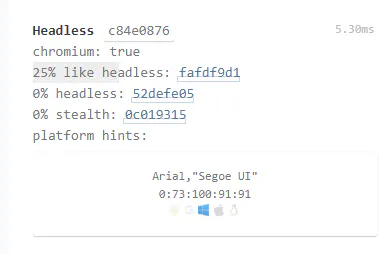
A Like Headless value other than 0% is not necessarily a sign of a problem. To understand the cause, you can click the hash next to each metric and see which conditions return true.
For example, the Like Headless result in the image is 25% because 4 out of 16 conditions are met, related to interface options and support for certain browser APIs.
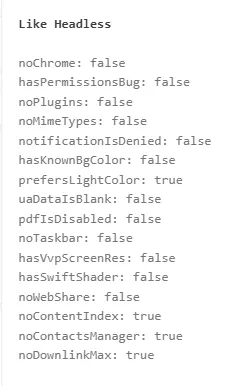
This is the percentage of conditions met, not the probability that your browser will be detected as a bot. Likewise, a Headless or Stealth value of 0% only means that the corresponding conditions were not recorded in that test.
In addition, Chromium and Platform Hints provide further information for identifying the browser environment and hints about the operating system platform.
2.3. Resistance
The Resistance block helps you learn about the privacy protection mechanisms that CreepJS can detect. Results are shown through Privacy, Security, Mode, and Extension.
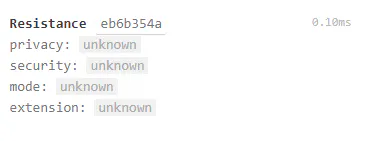
In the example image, all four fields show unknown. This means CreepJS could not determine the corresponding information. It does not mean the browser lacks security features or has no extensions installed.
3. How to read browser fingerprint parameters in CreepJS
The detailed data blocks in CreepJS show you what information your browser is providing to websites. You can use them to cross-check your device configuration, understand how your fingerprint changes, and recognize which data the browser limits.
3.1. Navigator and Worker
Navigator and Worker let CreepJS collect browser information from different JavaScript execution contexts. Notable data fields include User-Agent, User-Agent Data, Device, Lang, and Vendor.
You can use these two blocks to cross-check the reported information about the browser, operating system, memory, and number of logical processors.
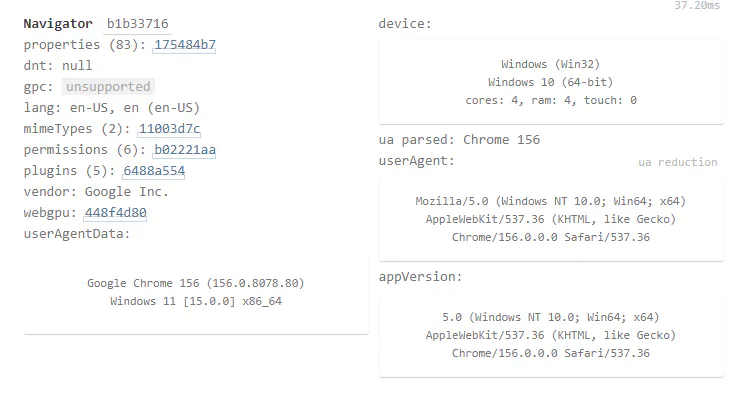
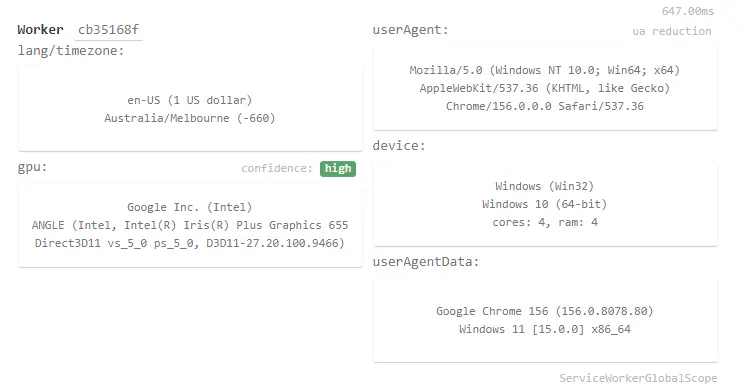
When cross-checking, pay attention to how the browser provides its data. For example, the User-Agent in the image shows Windows NT 10.0, while User-Agent Data identifies Windows 11. This can occur because of Chrome's User-Agent Reduction mechanism, and it is not a case of two contradictory operating system values.
In addition, the reported number of logical processors and amount of memory don't necessarily reflect your actual hardware configuration in full.
3.2. WebGL and Canvas 2D
WebGL and Canvas 2D help you understand your browser's graphics rendering characteristics and the data that can be used to generate a fingerprint.
WebGL
The WebGL block displays image rendering results (Images), pixel data (Pixels), graphics parameters (Params), supported extensions (Exts), and GPU information.
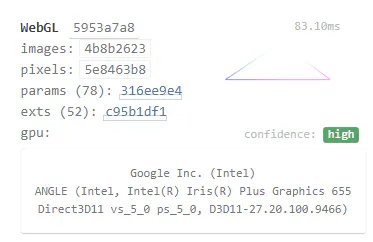
You can compare the GPU information between WebGL and Worker to see how the two contexts report the graphics environment. However, the GPU name may differ from your physical graphics card because the browser uses an intermediate graphics layer or software rendering.
Canvas 2D
The Canvas 2D block provides data from drawing operations (Data), image and text rendering results (Rendering), and text measurement values (TextMetrics).
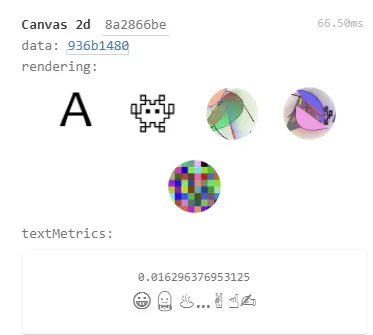
To find out whether your Canvas fingerprint changes between tests, you can compare the corresponding hashes. Two images that look identical to the naked eye can still produce different hashes because of pixel-level differences.
3.3. Audio
CreepJS uses the Web Audio API to analyze how the browser processes audio signals, without needing access to your microphone. Fields such as Sum, Gain, Freq, Time, and Unique reflect characteristics obtained from signal processing operations.
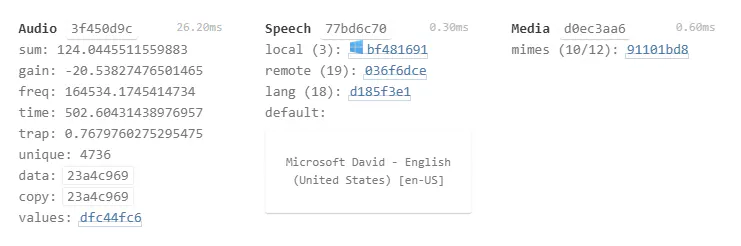
There is no standard Audio fingerprint value that applies to every device. Instead of judging whether a value is high or low, you can compare hashes and results between tests under the same conditions to see how the audio data changes.
Read more: AudioContext Fingerprint.
3.4. Fonts and Screen
Fonts and Screen help you understand the font and display environment information that websites can collect from your browser.
Fonts
The Load field shows how many fonts were detected from the test list. For example, Load (15/51) means CreepJS detected 15 of the 51 fonts it tested for. It does not mean the device has only 15 fonts.
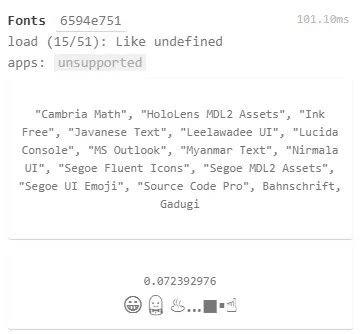
The Apps field gives hints about the software environment based on font data. If it shows unsupported, you shouldn't take that to mean the device has no applications installed.
Screen
The Screen block provides information about screen size (Screen), available screen area (Avail), touch capability (Touch), color depth and pixel depth (Depth), and the size of the browser viewport (Viewport).
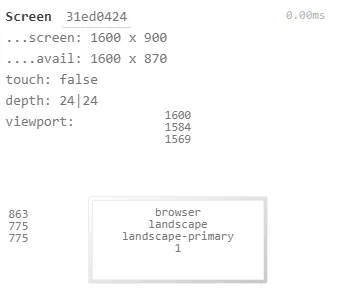
You shouldn't expect Screen, Avail, and Viewport to be the same size. In the example image, Screen is 1600 × 900 but Avail is 1600 × 870. This difference can come from the space taken up by the taskbar.
When comparing against your actual screen, you also need to account for the operating system's display scaling and the size of the browser window.
3.5. Timezone, Language, and Intl
These three groups of information help you understand how the browser handles time, language, and regional formatting:
Timezone: The time zone of the browser environment.
Language: The language and the list of preferred languages.
Intl: The locale and how dates, times, and numbers are formatted by region.
You can cross-check the corresponding information in Navigator, Worker, Timezone, and Intl to understand the settings the browser is using.
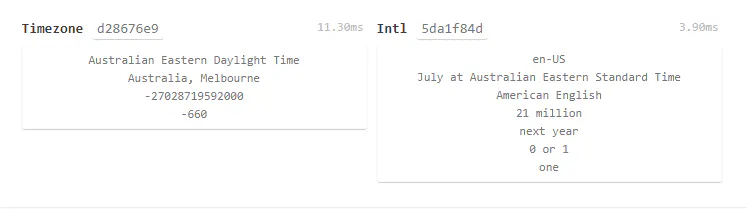
In the example image, the Timezone is Australia/Melbourne but the locale is en-US. This is not automatically a sign of a problem, because users can choose a language and regional settings that differ from where they live.
3.6. WebRTC
The WebRTC block helps you check the network data your browser can expose while setting up a real-time connection.
Of these, Host Connection, STUN Connection, and Foundation/IP relate to network connection information. SDP Capabilities reflects the ability to establish a communication session, while Devices provides information about the types of multimedia devices.
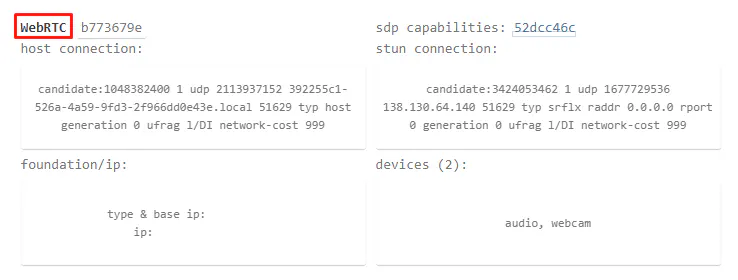
When reading the results, you need to tell apart local IP addresses, public IP addresses, and hostnames ending in .local. A .local hostname may be generated by the mDNS mechanism to avoid exposing your local IP address, and it is not a sign of an IP leak.
If WebRTC shows an unexpected IP address, you need to identify what type of address it is and compare it with the network connection you are using before drawing any conclusion.
3.7. Other fingerprint parameters
Besides the groups of data above, CreepJS also checks several other characteristics of the browser environment:
DOMRect and SVGRect: How the browser calculates the size and position of elements.
Speech and Media: Synthetic voices and support for multimedia formats.
CSS Media Queries and Computed Style: Display characteristics and how CSS is processed.
Math and Error: Calculation characteristics and error messages of the JavaScript engine.
Window, HTMLElement, and Features: Browser properties, APIs, and features.
Status: Information about the network, battery, memory, and storage capacity.
You can refer to these blocks when you need to study differences in fingerprints. Note that Error reflects how the JavaScript engine words its error messages, and is not a warning that the browser is having problems.
4. How to evaluate fingerprint test results in CreepJS
CreepJS does not classify test results as pass or fail. To use the tool effectively, you need to know which cases deserve a closer look and how to identify the cause, rather than just looking at hashes or percentages.
4.1. Signs to watch for when reading results
While testing your fingerprint, you may come across results that aren't what you expected. The table below helps you decide what to check next in each situation.
Result | What should you check? |
FP ID changes between tests | Compare the data and hashes of each block to find the component that changed. |
Headless or Stealth is not 0% | Look at the conditions that return true and understand what each test means. |
Data differs between Navigator and Worker | Consider the execution context and the corresponding API support. |
A field shows unknown or unsupported | Check feature support and the detection limits of CreepJS. |
A parameter is flagged | Look into the corresponding test, your privacy settings, and the effect of extensions. |
If you want to find the cause of a difference, you should repeat the test under equivalent conditions to limit factors that could affect the result.
4.2. Dedicated tests in the Tests section
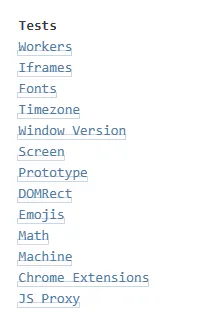
The Tests section at the bottom of the CreepJS page offers 13 dedicated tests. You can use them when you need to dig deeper into a particular group of data.
For example, Workers helps you study data across different execution contexts, Fonts focuses on font detection, and Screen and Timezone provide more information about the display environment and time zone.
You don't need to run all of the tests if the results on the main page already give you enough information.
5. Conclusion
The CreepJS Fingerprint Test helps you understand what data your browser can reveal to websites, from fingerprint identifiers and headless environment characteristics to hardware information and network connections.
If you use the antidetect browser Hidemyacc , you can combine it with CreepJS to check the fingerprint parameters provided by each browser profile and compare them against the configuration you set up.
However, CreepJS does not represent the full range of systems websites use to identify users. So you should treat this tool as an aid for analyzing browser fingerprints rather than the only standard for judging a browser environment.
6. FAQ
1. What counts as a good CreepJS result?
CreepJS doesn't give an overall score for fingerprint quality. You need to look at the consistency of the data, the flagged signs, and the results of each test group instead of relying only on percentages.
2. Why does the FP ID in CreepJS change with every test?
The FP ID can change when the data used to generate the fingerprint changes. The cause may be a browser update, a change in the device environment, or privacy settings. This is not necessarily a sign of a problem.
3. Is Creepjs.org the official CreepJS website?
No. According to the developer, the official online version of CreepJS is hosted at https://abrahamjuliot.github.io/creepjs/. You should use this address to reduce the risk of handing your fingerprint data to unauthorized websites.
4. Is the CreepJS Fingerprint Test free?
Yes. CreepJS is an open-source project under the MIT license. You can test your fingerprint for free on the official website without registering an account or installing any software.
5. Does CreepJS support Firefox and Safari?
Yes. CreepJS supports the browser engines Gecko, Blink, and WebKit, which are used by Firefox, Chrome, and Safari respectively. However, some parameters may be unavailable or display differently depending on each browser's API support and privacy protection mechanisms.