Have you changed your proxy and configured a separate fingerprint for each profile but still encountered checkpoints or website access restrictions? This suggests that managing browser environments involves more than simply changing a few settings. Behind every visit, websites can analyze various types of data to determine whether the visitor is a real user or a bot. So, how do bot detection techniques work, and can antidetect browsers be identified? This article explains these mechanisms and the factors that affect a website's ability to detect them.
1. What Are Bot Detection Techniques?
Bot detection techniques are methods websites use to determine whether incoming traffic comes from real users or automated programs. When you visit a website, its system does not only examine the actions being performed. It may also analyze your IP address, browser information, how you interact with the page, and the characteristics of your connection.
Based on this data, the website assesses the trustworthiness of the visit and determines how to handle it. Some visits are allowed to proceed normally, while those showing unusual patterns may be subject to additional verification, restrictions, or blocking.
Not all bots are harmful. In fact, many bots are developed to perform legitimate tasks, such as collecting data for search engines or monitoring website uptime. Therefore, bot detection systems need to distinguish between legitimate automated traffic and potentially risky activities.

1.1. What Is the difference between legitimate bots and malicious bots?
Not all automated visits pose a threat to a website. Some bots perform essential tasks, such as collecting data for search engine indexing, checking whether a website is operating properly, or generating link previews when users share URLs.
In contrast, malicious bots are often used to carry out unauthorized activities, such as creating accounts in bulk, scraping data without permission, or attempting to log in using lists of existing passwords. These two groups can be distinguished by their purposes and how websites handle their activities:
Comparison table:
| Criteria | Legitimate Bots | Malicious Bots |
|---|---|---|
| Examples | Search engine crawlers, uptime monitoring bots, link preview generators, AI crawlers | Bots that create fake accounts, perform unauthorized scraping, test login credentials, or commit click fraud |
| Purpose | Collect information or perform legitimate automated tasks | Abuse services, extract data, or carry out fraudulent activities |
| Website response | Allow access or apply restrictions according to established rules | Monitor activity, request verification, or block access depending on the level of risk |
Not all automated data collection is permitted by websites. For example, crawlers must comply with access policies and the limits set by website owners. Therefore, anti-bot systems need to assess whether automated activities follow these rules rather than allowing or blocking access solely because the visitor is a bot.
1.2. Why do websites need to detect bots?
Malicious bots can generate large volumes of traffic in a short period, affecting both systems and real users. If left unchecked, these activities can increase server load, disrupt services, or force websites to process large numbers of meaningless requests.
Some of the main purposes of bot detection include:
- Preventing fraud and automated attacks: Limiting bulk account creation, password attempts, click fraud, and other forms of abuse.
- Protecting accounts and data: Reducing the risk of unauthorized access, unpermitted data collection, and account takeover attacks.
- Managing server resources: Limiting unusual volumes of automated requests that can increase system load, affect response times, and reduce the website's ability to serve users.
- Protecting user experience: Reducing spam, fake accounts, and automated activities that negatively affect service quality.
For example, an e-commerce website receives thousands of failed login attempts within a short period from the same group of IP addresses. This could indicate a credential stuffing attack. The system may introduce additional verification or limit requests to protect user accounts.
According to the Imperva Bad Bot Report 2026 by Thales, automated traffic accounted for approximately 53% of total web traffic in 2025, up from 51% in 2024. Although this figure comes from a cybersecurity company, it highlights the growing importance of distinguishing legitimate bots from malicious ones.
2. What techniques do websites use to detect bots and antidetect browsers?
Websites typically examine four main layers of signals: IP addresses, browser fingerprints, user behavior, and TLS fingerprints. Each layer provides different information about a visit. Therefore, changing an IP address does not mean that browser characteristics, behavior, and connection details will change as well.
Anti-bot systems may use one or more methods depending on the platform and its security requirements. Below are four important groups of signals commonly used to evaluate access activity.
2.1. Detecting bots through IP addresses
An IP address is one of the first network signals websites can use to evaluate the source of incoming traffic. Through an IP address, a system can identify approximate geographical information, the network provider, and certain connection characteristics. It also provides a basis for assessing whether the traffic source may be associated with previously suspicious activity.
Some factors websites may examine include:
- IP type: An IP address may belong to a datacenter network, a residential network, or a VPN service. Each type has different characteristics and use cases.
- IP reputation and history: Systems may compare an IP address against data about previously reported traffic sources, blocklists, or unusual activities.
- Access frequency: Multiple accounts sending requests from the same IP address within a short period may attract the system's attention.
- Geographical location: An IP address's location may be compared with other information from the access session or the account's activity history.
For example, if multiple accounts repeatedly log in from the same datacenter IP within a short period, the website may increase its monitoring level. However, this does not mean that all datacenter IPs are blocked. Similarly, residential IPs are not automatically trustworthy if they have a poor access history or have been flagged by multiple services.
Read more:
- What Is a Static IP Address? Advantages, Disadvantages, and How to Configure It on Routers and Windows
- Mobile Proxy - Features, Benefits, and How to Use It
- What Is a Rotating Proxy? Top 7 Best Rotating Proxies Today
- Residential Proxy - How It Works and Why You Should Use It
- What Is a Datacenter Proxy? How It Works and Its Applications
2.2. Detecting bots through browser fingerprints
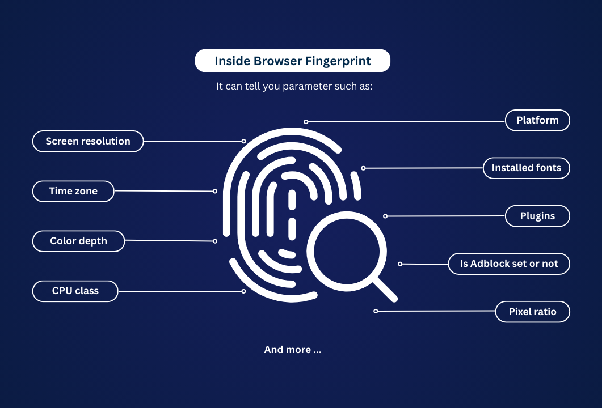
A browser fingerprint is a collection of browser and device characteristics that websites can collect to identify an access environment. Unlike an IP address, a fingerprint provides information about how a browser is configured and operates on a device.
Some attributes commonly used to create a browser fingerprint include:
- User Agent and operating system: Provide information about the declared browser, its version, and the operating system.
- Screen resolution: Indicates the screen size or viewport used by the browser.
- Canvas and WebGL: Can produce different results depending on the browser, device, and graphics environment.
- WebRTC: Provides information related to real-time communication capabilities and certain network characteristics of the browser.
- Fonts: The available font list can help distinguish between device environments.
- Language and time zone: Reflect the browser's language, region, and time settings.
Anti-bot systems do not necessarily evaluate each attribute individually. Instead, they may compare different parameters to identify inconsistencies, duplicate fingerprints, or unusual values.
For example, a browser may declare that it is running on macOS, while some environment attributes or the available font collection do not match that configuration. This discrepancy may become a signal that requires further inspection, although it is not enough on its own to conclude that the visit comes from a bot.
2.3. Detecting bots through user behavior
In addition to network and browser information, websites can analyze how users interact with a page. This method focuses on request frequency, session duration, and the sequence of actions to identify unusual activity patterns.
Behavioral signals may include:
- Request volume and frequency: Analyzing the number of requests sent within a certain period and how frequently they are sent. Bots may generate large volumes of requests or send them continuously at unusual intervals.
- Session duration: Tracking the length of an access session, from the beginning to the end, as well as how long users stay on a website. Sessions that are unusually short or long may require further inspection.
- Mouse movements and clicks: Analyzing mouse movement directions, click positions, and how users interact with page elements.
- Scrolling behavior: Tracking how users scroll through a page, their scrolling speed, and the areas where they pause or interact.
- Typing speed: Analyzing typing speed and the intervals between keystrokes.
- Action sequences: Checking the order in which actions are performed on a website, such as logging in, visiting pages, searching, and submitting forms.
For example, multiple profiles may perform the same sequence of actions, send requests at nearly identical intervals, and complete a process within an unusually short time. These repeated behavior patterns may indicate automation and require further investigation.
However, a single behavior is not enough to determine whether a visitor is a bot. Real users may also send multiple requests or perform actions quickly in certain situations. Therefore, systems need to combine multiple signals and consider the full context of an access session before making a decision.
2.4. Detecting bots through TLS fingerprints
TLS fingerprinting is an identification technique based on characteristics that appear when a browser establishes an encrypted connection with a website. Through the TLS handshake, a system can collect information such as the protocol version, cipher suites, and extensions sent during the connection process.

Websites can compare these characteristics with the browser information provided by a visit. For example, a request with a User Agent identifying itself as Chrome but TLS characteristics resembling those of an automated programming library may create a noticeable inconsistency.
Some commonly discussed methods in this field include JA3 and JA4. These methods generate fingerprints from TLS connection information, helping systems group and compare different connection patterns.
A TLS fingerprint cannot independently determine whether a visit comes from a bot. When compared with IP addresses, browser fingerprints, and access behavior, this signal gives websites additional information for assessing risk.
2.5. Supporting mechanisms: CAPTCHA, Honeypots, JavaScript, and Signature detection
In addition to the four main signal layers, websites may use several supporting mechanisms to detect or verify automated activity.
- CAPTCHA: Used as an additional verification step when the system considers a visit potentially risky. Users may be asked to select images according to instructions, enter characters, or complete another verification task to prove they are not bots before proceeding.
- Honeypots: Use hidden form fields or elements that real users typically cannot see or interact with. If an automated request submits data to these fields, the system may treat it as a sign of bot activity.
- JavaScript checks: Use JavaScript to collect information about the browser environment, code execution status, and certain interaction characteristics. This data helps systems identify environments that show signs of automation, but it is not sufficient to conclude that a visit comes from a bot.
- Signature detection: Compare requests and access characteristics against known patterns associated with bots or automation tools. When a match is detected, the system may flag the visit for further inspection.
These mechanisms can be combined with other analysis methods. For example, a website may use JavaScript to collect additional browser data and then compare the results with IP and behavioral signals.
3. How do websites combine bot detection techniques?
A single signal is usually not enough to determine whether a visit comes from a bot. A suspicious IP address, an unusual fingerprint, or a high request rate all need to be considered in their specific context. Therefore, anti-bot systems may combine multiple layers of data to assess risk rather than relying on just one factor.
3.1. Combining signals across multiple layers
Each detection layer provides a different perspective on a visit. IP addresses reflect the network source, browser fingerprints describe the browser environment, behavior shows how users interact with the website, and TLS fingerprints provide information about connection characteristics.
| Detection Layer | What Does the Website Examine? | When Is It Checked? | Potential Risk Indicators |
|---|---|---|---|
| IP | Network source, location, and IP reputation | When connecting or during browsing | IP addresses with a poor history or multiple accounts using the same unusual traffic source |
| Fingerprint | UA, OS, Canvas, WebGL, WebRTC, and fonts | When the browser loads a page or runs a checking script | Conflicting attributes, duplicate fingerprints, or unusual values |
| Behavior | Requests, clicks, scrolling, and typing speed | During user interactions | Repeated actions, unusual speeds, or script-like behavior |
| TLS | Cipher suites, extensions, protocol version, and handshake order | When establishing a connection | TLS fingerprints that do not match the declared browser characteristics |
Anti-bot systems may also monitor sequences of requests and behavior throughout one or multiple access sessions. An individual request may not show any suspicious signs, but a series of consecutive requests may reveal automated activity.
For example, actions repeated in the same sequence, at the same frequency, or at nearly identical intervals may become risk signals. Analyzing multiple sessions also helps websites identify activities such as bulk logins, continuous account creation, or repeated navigation through pages according to a fixed process.
After collecting data, systems may use machine learning and risk scoring to analyze relationships between signals. Machine learning helps identify unusual activity patterns, while risk scoring combines data to assess the risk level of a visit. These are analysis and assessment mechanisms, not a separate fifth bot detection layer.
3.2. Inconsistencies that may cause a profile to be flagged
A profile may provide individual pieces of information that appear normal but still contain inconsistencies when a website compares data across multiple layers. Some common scenarios that illustrate this issue include:
| Scenario | Inconsistency |
|---|---|
| An IP address is located in the US, but the browser's time zone is set to Vietnam | The network location does not match an environment attribute |
| The User Agent identifies Chrome, but the TLS fingerprint resembles that of a programming library | The browser information and connection characteristics do not correspond |
| Multiple profiles have different configurations but exhibit exactly the same behavior | The profiles have separate environments but share repeated behavioral patterns |
These signs are not enough to confirm that a profile is being operated by a bot. For example, users may access the Internet through a VPN while in another country, resulting in a difference between their IP location and time zone. Therefore, systems need to examine additional related signals before making a decision.
The key factor is consistency across different data layers. Changing one element, such as an IP address or User Agent, does not mean that the remaining information will be updated accordingly.
4. Can websites detect antidetect browsers?
Yes, but the extent to which they can do so depends on the signals collected by the website. Antidetect browsers help users customize browser settings and create separate environments for individual profiles, but this does not mean that all activity from these profiles is beyond a website's ability to inspect. When accessing a website, each profile still generates various signals, from IP addresses and browser fingerprints to usage behavior and TLS connection characteristics.
The likelihood of a profile being detected depends on how its environment is configured, the quality of its connection, and its actual activity on the website. Therefore, using an antidetect browser does not guarantee that an account will always be accepted by a platform. To better understand the limitations of this tool, you need to consider the factors websites can continue to examine.
Learn more: What Is an Antidetect Browser? Why Is It More Powerful Than a VPN and Proxy?
4.1. Why can antidetect browsers still be detected by websites?
Antidetect browsers help manage fingerprints and create separate browser environments for individual profiles, but they cannot control all the data websites collect during access. Therefore, even a separately configured profile may still show signs that prompt anti-bot systems to perform further checks.
Some factors that are beyond the tool's direct control include:
- IP reputation: A proxy assigned to an individual profile may still have an unusual access history or have been flagged by certain services.
- TLS connection characteristics: Changing a browser fingerprint does not mean that TLS connection characteristics will change accordingly.
- Access behavior: The tool does not automatically make website interactions resemble those of real users. High request frequency or repeated action patterns may still attract attention.
On the other hand, anti-bot systems also have limitations. Modern bots can imitate user behavior, while real users who send multiple requests within a short period may still be mistakenly asked to verify their identity (false positives). Websites do not necessarily check all four layers in every situation. Therefore, it is not accurate to say that all antidetect browsers are detected in the same way. The outcome depends on profile configuration, connection quality, access behavior, and each platform's detection mechanisms.
4.2. How do antidetect browsers help manage identification signals?
Antidetect browsers can help manage certain aspects of the access environment, but they do not automatically handle every factor that affects detectability. Therefore, in addition to the features provided by the tool, users still need to actively check and manage several other factors.
| Signal Layer | What Can an Antidetect Browser Handle? | What Else Should Users Do? |
|---|---|---|
| IP | Supports configuring a separate proxy for each profile, helping assign IP addresses based on accounts or usage purposes. | Choose proxies with suitable quality, and check their IP locations and connection stability. |
| TLS | TLS characteristics may be partially determined by the browser and connection environment used by the tool. | Check compatibility between the browser, profile environment, and connection characteristics. Do not assume that changing a browser fingerprint will also change the TLS fingerprint. |
| Fingerprint | Allows users to create and manage profiles with separate browser settings, such as User Agent, operating system, resolution, language, and time zone. | Ensure that the settings within each profile are consistent with one another, and avoid using multiple profiles with unnecessarily duplicated fingerprints. |
| Behavior | Helps manage profiles and organize workflows. Some tools also provide automation features. | Actively control the frequency, sequence, and execution of actions. Using automation tools does not mean that access behavior will resemble that of real users. |
Based on these criteria, a suitable antidetect browser should not only support browser customization but also meet users' profile management needs during operation. So, how can a specific tool support these tasks?
Read more: Top 10 Antidetect Browsers for Managing Multiple Accounts
4.3. Maintaining consistent profiles with antidetect browser Hidemyacc
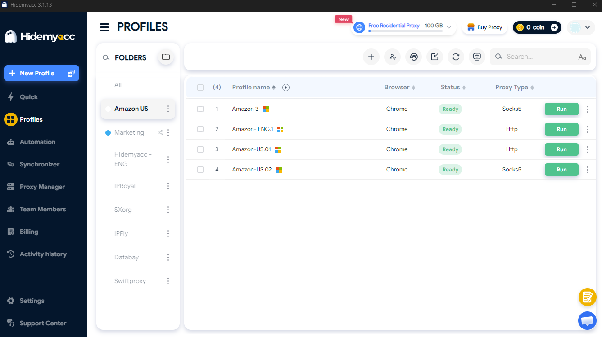
Antidetect Browser Hidemyacc supports creating and managing separate browser profiles, helping users maintain independent access environments for individual accounts. Instead of using a shared browser configuration, you can set up a separate fingerprint for each profile, including parameters such as User Agent and other browser identification attributes. This makes it easier to manage each account's environment information in one place.
In addition to fingerprint configuration, Hidemyacc integrates Proxy Manager, allowing users to store, manage, and assign proxies to individual profiles. This makes it easier to track the proxy configuration associated with each browser environment without having to manage them separately outside the tool.
As the number of profiles increases, features such as folder creation, member permissions, and profile sharing also make management more convenient. You can organize profiles by account, client, or campaign, and share the necessary profiles with team members without providing them with the main account password.
These features help users centrally manage fingerprint configurations, proxies, and profile data. However, Hidemyacc does not control all the signals websites use to detect bots, such as IP reputation, TLS characteristics, or access behavior. Therefore, the tool supports browser environment management but does not guarantee that accounts will remain undetected. Users still need to choose suitable proxies, maintain consistent profile configurations, and pay attention to how their accounts are operated.
5. Common Mistakes That Lead to Bot Detection and How to Fix Them
Even when using proxies and antidetect browsers, users may still expose signals that cause websites to suspect automated activity. This may happen because they do not fully understand the factors examined by anti-bot systems or have not paid enough attention to consistency across the access environment.
5.1. Changing Only the Proxy While Ignoring Fingerprints
Using a separate IP address for each profile does not mean that the browser environments are completely independent. If multiple profiles still share identical fingerprint attributes, websites may identify similarities between their visits.
To check this, you can use Pixelscan, CreepJS, or BrowserLeaks. These tools display attributes such as User Agent, operating system, Canvas, and WebGL, helping you identify areas that may require further review. However, their results do not represent the full range of evaluation mechanisms used by websites.
5.2. Creating Random Fingerprints Without Maintaining Consistency
Changing fingerprints incorrectly can also cause the browser environment to contain unreasonable or inconsistent attributes. This often happens because users focus on adjusting individual settings without considering the relationships between them.
When setting up a profile, you should prioritize configurations supported by the tool instead of changing individual parameters arbitrarily. If manual adjustments are necessary, learn about the impact of each attribute and review the configuration after making changes.
5.3. Failing to Check IP Quality and History
Not all IP addresses have the same level of trustworthiness. Websites may evaluate IP sources based on their reputation, access history, and network characteristics. Therefore, choosing a proxy based only on its IP type or geographical location while ignoring its actual quality may expose users to risks.
For example, an IP address may belong to a residential network but have previously been used for multiple unusual activities or flagged by certain services. Using this type of IP does not guarantee that a visit will be considered trustworthy.
Before using a proxy, you should pay attention to three factors:
- IP reputation: Check whether the IP address has been flagged by services as a suspicious traffic source.
- Geographical location: Compare the IP location with the information in the access environment.
- Provider: Prioritize proxies with clear origins and transparent service information.
5.4. Failing to Control Automation Across Profiles
Running the same automated process across multiple profiles may generate large volumes of requests or repeated access patterns. For example, several profiles may send requests to the same service simultaneously or repeatedly perform the same task within a short period.
To limit this situation, you need to control the frequency and number of requests while complying with the platform's access limits. For tasks with supported integrations, prioritize official APIs or methods permitted by the platform.
5.5. Failing to Recheck After Browser Updates or Proxy Changes
Updating the browser engine, changing the browser version, or switching proxies may affect certain fingerprint attributes and connection information. If you continue using previous test results, you may overlook changes in the access environment.
Therefore, check the following information again after adjusting your configuration:
- Fingerprint information after updating the browser.
- IP address and geographical location after changing proxies.
- Browser version and profile settings for easier comparison.
These mistakes show that setting up a separate profile or changing an IP address is not enough to eliminate all unusual signals. Websites may combine data from IP addresses, browser fingerprints, access behavior, and TLS connections to assess the risk level of each visit. Therefore, users need to understand the role of each signal layer and check their browser environments as a whole instead of focusing on just one individual setting.
6. Conclusion
Bot detection techniques do not rely on a single indicator. Instead, they may combine multiple layers of data, including IP addresses, browser fingerprints, access behavior, and TLS connection characteristics. Therefore, changing only an IP address or browser setting is not enough to eliminate every unusual signal during website access.
For people who regularly manage multiple accounts, an antidetect browser is a tool that helps set up and maintain separate browser environments. With Hidemyacc, you can manage fingerprints, assign proxies, and organize profiles on a single platform. By understanding the signals websites use to detect bots, you can identify which factors need to be checked and choose tools that better suit your needs.
7. FAQ
1. How do websites detect bots?
Websites can detect bots by analyzing multiple signals, including IP addresses, browser fingerprints, access behavior, and TLS fingerprints. Anti-bot systems may combine this data to assess the risk level of a visit and then allow access, request verification, or block suspicious requests.
2. Can antidetect browsers be detected?
Yes. Antidetect browsers do not guarantee that accounts or profiles will remain undetected by websites. These tools can help manage fingerprints and proxies, but websites may still evaluate TLS fingerprints, access behavior, and other signals. The likelihood of detection also depends on profile configuration and each platform's anti-bot mechanisms.
3. How can you check whether a visitor is a bot?
You need to combine multiple indicators instead of relying on a single factor. You can check the IP source, browser fingerprint, request frequency, action sequence, and connection characteristics. For example, a visit with an unusual request rate, repeated behavior, and an inconsistent fingerprint may require further inspection. However, no single indicator is enough to conclusively determine that a visitor is a bot.
4. How can you reduce the risk of being mistakenly identified as a bot?
You should maintain consistent profile information, use a connection suitable for your needs, and recheck the browser environment after changing its configuration. You should also avoid automated processes that generate unusual request volumes or interaction patterns. If you encounter a verification request or access restriction, review the notification and follow the platform's official support procedures. No configuration can guarantee that you will never be mistakenly flagged.
5. Which tools can you use to check a profile's fingerprint?
You can use Pixelscan, CreepJS, or BrowserLeaks to check certain browser attributes and fingerprint signals. Each tool has different testing methods and data coverage. Their results help you better understand the browser environment you are using, but they cannot guarantee an accurate prediction of how every platform will evaluate a profile.