Are you at school or work, clicking on YouTube or Facebook only to receive a blocked notification, while not having the permissions to install additional software? CroxyProxy is a web proxy service that helps you access restricted websites directly on your browser without any software installation. This article will first guide you on how to use CroxyProxy to access websites immediately, and then explain how the tool works, its advantages, limitations, security level, and cases where you should consider alternative solutions.
1. What is CroxyProxy?
CroxyProxy is a web proxy, meaning it is a service that acts as an intermediary server between you and the website you want to access. Instead of connecting directly to YouTube, Facebook, or any other website, your access request will go through the CroxyProxy server first before being forwarded to the destination page.
The main difference between CroxyProxy and other bypass tools is that you can use it instantly on your browser without downloading or installing additional software. Since it operates entirely on the web, this tool is commonly used when users do not have administrative rights to install applications, such as on computers at schools, libraries, or companies.

1.1. How does CroxyProxy work?
When accessing a website normally, the browser sends a direct request to that website's server. With CroxyProxy, this process involves an intermediary step.
The operational workflow is as follows:
- You access CroxyProxy and enter the link of the website you want to open.
- CroxyProxy sends a request to the destination website on your behalf.
- The website returns data to the CroxyProxy server.
- CroxyProxy forwards that content back to your browser for viewing.
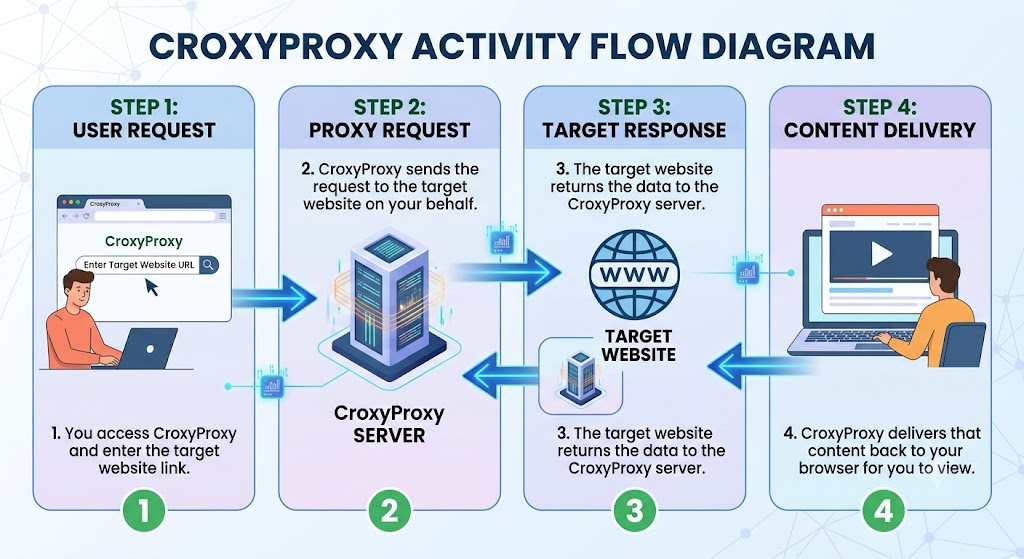
Thanks to this mechanism, the local network you are using only sees that you are accessing CroxyProxy instead of the destination website. Meanwhile, the website you open receives the request from the CroxyProxy server's network address instead of your real network address.
1.2. Which websites can CroxyProxy unblock?
CroxyProxy is designed to help users access restricted websites on certain local networks without installing software. In practice, this tool works relatively well with websites that only require reading content or watching videos.
Some websites that usually run stably include:
- YouTube, supporting direct video searching and playback. This is also why many people search for the keyword croxyproxy youtube when they want to watch videos at school or work.
- Facebook, suitable for reading articles, viewing the news feed, or accessing public pages. This is one of the popular demands associated with the keyword croxyproxy facebook.
- X (Twitter), Reddit, Wikipedia, and many news websites blocked by local networks.
If your sole purpose is to read content or watch videos, CroxyProxy generally meets the requirement well. Conversely, if you need to log into important accounts or perform transactions, you should consider more suitable solutions.
1.3. Should you use the free or paid version of CroxyProxy?
CroxyProxy currently offers both free and paid versions. Both versions utilize the same operational mechanism, but the experience will differ in terms of speed, ads, and additional features.
1.3.1. Free Version
This is the default version when you access CroxyProxy. Users do not need to create an account or register for a service plan to use it.
The biggest advantage is instant access, support for video playback, and session encryption at no cost. Therefore, this is a suitable choice if you only occasionally need to open YouTube, Facebook, or a blocked website.
In return, the free version contains advertisements, speeds may drop during peak hours, video playback quality is sometimes limited, and the number of servers is fewer.
1.3.2. Paid Version
The paid version is geared toward users who use CroxyProxy frequently and want a more stable experience.
Compared to the free version, this version removes advertisements, improves access speeds, supports higher quality video playback, and provides more server options.
However, even with the paid plan, CroxyProxy still operates solely within the browser and cannot replace a VPN or an antidetect browser for specialized needs.
Comparison between Free and Paid versions
| Criteria | CroxyProxy Free | CroxyProxy Premium |
|---|---|---|
| Cost | Free | Paid subscription |
| Account required | No | Yes, after subscription |
| Advertisements | Yes | No |
| Speed | Can be slow during peak hours | More stable due to less loaded servers |
| Video quality | Suitable for basic needs | Supports better high-quality video playback |
| Server choices | Limited | Can select preferred servers |
| Large file support | Limited | Unlimited file size |
| Technical support | None or limited | Priority support |
| Best suited for | Users who occasionally need to open YouTube, Facebook, or blocked sites | Users who frequently access blocked websites and want a more stable experience |
If you only need to quickly open YouTube, Facebook, or a blocked website a few times a day, the free version usually meets your needs. Conversely, if you use CroxyProxy frequently and want to reduce ads and improve connection speed, you can consider the paid version.
1.4. How does CroxyProxy differ from VPNs and antidetect browsers?
CroxyProxy, VPNs, and antidetect browsers can all help change your network address when accessing the Internet, but the purposes of these three tools are completely different.
A VPN (Virtual Private Network) creates an encrypted connection between your device and the VPN server. When the VPN is turned on, all Internet traffic on the device, including browsers, chat software, and other applications, goes through this connection. VPNs are suitable when you need to increase privacy or access region-restricted content, but they are not designed to manage multiple accounts on the same platform.
Read more: What is a VPN? Why should you use a VPN to protect personal information?
So what is an antidetect browser? These are anti-detection browsers that create multiple independent browser profiles, each with its own set of identification parameters. When combined with a proxy, each profile can act as a different device. This type of tool is typically used to manage multiple accounts on YouTube, Facebook, TikTok, Google, or other platforms that restrict accounts from being linked together.
Meanwhile, CroxyProxy is much simpler. This tool only acts as a web proxy that helps forward traffic of the currently open browser tab. You do not need to install software, but you also do not have the ability to change the browser fingerprint.
| Criteria | CroxyProxy | VPN | Antidetect Browser |
|---|---|---|---|
| Installation required | No | Yes | Yes |
| Scope of operation | Browser tab | Entire device | Browser profile |
| Network address change | Yes | Yes | Yes, when combined with proxy |
| Browser fingerprint change | No | No | Yes |
| Traffic encryption | In proxy session | Entire connection | Depends on proxy |
| Best suited for | Quickly opening blocked websites | Protecting Internet connection | Managing multiple accounts |
It can be seen that these three tools serve entirely different needs. CroxyProxy is suitable when you need quick access to a blocked website directly on the browser, a VPN is appropriate when you want to protect the entire device's Internet connection, and an antidetect browser is designed for managing multiple accounts with separate browser profiles.
2. How to use CroxyProxy
CroxyProxy is very simple to use because it runs right in your browser. You do not need to install software or change network configurations; just access the service website and enter the address of the website you want to open. Below is a detailed guide for computers and phones.
2.1. Using CroxyProxy on a computer
If you are using a computer, you can access CroxyProxy right on Chrome, Edge, Firefox, or any other popular browser. The whole process only takes about one to two minutes and does not require additional software installation.
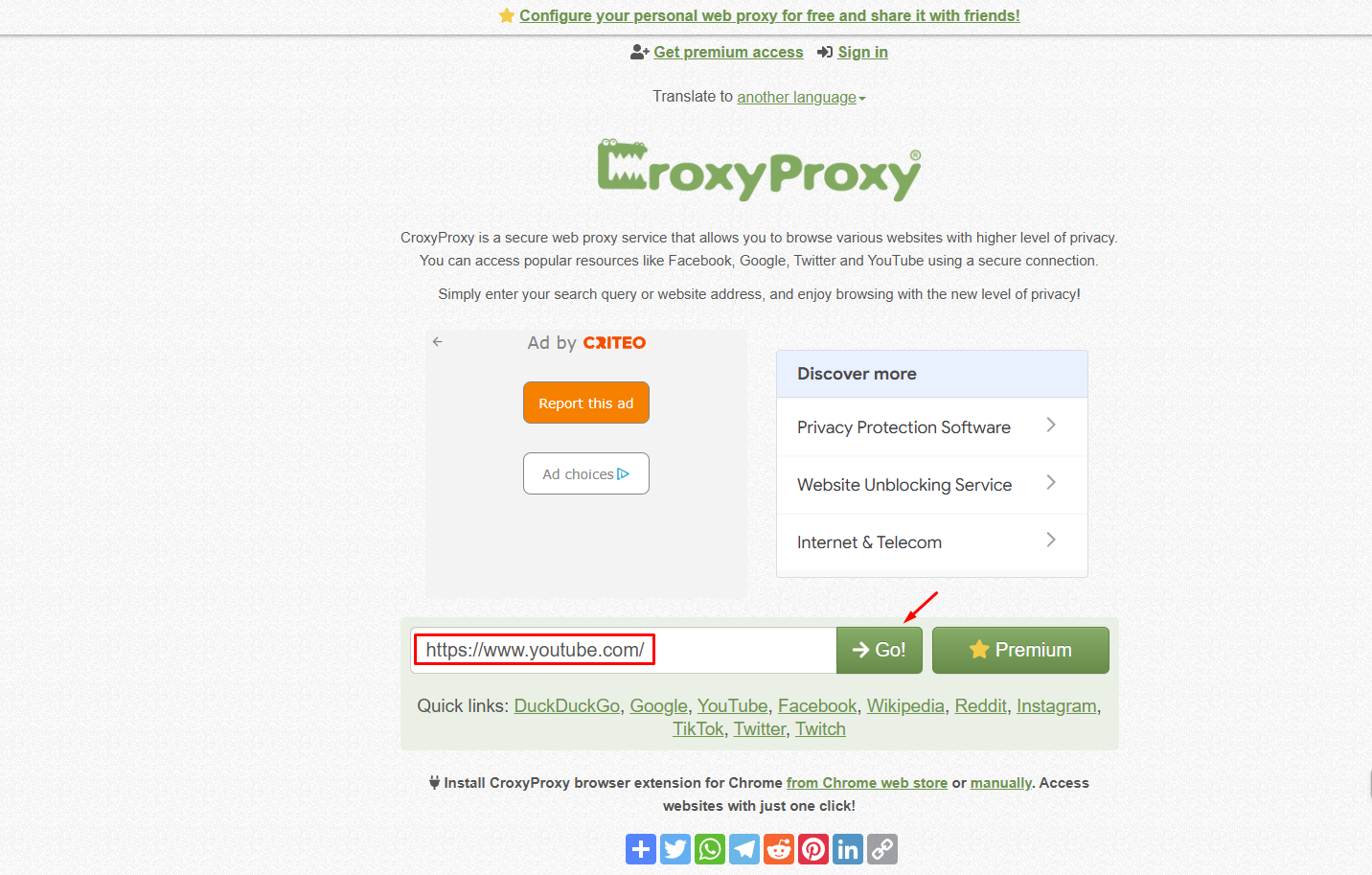
- Step 1: Open your browser and access the official CroxyProxy website at https://www.croxyproxy.com/.
- Step 2: On the homepage interface, enter or paste the link of the website you need to access into the search box. You can also directly type domains like youtube.com, facebook.com, or the address of any website you want to open.
- Step 3: Click the button to start accessing. CroxyProxy will send the request through an intermediary server and load the website's content to your browser.
- Step 4: After a few seconds, the website will display on the screen. During use, you can use the CroxyProxy control bar to open another link, change the server if supported, or end the session when you no longer need it.
Note: You should only access CroxyProxy from the official website address. Before entering any information, carefully check the domain name being used.
2.2. Using CroxyProxy on a phone
On a phone, the method of use is almost identical to a computer. You just need to use the available browser on your device without downloading any additional applications.
- Step 1: Open Chrome on Android or Safari on iPhone, then access the CroxyProxy website.
- Step 2: Enter or paste the link of the website you want to open into the search box.
- Step 3: Press the launch button and wait a few seconds for the website to finish loading. If you are watching a video, you can rotate the screen horizontally for a better experience.
- Step 4: When finished, simply close the tab or exit the proxy session.
Note: If you frequently use CroxyProxy on your phone, you can add the website to your home screen or bookmarks for quicker access. Additionally, avoid switching to other applications for too long because the proxy session might disconnect and require reloading.
3. Advantages and limitations of CroxyProxy
After understanding what CroxyProxy is and how it works, the next thing many people care about is whether this tool is really suitable for their needs. Before deciding to use it long-term, you should clearly understand both the strengths and limitations of CroxyProxy.
3.1. Advantages of CroxyProxy
CroxyProxy is used by many people because of its simple operation and ability to meet basic access needs. Some prominent advantages of this tool include:
- No software installation required: CroxyProxy works directly on your browser, so you only need to access the website and enter the link you want to open. This is a major advantage when using computers at schools, libraries, or companies, where users usually do not have rights to install applications.
- Free for basic needs: You can use the free version without registering an account. This is suitable if you only want quick access to a blocked website, to read news, or to watch videos for a short time.
- Supports online video streaming: Compared to many other free web proxies, CroxyProxy displays YouTube's interface quite fully and still supports video streaming. Because of this, the experience of viewing content is usually more stable than services that only load text.
- Works on multiple devices: CroxyProxy can be used on Windows, macOS, Linux, Chromebook, Android, and iPhone because it only requires a web browser. You do not have to install a separate application for each operating system.
Overall, if you only need quick access to a website or to view online content, CroxyProxy meets daily usage needs quite well.
3.2. Limitations of CroxyProxy
Alongside its advantages, CroxyProxy still has several limitations that you should consider before using:
- Advertisements in the free version: To maintain the free service, CroxyProxy displays advertisements during use. This can affect your experience if you access it frequently.
- Unstable speed during peak hours: Access speed depends on the volume of users connecting to CroxyProxy's servers. During peak hours, page loading or video streaming may be slower than usual.
- Only works inside the browser: CroxyProxy only forwards traffic of the currently open tab. Other applications on your device still use the normal Internet connection, so this tool cannot replace a VPN.
- Some websites may require CAPTCHAs or deny access: Websites that have strong anti-bot systems or require strict verification may display CAPTCHAs continuously, deny access, or require identity verification before allowing login.
Every tool has its own strengths and limitations. Understanding these characteristics will help you choose the appropriate way to access for each need instead of expecting CroxyProxy to meet every case.
4. Common errors when using CroxyProxy
Although CroxyProxy is quite easy to use, during access you may still encounter some errors due to service limitations or the way websites check traffic. Below are the most common situations, along with their causes and corresponding handling methods.
4.1. Cannot access websites
The main reason you cannot access is usually because network administrators at your company or school have proactively added popular proxy service domains to the block list to ensure security and maintain work focus. Since network filters continuously update their blacklists, finding an alternative proxy service is sometimes only temporary and unstable.
To handle this problem effectively, you can consider switching to using a personal 4G/5G data network to completely separate from the local network system. Additionally, using personal browser extensions or switching to less popular proxy services is also an option. However, if your access needs are frequent and urgent, you should prioritize sustainable solutions like equipping a VPN if allowed by your organization's policy, to ensure your connection is always seamless and secure.
4.2. Persistent CAPTCHAs
The phenomenon of CAPTCHAs appearing continuously usually stems from too many users sharing a single IP address from the service's server, causing the destination websites to suspect and flag the traffic as suspicious.
Real-world example: Because thousands of people share the same IP address of the proxy server, the destination website will think that a single computer is trying to spam access, leading to constantly forcing you to solve CAPTCHAs (such as selecting traffic lights, crosswalk images) to prove you are a real human.
To fix this situation, you can try changing the connection server, clearing browser cookies, and starting a completely new access session. It must be emphasized that this is an inherent technical limitation of shared proxy services, and is not due to any operational error on your part.
Read more:
7 effective ways to bypass Captchas - Detailed Guide
Top 5 automatic CAPTCHA solver services
4.3. Slow or blurry video loading
Slow or blurry video loading when using CroxyProxy usually stems from the server's bandwidth being shared among many users simultaneously, especially during peak hours. Because this is a free web proxy, system resources are limited, making it difficult to maintain continuous high speeds for all data transmission requests.
You can mitigate this problem by lowering the video resolution quality or switching to another server in the tool interface to find a more stable connection. Additionally, for users who need to watch videos frequently, accessing during off-peak hours or considering upgrading to the paid version are also effective options to significantly improve the smooth experience.
4.4. Cannot log into Facebook
The inability to log into Facebook when using CroxyProxy occurs because Facebook's security system detects that the login session is coming from a strange IP address or a server located abroad, which is completely different from your usual access sessions from your local country. To ensure account safety, users absolutely should not attempt to log in multiple times, as each failed attempt increases the risk of the account being temporarily locked by the system. If your main need is just to read information or view the feed, the best way is to use the service without logging in to avoid triggering the platform's strict security verification mechanisms.
4.5. Cannot log into Google
Similar to Facebook, Google's system has extremely tight security control mechanisms. Accessing via a strange IP address from a proxy server frequently triggers identity verification processes, requiring users to verify via phone numbers or trusted devices. Therefore, if you encounter login warnings, the best way is to return to using your normal network connection to verify and remove these barriers, instead of continuing to use the proxy for services that require high account security.
In summary, while obstacles regarding CAPTCHAs or video speeds can be resolved by changing servers or accessing during off-peak hours, login issues are an inevitable consequence of the nature of proxy tools. If your needs go beyond just viewing content and you need to log in and manage multiple accounts, these technical limitations are hard to avoid.
5. Is CroxyProxy safe?
Many users often wonder about the safety of CroxyProxy when accessing blocked websites. The short answer is: this tool is safe enough to view content, but absolutely not safe enough to handle sensitive data.
Technically, this service acts as an intermediary server standing between you and the destination site. This means all your traffic still goes through a third-party server system, so before using it regularly, you should consider and review the service's privacy policy. The two sections below cover what you should and should not do.
5.1. Things you should avoid
CroxyProxy is suitable for basic access needs, but how you use it also directly affects your experience and safety level. Below are things you should avoid and habits you should implement.
- Logging into important accounts through a web proxy: Platforms like Google, Facebook, or financial services check many factors when a user logs in, including network address, location, and session history. When detecting a login from a proxy IP, the system may require identity verification or temporarily lock the session to protect the account.
- Entering sensitive information like passwords or payment data: Technically, traffic goes through the proxy server before reaching the destination website. Therefore, you should not enter information such as important account passwords, bank card numbers, or payment data when using a web proxy not intended for secure transactions.
- Assuming CroxyProxy protects the entire device: CroxyProxy only works inside the active browser session. Other applications on the device, such as messaging software, account management apps, or other browsers, still use the normal Internet connection. Therefore, this tool cannot replace a VPN if the goal is to protect all network traffic.
- Sharing a single proxy session for multiple accounts on the same platform: If you log into multiple accounts on the same browser session, these accounts can still leave behind many connecting signs like cookies, browser data, or device parameters. Simply changing the network address is not enough to create independent usage environments.
Simply changing the network address is not enough to create independent usage environments among multiple accounts on the same platform.
5.2. Recommended practices
Alongside things to avoid, a few habits below will help you use CroxyProxy effectively and limit common issues.
- Clear cookies after each session: Form a habit of clearing browser cookies after use to minimize the possibility of linking your browsing session through the proxy with your daily browsing session.
- Accept technical limitations: The free version will experience slow speeds during peak hours. Instead of reloading the page continuously, which the system might misinterpret as spam behavior, be patient, change servers, or choose off-peak hours for a better experience.
- Check regulations at your network location: Most countries allow the use of proxies, but some organizations, schools, or businesses may have their own regulations. Make sure that using CroxyProxy does not violate those policies.
- Choose the right tool for the right need: CroxyProxy is suitable when you only need to read content or quickly open a blocked website. If you want to protect your entire Internet connection, a VPN is more appropriate. And when you need to log in and manage multiple accounts on the same platform, you should use a solution designed for that purpose.
No single tool is suitable for every situation. Understanding the limitations of CroxyProxy will help you use it for the right purpose and choose the appropriate solution when your needs change.
6. Alternative services to CroxyProxy
If CroxyProxy is inaccessible because its domain has been blocked on the local network, the speed is too slow, or ads affect your experience, you can consider several other web proxy services. These tools work in a similar way, acting as an intermediary between your browser and the website you need to access without requiring software installation.
However, each service will have its own limitations on speed, video playback capability, number of servers, or advertisement levels. Therefore, the appropriate choice will depend on your purpose of use.
| Service | Free | Ads | Characteristics |
|---|---|---|---|
| CroxyProxy | Yes | Yes | Supports many websites, relatively stable YouTube video streaming, no installation required |
| Hide.me Proxy | Yes | Few | Simple interface, suitable for quick access to basic websites |
| ProxySite | Yes | Yes | Easy operation, supports many popular websites |
| Plain Proxy | Yes | Few | Suitable for text-based websites, loads lightweight content |
Hide.me Proxy
Hide.me Proxy is a free web proxy service that allows users to access websites through an intermediary server without installing software. This tool has a simple interface, few setup steps, and is suitable for basic needs like reading news or opening regional restricted websites.
The limitation of Hide.me Proxy is that it is not intended to handle heavy tasks like watching high-quality videos or continuous access over a long time. If you only need to quickly open a website, this can be a simple alternative to CroxyProxy.
ProxySite
ProxySite is one of the popular web proxy services, focusing on quick access to restricted websites. Users only need to enter the website address they need to open and choose a server before starting the access session.
The advantage of ProxySite is its simple usage and support for many popular websites. However, the free version still has advertisements, and the speed can vary depending on the number of users connecting at the same time.
Plain Proxy
Plain Proxy is a suitable choice if your needs are mainly to access text-based or lightweight content websites. Compared to services geared toward video like CroxyProxy, this tool is simpler and does not focus on the multimedia viewing experience.
Thanks to its lightweight interface, Plain Proxy can be suitable in cases where you only need to read information or quickly check a website.
The above services all solve the same need of accessing websites through a web proxy, so they also have similar limitations to CroxyProxy. If one service is not working stably, you can try switching to another option, but you should still note that CAPTCHAs, uneven speeds, or difficulty logging into accounts are common situations with this group of tools.
7. Is CroxyProxy suitable for logging in and managing multiple accounts?
Note: If you only need to watch a video or read a blocked website, you can skip this section. The content below is dedicated to users who have tried using CroxyProxy or alternatives to log into accounts and encountered verification errors or account locks.
A question many people ask is: Since I have changed my IP address with a proxy, why am I still asked for verification or even have my account locked?
The reason is that websites do not rely solely on the IP address to identify users. When you access a platform, the system also collects a lot of information from the browser and device, such as screen resolution, time zone, fonts, hardware configuration, WebGL, Canvas, and many other parameters. The collection of this data is called the browser fingerprint.
CroxyProxy only changes the network address of the access session, while the browser fingerprint remains the same. Therefore, if multiple accounts operate on the same browser, the platform can still recognize that they come from the same environment and link the accounts together.
For example, you can use different IPs to log into multiple Facebook, YouTube, or TikTok accounts. However, if they all use the same browser with the same cookies and the same set of device parameters, the platforms can still detect these similarities.
This is why web proxies are generally suitable for accessing content, but are not the optimal choice for tasks that need to run multiple accounts, such as:
- Managing multiple YouTube channels.
- Multichannel selling on Facebook, TikTok.
- Doing affiliate marketing with multiple accounts.
- Running advertisements on different accounts.
In these cases, users usually need a solution capable of separating each browser environment.
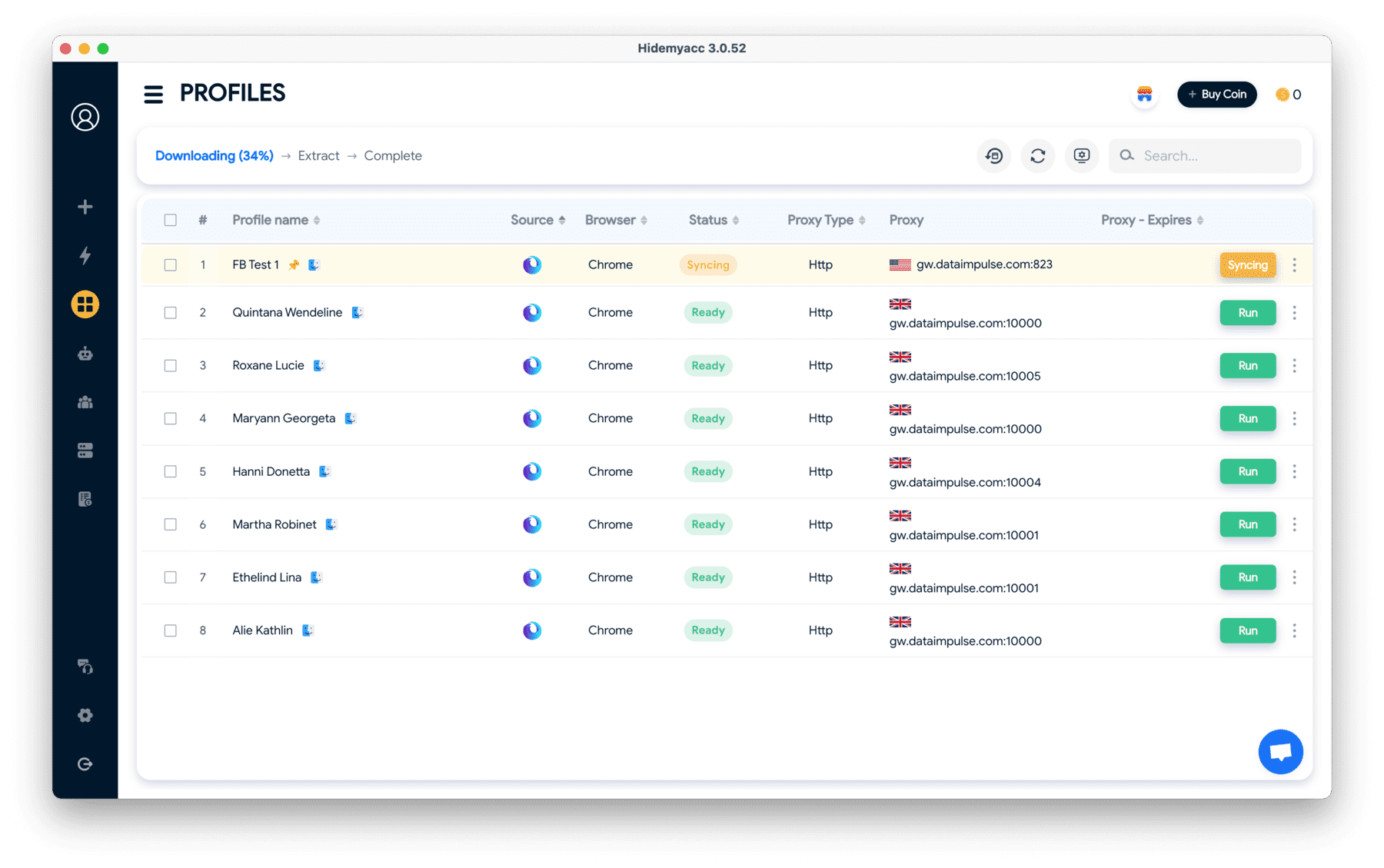
One of the popular choices is the antidetect browser Hidemyacc. Unlike CroxyProxy, which only forwards connections through an intermediary server, an anti-detection browser allows creating multiple independent browser profiles. Each browser profile will be created with an entirely separate set of identification parameters and bound to a dedicated proxy network address. Thanks to this, the platform will view each profile as an independent user, protecting accounts from the risk of mass bans.
If your actual need is professional account management, using normal web proxy tools is not only inefficient but also carries the risk of mass account locks. Instead of struggling with those technical limitations, prioritize specialized solutions designed to isolate the browser environment, helping your work run smoothly and safely.
8. Conclusion
CroxyProxy is a reasonable choice when you need to open YouTube, Facebook, or a blocked site immediately without having the permissions to install software on your machine. You only need an existing browser, paste the link in, and watch. In return, you accept several limitations: ads in the free version, speed fluctuations during peak hours, the scope of protection is limited to the active tab, and logging into accounts is nearly unfeasible.
So use CroxyProxy for the exact tasks it can do, which is watching, reading, and listening. Do not use it to log into accounts you do not want to lose, and do not enter bank details or work data there.
And if your work is tied to multiple accounts on the same platform, invest in an antidetect browser from the start instead of resolving it with a web proxy. A locked account usually costs much more time and money to recover than taking preventive measures beforehand.
9. FAQ
1. Is CroxyProxy free? Do I need to register an account?
Yes. You can use CroxyProxy free directly on your browser without creating an account. The free version has ads and speed can be slower during peak hours. If you need a more stable experience, you can consider the paid plan.
2. Is it safe to use CroxyProxy to log into Facebook or YouTube?
It is not recommended if it is an important account. Logging in from an unfamiliar network address can cause Facebook or Google to require identity verification or even temporarily lock the account. CroxyProxy is more suitable for viewing content instead of logging in.
3. Can CroxyProxy replace a VPN?
No. CroxyProxy only forwards the traffic of the open browser tab, while a VPN protects the entire network connection on the device. The two tools serve different needs.
4. Why can't I access CroxyProxy?
The most common reason is that your school, company network, or Internet Service Provider has blocked the domain of the service. You can try switching to a mobile network, using another proxy service, or considering a VPN if allowed to install.
5. Can CroxyProxy be used on phones?
Yes. You only need to open CroxyProxy with Chrome on Android or Safari on iPhone and enter the link you need to access. No need to install additional applications to use it.