Many people look for proxies on proxy marketplaces because of their competitive pricing and diverse IP pools, but whether the actual quality is as consistent as advertised is another question. SX.org is one such platform, offering Mobile, Residential, and Corporate Proxies alongside its own IP cleanliness rating system. In this review, I purchased and tested both Mobile and Residential Proxies, evaluating anonymity, speed, blacklist status, and CAPTCHA performance based on real-world results. Before getting into the tests, let us first look at what SX.org is, how users rate the platform, and what the service offers.
1. What Is SX.org?
SX.org is a proxy marketplace, meaning it aggregates IPs from multiple sources rather than operating its entire proxy infrastructure itself. According to information published on its website, SX.org offers more than 12 million IPs across 235 countries and over 100,000 cities, divided into three main categories: Mobile, Residential, and Corporate.
One notable difference between SX.org and some conventional proxy providers is its rating system. Each proxy is scored based on several factors, such as whether the IP appears on public blacklists or is blocked by popular platforms.
This evaluation is carried out through two tools developed by SX.org:
- checker.net: used to check IP quality and cleanliness.
- i.pn: displays IP information from the perspective of a website.
SX.org also does not require identity verification (KYC) and uses a usage-based payment model. Users only need to create an account, add funds, and purchase proxies.
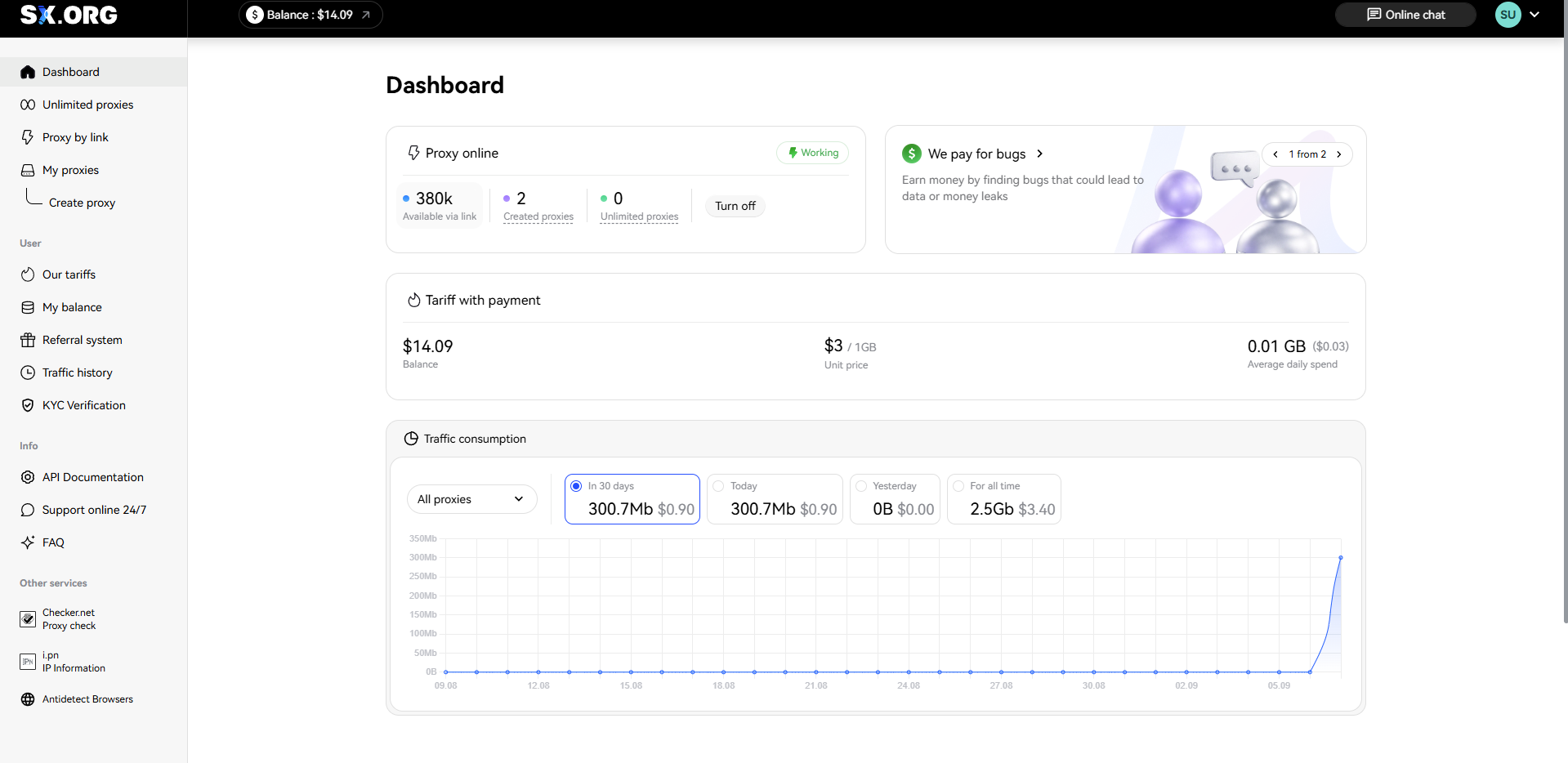
To get a clearer picture of how SX.org presents its service, you can refer to the platform's homepage interface below.
2. Community reviews of SX.org
In addition to direct testing results, feedback from people who have already used the service is also worth considering when evaluating a proxy provider. However, publicly available review data for SX.org currently varies significantly across platforms.
At the time of checking, SX.ORG had a rating of 4.3/5 based on 21 reviews on G2. This is a relatively positive signal, although the number of reviews is still too small to represent the full experience of the broader user community.
The SX.ORG review page on G2 at the time of checking is shown below:
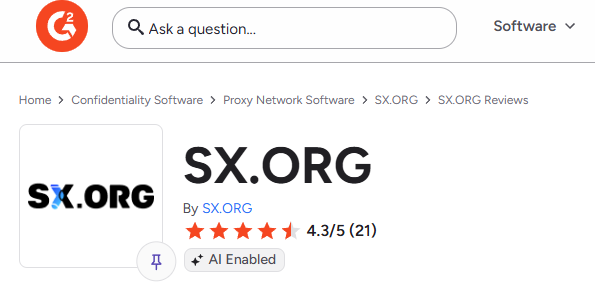
With only 21 reviews, the data on G2 can be considered an initial reference point. However, this review volume remains relatively small compared with larger proxy providers, so the 4.3/5 score should not be treated as a definitive conclusion about SX.org's overall quality.
Community feedback reflects only one part of the user experience. To get a more specific picture of the service, the next section looks at the features SX.org offers before moving on to the hands-on testing process.
3. Key features of SX.org
Before moving into the testing process, it is worth looking at what SX.org offers, from its proxy types to the way users create and manage proxies through the dashboard.
3.1. Proxy types and key specifications
SX.org currently offers three main proxy types: Residential, Mobile, and Corporate. Each type has a different IP pool size and connection method.
The specifications published by SX.org for each proxy type are as follows:
| Specification | Residential | Mobile | Corporate |
|---|---|---|---|
| Number of IPs | 7 million | 4 million | 1 million |
| Connection method | Direct connection, unlimited IP rotation | Backconnect | Backconnect |
| Protocols | HTTP, SOCKS5 | HTTP, SOCKS5 | HTTP, SOCKS5 |
| Connection success rate | 99.78% | 99.97% | Not disclosed |
| Identity verification | Not required | Not required | Not required |
Based on the published specifications, the main differences between the three proxy types are their IP pool size and connection method. Residential Proxies use direct connections with unlimited IP rotation, while Mobile and Corporate Proxies operate through a backconnect model.
In addition to selecting the proxy type and IP location, SX.org also allows users to configure how the system behaves when a proxy fails. This gives users control over how the connection is handled instead of relying on a fixed default configuration.
3.2. Dashboard interface and user experience
Based on the registration process, proxy creation, and traffic monitoring experience, SX.org's dashboard is relatively easy to use, even for people who are using proxies for the first time.
The Create Proxy screen is organized into clear steps. Users can select the proxy type, Country, Region, City, and ASN before moving to the Settings section. Completed fields are marked with green check marks, making it easy to see which parts of the configuration have already been completed.
The proxy type selection also uses clear visual icons for Mobile, Residential, and Corporate, making the options easy to distinguish without having to read extensive descriptions.
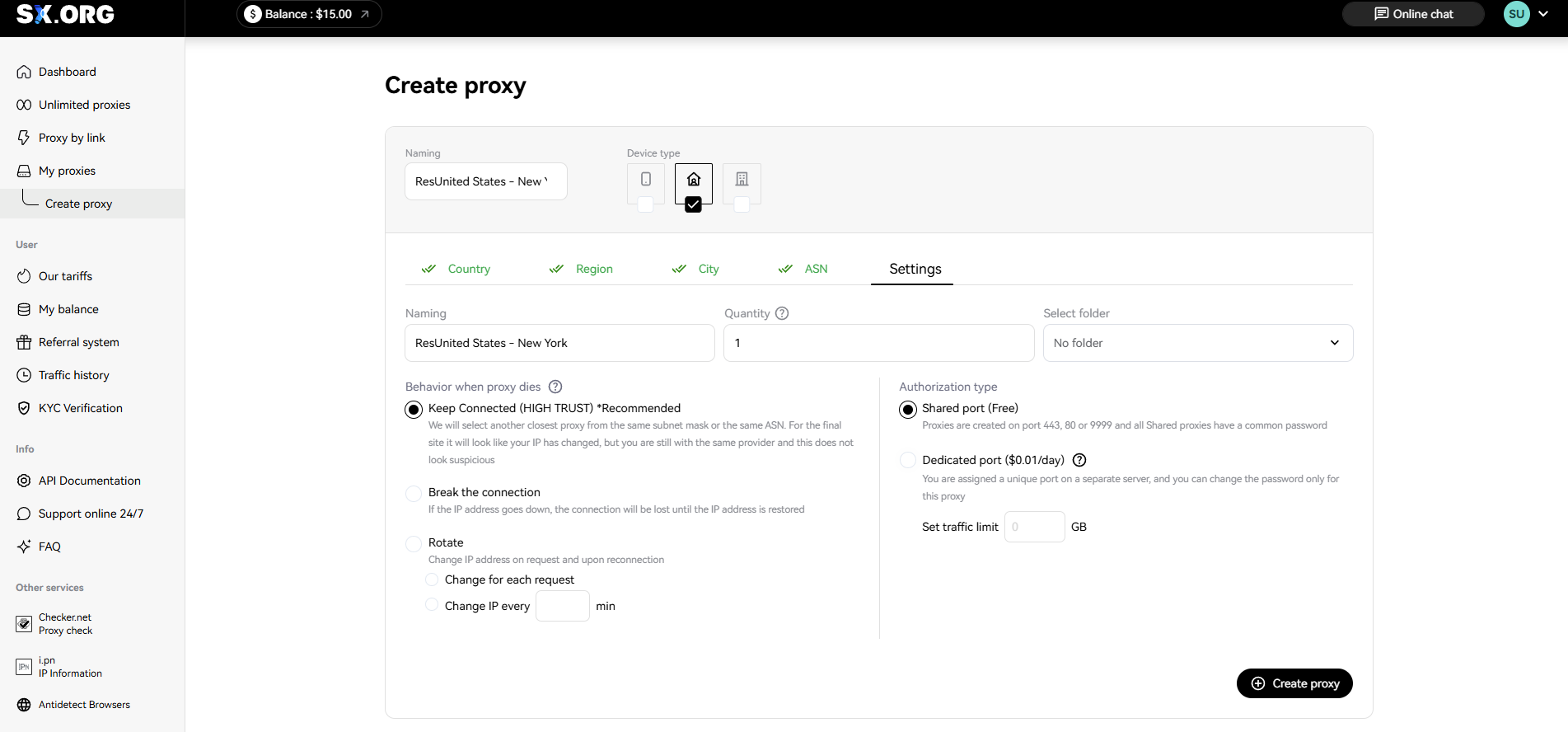
One of the options recommended by SX.org is Keep Connected. According to the platform, the system attempts to select the closest available IP within the same network range to maintain the connection and reduce interruptions.
These options provide more flexibility when creating a proxy. Once the configuration is complete, the newly created proxy appears in the My Proxies section, where users can monitor and manage connection details.
The My Proxies page displays the essential information in one interface, including Host, Login, Password, and the full proxy connection string. Each field has its own copy button, making the process faster than manually highlighting and copying the information.
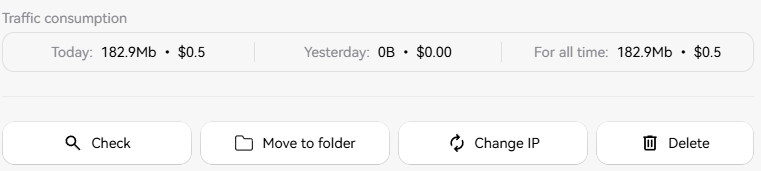
The Traffic Consumption section is also displayed directly below each proxy, with usage shown across three periods: Today, Yesterday, and For all time. This makes it convenient to monitor traffic usage without opening a separate statistics page.
Another useful feature is the left sidebar, which includes direct shortcuts to Checker.net and i.pn, SX.org's own proxy-checking tools, along with an Antidetect Browsers section. This allows users to check proxy quality within the same workflow without opening additional tabs to search for external tools.
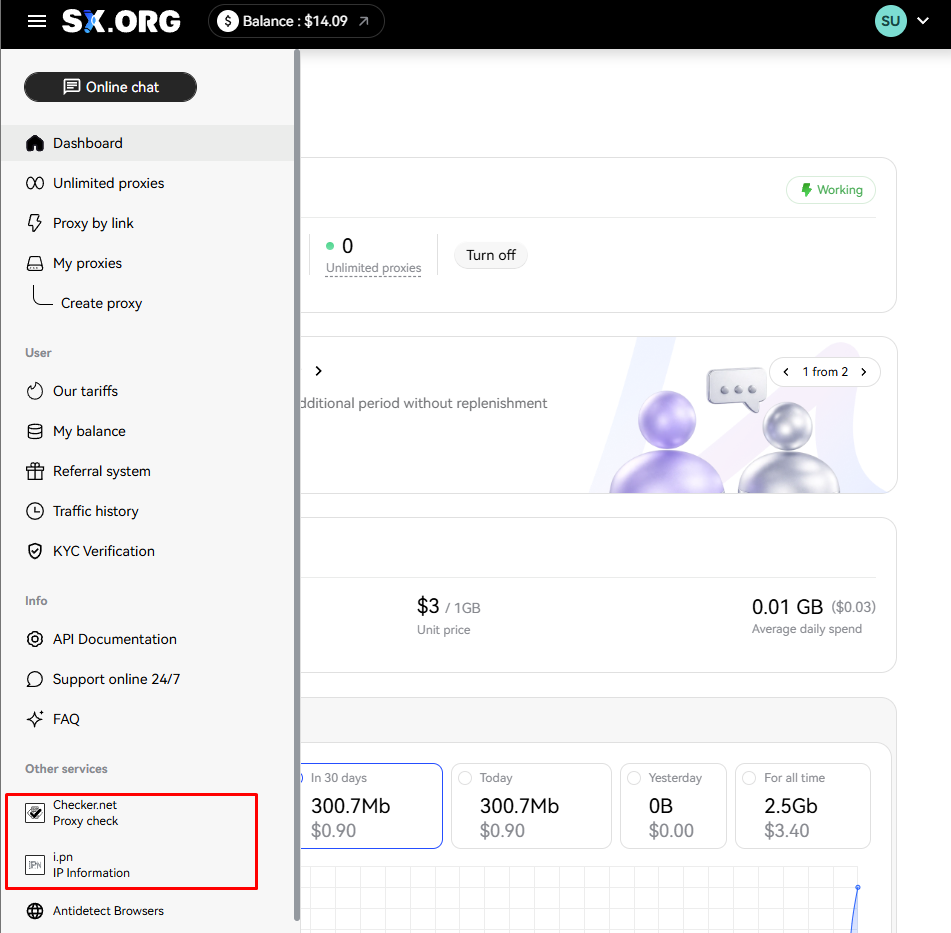
SX.org's dashboard brings the main tasks together in one system, from creating and managing proxies to monitoring traffic and checking IP information. New users can get through the core workflow relatively quickly without switching between multiple tools. However, some configuration options can also affect the overall cost of using the service.
4. SX.org pricing and payments
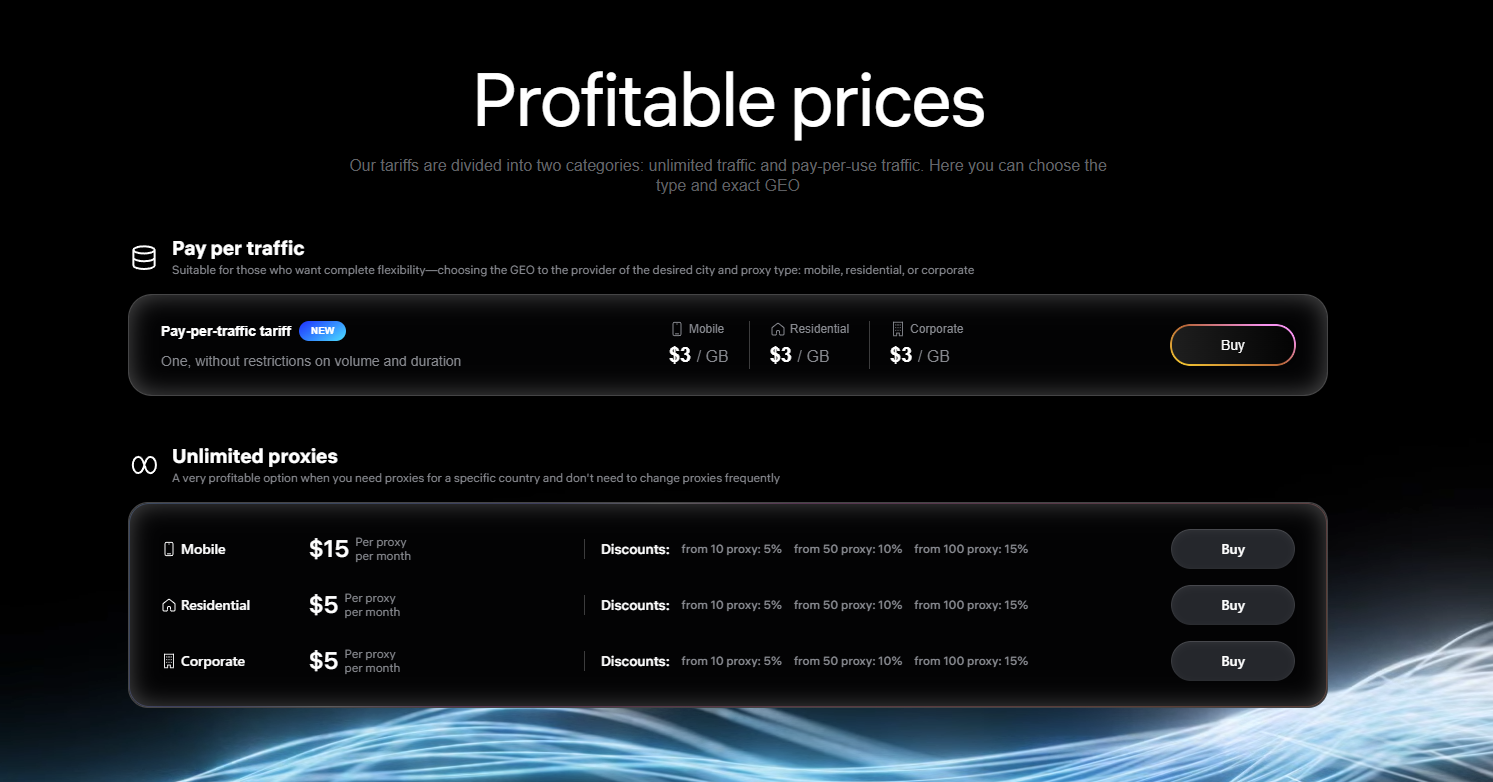
In terms of pricing, SX.org currently offers two different models depending on usage needs: pay-as-you-go traffic pricing or monthly unlimited-traffic proxy rentals.
Pay-as-you-go traffic
This model uses a flat rate of USD 3/GB for all three proxy types: Mobile, Residential, and Corporate. Purchased traffic does not expire.
Monthly unlimited traffic
If you need to use a fixed proxy over a longer period, SX.org also offers monthly plans at the following prices:
- Mobile: USD 15/month.
- Residential: USD 5/month.
- Corporate: USD 5/month.
The price decreases when purchasing larger quantities:
- 5% discount from 10 proxies.
- 10% discount from 50 proxies.
- 15% discount from 100 proxies.
This pricing structure is more suitable for users purchasing proxies in larger volumes, while those who only want to test the service or use it for a short period may find the pay-as-you-go traffic model more flexible.
To get an overview of how SX.org prices its proxy services, you can refer to the pricing table displayed on the website below.
Dedicated port fee: An important note
There is one point worth noting when purchasing proxies on SX.org. If you set a traffic limit through the Set traffic limit option, the system automatically changes the connection method from the free Shared Port to a Dedicated Port, which costs USD 0.01 per day.
The fee itself is small, but users should be aware of it in advance because setting a traffic limit to control spending means giving up the default free Shared Port.
For this test, two US-based proxies were purchased through the pay-as-you-go traffic model: 2 GB of Residential traffic and 3 GB of Mobile traffic, for an estimated total cost of USD 15. After purchasing the proxies, the next step was to configure them in Hidemyacc for real-world testing.
5. How to set up SX.org on Hidemyacc
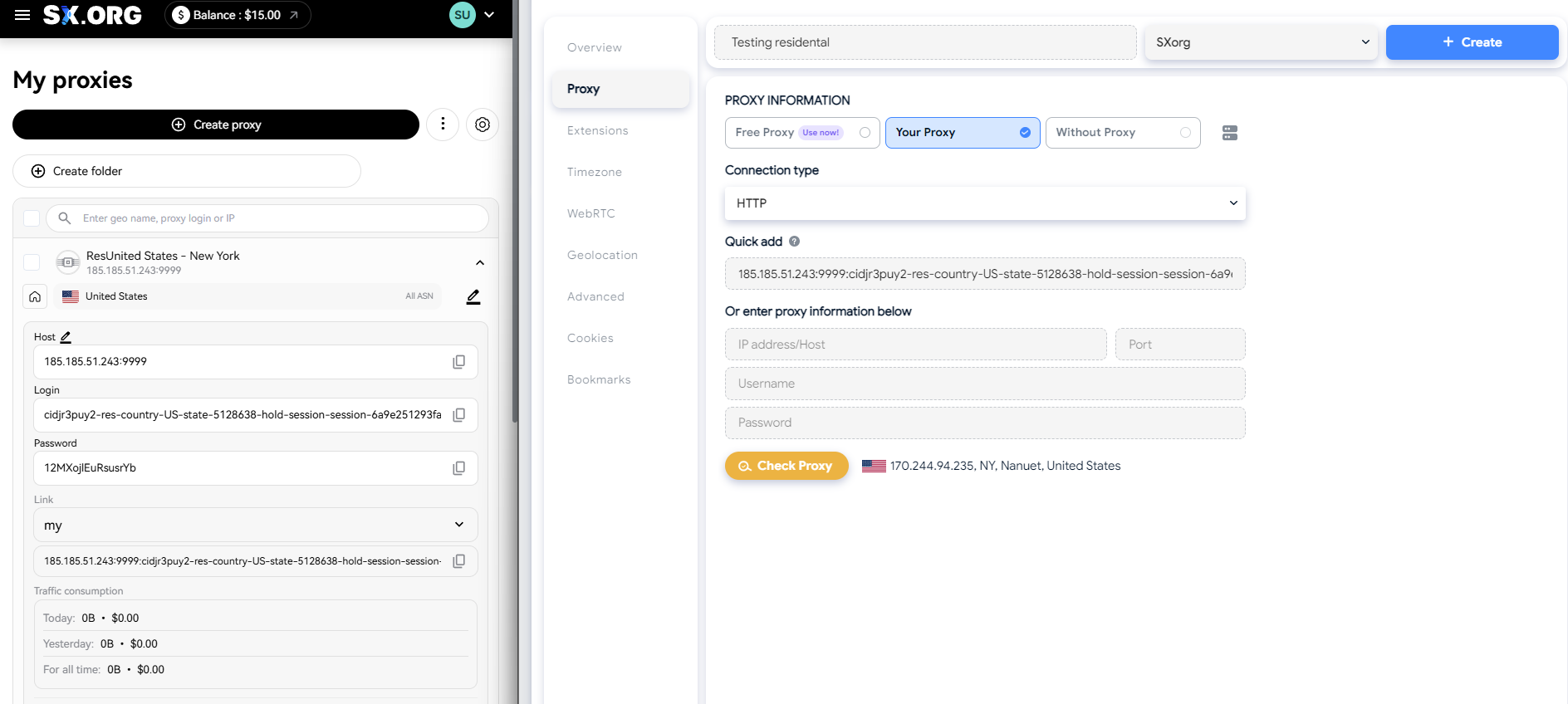
After selecting a suitable proxy type, the next step is to create the proxy on SX.org and connect it to the antidetect browser Hidemyacc. The process is relatively straightforward because the proxy format provided by SX.org can be recognized directly by Hidemyacc.
5.1. Creating a proxy on the SX.org dashboard
After logging in, go to Create Proxy and follow these steps:
- Select the proxy type: Mobile or Residential.
- Select the Country, Region, and City based on your needs.
- In the Settings section, choose how the system should behave when the proxy fails.
During this test, Keep Connected (HIGH TRUST) was selected to prioritize connection continuity. Shared Port was also selected when there was no need to enforce a strict traffic limit.
Once the proxy is created successfully, SX.org provides a connection string in the following format:
host:port:username:password
You can copy this string directly into Hidemyacc.
5.2. Configuring a profile on Hidemyacc
You can combine an SX.org proxy with the Hidemyacc antidetect browser to create a separate browser environment for each profile.
Follow these steps:
Step 1: Create a new profile in Hidemyacc.
Step 2: Open the Proxy section and select Your Proxy.Step 3: Set the Connection Type to HTTP, then paste the full proxy string from SX.org into the Quick Add field.Hidemyacc will automatically detect and populate the Host, Port, Username, and Password fields, so there is no need to enter each field manually.
Step 4: Click Check Proxy to test the connection. If successful, the system will display the IP address and geographic location currently used by the proxy.
6. Real-world performance: Testing process and results
The specifications published by SX.org describe how the service is expected to perform in theory. However, the quality of a proxy only becomes clear when it is used under real-world conditions.
To test this, one US Residential Proxy and one US Mobile Proxy were purchased and evaluated using several independent tools. The evaluation criteria included:
- Anonymity and information leaks.
- IP quality and classification.
- Network speed and latency.
- CAPTCHA performance on Google.
- Connection stability when accessing major platforms.
These criteria were tested step by step to see how the two proxies differed when moving from technical specifications to real-world usage.
6.1 Anonymity and identity leak testing
The first test focused on factors that directly affect IP trustworthiness, including IP quality scores, blacklist status, WebRTC leaks, detected IP type, and geographic accuracy.
The combined results for the Residential and Mobile Proxies are shown below:
| Criteria | Residential | Mobile |
|---|---|---|
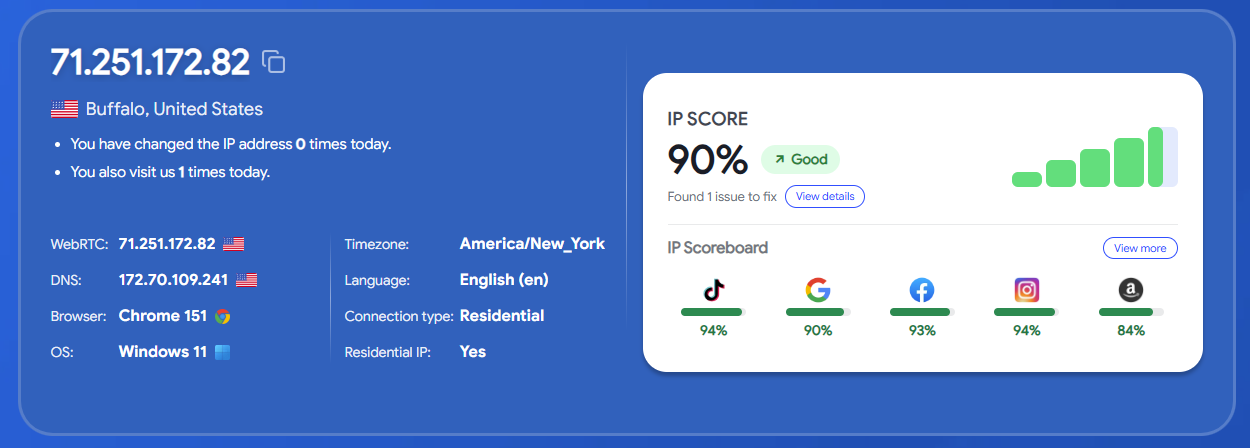
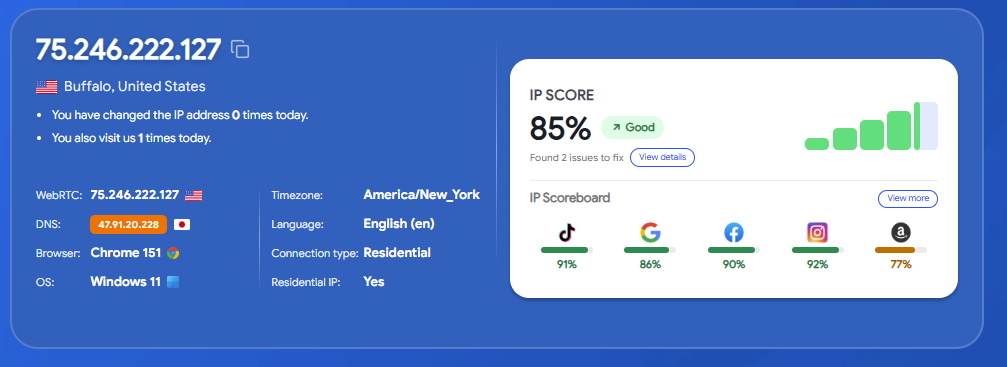
| IP Score (IPFighter) | 90% (Good) | 85% (Good) |
| Blacklist status | 2/10: zen.spamhaus.org, cbl.abuseat.org | 2/10: zen.spamhaus.org, cbl.abuseat.org, plus DNS leak (-5%) |
| WebRTC leak | No leak detected | No leak detected |
| Detected IP type (checker.net) | Residential, rating 4.3 | Mobile, rating 5.0 |
| Detected IP type (IPFighter, third party) | Residential | Residential (does not match checker.net) |
| Actual location | New York selected; detected as Nanuet, then Buffalo | New York selected; detected as Brooklyn |
Neither proxy showed a WebRTC leak, and both received a Good IP Score. However, the results also showed that both Residential and Mobile Proxies appeared on certain blacklists, while the way different tools classified the IP type was not entirely consistent.
Residential proxy test results
The Residential Proxy was tested with both IPFighter and checker.net to compare how the two tools classified the same IP address.
Results on IPFighter:

Results on checker.net:
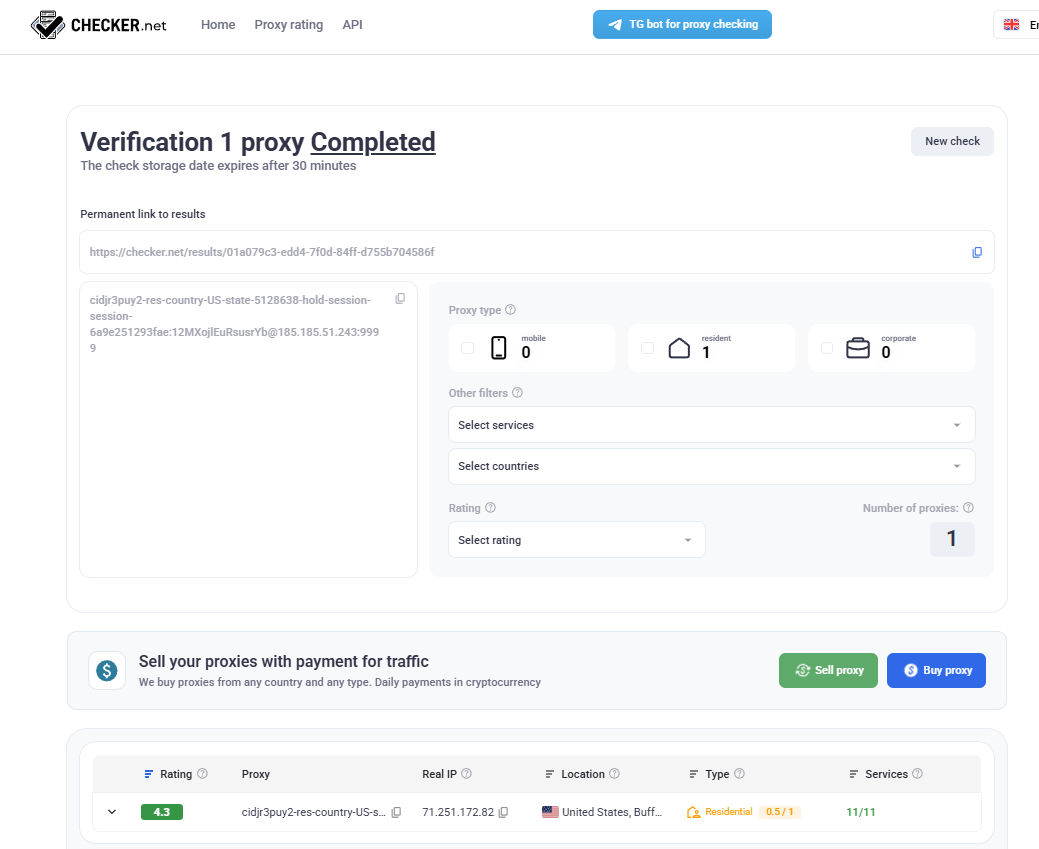
Both tools classified this IP as Residential. However, the blacklist check still showed that the IP address appeared on two blacklists: zen.spamhaus.org and cbl.abuseat.org.
The Mobile Proxy results showed a more noticeable discrepancy.
The mobile proxy was classified differently by two tools
Checker.net, a tool integrated into SX.org's ecosystem, classified this IP as Mobile. IPFighter, a third-party tool, classified the same IP address as Residential.
Results on IPFighter:
Results on checker.net:
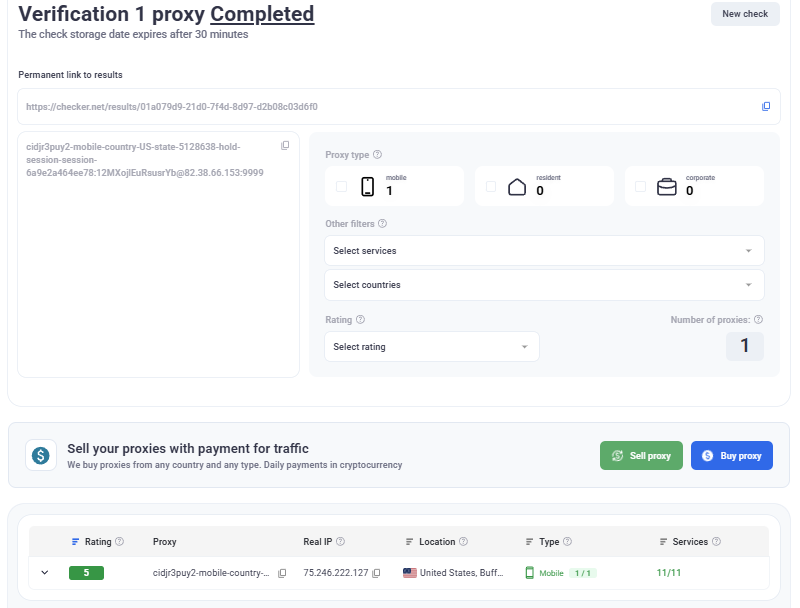
This discrepancy made it necessary to examine the Mobile Proxy with another tool to better understand the actual origin of the IP address.
The Mobile Proxy was then analyzed using whoer.net:
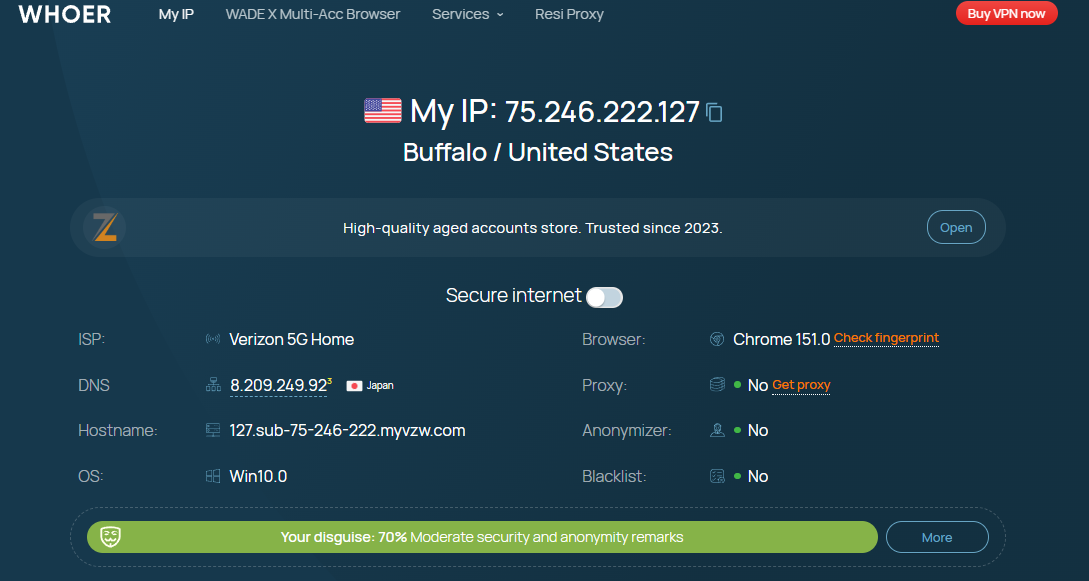
The result showed that the actual ISP was Verizon 5G Home Internet, a fixed home internet service that uses 5G infrastructure rather than conventional mobile data from a handheld smartphone.
The returned hostname ended in myvzw.com, indicating that the IP belongs to Verizon Wireless infrastructure. Whoer.net also did not detect a Proxy or Anonymizer and did not report the IP as blacklisted based on its own data.
Information from whoer.net partly explains why the two previous tools produced different classifications. From a network infrastructure perspective, the IP belongs to a telecommunications carrier's range and can therefore be classified as Mobile. However, in practical use, it is a home internet connection running on 5G infrastructure, which is why some tools classify it as closer to Residential.
This is an important distinction if your use case requires accurately simulating browsing behavior from a mobile device.
IP location accuracy
In terms of geographic location, both the Residential and Mobile Proxies showed city-level differences compared with the original selection, although both remained within the correct state.
The Residential Proxy was configured for New York, but the test results returned Nanuet and later Buffalo. The Mobile Proxy was also configured for New York, but its actual location was detected as Brooklyn.
This level of variation may not matter much for tasks that only require country- or state-level targeting. However, if your work requires city-level IP accuracy, you should verify the actual location after creating the proxy rather than relying solely on the location selected in the dashboard.
IP stability
Another point that needed clarification was IP stability during testing.
The first check performed directly on the SX.org dashboard returned a different IP address. However, after opening the proxy in Hidemyacc and checking it with three independent tools in subsequent steps, all three returned the same IP address.
This suggests that the IP remained relatively stable during actual browser use, although the result from SX.org's web-based quick-check tool may differ during the initial test.
6.2. Network speed and latency testing
Next, both proxies were tested for download speed, upload speed, and network latency. These metrics directly affect the browsing experience and the ability to maintain a connection during tasks that require fast responses.
| Network Metric | Residential | Mobile |
|---|---|---|
| Download | 2.62 Mbps | 3.62 Mbps |
| Upload | 21.20 Mbps | 17.53 Mbps |
| Latency (Ping) | 589 ms | 697 ms |
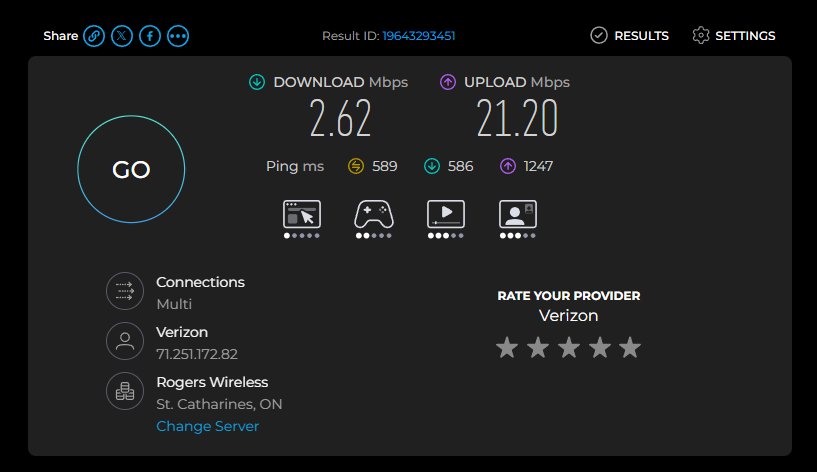
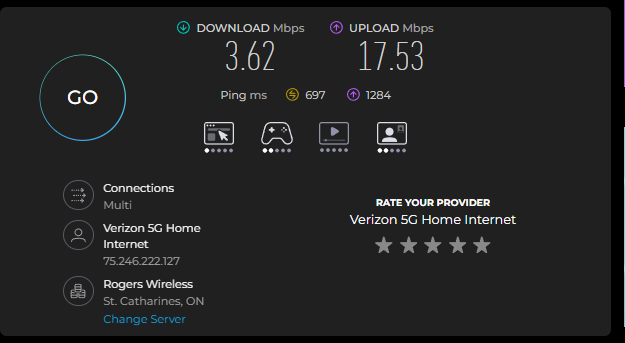
Both proxy types recorded relatively high ping compared with a typical internet connection, which commonly falls within the 20–80 ms range. Download speeds were also relatively low, while upload speeds were significantly higher.
For tasks that do not require immediate responses, such as basic web browsing or static data collection, this level of performance may still be acceptable.
However, for tasks that require fast responses, the high latency may cause lag or timeouts. This becomes more apparent in the real-world access tests below.
6.3. CAPTCHA testing on Google search
The ability to avoid detection by Google's anti-bot systems was tested using the same Google search query on both the Residential and Mobile Proxies.
The keyword used was:
"buy running shoes online"
| Proxy Type | Result when searching buy running shoes online |
|---|---|
| Residential | Triggered an image-selection CAPTCHA on the first search attempt and still did not pass after four verification attempts |
| Mobile | No CAPTCHA was triggered; search and results loaded normally |
This was the clearest difference between the two proxies in this test.
The Residential Proxy was flagged by Google's anti-bot system from the very first request and continued to require CAPTCHA verification. Meanwhile, the Mobile Proxy, despite being identified as a Verizon 5G Home Internet connection, was able to search Google normally without triggering a CAPTCHA.
This result suggests that an IP's trust level in the eyes of an anti-bot system may depend heavily on the individual IP's usage history and reputation rather than solely on whether it is labeled Residential or Mobile.
However, these results are based only on the IPs purchased for this particular test and should not be considered representative of SX.org's entire IP pool.
6.4. Access stability and page load times on major platforms
Finally, both proxies were used to access several major platforms to test connection stability under real-world conditions.
During testing with the Mobile Proxy, all three platforms initially displayed a connection timeout before the pages eventually reloaded successfully.
One of the recorded errors is shown below:
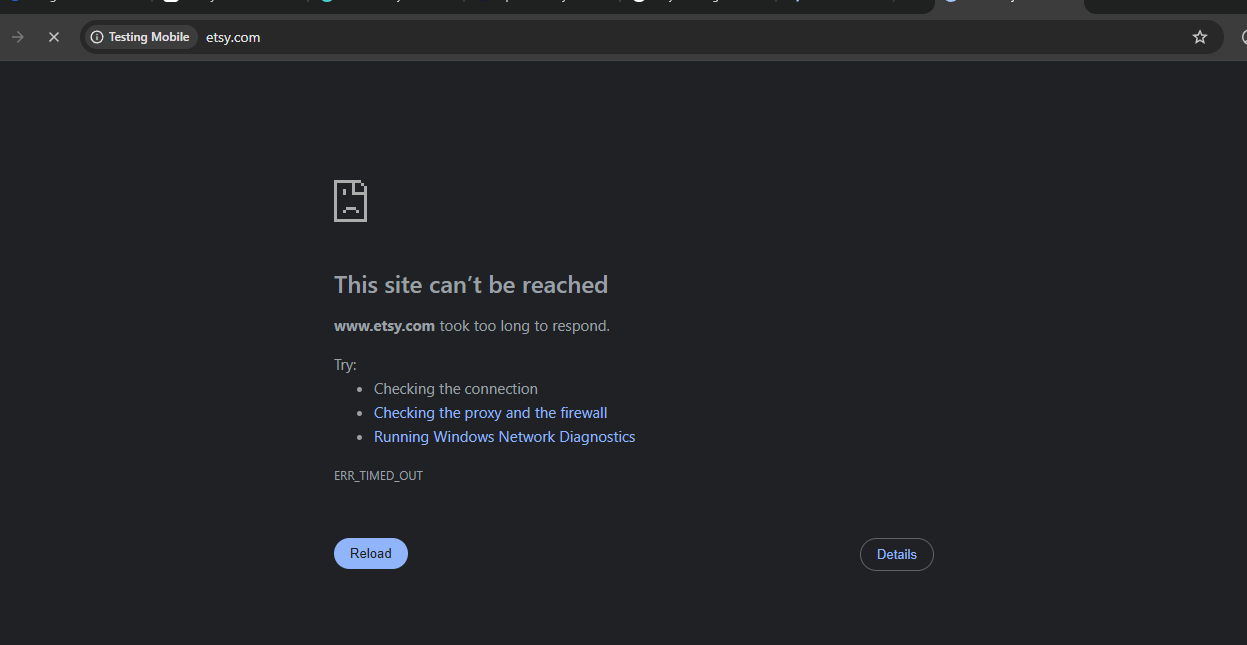
However, the pages could still be accessed after reloading. Therefore, the times shown in the table below include both the initial timeout and the page reload process rather than uninterrupted loading time from a single connection attempt.
| Platform | Residential | Mobile |
|---|---|---|
| Amazon.com | 25 seconds | 26 seconds |
| Etsy.com | 30 seconds | 51 seconds |
| TikTok.com | 36 seconds | More than 60 seconds |
The results showed that the Residential Proxy had more consistent load times across all three tests. The Mobile Proxy was still able to access the platforms, but it generally took longer because a timeout occurred before the page successfully reloaded.
This behavior is also consistent with the high latency recorded in the Speedtest results. It suggests that the Mobile Proxy used in this test was prone to temporary connection interruptions on the initial request, even though the content could eventually be loaded successfully.
7. Pros and cons of SX.org
After reviewing the product information and the hands-on test results, SX.org showed several notable strengths as well as limitations worth considering.
7.1. Pros
The positive points observed during testing include:
- No KYC requirement; you can start using the service immediately after creating an account and adding funds.
- Checker.net and i.pn are integrated into the ecosystem, making it easier to check IP information and quality.
- The proxy connection string is directly compatible with Hidemyacc and can be pasted into Quick Add without manual editing.
- The Mobile Proxy used in this test did not trigger a CAPTCHA during Google searches.
- Multiple options are available for proxy type, location, and connection maintenance.
SX.org's main strengths are the convenience of its setup process, the lack of a KYC requirement, and the availability of built-in IP-checking tools within its ecosystem. However, these advantages do not mean that every IP in the pool will perform at the same level, which became clear during the testing process.
7.2. Cons
Alongside the positive points, the tests also revealed several limitations:
- Both proxies appeared on two commonly referenced blacklists: zen.spamhaus.org and cbl.abuseat.org.
- The Residential Proxy triggered a CAPTCHA on the first Google search and could not pass it after multiple attempts.
- Network latency was relatively high for both proxy types, resulting in timeouts during some connection attempts.
- The actual IP location differed at the city level from the location originally selected.
- The Mobile Proxy was classified differently by SX.org's internal tool and third-party testing tools.
- Setting a traffic limit automatically switches the connection to a paid Dedicated Port instead of the default free Shared Port.
These limitations are mainly related to the quality and stability of the individual IPs used in this test. Therefore, if you have high requirements for speed, geographic accuracy, or anti-bot performance, it is advisable to test each proxy carefully before using it for long-term purposes.
This leads to the most important question of the review: based on these results, is SX.org actually worth using?
8. Conclusion
SX.org is a young and dynamically developing service that already offers a user-friendly interface, no KYC requirements, and a transparent proxy management system. The tests show that the platform is well-suited for everyday tasks: the Mobile proxies handled CAPTCHA avoidance exceptionally well, while the Residential proxies successfully covered basic workflow needs.
As the service actively evolves and expands its network infrastructure, further improvements in connection stability and speed can be expected over time. For optimal results when managing multiple accounts, we recommend aligning your antidetect browser settings (timezone, language, and browser fingerprint) with the actual parameters of the assigned IP.
Read more:
- Reviewing Byteful (Ping Proxies): Do they deliver?
- NaProxy Review: Should You Make It Your Go-To Proxy Provider?
- PrivateProxy Review: Explore performance, and features
- MarsProxies Review - Main Features, Pros and Cons
- TabProxy Review: Does It Provide High-Quality Residential Proxies?
- GoProxy Review 2026: Is It Worth Using for Residential Proxies?
- Proxyma Review: Features, Pricing, and Performance Test
9. FAQ
1. What is SX.org suitable for?
SX.org may be suitable for tasks such as data collection, location-based access testing, or managing multiple online environments, provided that you can accept the relatively high network latency observed in this test.2. Should I choose SX.org Residential or Mobile Proxies?
In this test, the Mobile Proxy performed better when accessing Google without triggering a CAPTCHA. The Residential Proxy could still handle basic tasks but triggered a CAPTCHA on the first search attempt.However, the better option ultimately depends on the specific requirements of your use case.
3. Is SX.org's Mobile Proxy a real smartphone IP?
In this test, the IP was identified as belonging to Verizon 5G Home Internet, which is a home internet connection using 5G infrastructure. It is not conventional mobile data from a handheld smartphone.4. Does SX.org require identity verification?
No. According to information provided by SX.org, you can create an account and use the service without completing KYC verification.5. Is SX.org's IP location accurate at the city level?
In this test, both the Residential and Mobile Proxies matched the correct state but differed at the city level from the location originally selected. If your work requires high geographic accuracy, you should verify the actual IP location after creating the proxy.