


Share client accounts with your whole team while platforms see just one device


Agencies and teams often manage ad accounts, Facebook Pages and seller accounts for many clients at once, with several people working in the same account. Every time a team member logs in from a different computer and network, the platform sees an unfamiliar device and may ask for verification or temporarily lock the account. And if you have to send passwords to everyone, keeping track of who has access only gets harder.
With the Hidemyacc antidetect browser, each client account lives in its own browser profile with a fixed fingerprint, cookies and proxy. Whoever on the team opens the profile, the platform still sees the same device and the same IP address. Admins assign access by role, share profiles without sending passwords and track activity on every profile.
1. The challenges agencies and teams face when sharing client accounts
When an agency manages many clients, each account is usually used by several people: account managers, media buyers, designers and freelancers. The more people involved, the more risk comes from two directions: platforms getting suspicious of the account, and access becoming hard to control.
- Logging in from many devices triggers security checks: Every team member uses their own computer, browser and network. On Facebook, Google or TikTok, an account that keeps showing up on unfamiliar devices looks suspicious, which can lead to identity checks, ad spending limits or a disabled account.
- Client accounts get linked to each other: When several client accounts are opened in the same browser or on the same network, the platform may treat them as run by the same person. One account running into trouble can drag other clients' accounts down with it.
- Onboarding new team members is manual: Every time an employee or freelancer joins a project, the manager has to create accounts, send login details and set up access for every tool the client uses. That step alone is repeated over and over for each new hire.
- Offboarding means resetting passwords: When someone leaves the team or a project ends, the manager has to review every client account that person ever accessed and change the passwords to make sure their access is really gone.
- Role based access is hard to set up: Designers, media buyers, account managers and freelancers all need different levels of access. If everyone can edit or administer everything, one wrong click can affect a client's profile.
- Sharing passwords over chat gets out of control: Passwords for clients' ad accounts, Facebook Pages and stores are often sent over Telegram, WhatsApp or email. They end up stored in many places, and it becomes very hard to know who still has access.
- No clear activity history: When many people work in one client profile, it is not always clear who opened, edited, shared or transferred it, so audits and troubleshooting take much longer.
These problems leave agencies worrying about client accounts getting locked while spending hours on granting access, handovers and staff control.
One locked account should not take down your whole client list
Put every client in their own browser environment and let your whole team work without sending passwords.
2. How Hidemyacc helps agencies work safely in client accounts
The Hidemyacc antidetect browser tackles both sides of the problem: it keeps a stable environment for every account, and it lets you control who can do what in that account.
2.1. A separate browser environment for every client
In Hidemyacc, every client account sits in its own independent browser profile, with its own browser fingerprint, cookies, storage and proxy. To the platform, every profile is a different device.
- Client accounts stay unlinked: Client A and client B live in two separate profiles that share no browser traces or IP address. If one account runs into trouble, the others are not affected.
- The environment follows the account, not the user: When a profile uses a fixed proxy, the platform sees the same device and the same IP whether your account manager opens it at the office or a freelancer opens it at home. The account is not flagged for unusual logins every time someone new takes over.
- Proxies that match each client's region: A US client uses a US IP and a UK client uses a UK IP, so every account keeps logging in from a familiar location.
- Organize profiles in folders: Group all profiles for one client or brand in a folder, then share the whole folder with the person in charge when you assign access.
2.2. Create separate logins for each team member and set access levels when sharing profiles
A Hidemyacc workspace has two main roles:
| Role | Permissions |
|---|---|
| Owner | The main account that manages the whole workspace: creates and manages Sub Accounts, shares or transfers profiles, uses Force Close and views the Activity Log. |
| Sub Account | A login for each employee or freelancer. It can only access the profiles or folders the Owner grants. |
Instead of everyone sharing one Hidemyacc login, the Owner creates a Sub Account for each team member in Team Member. Each Sub Account has its own login details but uses the workspace's shared resources. The number of free Sub Accounts depends on your plan, and you can buy more as your team grows.
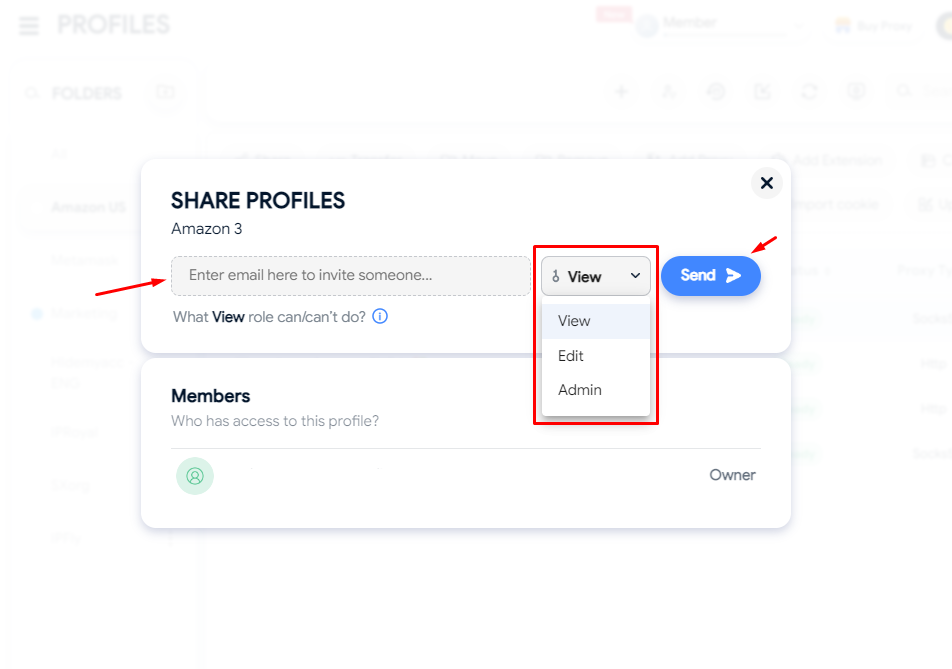
Once Sub Accounts are set up, the Owner uses Share Profile to grant access to each client profile at one of three levels:
| Access level | What the team member can do |
|---|---|
| View | Open and use the profile, but not edit the fingerprint. Cookies and browsing history are not synced to the cloud. |
| Edit | Work in the profile as usual. Cookies and history sync to the cloud, but the fingerprint still cannot be changed. |
| Admin | Edit the profile configuration, add proxies, cookies and extensions, and share or transfer the profile. Cannot permanently delete the profile. If a folder is shared with Admin access, the Sub Account can create new profiles directly in that folder. |
In practice, freelancers and short term contractors only need View access, operations staff use Edit, and Admin suits the account manager or team lead who owns the client relationship. Whatever their access level, team members cannot change the fingerprint, so each account's environment always stays stable.
2.3. Share profiles without exposing passwords, or transfer ownership outright
With Share Profile, the Owner gives a Sub Account access to a browser profile without sending the original account password. The team member just opens the profile and starts working in the existing login session and environment. For extra safety, use View access for people outside your core team and do not save passwords in the profile's browser.
When a client needs to move to someone else entirely, the Owner can use Transfer Profile to hand over full ownership of the profile, including cookies, proxy and related settings, to another Hidemyacc account. Unlike Share Profile, after a transfer the recipient becomes the new owner of the profile. Because the fingerprint, cookies and proxy move over intact, the recipient keeps working in exactly the same environment, and the platform never sees the account switch to a new device.
2.4. End active sessions instantly with Force Close
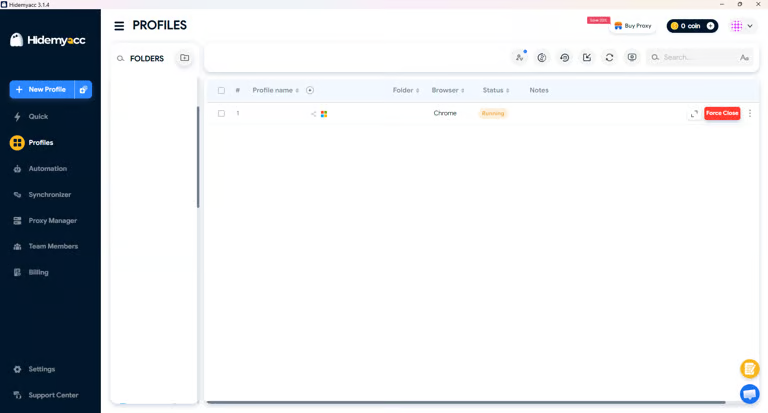
When a Sub Account is using a browser profile, the Owner can use Force Close to end that session immediately without waiting for the user to close it. This is useful when you need to shut down an active profile right away or deal with suspicious access. Force Close only ends the running session. To fully revoke a team member's access, remove the profile share or delete their Sub Account in Team Member after using Force Close.
Force Close lets you:
- Close an active browser profile immediately: The session ends even while the Sub Account is still using the profile.
- Confirm before acting: The system asks the Owner to confirm, so profiles are not closed by mistake.
- Keep all profile data intact: Cookies, fingerprint, proxy and profile settings stay exactly as they were after closing.
The Owner can also filter by a Sub Account's email to see which browser profiles that person currently has open, which makes it easy to monitor active sessions and Force Close the right profile when needed.
2.5. Track activity with a log for every profile
Every profile has an Activity Log that records what members of the workspace have done in it.
The log shows who did what and when, including creating, opening, closing, sharing or transferring the profile. The Owner can easily review handover history and monitor activity on every client account when many people are working on it.
3. How to set up your team in Hidemyacc
Once you have decided how your team is structured and how client accounts are divided, set things up with these steps:
3.1. Create a profile for each client account
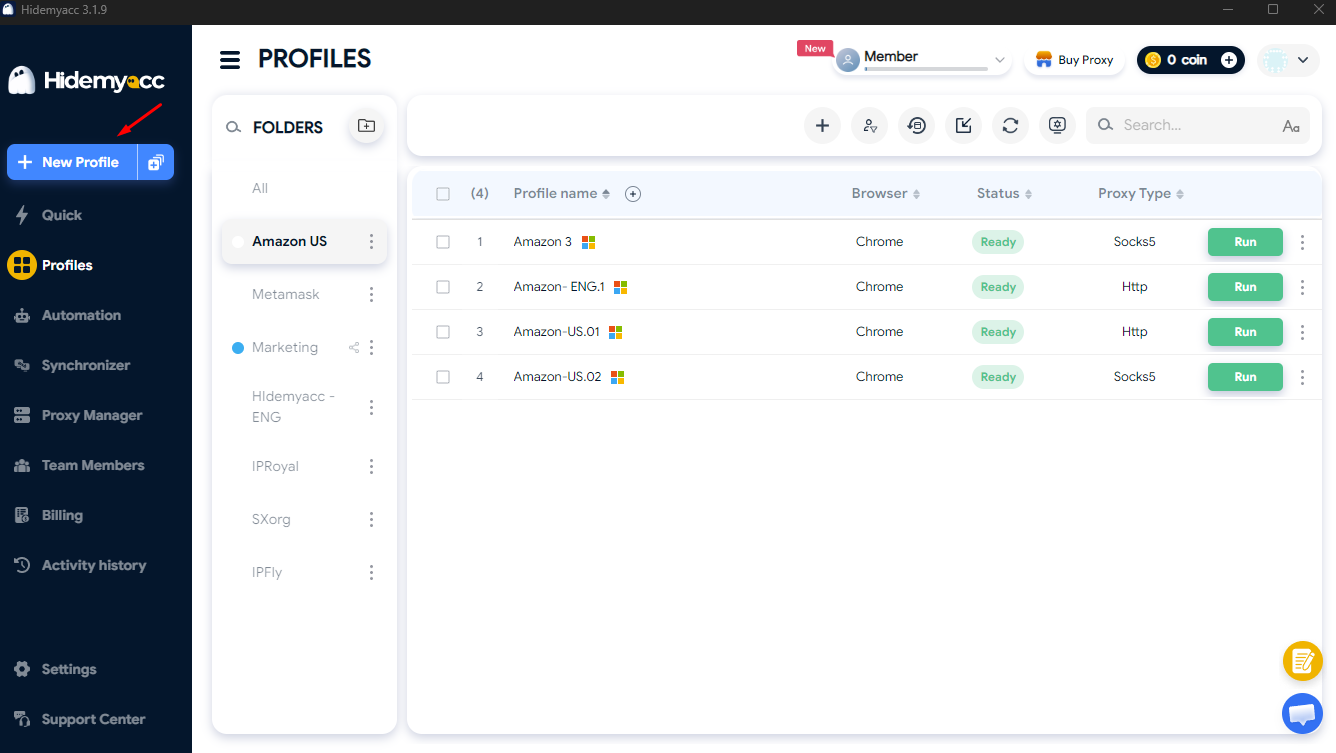
In Profile, create a browser profile for each client account, assign a proxy that matches the client's region and organize profiles into folders by client or brand.
3.2. Create Sub Accounts in Team Member
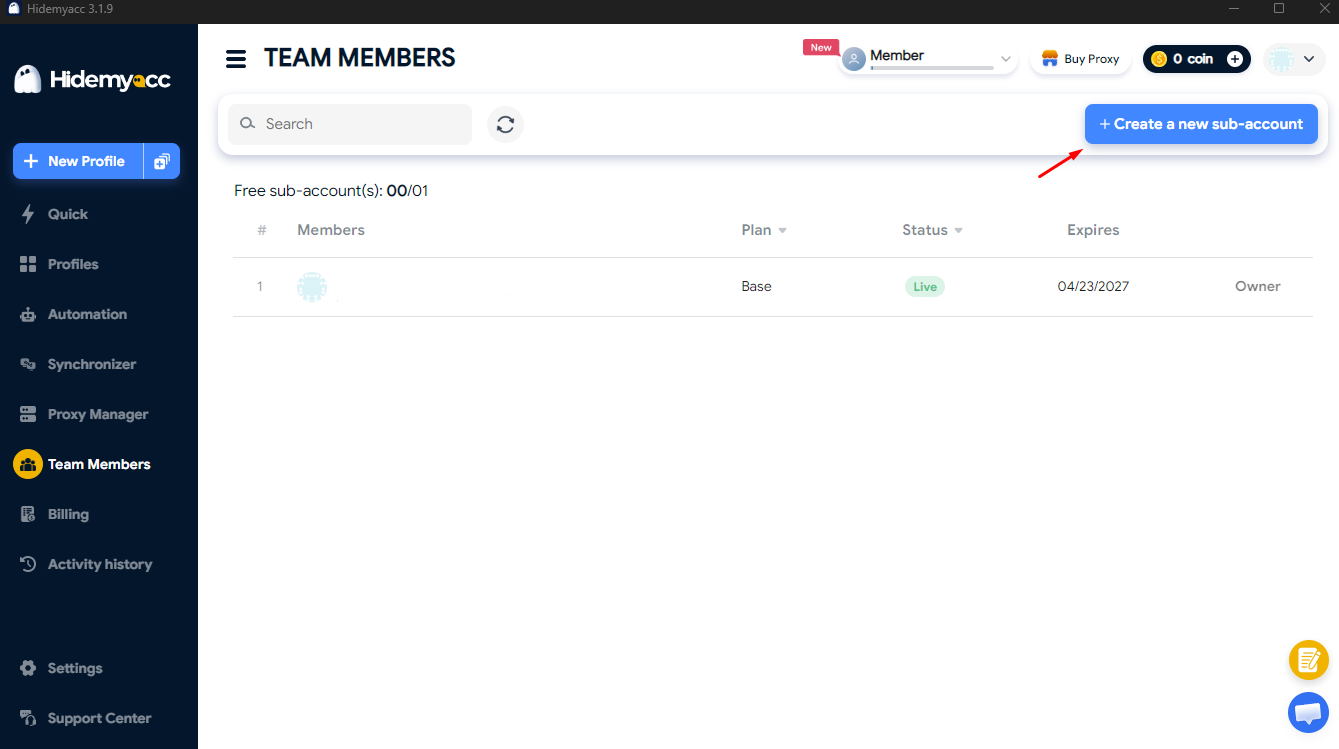
Go to Team Member, click Create Sub Account and create a separate login for each employee or freelancer.
3.3. Share profiles or folders
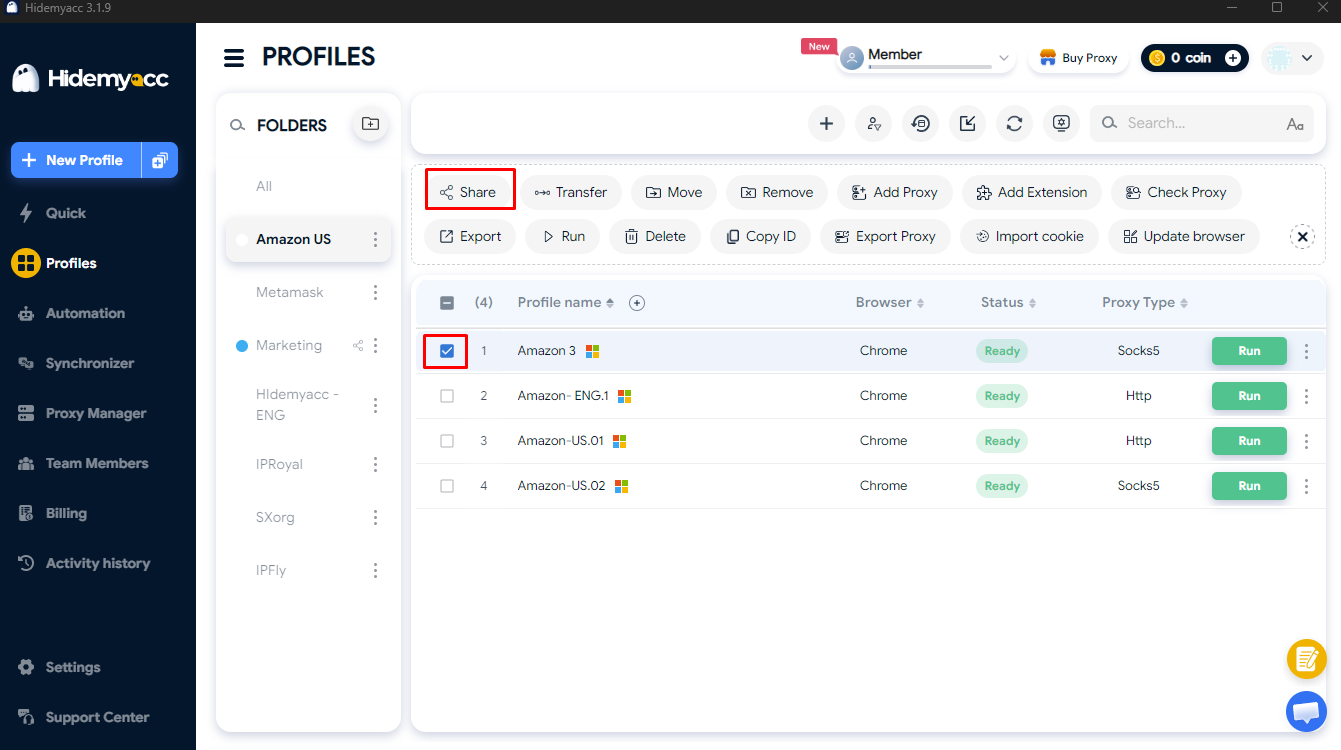
Select the client's profile or folder, click Share and grant View, Edit or Admin access to the right Sub Account.
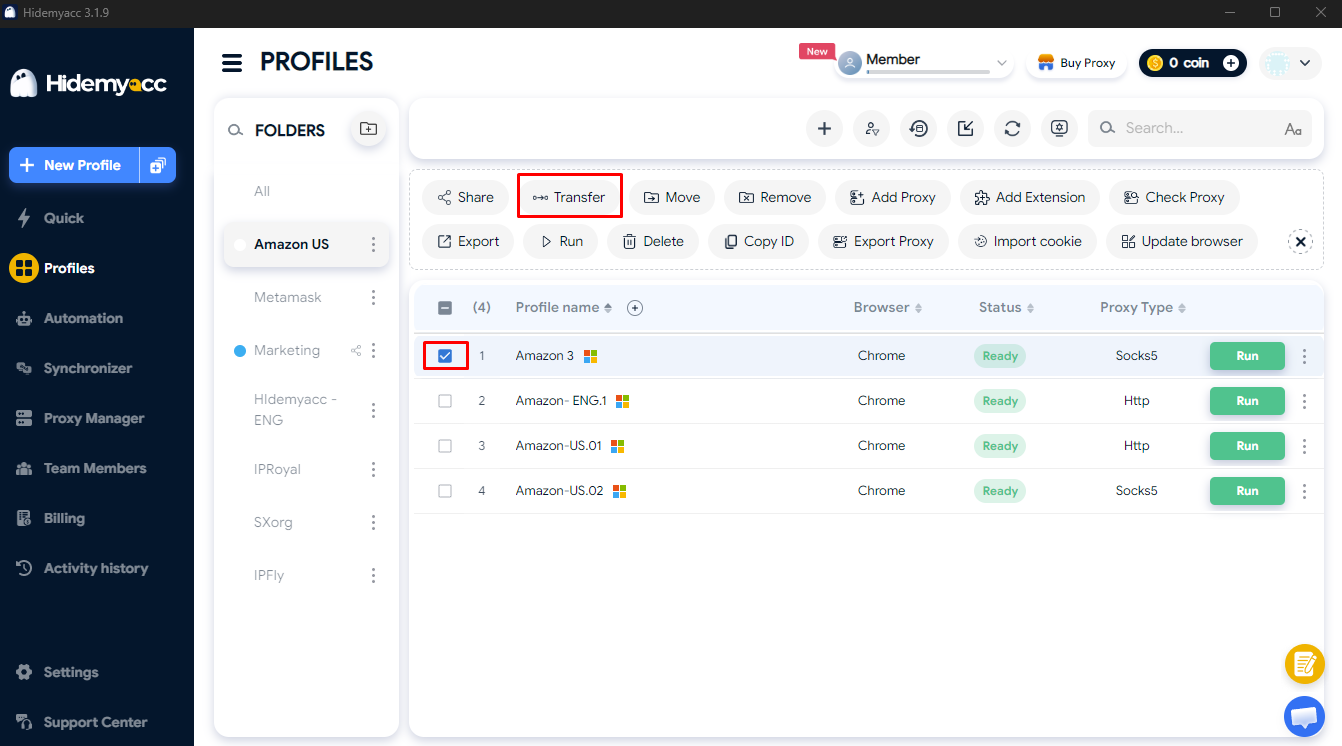
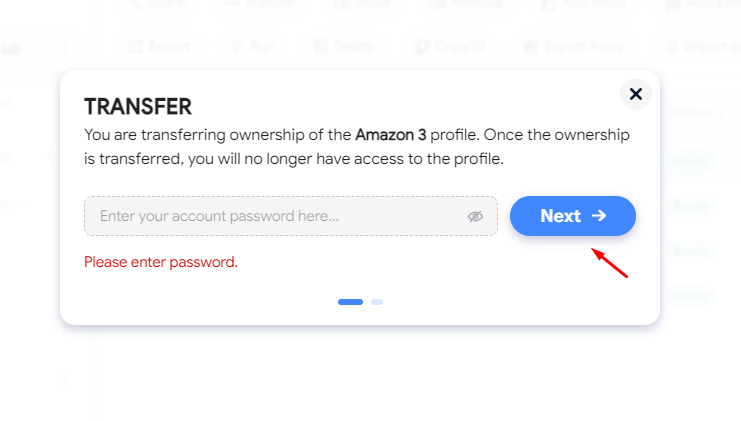
Select the profile to hand over, click Transfer Profile and choose the Hidemyacc account that will receive ownership, moving all cookies, proxy and settings with it. Note that once the transfer is complete, you no longer have access to that profile.
When your team changes, use Force Close to end any open sessions, remove profile shares or delete the Sub Account, then open the Activity Log to review the action history.
This workflow lets your agency manage every client profile in one place while making access control and handovers between team members much simpler.
Learn more in the Hidemyacc guides:
4. FAQ
4.1. Can team members with access see the account password?
You never need to send the password. When a profile is shared, the Sub Account works directly in the existing login session. To reduce risk, avoid saving passwords in the profile's browser and use View access for people outside your core team.
4.2. Is there a limit on how many members a team can have?
Each plan includes a number of free Sub Accounts, and higher plans include more. If your team needs more, you can buy additional Sub Accounts. Sub Accounts are available on the Base plan and above.
4.3. Can I give someone view only access with no editing rights?
Yes. When sharing a profile with a Sub Account, the Owner can choose View access, which lets the member open and use the profile but not change its configuration or share it with anyone else.
4.4. Do I need to change the account password when someone leaves?
Not necessarily, because the team member was never given the password. Simply remove the profile share or delete their Sub Account. If they had Admin access, it is also worth checking the security settings of the original account.
4.5. Can several people open the same profile at once?
No. Each profile can only be open for one person at a time. While one team member is using it, others have to wait until it is closed. This means the account is never logged in from several places at once, and because the profile keeps the same fingerprint, cookies and proxy, the platform sees the same device and the same IP whoever opens it. If someone forgets to close a profile, the Owner can use Force Close to free it up immediately.
A separate environment for every client, safe sharing for your whole team
Keep each client's accounts isolated, share profiles with the right people without sending passwords, and control all access from one workspace.
Sub Accounts are available on the Base plan and above.
Every new account starts with a 7 day free trial with 30 profiles. After that, choose from 5 plans and get 50% off when you pay yearly.
Comparing tools? See Hidemyacc vs Gologin, or explore more ways to use Hidemyacc.

Try for FREE now !
Don't forget you have 7 days free trial
Test it first and love it later.
Do you wanna join our Affiliate program? Join now!