


Manage multiple Ad accounts with antidetect browser Hidemyacc


Running paid ads for several clients usually means juggling many ad accounts on the same computer. Each account comes with its own login, session data and browser setup, and squeezing all of them into one browser makes switching between accounts slow and managing them messy.
Hidemyacc solves this by giving every ad account its own browser profile. Each profile keeps its own fingerprint, cookies and session data, and can run through its own proxy. You can organize accounts by client or campaign, switch between them in one click and run all of them from a single device.
1. The challenges of managing multiple ad accounts
For media buyers and agencies, managing multiple ad accounts is more than logging in and hopping between them. Each account may belong to a different client, brand, campaign or market, so keeping everything organized gets harder with every account you add.
Common problems include:
- Constant account switching: You keep jumping between ad accounts for different clients, brands and campaigns, logging out of one to get into the next.
- Keeping each environment separate: It is hard to keep browser settings, cookies and session data apart for every account or market.
- Proxy and network setup: When you run ads in several markets, keeping track of which proxy belongs to which account quickly gets complicated.
- Switching computers: Moving to another machine means setting up cookies, proxies and logins all over again.
- Team handoffs: Passing an account to a teammate without losing the environment you already set up is difficult.
- Scaling up: As accounts and campaigns multiply, tracking them by hand makes it easy to mix up accounts, clients and campaigns.
- Linked accounts in a shared environment: When several ad accounts run in the same browser, the browser data ad platforms collect can become one of the signals they use to associate those accounts. If one account gets restricted or suspended, the platform may also review the accounts linked to it, which makes running many accounts in one environment riskier.
These problems cost time, and they make it harder to keep a consistent workflow as your number of accounts and campaigns grows. Giving each ad account its own separate workspace is one of the simplest ways for media buyers and agencies to keep operations organized.
A separate environment for every ad account
Create a profile with its own fingerprint, cookies and proxy for each account, so ad accounts for different clients never share browser traces.
2. How Hidemyacc helps you manage ad accounts
Hidemyacc is an antidetect browser that lets you create and manage many browser profiles on one device. Each profile can hold a single ad account, keeping its cookies, login session and browser settings apart instead of piling every account into the same environment. If you are new to the concept, see how a multi account browser works.
This setup suits media buyers and agencies running multiple Facebook Ads, TikTok Ads or Google Ads accounts, or accounts on any other ad platform. Organize profiles by ad account, client or campaign, then configure the matching environment for each one.
2.1. A dedicated workspace for each account
When you manage ad accounts for many clients, keeping them all in one browser makes switching confusing. With Hidemyacc, you create a separate profile for each account and name it after the client or campaign so you can find it at a glance.
Cookies, local storage and browsing data are stored separately in each profile. To move from one client's account to another, you simply open the right profile, with no logging in again and no rebuilding your setup.
2.2. Keep a distinct configuration for each account
Your ad accounts may serve different clients or markets, so giving each profile its own configuration makes them easier to control.
With Custom Browser Fingerprints, you can set the browser fingerprint for each profile, including user agent, operating system, screen resolution, timezone and language. Each profile then keeps its own setup instead of sharing one configuration across every account.
2.3. Manage proxies by market and campaign
When your agency runs ads across several markets, you can assign proxies by account or by region. Hidemyacc lets you attach a proxy directly to the matching profile.
In Proxy Manager, you can see how many profiles each proxy is assigned to, which keeps proxy allocation under control as your account count grows. The proxy setting is saved with the profile, so when you switch to another account or campaign, you just open the profile you already set up.
2.4. Hand off accounts to your team easily
In an agency or a larger team, an ad account often changes hands between teammates at different stages. Instead of sharing login credentials and rebuilding the environment from scratch, you can use Share Profile or Transfer Profile to share a profile with, or transfer it to, an authorized teammate.
The new owner works in the profile exactly as it was set up, which makes handing off accounts and campaigns across the team much smoother.
3. How to set up multiple ad accounts in Hidemyacc
Once you have decided how to split your accounts and campaigns, set up the matching environments in Hidemyacc with these steps:
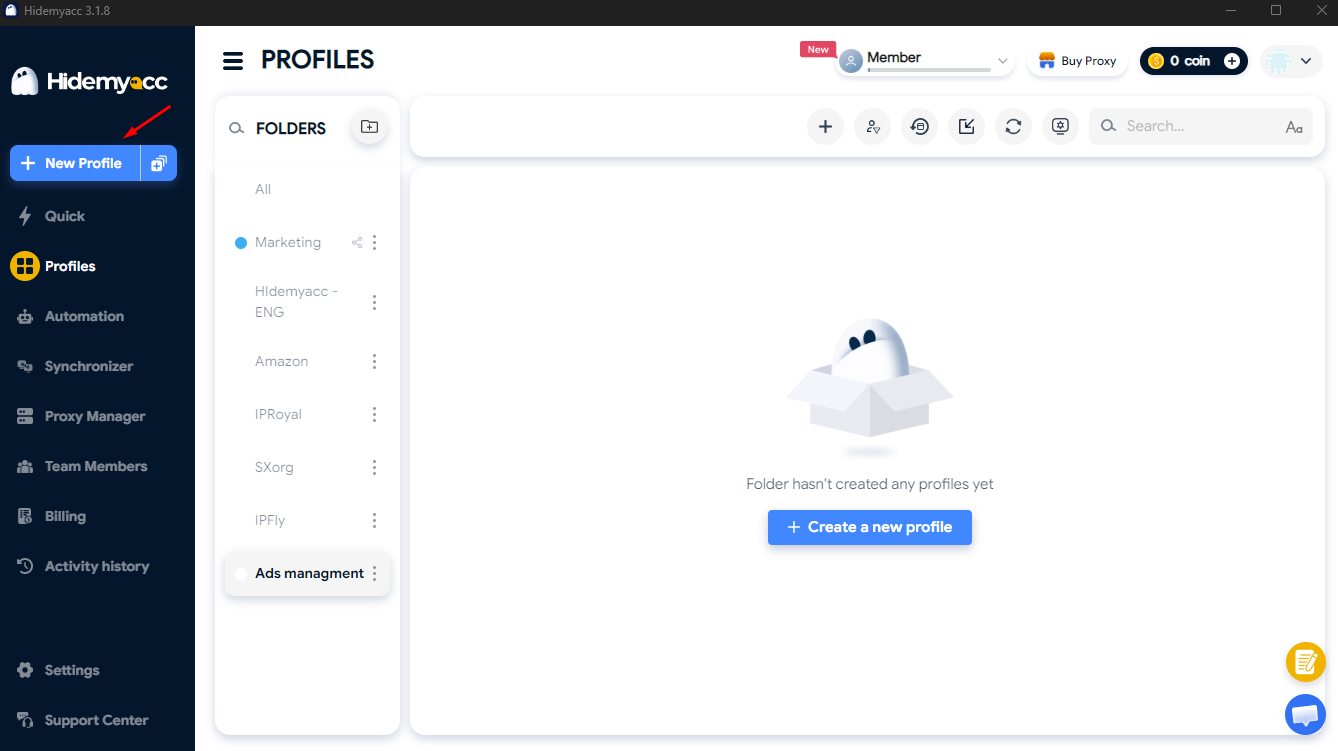
3.1. Create a new profile
In the profile manager, click New Profile. Name it after the ad account, client or campaign so it is easy to spot among many profiles.
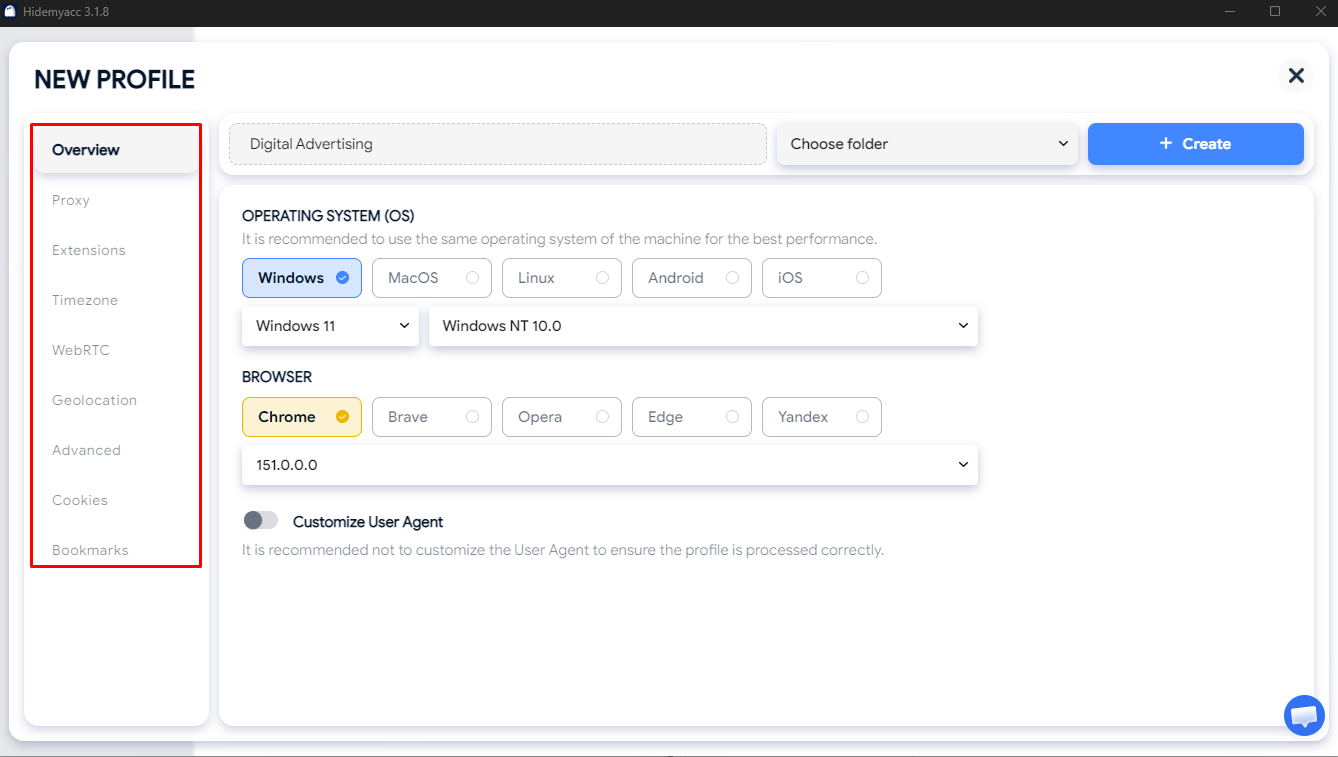
3.2. Configure the fingerprint
In the profile settings, set the user agent, operating system, screen resolution, timezone and language to match the environment you want.
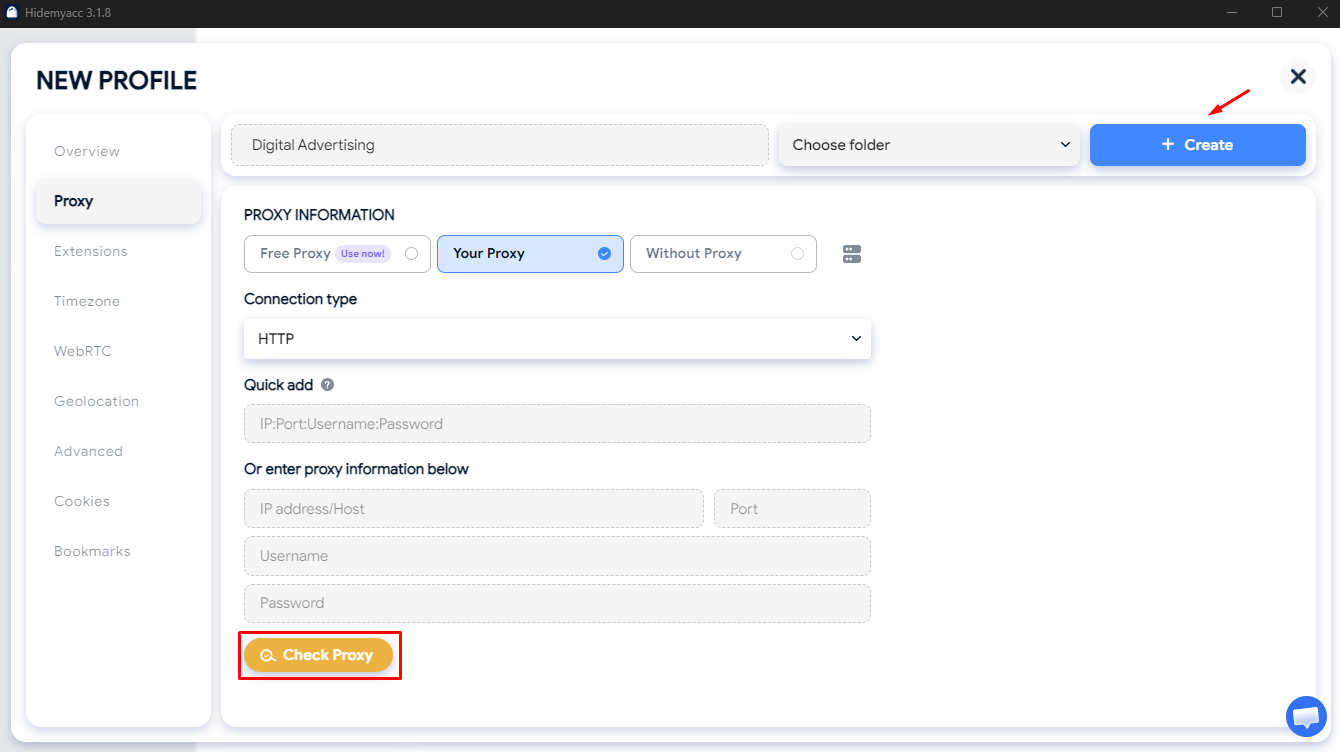
3.3. Set up the proxy
In the Proxy tab of the profile, you can choose Free Proxy for simple tasks that do not need a stable connection. For ad accounts, use stable, reliable proxies such as dedicated or residential proxies, depending on your market and workflow. Enter the proxy details, click Check Proxy to test the connection, then click Create to save the profile. For a full walkthrough, read our guide on how to use a proxy in Hidemyacc.
3.4. Launch the profile and log in
Click Run to open the profile, go to the ad platform and log in to the matching account. From then on, just open the same profile to pick up where you left off.
3.5. Share or transfer the profile
When an account changes hands, use Share Profile or Transfer Profile to share it with, or transfer it to, an authorized teammate, who continues working in the same setup.
Related reading:
4. FAQ
4.1. How many ad accounts can I manage on one computer?
It depends on your Hidemyacc plan and your computer's specs. When you open many profiles at once, RAM and CPU also affect how smoothly they run.
4.2. Does Hidemyacc reduce the risk of ad account bans?
Hidemyacc separates fingerprints, cookies and session data between profiles, but it cannot guarantee that an account will never be restricted. Account status still depends on each platform's policies and on how the account is actually used.
4.3. Do I need a separate proxy for each ad account?
Not always. If your workflow needs separate network environments, or you run accounts for specific regions, you can assign a dedicated proxy to each profile with Proxy Manager.
4.4. Can I hand off a profile to someone else on my team?
Yes. With Share Profile and Transfer Profile, you can share a profile with, or transfer it to, an authorized teammate so they can keep working in the environment you set up.
Manage every ad account from one device
Give each account its own profile, keep every workspace organized and switch between campaigns in one click.
Every new account starts with a 7 day free trial with 30 profiles. After that, choose from 5 plans and get 50% off when you pay yearly.
Comparing tools? See Hidemyacc vs Gologin, or explore more ways to use Hidemyacc.

Try for FREE now !
Don't forget you have 7 days free trial
Test it first and love it later.
Do you wanna join our Affiliate program? Join now!