


Manage multiple Social media accounts without worrying about bans


For social media managers, agencies and creators, running multiple Facebook, Instagram, TikTok or X accounts on the same device is everyday work. But platforms track more than your IP address. They also analyze your browser fingerprint, cookies and login sessions to spot accounts that share the same browser environment.
The Hidemyacc antidetect browser lets you create many browser profiles on one device, each with its own fingerprint, cookies, cache, login session and proxy. Every Facebook, Instagram, TikTok or X account runs in its own isolated browser environment and can be shared with the right person on your team without sending a password.
1. The challenges of managing multiple social media accounts in one browser
As your number of Pages, channels and personal accounts grows, managing them all in one browser creates more and more risk in day to day operations.
- Linked accounts and chain bans: When several accounts log in through the same browser, matching cookies, cache and browser fingerprints can become signals the platform uses to connect them. If one account is flagged or restricted, the other accounts in the same environment are more likely to be reviewed or restricted too.
- Posting from the wrong account or replying to the wrong customer: Logging in, logging out and switching between clients all day is slow and makes it easy to open the wrong account, publish the wrong content or reply in the wrong channel.
- Several people logging in to one account triggers security checks: When the account manager, the content writer and the community manager handling DMs all log in to the same Page or account from their own computers and networks, the platform keeps seeing unfamiliar devices. This is one of the most common reasons accounts get hit with verification requests or temporary locks.
- Losing sessions when you switch computers or clear cookies: Lose your cookies or change devices, and you have to log back in to every account, often going through extra security checks from the platform.
- IP addresses that keep changing: Rotating proxies, shared free proxies or logging in from a different network every time make an account appear in many locations within a short time. On social media, that looks suspicious and can easily trigger a security checkpoint.
All of these risks share one root cause: your accounts do not have their own stable working environment. The next section shows how Hidemyacc puts every account in its own browser profile and keeps that environment consistent no matter who on the team opens it.
One locked account should not take down all your channels
Put each social media account in its own profile with a fixed fingerprint, cookies and proxy, so your whole team can work in it while the platform still sees just one device.
2. How Hidemyacc helps you manage multiple social media accounts
The Hidemyacc antidetect browser lets you create many browser profiles on one device, each with its own fingerprint, cookies, cache, local storage, login session and proxy.
Instead of managing every account in one browser, you assign each Page, channel or social media account to its own browser profile, then share that profile with the right person. You switch between accounts faster, keep data from different sessions apart and keep each account's environment stable over time.
2.1. Isolate every account in its own browser profile
Each Facebook, Instagram, TikTok or X account can live in its own browser profile. The cookies, cache, local storage and login session of one profile are completely separate from the others, so you can switch between accounts without logging out, and one account's login data never leaks into another.
Hidemyacc also lets you configure a separate browser fingerprint for each profile, including user agent, operating system, screen resolution, timezone and language, so every account keeps its own independent browser environment.
2.2. Keep a consistent login location for each profile with proxies
For social media accounts, a stable IP matters just as much as an IP in the right region. An account that keeps logging in from different IP addresses is likely to get verification requests, even when all its activity is legitimate.
Hidemyacc lets you attach a proxy directly to each browser profile. The proxy setting is saved with the profile, so every time you reopen it, the account logs in from the same IP without any extra setup. For a stable environment, give each account one fixed proxy and keep using it long term, and avoid rotating proxies or shared free proxies.
With Proxy Manager, you can manage all your proxies in one place and see how many profiles each proxy is assigned to, so you do not end up with too many accounts on one IP.
Not every account needs a proxy. But when you manage accounts for many clients or markets, a dedicated proxy or a static residential proxy for each profile is the safer choice.
2.3. Keep posting and engagement running across many accounts
When you run many Pages or channels at once, repetitive tasks like scheduled posting, checking notifications or pulling stats from every account take a lot of time. Hidemyacc Automation lets you build scripts with ready made drag and drop commands, import your own script or record your actions directly in the browser.
Each script runs inside the profile of that specific account, so data and login sessions never get mixed between accounts. Use Automation for operational tasks, and avoid automating interactions between your own accounts, since platforms may treat that as inauthentic behavior.
Learn more: Automate your workflow with Hidemyacc Automation
2.4. Archive profiles for paused clients to save costs
Agencies do not work with every client all year round. When a client pauses their contract, their profiles still take up space in your plan even though nobody uses them.
On the Business plan, you can use Export Profile to save profiles you do not need right now, including the browser fingerprint, cookies, browsing history, bookmarks and local storage, then delete them to reduce the number of profiles in your plan. When the client comes back, simply use Import Profile to restore the exact same environment. Proxy settings are not included in the export, so note each profile's proxy before deleting it and reattach it after importing.
If you accidentally delete a profile you have not exported, you can recover it from Restore within 24 hours of deletion.
2.5. Share accounts with your team without sending passwords
In agencies, several people often handle the same Page or client account. Instead of sending the password to each of them, use Share Profile to share the right profile with an authorized team member. They work right away in the environment you set up, so whoever opens the profile, the platform still sees the same device and the same IP.
Each profile can only be open for one person at a time, so the account is never logged in from several places at once. When your team changes, you revoke access to the profile without changing the social media account's password.
See how to set View, Edit and Admin permissions for each team member in our antidetect browser for agencies and teams use case.
3. A sample workflow for managing multiple social media accounts in Hidemyacc
Once you know how many accounts you have and how to split them by client or channel, set things up with these steps:
3.1. Create a browser profile for each account or channel
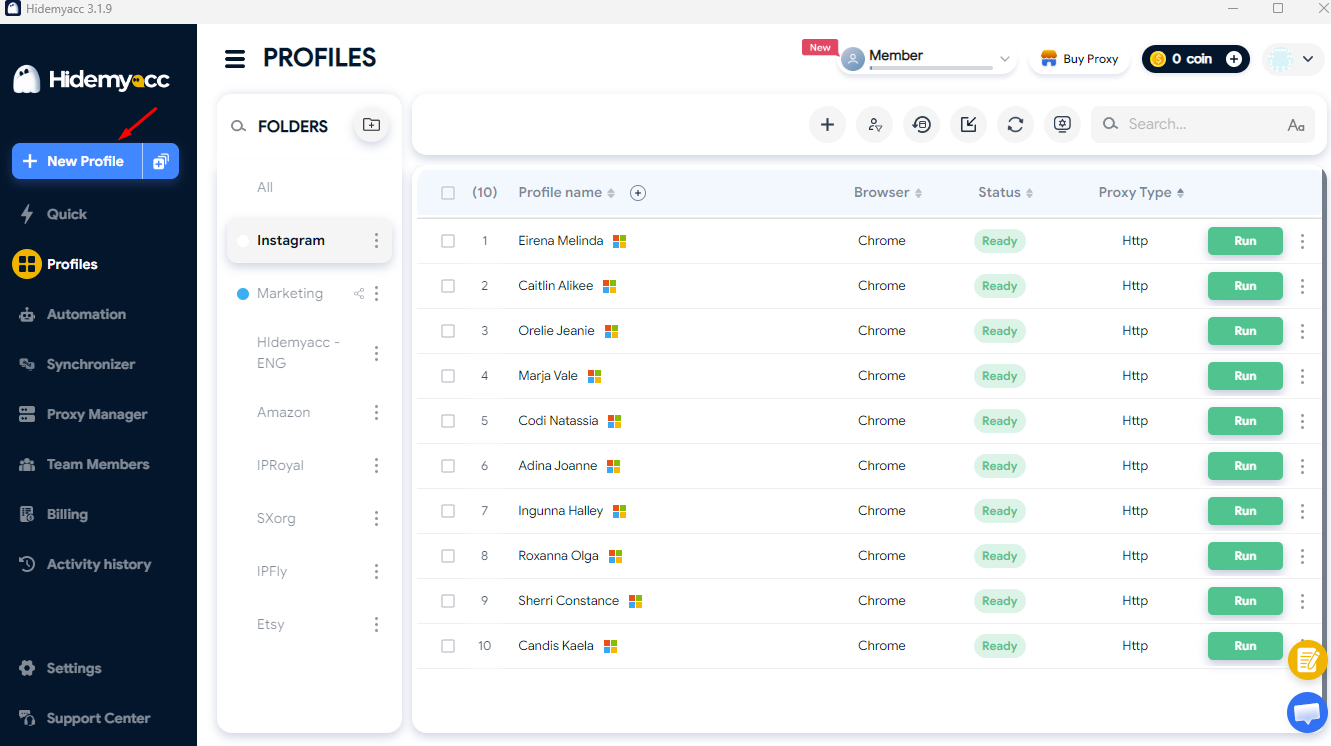
In the Profile screen, click New Profile and create a separate profile for each Facebook, Instagram, TikTok or X account. Name it after the Page, channel or client so it is easy to manage.
3.2. Assign a fixed proxy to each account
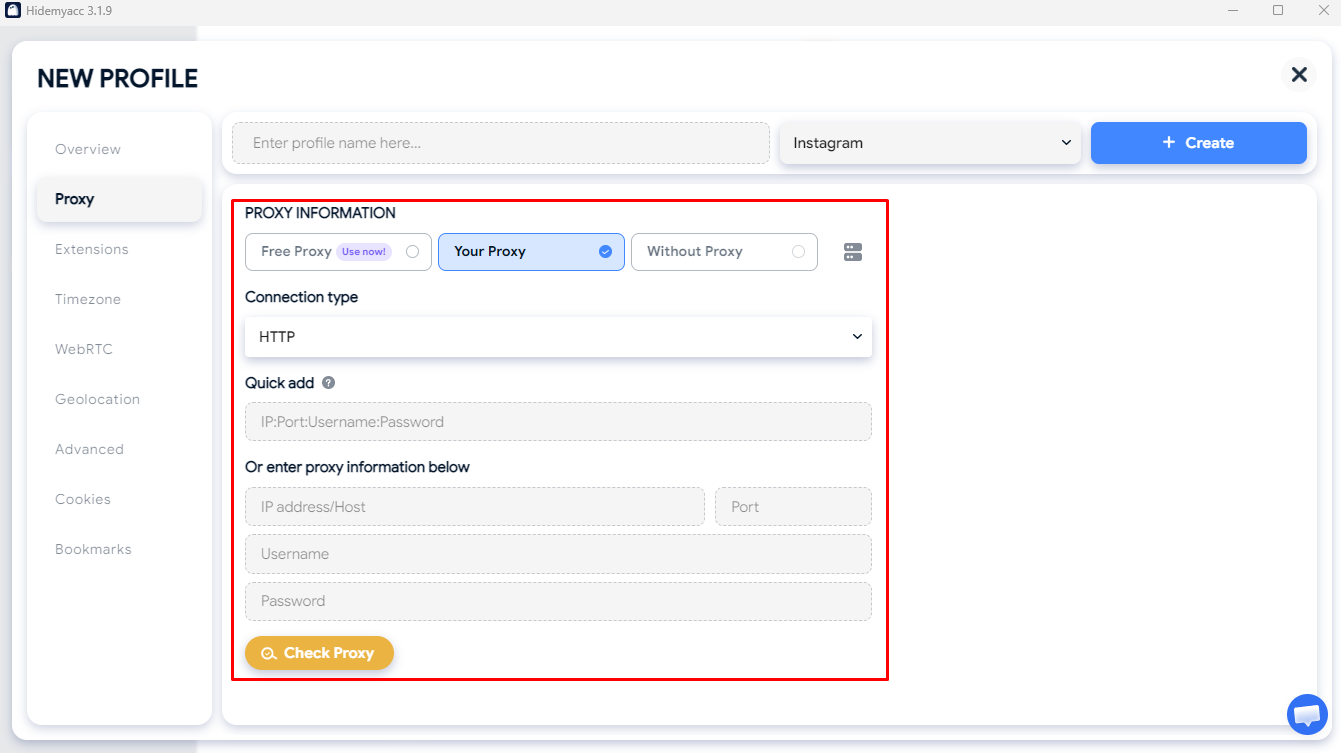
In the profile's Proxy section, attach a stable proxy that matches the account's region. Use the same proxy for each account long term and avoid rotating proxies. Once saved, the proxy setting stays with the profile. For a full walkthrough, read our guide on how to use a proxy in Hidemyacc.
3.3. Run each account from its own profile
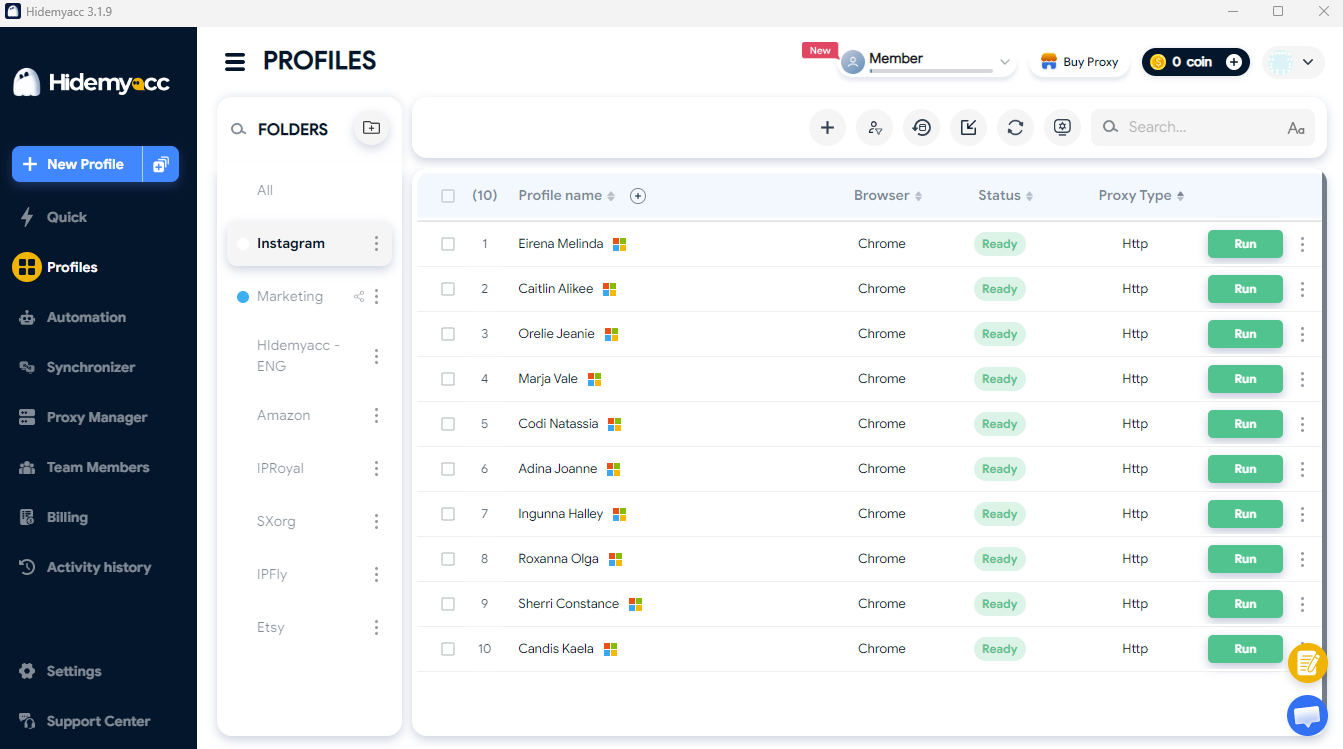
Open the matching browser profile to post, reply to comments and answer DMs. For repetitive actions like scrolling the feed, watching videos, liking or sharing, you can use Automation to run the same script across multiple profiles.
3.4. Archive profiles for paused clients
On the Business plan, use Export Profile to save profiles you do not need right now, delete them from your plan to save costs and use Import Profile when you need them again. Remember to note each profile's proxy before deleting it.
3.5. Share profiles with your team
Use Share Profile to assign each account to the right person, and revoke access when your team changes without changing any passwords.
With this workflow, every social media account always runs in its own environment, helping agencies and social media managers handle many clients on one device in a clear and consistent way.
4. FAQ
4.1. Will logging in to multiple Facebook accounts on one computer get them banned?
Logging in to several accounts does not automatically get them banned. Hidemyacc separates cookies, cache and browser fingerprints between browser profiles, but each account's status still depends on the platform's policies and how the account is actually used.
4.2. How is Hidemyacc different from a regular incognito window?
Incognito only clears your data when you close the browser and does not create multiple independent environments. Hidemyacc creates separate browser profiles, each with its own cookies, cache, fingerprint and login session saved for that account.
4.3. Do I need a separate proxy for each social media account?
It is not required. However, if an account operates in a specific region, or several people open it from different places, attach a fixed proxy to that browser profile so the account always logs in from the same IP.
4.4. Does Hidemyacc work with the Instagram and TikTok mobile apps?
Hidemyacc is a desktop browser, so you manage accounts through the web versions of Facebook, Instagram, TikTok and X. Common tasks like posting, replying to comments and answering DMs all work on the web. If the same account is also used in a mobile app, the platform will record your phone as an additional device.
4.5. Can several people open the same profile at once?
No. Each profile can only be open for one person at a time. While one team member is using it, others have to wait until it is closed. This way, the account is never logged in from several places at once.
Manage all your social media accounts from one device
Create a separate browser profile for every Page or channel and keep cookies and login sessions apart to manage multiple Facebook, Instagram, TikTok and X accounts more efficiently.
Every new account starts with a 7 day free trial with 30 profiles. After that, choose from 5 plans and get 50% off when you pay yearly.
Comparing tools? See Hidemyacc vs Gologin, or explore more ways to use Hidemyacc.

Try for FREE now !
Don't forget you have 7 days free trial
Test it first and love it later.
Do you wanna join our Affiliate program? Join now!