


Test websites across multiple devices, regions and test accounts on one machine


Dev, QA and fraud prevention teams often need to test their application from many users' points of view: different devices, different countries and accounts in different states. Building each of those environments with virtual machines or by switching VPNs by hand is slow and hard to reproduce consistently from run to run.
The Hidemyacc antidetect browser creates many persistent browser profiles on the same machine. Each profile has its own browser fingerprint, proxy, cookies and data, all saved between sessions. You can run test scripts with Automation, control profiles through the API or open a profile manually to inspect it.
1. When testing calls for an antidetect browser
If all you need is to isolate cookies between tests, a Playwright browser context or a separate user data directory for each Selenium session is enough. An antidetect browser earns its place in the following situations.
- Testing region specific content: Geo redirects, regional pricing and localized content all depend on the browser's IP, timezone and language. When these three do not match, your test results do not reflect what users in that region actually experience.
- Testing device fingerprinting and fraud prevention: If your product has rules against multi accounting, coupon abuse or bots, you need many devices that look different to check whether those rules work correctly. Browser contexts inside the same browser share one fingerprint, so your system only sees a single device.
- Test accounts that need to keep their state: Many test cases need accounts in a specific state: new members, paid subscribers, accounts on a trial. Ephemeral test environments lose their cookies and data after every run, forcing you to log in and rebuild that state from scratch.
- Manual QA and automated scripts need to share an environment: When a script reports a failure, QA needs to open that exact environment to see what the website showed. Ephemeral environments are usually gone by the time the test finishes.
All of these situations need the same thing: persistent browser environments, each carrying the footprint of its own device and its own region.
What price are your UK customers actually seeing on your website?
Create profiles with a proxy for each country and a timezone that follows the IP, so you can test exactly what users in every market see.
2. How Hidemyacc supports testing
The Hidemyacc antidetect browser lets you create and manage many independent browser profiles on the same device. Each profile works as a separate browser with its own browser fingerprint, cookies, login session, extensions and proxy, so you can set up separate environments for development, testing and automation without sharing browser data.
For automation and development, this setup fits whenever you need to test a website, an app or an automated workflow across many different environments. Each browser profile can be configured for a specific test case, which makes it easy to spin up environments, run automation and track the results of every session.
2.1. Dedicated proxies with configurable timezone and language
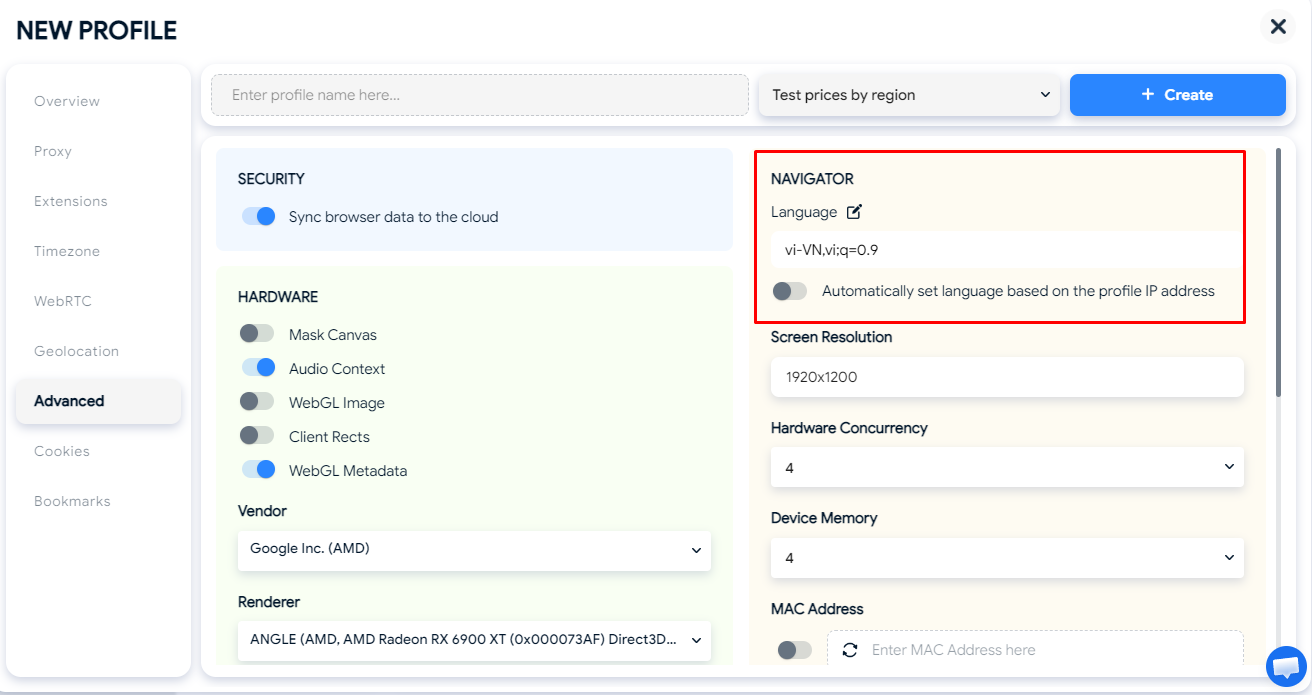
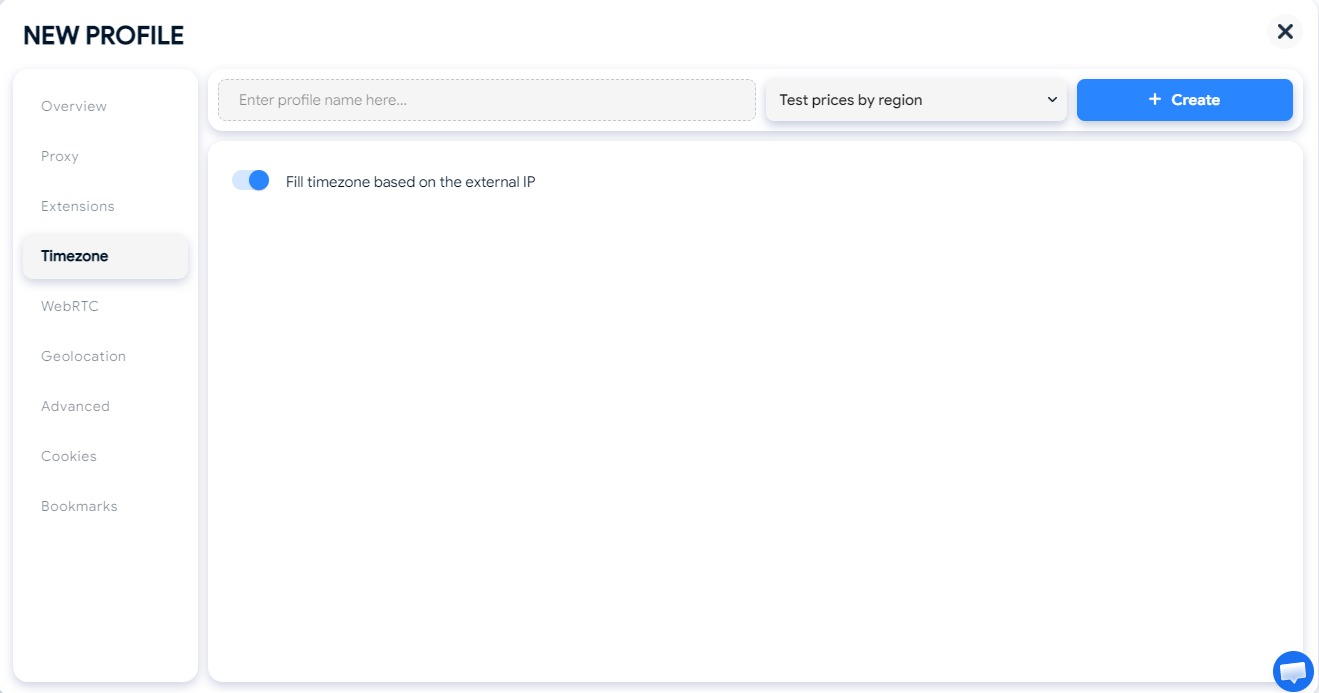
Each profile gets its own proxy. The timezone can follow the IP location automatically or be set manually, and the browser language is configurable too. This lets you test both the normal case, where IP, timezone and language all match, and edge cases where they do not, such as a Vietnamese user traveling in the US with a Vietnamese language browser and a US IP.
Proxy Manager shows how many profiles each proxy is assigned to, so you can control how IPs are distributed across test groups.
2.2. A unique fingerprint for every profile
Each profile has its own fingerprint, including user agent, operating system, Canvas, WebGL, fonts and screen resolution. To your fraud prevention system, every profile appears as a separate device, so you can test your device detection rules against many devices without needing many machines.
The fingerprint emulates the browser parameters reported to websites. It does not change how pages are rendered. To test your UI on other operating systems or browsers, you still need real devices or a cross browser testing service.
Learn more: What is a browser fingerprint?
2.3. Persistent profiles you can also open manually
Cookies, local storage and login sessions are saved in the profile between sessions. Create a test account once and keep it in that exact state for future runs. When a script reports a failure, QA can open the same profile that just ran to investigate.
Each profile can only be open in one place at a time, including when it is opened through the API, so stop the script before opening the profile manually.
2.4. Automation: test scripts without building a framework
Hidemyacc Automation lets you create scripts by dragging and dropping ready made commands, recording your actions with Record or importing a script you have already written. For QA engineers who are new to scripting, Record is the fastest way to start: you go through the flow once on the page as usual, and Hidemyacc turns it into a script you can replay across many profiles.
The drag and drop commands cover a complete test flow:
- Read spreadsheet reads test data from Excel or Google Sheets, such as a list of accounts or product URLs.
- Loop data iterates through each row of data, while Type, Click element and Keypress carry out the user flow.
- Conditions checks whether an element appears on the page, such as a success message or an error page.
- Take screenshot captures the full page or a single element as evidence.
- Export variable writes the result of each run to a file.
When you need to assert a specific value, such as a displayed price or the text of a message, the Javascript code command lets you write Puppeteer code to read and compare values on the page, then write the results to a file. Return values and errors in your code both show up in Debug after a test run.
Scripts run on multiple profiles in parallel, up to 10 profiles at once, with configurable loop counts, maximum run time and delay between profiles. You can also schedule runs for a specific time or daily, as long as the Automation screen is open.
Scripts that use the Javascript code command run code on your machine, so only import scripts from sources you trust.
Learn more:
2.5. Control profiles through the API
If your team already has an automated test suite, Hidemyacc provides an API to create, start and stop profiles. When you start a profile through the API, you enable a remote debugging port and connect with Puppeteer (Node.js) or Selenium. Your test suite keeps its logic; you only replace the browser setup with a connection to the profile.
Hidemyacc provides technical support for Puppeteer. For Selenium, you can follow the integration examples on the Hidemyacc GitHub, making sure to use the ChromeDriver version that matches the Hidemyacc browser version.
Learn more: Hidemyacc API documentation
2.6. Organize profiles by project
Naming, tagging and organizing profiles into folders keeps staging, production and individual projects separate. The Activity History page records the time, profile and account behind every action, and you can filter it by date or search it. When several people on your team share the same set of test profiles, you know who opened which profile and when.
3. Sample workflow: testing regional pricing and content
Say your website shows prices and currency based on the user's country, and you need to confirm that every market sees the right price after each pricing update.
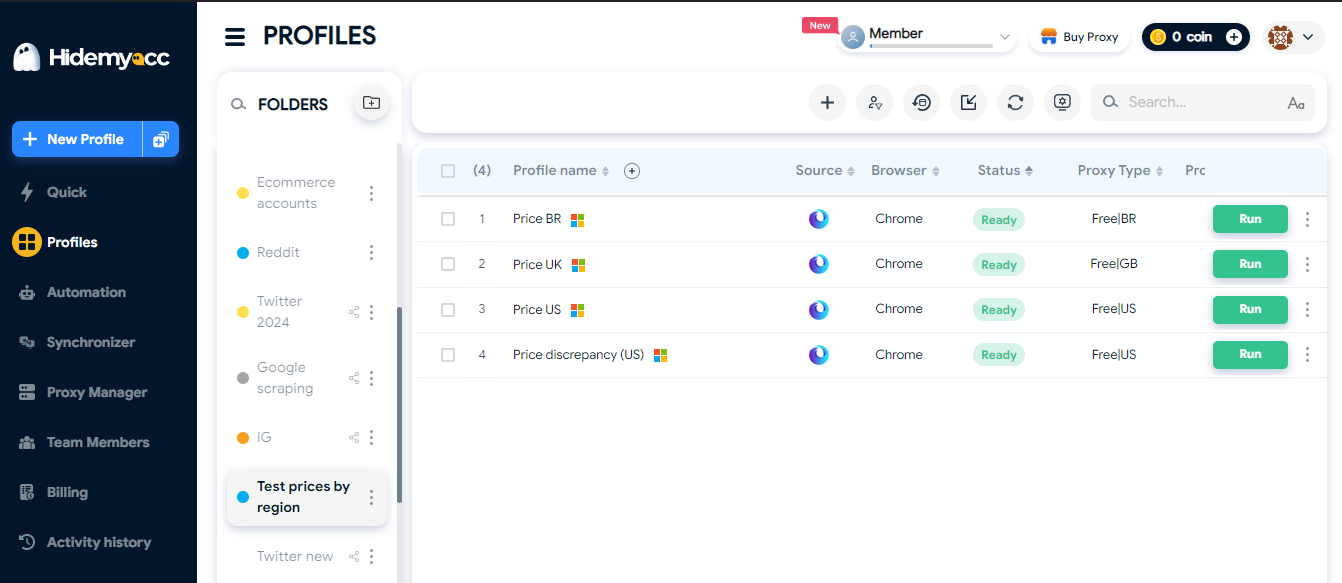
3.1. Create profiles by region
Create a folder called \"Regional price test\" with the profiles \"Price US\", \"Price UK\" and \"Price VN\". Add a \"Price US mismatch\" profile to cover an edge case.
3.2. Attach proxies and set up the environment
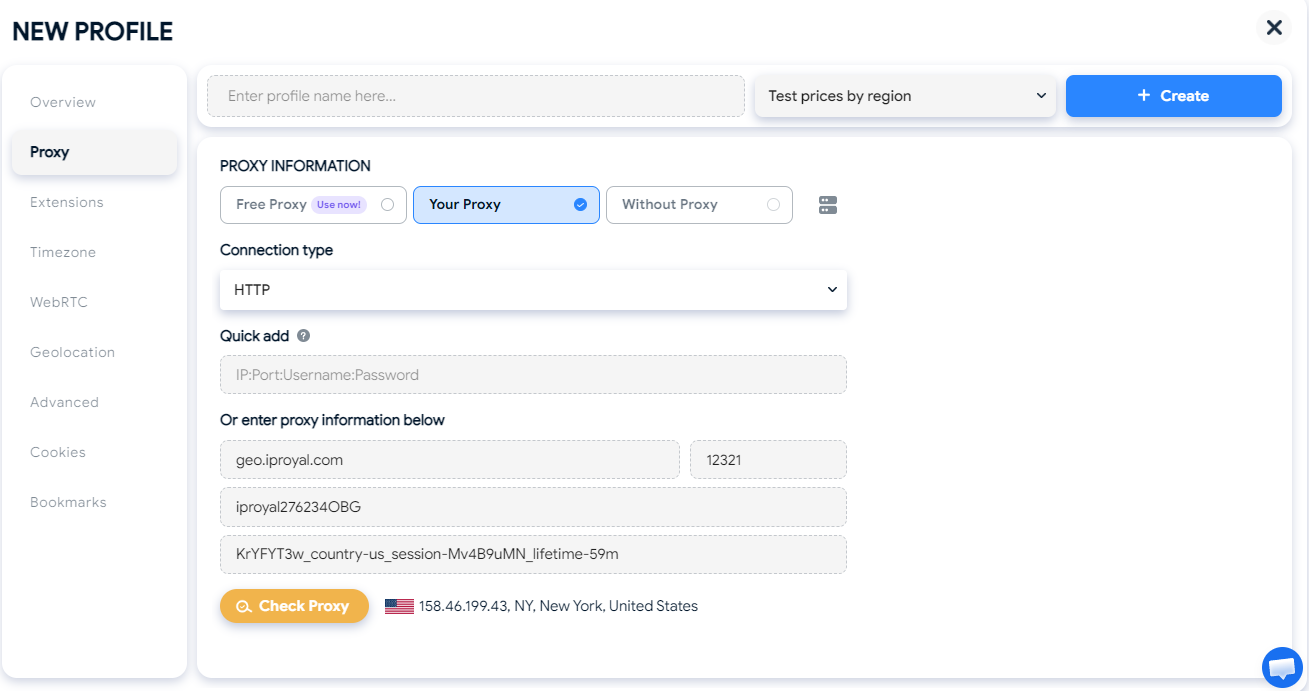
Attach a proxy from each country and let the timezone follow the IP. For the \"Price US mismatch\" profile, use a US proxy but set the browser language to Vietnamese to simulate a Vietnamese user in the US.
In Automation, use New tab to open the product page, Take screenshot to capture the price area, and Javascript code to read the price, the currency and the URL after redirect, then write them to a file.
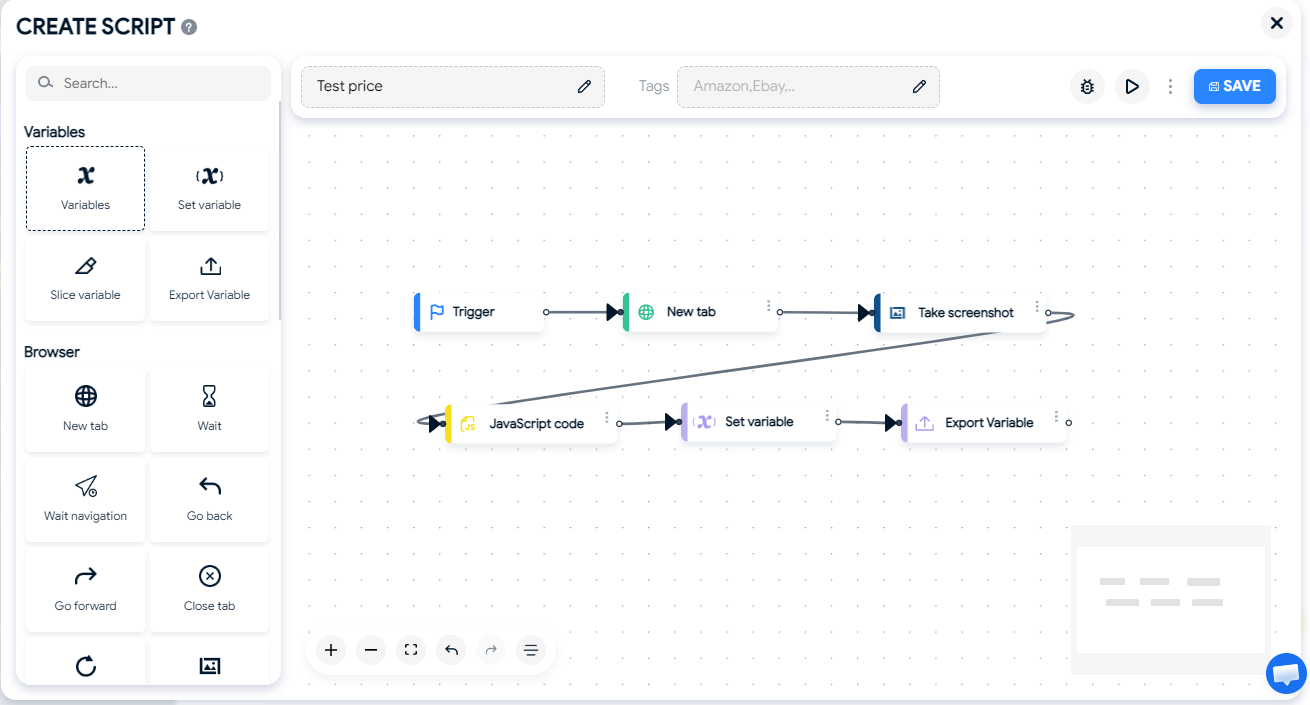
3.4. Run and compare
Run the script on all 4 profiles and compare the output files and screenshots with the expected price list for each market. Schedule a daily run to catch incorrect prices early after every update.
4. FAQ
4.1. How is Hidemyacc different from a Playwright or Selenium browser context?
A browser context creates an ephemeral environment that disappears when the test ends, and all contexts share one fingerprint. Hidemyacc browser profiles are persistent, each one has its own fingerprint and proxy, and you can open them manually to inspect. If you only need to isolate cookies between tests, a browser context is enough. Hidemyacc fits when you need real regional IPs, many devices that look different, or environments that keep their state over several days.
4.2. Can Automation verify test results?
The drag and drop commands can check whether an element appears on the page, take screenshots and write results to a file. To assert specific values such as a price or displayed text, use the Javascript code command with Puppeteer code.
4.3. Is there a limit on how many profiles can run at once?
When you open profiles manually or through the API, Hidemyacc does not limit how many profiles run at the same time. Each profile is a full Chromium browser, so how many run reliably depends on your machine's RAM and CPU. Automation runs up to 10 profiles in parallel per run.
4.4. Which operating systems does Hidemyacc run on?
Hidemyacc currently runs on Windows and macOS. A Linux version is in development and coming soon.
4.5. Can I schedule test runs?
Automation supports scheduling scripts for a specific time or daily, as long as the Automation screen is open. For Puppeteer or Selenium test suites that call the API, use the scheduler you already have.
Build persistent test environments for every region and device
Create profiles with their own fingerprint and proxy, run scripts with Automation or connect your existing test suite through the API.
Every new account starts with a 7 day free trial with 30 profiles. After that, choose from 5 plans and get 50% off when you pay yearly.
Comparing tools? See Hidemyacc vs Gologin, or explore more ways to use Hidemyacc.

Try for FREE now !
Don't forget you have 7 days free trial
Test it first and love it later.
Do you wanna join our Affiliate program? Join now!