DICloak is a budget-focused antidetect browser designed for basic multi-account management. This review analyzes its features, pricing, fingerprint reliability, proxy limitations, strengths, weaknesses, and who it is best suited for in 2026.
Overview
- Year Founded: 2024
- Headquarters: Singapore
- Free Trial / Free Plan: Free plan
- Starting Price: Paid plans start $8/month
- Cross-Platform App: Windows and macOS
- Support: Email and online documentation
- Trustpilot Rating: 4.8/5 with 52 reviews
1. What is DICloak and what does it offer?
DICloak is an antidetect browser designed to help users manage multiple online accounts on a single device without being detected or linked by platforms such as Facebook, Google, TikTok, Amazon, or other major websites.
Instead of using a regular browser where cookies, device fingerprints, and system data are shared across all sessions, DICloak allows users to create isolated browser profiles. Each profile behaves like a completely separate device with its own fingerprint, cookies, and storage.
DICloak is commonly used for:
- Affiliate marketing
- Multi-account advertising
- Social media account management
- E-commerce platforms (Amazon, eBay, Shopify, etc.)
- Basic automation and repetitive tasks
Compared to well-known solutions like Multilogin or AdsPower, DICloak positions itself as a budget-friendly antidetect browser, targeting individual users, beginners, and small teams who need core multi-account protection without paying enterprise-level prices.
However, affordability often raises an important question: Is DICloak simply cheap, or is it actually reliable and safe for long-term use? And more importantly, how strong is its fingerprint protection compared to established competitors? In this review, we will take a deep, unbiased look at DICloak, breaking down its features, strengths, weaknesses, real-world use cases, and how it compares to other antidetect browsers on the market.
You can explore the concept further in our guide on how antidetect browsers help manage multiple accounts safely: https://hidemyacc.com/what-is-antidetect-browser
2. How does DICloak work?
DICloak works by isolating and customizing browser data at the profile level, rather than at the device level. To achieve total environment separation on a single computer, every individual profile inside the system isolates four core data components:
- Cookies and cache
- Local storage and session data
- Browser fingerprint parameters
- Proxy configuration
From the perspective of a website, each profile looks like a different physical computer, even though they are all running on the same machine.
Browser Fingerprint Isolation
A browser fingerprint is a collection of technical signals that websites use to identify users, including:
- Operating system and browser version
- Screen resolution
- Language and timezone
- WebGL, Canvas, and audio context data
- Installed fonts and system preferences
DICloak allows users to modify or randomize many of these parameters when creating a profile. While this provides a basic level of fingerprint protection, the depth of spoofing is generally considered entry-level to mid-range, rather than enterprise-grade.
Profile-based Workflow
The typical workflow inside DICloak looks like this:
- Create a new browser profile
- Assign a proxy (HTTP, HTTPS, or SOCKS5)
- Configure fingerprint settings or use auto-generated values
- Launch the profile in an isolated browser window
- Use the profile as if it were a separate computer
Profiles can be started, stopped, edited, or duplicated at any time, making DICloak suitable for repetitive account-based workflows.
By streamlining this routine, the software directly addresses the most common risks that trigger instant platform suspensions. Typical issues solved include account bans caused by shared fingerprints, cookie conflicts, IP-based account linking, and the hassle of manual browser switching.
3. How much does DICloak cost and what do you get for the price?
DICloak is clearly positioned to lower the entry barrier for antidetect browsers. Instead of targeting large agencies, its pricing structure focuses heavily on individual marketers, solo users, and small teams who need core functionality without committing to a high upfront cost.
The platform offers a basic Free Plan alongside several paid tiers that start at an affordable $8/month. As your operations grow, the subscription scales based on the number of browser profiles, added team members, and access to automation tools.
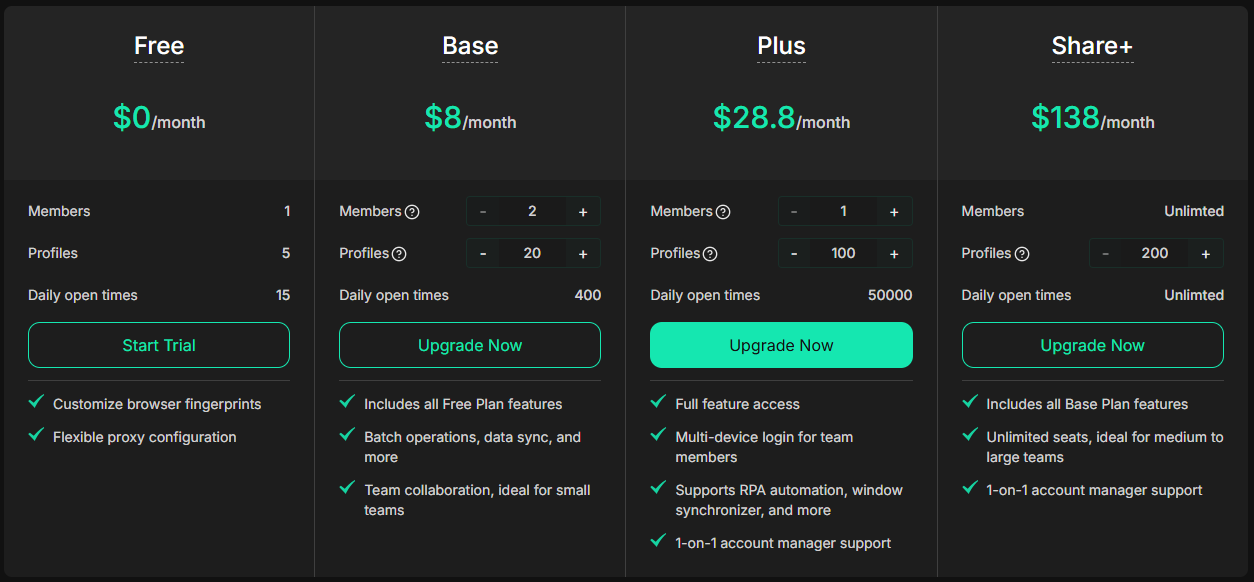
However, this lower price point comes with unavoidable technical trade-offs:
- Limited Advanced Emulation: Deep, core-level hardware fingerprint spoofing is heavily restricted compared to premium competitors.
- Basic Automation Restrictions: Full developer API access for high-volume execution is not available on entry-level paid plans.
- Minimal Collaboration Controls: Advanced team monitoring, centralized audit logs, and permission granularities are strictly locked.
While DICloak offers solid value for beginners or solo marketers with intermediate needs, users running high-budget advertising campaigns or complex scripting will eventually outgrow its infrastructure. If affordability is your absolute priority, the cost makes sense—but for high-risk, scalable workflows, the financial savings may not compensate for the feature limitations. But how does this low-cost model reflect on the daily user experience? Let's take a closer look at the actual application interface.
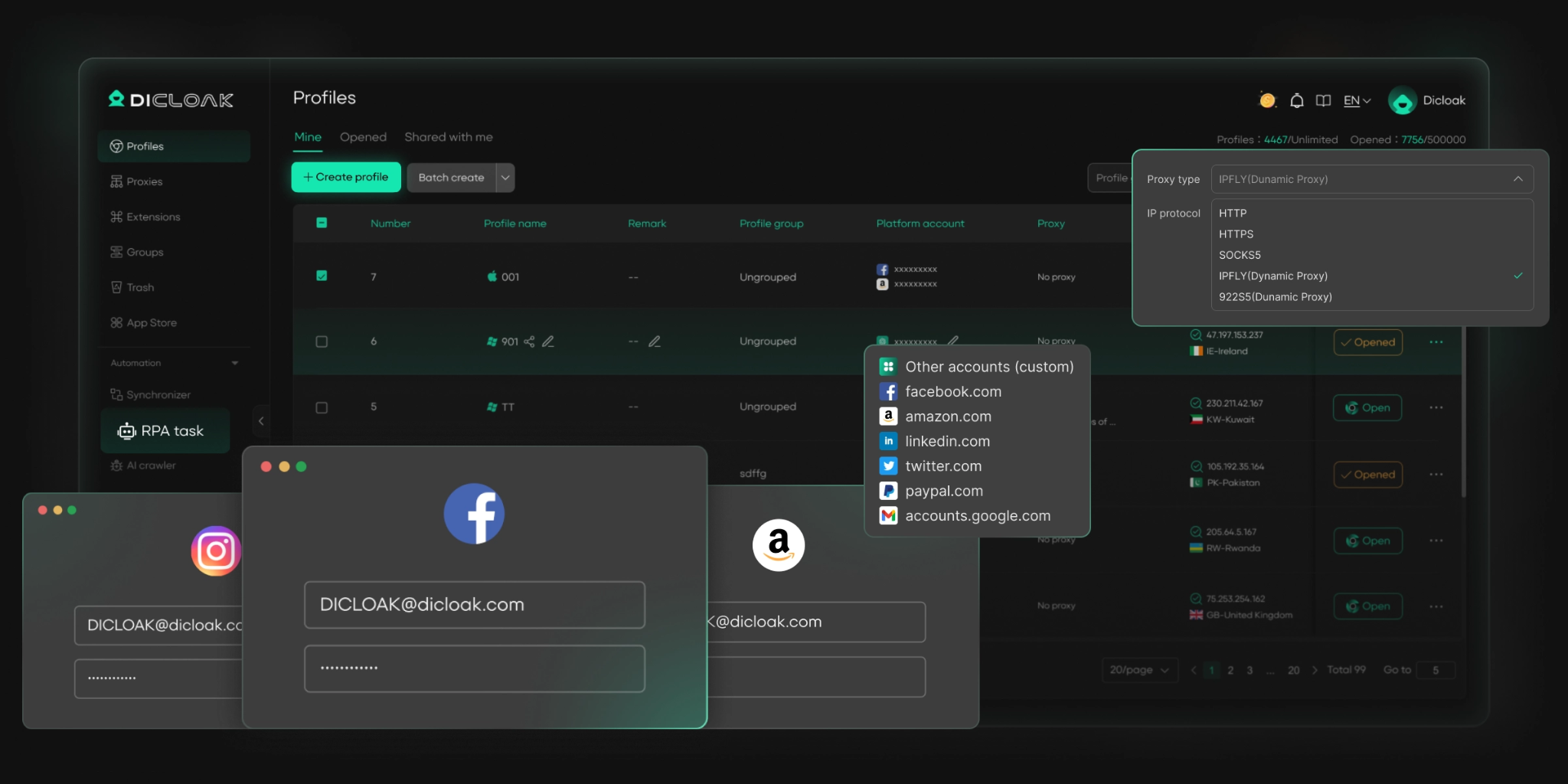
4. How user-friendly is DICloak’s interface and overall experience?
Ease of use is one of the areas where DICloak clearly tries to stand out, especially for users who are new to antidetect browsers. From the first launch, the interface feels relatively straightforward and does not overwhelm the user with too many technical options at once.
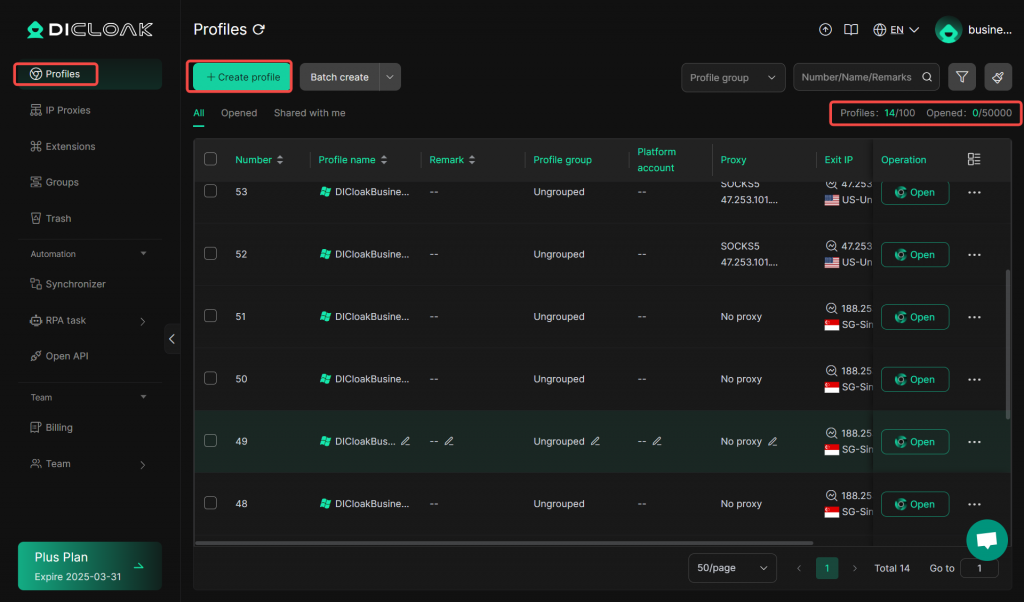
The main dashboard centers entirely on browser profile management, utilizing a guided step-by-step creation process where essential settings—such as browser core, operating system, and proxy configuration—are logically grouped together.
To give you a clearer picture, our hands-on testing revealed several notable user experience pros and cons:
- Intuitive Workflow: Routine actions like launching, editing, duplicating, or stopping profiles are accessible directly from the main control panel. Profiles load in completely separate browser windows, keeping different account sessions mentally organized.
- Abstracted Customization: Key fingerprint settings are heavily automated. While this makes the tool highly approachable for beginners, advanced power users may find the interface restrictive since it does not expose granular configuration parameters for deep manual control.
- Hardware Resource Strain: On standard hardware under light workloads, profile switching and loading times are reasonably smooth. However, launching a large number of profiles simultaneously puts a heavy strain on system resources, causing noticeable sluggishness on lower-end machines.
Overall, DICloak delivers an accessible, streamlined user experience that successfully prioritizes simple everyday multi-account tasks over technical complexity.
5. How strong is DICloak’s browser fingerprint protection?
Browser fingerprint protection is the absolute core of any antidetect software. DICloak aims to prevent tracking systems from identifying and linking your multiple profiles by modifying key tracking parameters during creation.
When you configure a profile inside DICloak, the engine alters two primary layers of your digital identity:
- Browser-Level Parameters: Allows manual modification or automatic generation of the User-Agent, screen resolution, browser language, and localized timezone.
- Common Fingerprint Vectors: Applies basic masking over vulnerable canvas parameters, WebGL configurations, and AudioContext signatures to reduce simple account linking in routine workflows.
However, our technical analysis reveals a critical limitation regarding its deep hardware-level simulation depth:
While the dashboard displays randomized values for hardware-related parameters, certain deep OS-level identifiers—such as your actual MAC address or low-level hardware serials—cannot be independently verified through public fingerprint checkers. Because these values are hidden in standard browser environments, it is impossible to validate whether DICloak simulates them with real-world precision or merely relies on abstract representations. Any claims regarding flawless hardware-level emulation should be viewed with heavy caution.
From a practical standpoint, DICloak's protection is sufficient for mainstream platforms that primarily scan browser-level configurations and network details. However, for high-risk operations or complex advertising networks that execute deep system queries, the lack of transparent, verifiable hardware accuracy poses a noticeable long-term threat.
In short, DICloak offers practical, entry-level security for beginners, but it lacks the provable, transparent fingerprint emulation required for enterprise-grade protection. But remember, even standard browser spoofing will fail instantly if your network infrastructure leaks your true location.
6. How well does DICloak handle proxy integration?
Proxy integration is a critical component of any multi-account workflow, and DICloak treats proxies as an essential requirement for running browser profiles safely. Each profile can be assigned a separate proxy, allowing accounts to appear as if they are accessing the internet from different networks and locations.
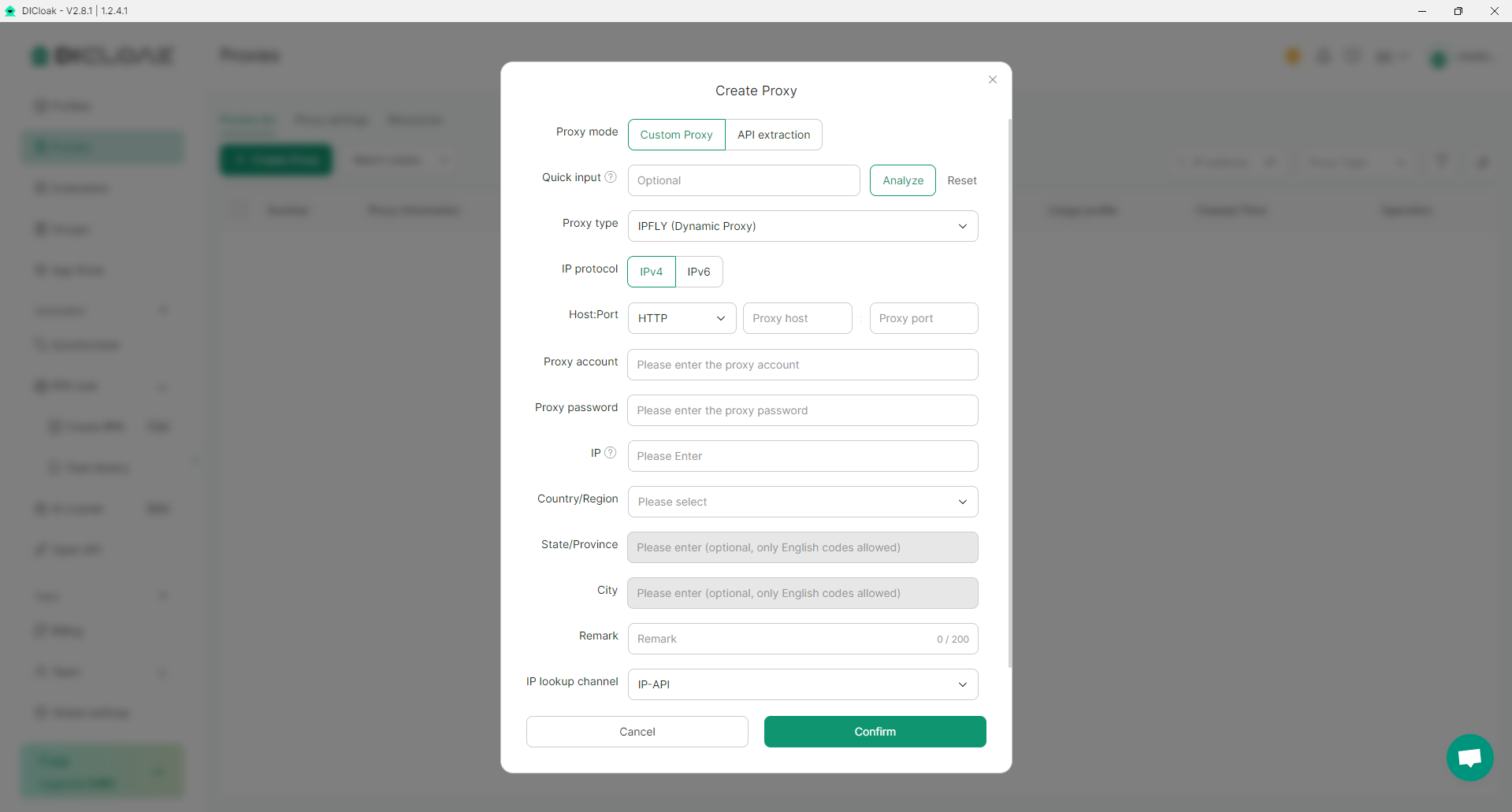
The platform supports standard protocols including HTTP, HTTPS, and SOCKS5. Users can add proxies manually during profile creation or edit them later through a functional built-in proxy connection tester to verify connectivity before launching a session.
Despite the functional setup, our testing highlighted two major proxy limitations:
- Zero Bundled or Free Proxies: DICloak does not offer any built-in proxy resources, even on their highest-priced subscription tiers. Unlike competitors that bundle discounted or free premium proxy bandwidth, DICloak forces you to source, purchase, and fund all proxy setups entirely through external third-party providers.
- Lack of Advanced Management Tools: While you can run a basic connectivity test, DICloak completely lacks automated proxy management. Features like automatic proxy rotation, live proxy health monitoring, or automated failure replacement are non-existent.
If you are managing large proxy pools, you must handle rotation and monitoring manually or rely heavily on external software setups. For absolute beginners, this completely external workflow adds extra setup complexity and unpredicted costs beyond the basic browser subscription.
7. How effective is DICloak’s automation and RPA capabilities?
Automation is an area where DICloak tries to add extra value beyond basic profile management. Instead of relying entirely on manual workflows, DICloak includes built-in automation features designed to reduce repetitive tasks.
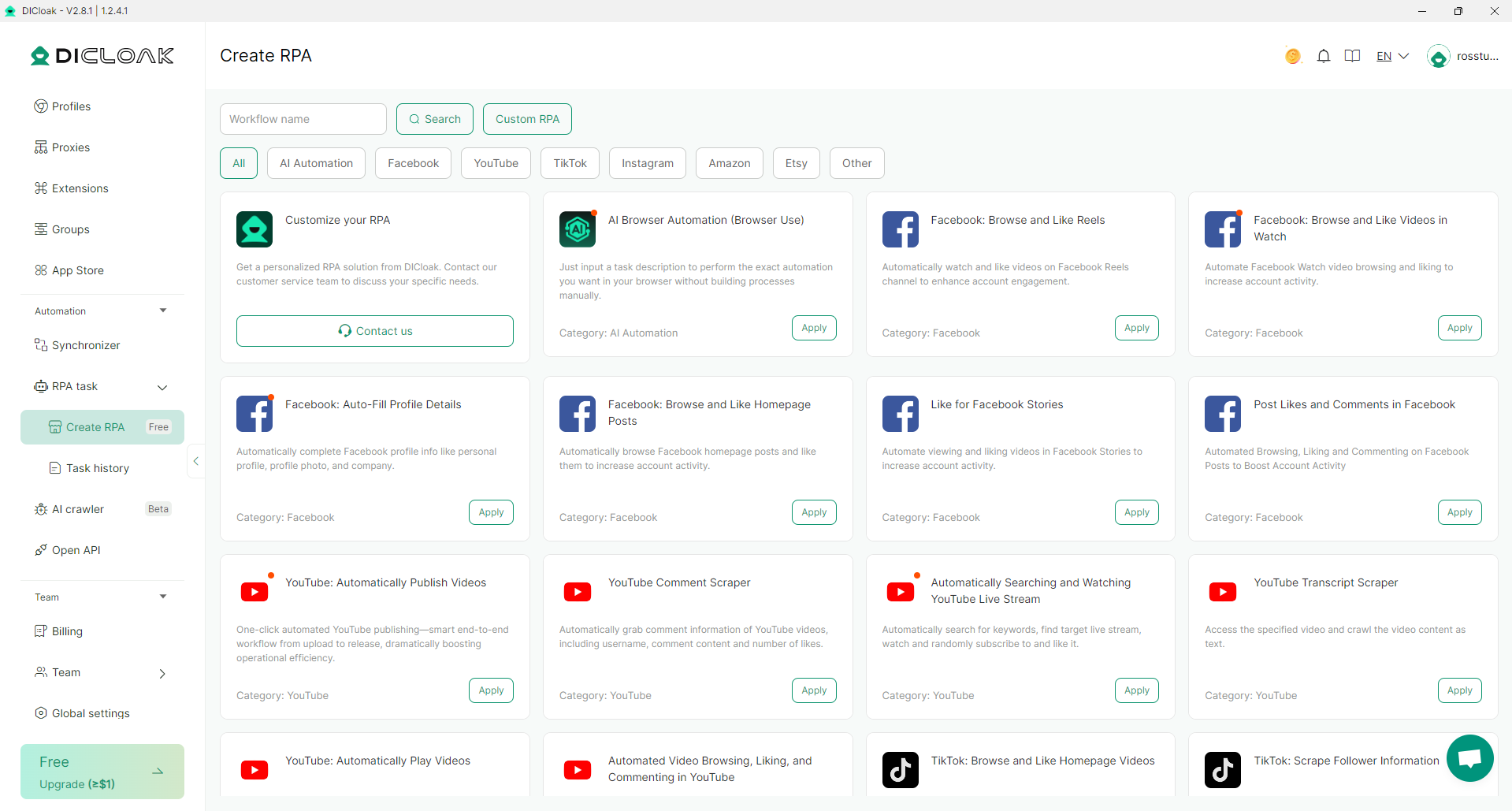
However, DICloak’s automation capabilities remain relatively limited when compared to more advanced solutions. It does not natively support popular automation frameworks such as Selenium, Puppeteer, or Playwright. As a result, developers or advanced users looking to build complex, scalable automation systems may find DICloak restrictive.
Another limitation is the lack of fine-grained control over browser behavior. RPA-based automation tends to rely on visual or structural elements of web pages, which can break when websites change layouts or introduce dynamic content. Without deeper scripting access, maintaining automation workflows may require frequent manual adjustments.
Overall, DICloak’s automation features are best viewed as a convenience tool rather than a core strength. They are suitable for simple, repetitive tasks and beginner-level automation but are not designed to support high-volume, enterprise-grade automation projects.
8. Is DICloak suitable for teamwork and multi-user management?
Team collaboration is an important factor for users who manage accounts together with partners, virtual assistants, or small teams. DICloak does provide basic features to support multi-user workflows, but its focus remains primarily on individual users and small groups rather than large organizations.
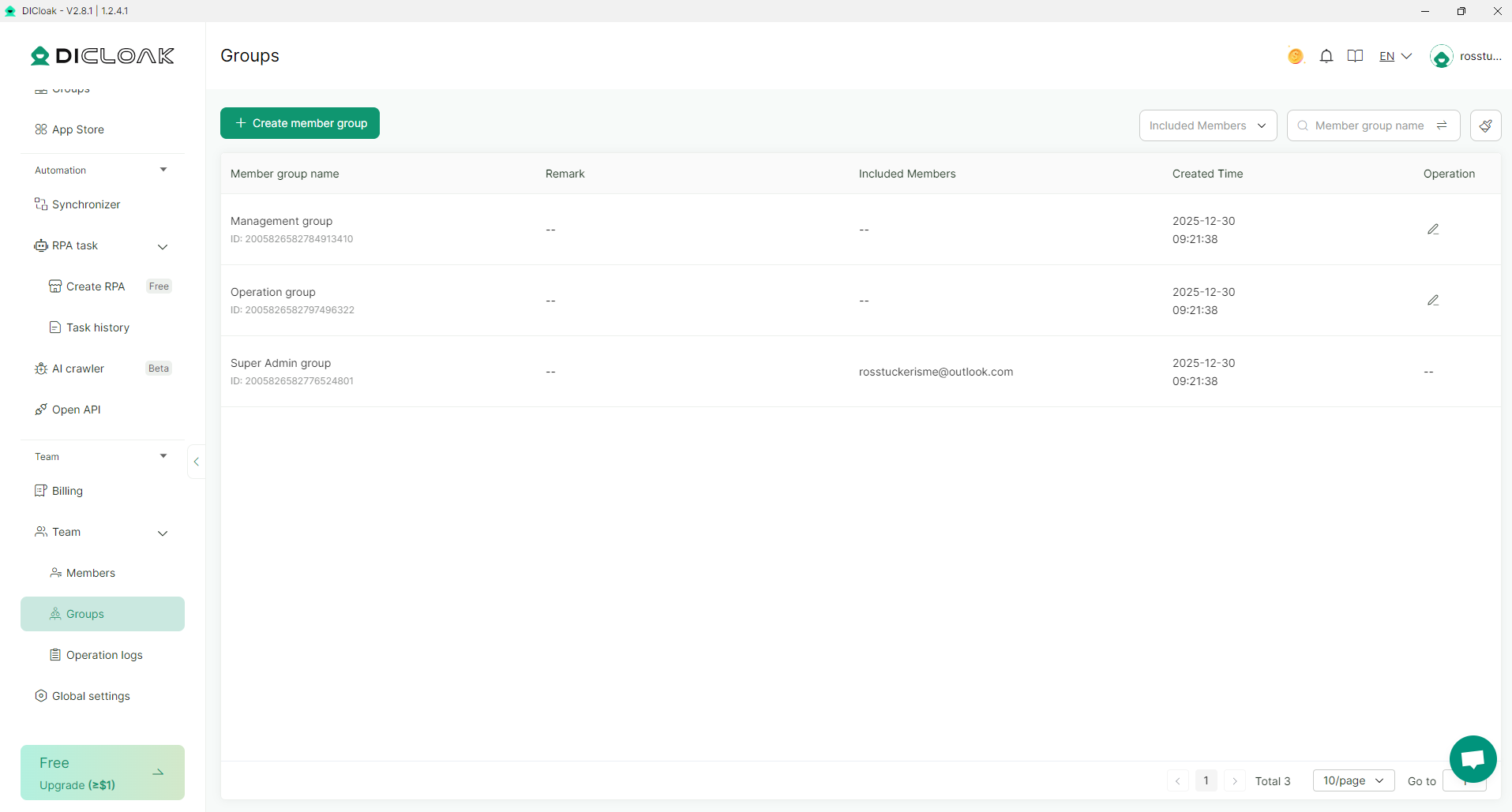
DICloak allows users to share browser profiles and grant access to other team members, which can be useful for delegating routine tasks or managing accounts collaboratively. This makes it possible for multiple people to work on the same set of profiles without constantly exporting and importing data.
Permission management, however, is relatively simple. Role-based access control and advanced permission granularity are limited, meaning team owners may not have fine control over what each member can view or modify. For small teams, this is usually acceptable, but it may become a concern as team size grows.
Another limitation is scalability. While DICloak can handle basic team collaboration, it is not designed for large agencies managing hundreds or thousands of profiles across multiple departments. Advanced features such as detailed activity logs, centralized audit trails, or enterprise-level synchronization are either minimal or not available.
9. What are the real strengths and weaknesses of DICloak?
After breaking down DICloak’s features in detail, its overall strengths and weaknesses become clearer. Like most antidetect browsers in its price range, DICloak focuses on practicality and accessibility rather than advanced or enterprise-level functionality.
Strengths
- Affordable pricing: DICloak is significantly cheaper than most established antidetect browsers, making it accessible to beginners and users with limited budgets.
- Easy to use interface: The platform is intuitive and beginner-friendly, with a clear workflow for creating and managing browser profiles.
- Solid profile isolation: Each profile runs in an isolated environment with separate cookies, storage, and basic fingerprint parameters.
- Built-in RPA-style automation: Simple automation tools help reduce repetitive manual tasks without requiring programming skills.
- Suitable for small-scale use: Works well for individual users and small teams managing a limited number of accounts.
Weaknesses
- Moderate fingerprint spoofing depth: Browser-level fingerprint protection is adequate, but advanced consistency and deep emulation are limited.
- Unverifiable hardware-level parameters: Hardware-related values such as MAC address cannot be independently tested, making true emulation accuracy impossible to confirm.
- No bundled or free proxy options: All proxies must be sourced externally, even on higher-tier plans, increasing overall cost and setup complexity.
- Limited automation flexibility: Lack of native support for Selenium, Puppeteer, or Playwright restricts advanced automation use cases.
- Basic teamwork features only: Collaboration and permission controls are minimal and not suitable for large teams or agencies.
- Limited security transparency: There is little publicly available information about encryption, audits, or internal data handling.
Upgrade Your Account Security!
Don't let weak browser fingerprints disrupt your work. Hidemyacc provides high security with global-standard technology.
Start FREE Trial10. Conclusion
DICloak works best as a starting point or lightweight solution. It is a reasonable choice for users who value simplicity and affordability over advanced control and scalability. As needs grow more complex, many users may eventually look toward more mature antidetect browsers with deeper technical capabilities.
In conclusion, DICloak is worth using in 2026 if your priorities are cost efficiency, ease of use, and basic multi-account protection. For advanced users or long-term, high-risk workflows, it is better viewed as a stepping stone rather than a final destination.
>>> Other reviews of antidetect browsers
- Gologin Antidetect Browser: Detailed reviews, Pro & Cons
- What is Multilogin? Detailed Review, Pros, and Cons
- AdsPower Review - Does it provide a high-quality antidetect browser?
- Dolphin Anty Review - Is this antidetect browser worth it?
- Antidetect Browser Kameleo review: Is it worth using?
- MoreLogin Browser: Detailed Review and Alternatives
- Incogniton Browser: Honest Review
- BitBrowser: Detailed, hands-on review
- VMLogin Review - Is it an efficient antidetect browser?
- Is Linken Sphere the Right Antidetect Browser?
- SessionBox review: Honest look at its features & limits
- Ghost Browser in-depth review: A multi-session browser
- Nstbrowser Review: Affordable, but is it powerful enough?
- Is Lalicat a good antidetect browser? Full review & real testing
- Octo Browser: Full Review for Multi-Account Management
- Is Undetectable the right antidetect browser for your needs?
- ixBrowser review: How does it work and is it good for multi-account?
- Is DICloak a reliable antidetect browser? Pros & cons!
11. FAQ
Is DICloak safe to use?
DICloak is generally safe to use for basic and intermediate multi-account workflows when configured correctly. Like all antidetect browsers, its effectiveness depends heavily on proper fingerprint settings, high-quality proxies, and realistic user behavior. The tool itself does not eliminate risk entirely, but it can significantly reduce account linking when used responsibly.
Can DICloak completely prevent account bans?
No antidetect browser can guarantee complete protection from bans. DICloak helps reduce detection by isolating browser profiles and modifying fingerprints, but account safety also depends on factors such as proxy quality, login behavior, activity patterns, and platform-specific rules.
Does DICloak provide free or built-in proxies?
No. DICloak does not include free or built-in proxy services, even on higher-tier plans. Users must purchase and manage proxies separately through third-party providers.
What types of proxies work best with DICloak?
Residential or mobile proxies generally produce the best results, especially for social media, advertising, and e-commerce platforms. Datacenter proxies can work for low-risk tasks but carry a higher chance of detection. Matching proxy location with browser fingerprint settings is strongly recommended.
Can DICloak be used for advertising accounts (Facebook, Google, TikTok)?
DICloak can be used for advertising accounts, particularly for small-scale or test setups. However, users running high-budget or long-term ad campaigns may require deeper fingerprint consistency and more advanced tools than DICloak currently provides.
Does DICloak support automation tools like Selenium or Playwright?
No. DICloak does not natively support Selenium, Puppeteer, or Playwright. Automation is limited to built-in RPA-style tools designed for simple, repetitive tasks.
Can DICloak be used by teams or agencies?
DICloak supports basic team collaboration and profile sharing, which is sufficient for small teams. It is not designed for large agencies that require advanced permission controls, detailed activity logs, or enterprise-level workflow management.
Is DICloak suitable for long-term account farming?
For short- to medium-term projects, DICloak can be effective when combined with good proxies and careful usage. For long-term, high-risk account farming, more advanced antidetect browsers with stronger fingerprint consistency may be a safer choice.
Which operating systems does DICloak support?
DICloak primarily supports major desktop operating systems such as Windows and macOS. Linux support may vary depending on the version and should be verified directly with the provider.
Is DICloak a good choice for beginners?
Yes. DICloak is particularly well suited for beginners due to its simple interface, lower pricing, and straightforward setup process. It allows new users to learn the basics of multi-account management without a steep learning curve.