Octo Browser is an antidetect browser designed to help users manage multiple accounts more safely by creating separate browser profiles and generating consistent fingerprints. Many people consider it when they need a tool that keeps logins stable, reduces unnecessary flags, and simplifies account workflows. However, questions often arise: How accurate is its fingerprinting system? Is the interface easy to work with? Does the pricing match the value it offers? And how does it compare with alternatives like Hidemyacc, which provide broader customization and more flexible plans?
In this review, we break down Octo Browser’s real performance, from usability and fingerprint control to proxy compatibility and automation options, along with genuine user feedback from major review platforms. By the end, you’ll have a clear and grounded understanding of Octo Browser’s strengths, limitations, and whether it is the right tool for your multi-account setup.
1. Overview of Octo Browser
- Year Founded: 2021
- Headquarters: Vilnius, Lithuania
- Free Trial / Free Plan: No official free plan; trial available only upon request
- Starting Price: €29/month
- Cross-Platform App: Windows, macOS, Linux
- Support: Telegram, Email Ticketing
- Trustpilot Rating: Around 4.6/5 with 63 review
What are the main features of Octo Browser?
Octo Browser focuses on delivering a high-performance, secure environment for operating multiple accounts. Its core features include:
- Fingerprint generation: Browser fingerprints designed to mimic genuine device environments.
- Isolated browser profiles: Each profile runs in a fully separate environment with unique cookies, cache, and storage.
- Proxy assignment per profile: Built-in proxy support for HTTP, SOCKS5, and SSH connections.
- Fast profile creation and duplication: Ideal for scaling large campaigns or account farms.
- Team collaboration tools: Role-based access for agencies and distributed teams.
- Automation API: Enables integration with bots, scripts, and external automation tools.
- Encrypted cloud sync: Ensures profiles remain secure across devices.
Many automation setups rely on fingerprint isolation. Our guide explains how antidetect browsers manage browser fingerprints: https://hidemyacc.com/what-is-antidetect-browser
2. What is the Octo antidetect browser?
Octo Browser is an antidetect browser designed for people who need to work with multiple online accounts, run automation tasks, or manage advertising, marketing, and e-commerce operations. It allows users to create separate browser profiles that behave like different devices, helping reduce the chance of platforms linking accounts together.
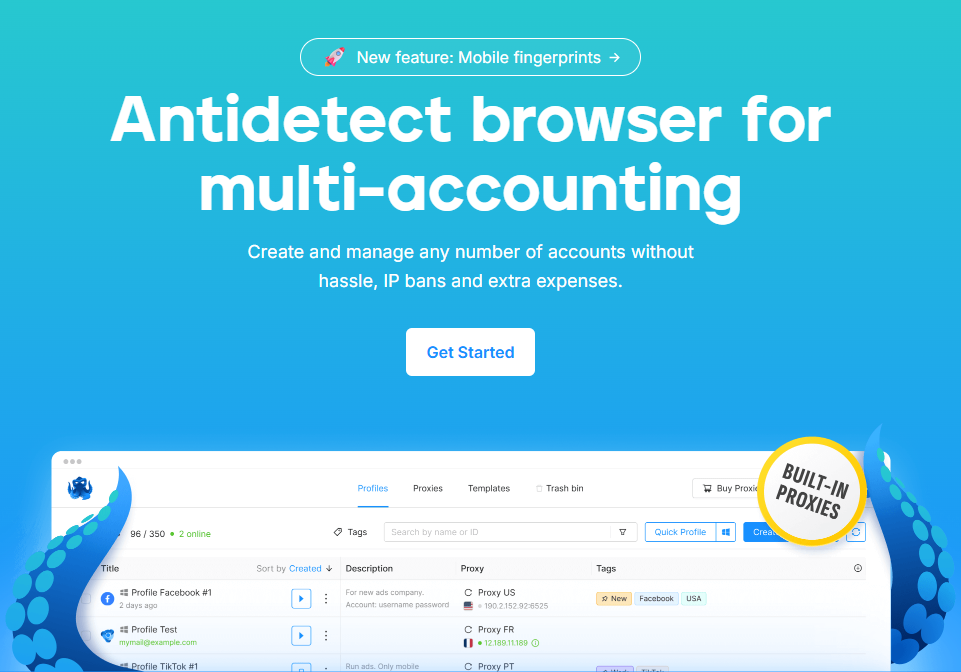
Octo Browser mainly helps solve issues related to fingerprint exposure. On many platforms, even if you use proxies, the browser’s real fingerprint can still reveal that multiple accounts belong to the same user. This often leads to account restrictions or bans. Octo Browser helps avoid that by giving each profile its own fingerprint and isolated environment, so actions look more natural across different platforms.
Overall, the browser’s advantages include stable profile separation, easy proxy setup, and a structure that works well for teams or people handling accounts at scale. It’s suitable for affiliate marketers, e-commerce sellers, ad managers, agencies, crypto users, and anyone who needs separate digital identities for daily work.
As for reliability, Octo Browser has been on the market for a while and is used by many people in the multi-accounting space.
In general, Octo Browser is used by people who need a straightforward way to manage multiple accounts without getting them linked or flagged, especially when dealing with high-maintenance platforms.
3. How much does Octo Browser cost?
Quick answer: No, Octo Browser does not have a free plan. It offers paid subscriptions instead, with the Lite plan providing 3 browser profiles and the Starter plan providing 10 profiles. Users can choose higher-tier plans or add resources as their needs grow.
Octo Browser offers several paid plans, each based on the number of profiles you need and whether you work alone or with a team. The pricing is straightforward, but you will need to subscribe before you can actually test how well the browser works in your workflow.
Pricing Overview
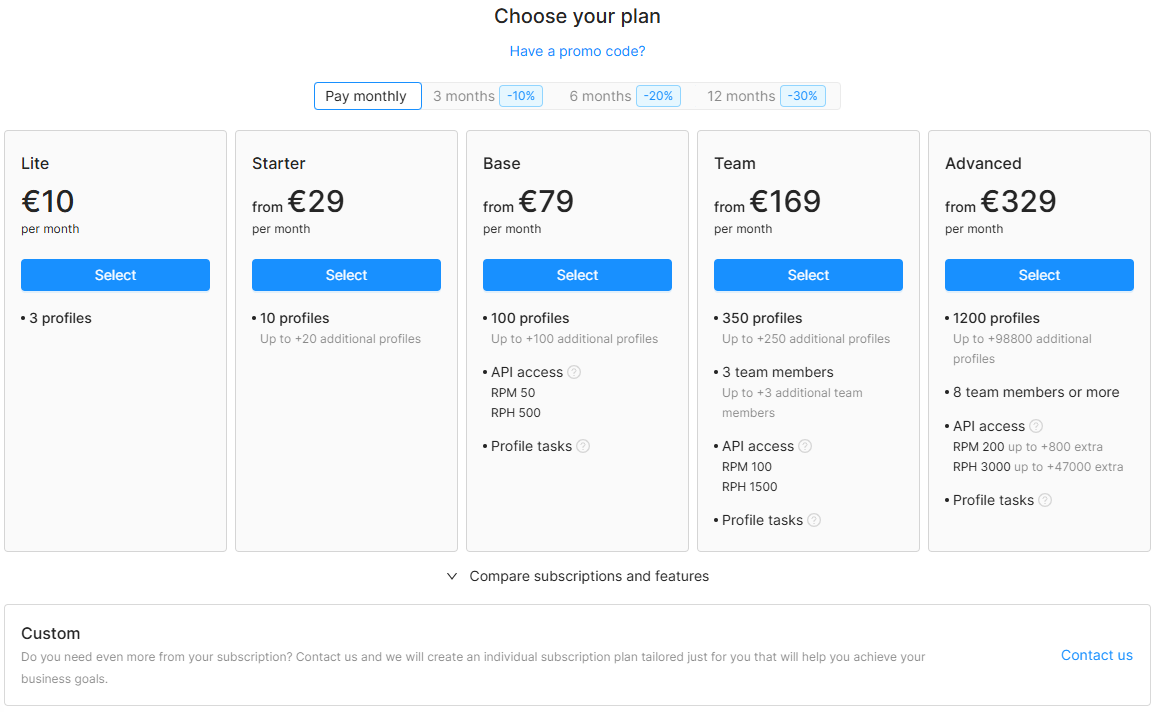
Annual or long-term subscriptions usually come with discounts, but the entry cost is still something new users need to consider.
One of the biggest drawbacks for first-time users is that Octo Browser does not offer a public free trial or a permanent free plan. For a tool in the anti-detect category, this is a significant limitation. Most users want to test how well a browser handles fingerprints, stability, profile isolation, and proxy integration before committing to a paid plan.
Without a trial, you have to pay upfront just to see whether Octo Browser actually fits your work style or whether its fingerprints hold up on the platforms you care about. For beginners or casual users managing only a few accounts, this can feel like a risky investment.
For people handling a high number of accounts, working with automation, or running team operations, the pricing can still be reasonable but only if the browser proves stable for your use case.
Overall Impression
The pricing structure is clear and covers both individual users and teams. However, the lack of a free trial makes it harder for new users to evaluate Octo Browser properly. Most people would prefer to test at least fingerprint quality and platform compatibility before paying. This is an area where Octo Browser could improve, especially considering how competitive the anti-detect market has become.
4. Is Octo Browser the right antidetect browser for you?
Choosing an antidetect browser goes beyond evaluating basic technical specifications; it depends heavily on real-world usability, operational transparency, and how seamlessly the tool integrates into your team’s daily workflows. To help you make an informed investment decision, we provide a comprehensive analysis below, examining everything from their web presence and interface structure to Octo Browser's actual fingerprint security and emulation performance.
4.1. Is the Octo Browser website user-friendly and transparent?
When I first visited the Octo Browser website, I found it to be fairly clear and informative, enough to give a potential user a sense of what they’re getting, but not without some caveats.
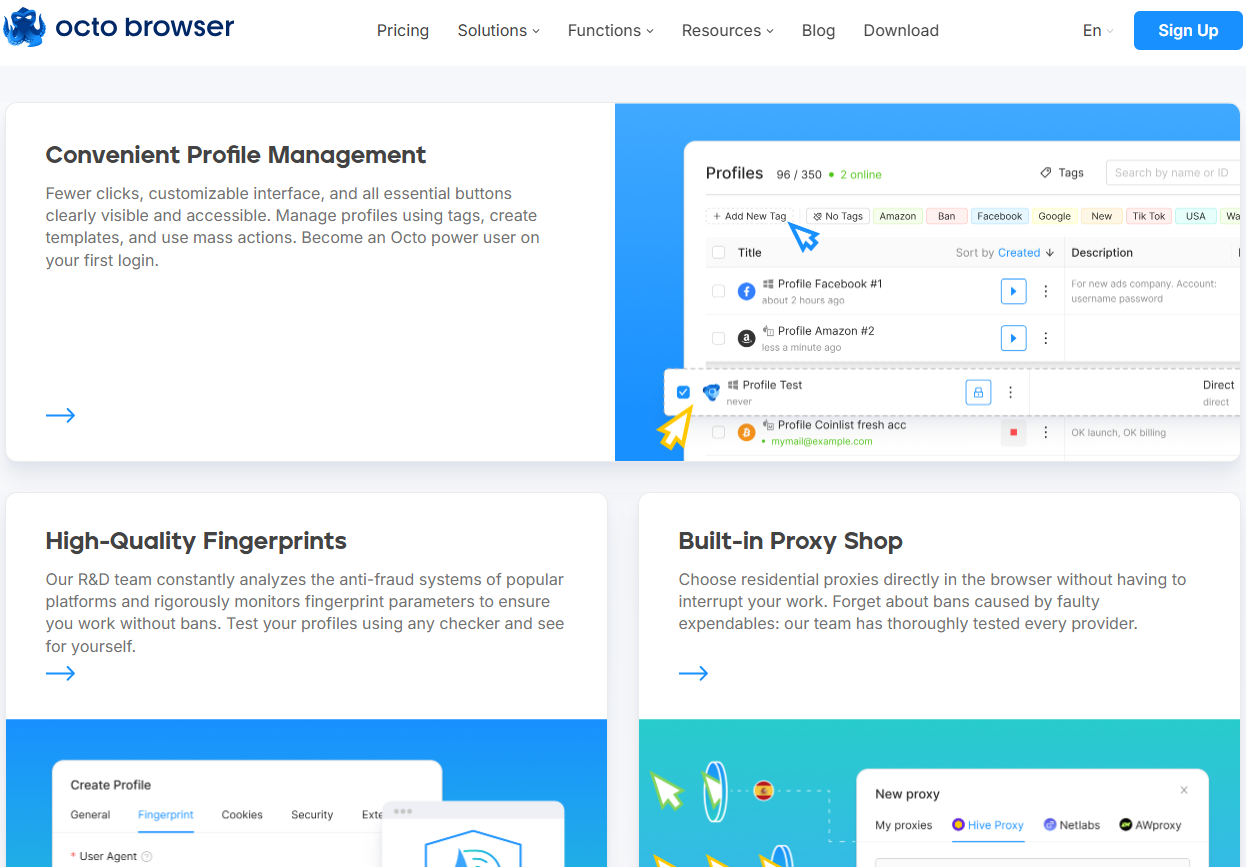
What works well:
- The site lays out key information up front: you can see what Octo promises (multi-accounting, profile separation, proxy support, encryption), that gives a quick idea whether it's relevant for your needs.
- There are sections describing data-protection practices (encrypted profiles, cloud storage, secure architecture), which helps build some trust about privacy and security.
- They present information for various types of users (solo, agencies, teams) and show that the tool can work for individuals or groups that helps readers self-assess whether it’s appropriate.
- Documentation and support/contact info is clearly accessible: support via mail, Telegram/WhatsApp, widget on site, etc.
If you come to Octo Browser’s website as a curious marketer or someone evaluating anti-detect tools, the website gives a decent first impression. It explains what the tool claims to do (multi-accounting, fingerprint isolation, proxy + encryption, team support) and provides some security and privacy assurances which is much more than many lesser-known tools out there.
However, the lack of a visible free trial or “demo mode” is a major drawback, especially for newcomers. Because with anti-detect tools, the real test is whether the “fingerprint + proxy + profile isolation” actually works on the platforms you use. Without being able to test that risk-free, you’d have to pay first which feels like a gamble.
So: the website is reasonably user-friendly and provides enough information to understand what Octo Browser promises. But in terms of transparency and giving a safe “trial before buy”, it falls short. For someone deciding whether to pay, that matters a lot.
4.2. Is the Octo Browser interface easy to use?
Octo Browser’s interface looks simple enough for daily use, especially if you're used to managing multiple accounts or working with tags, proxies, and templates. The layout follows a familiar “dashboard-style” structure, so most users won’t take long to figure out where things are.
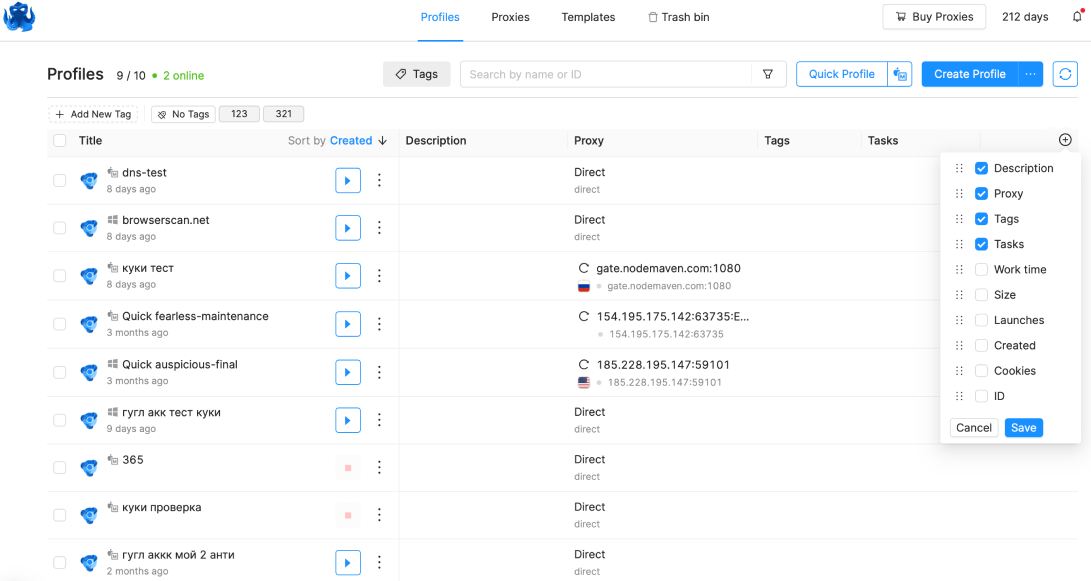
The Profiles tab shows everything in a clean table view, with columns for title, description, proxy, and tags. This makes it easy to scan through dozens of profiles without getting overwhelmed. Each row has a clear “play” button to launch a profile and an options menu for additional actions. For people handling many accounts, this kind of structure feels practical and predictable.
The tag system at the top helps filter profiles quickly. Seeing all tags visible and color-coded is useful when you’re dealing with different projects such as airdrop tasks, Amazon accounts, Google accounts, or anything else. You can also sort profiles by creation date, which is convenient if you want to keep new tasks separated from older ones.
The interface also includes noticeable buttons like Quick Profile and Create Profile, so even beginners can create new profiles with minimal setup. The navigation bar (Profiles, Proxies, Templates, Trash) is straightforward, so you don’t have to click around to find your way.
Overall, the UI feels functional rather than fancy. Everything is laid out in a way that supports productivity, and there’s no unnecessary clutter. If your work involves launching, editing, and tagging profiles repeatedly, the interface should feel natural after a short period of use.
4.3. How does Octo Browser handle browser fingerprint customization?
Octo Browser gives users control over most of the basic fingerprint parameters, and the screenshot you provided shows a familiar layout for setting up a new profile. You can manually adjust user agent, operating system, screen resolution, fonts, languages, timezone, geolocation, hardware data, and more. For anyone who needs to build separate profiles for different platforms or campaigns, these settings cover the standard requirements.
However, after using it and looking through all available options, I noticed that the customization range is not as broad as some users might expect. For example, the OS choices are mostly limited to Windows and macOS, and there is no Linux or iOS option. This becomes noticeable if you work in niches where mobile or Linux-based fingerprints are important.
The browser engine is also quite limited. From what I see, Octo Browser relies mainly on Chromium, and on macOS you might see a Safari-like fingerprint. That means the variety of browser types is not especially flexible. For most users, this doesn’t break the workflow, but if your work needs more diverse environments, this limitation stands out.
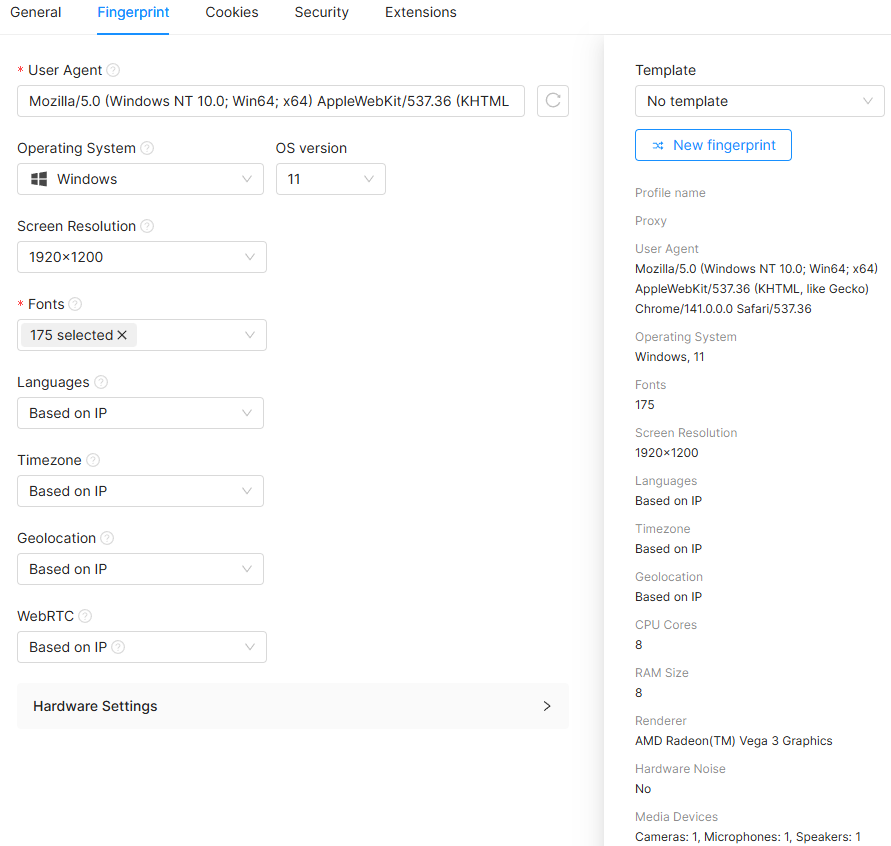
These settings are enough to build a clean fingerprint for common use cases. For example, e-commerce accounts, social platforms, or airdrop farming. But if you're expecting deeper customization or rare device profiles, the current options feel more basic and somewhat restricted.
Overall, Octo Browser gives you the core fingerprint controls you need, but the range of environment types (OS, browser family) is not very diverse. It works fine for standard tasks, but users who rely on broader device simulation might find these limits noticeable.
4.4. How does Octo Browser integrate with proxy services?
Octo Browser supports standard proxy types such as HTTP, HTTPS, and SOCKS5, so you can pair it with most third-party proxy providers on the market. Adding a proxy is straightforward: just paste the host, port, login, and password, and Octo automatically syncs the IP with your profile’s timezone and geolocation settings.
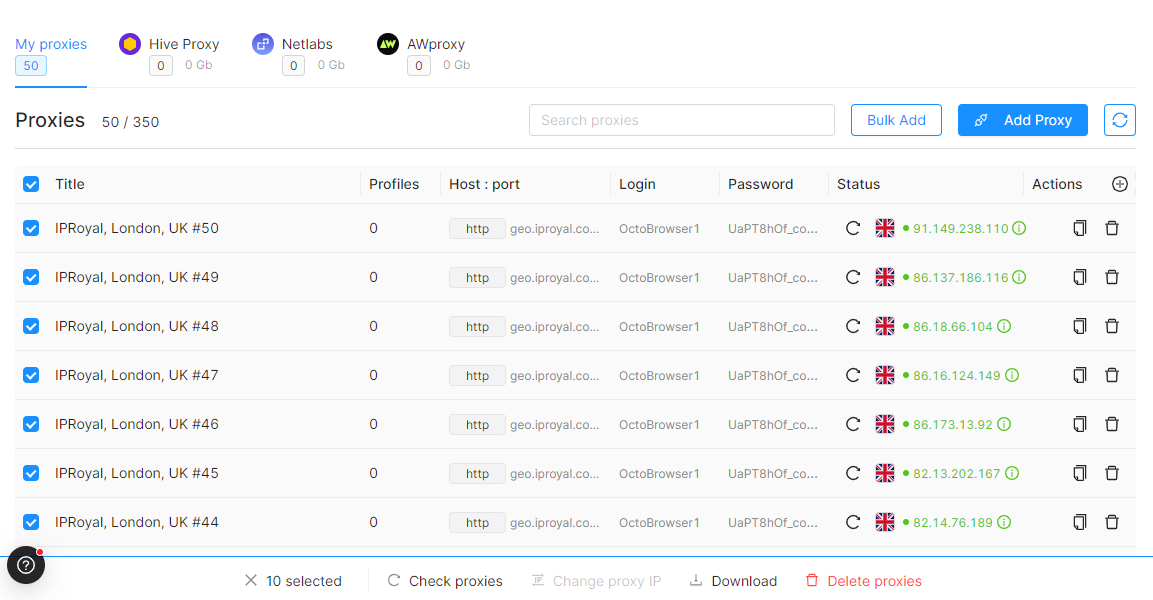
However, after using Octo Browser and checking its integrated proxy panel, there are a few limitations worth noting.
Another thing I noticed is that Octo Browser does not provide any free proxy options, even temporary or testing proxies. This means new users cannot experiment with profile setup unless they already have a paid proxy source.
Their proxy store is also quite restricted. The marketplace section shows only a few partner providers and no exclusive discounts or promo codes for Octo Browser users. In practice, most people will still end up buying proxies from external websites rather than directly through the browser interface.
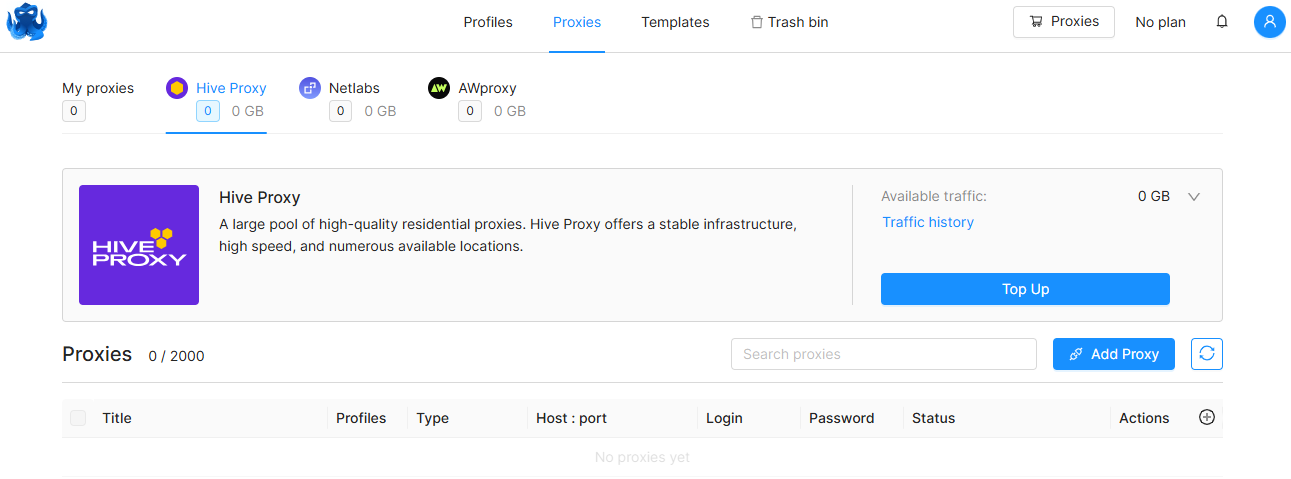
In short, Octo Browser works fine with any standard HTTP or SOCKS5 proxy, and it offers basic third-party integrations. But the ecosystem around proxies store, partner selection, free options, and promos feels minimal. If you require a broad proxy marketplace or built-in deals, Octo might not fully meet that expectation.
4.5. Is Octo Browser automation easy to use?
Octo Browser technically supports automation, but it’s not something that most non-technical users will find easy to work with. The tool relies almost entirely on its API rather than offering built-in automation workflows. That means if you don’t know how to use APIs, write scripts, or integrate tools like Playwright or Puppeteer, the automation options can feel quite limited.
- Octo lets you automate tasks such as creating or editing profiles, importing/exporting data, adding tags, and managing proxies but all of this is done through API calls, not through a UI.
- You can also launch profiles through automation frameworks like Playwright, Puppeteer/Pyppeteer, Selenium, and CDP, but again, this requires coding.
- The tool supports “one-time profiles,” which can be created and deleted automatically through API, useful for developers, but not something a casual user would easily set up.
- Octo also exposes data like available GPUs, screen resolutions, and device models (for Android profiles), but this info is only accessible through API requests.
There is no visual automation builder, no drag-and-drop interface, and no pre-made scripts you can import. Everything depends on how comfortable you are with sending API requests and writing automation logic.
The API itself is only available on paid tiers (Base and above), and the rate limits vary depending on your subscription, meaning full automation capabilities require higher plans.
Overall, Octo Browser’s automation is powerful only if you’re already a technical user. For everyday users who want simple task automation without coding, the tool doesn’t offer much. The lack of built-in automation features makes the experience less accessible compared to browsers that include workflow builders or script editors.
4.6. How is Octo Browser rated by real users?
When looking at public feedback across major review platforms, Octo Browser generally receives very positive ratings. On G2, it holds an average score of around 4.8 out of 5, while Trustpilot shows a similarly strong rating close to 4.6. Product Hunt also reflects a high level of satisfaction, although the number of reviews there is relatively small. Most users praise the tool for its stable multi-accounting performance, simple interface, and reliable fingerprint behavior. Some reviewers also mention that the support team is responsive and that profile creation feels smooth, even for newcomers.
However, the credibility of these ratings requires a bit of caution. The overwhelmingly positive tone across platforms can feel somewhat unbalanced. This doesn’t automatically mean the reviews are manipulated, but it does suggest that some of the ratings may have been encouraged, incentivized, or influenced by community-driven efforts.
The relatively low number of total reviews also makes it difficult to form a definitive conclusion about long-term performance. A few dozen high ratings can make the tool appear near-perfect, even though the sample size is too small to represent the full experience of thousands of users worldwide.
Overall, the public sentiment toward Octo Browser is clearly positive, and many users seem genuinely satisfied with its performance. But these ratings should be viewed as a reference, not the final verdict. For a tool in such a specialized field, the best way to judge its reliability is still through personal testing, using your own proxies, your own workflows, and your own accounts to see whether it fits your needs.
5. What are the pros and cons of using Octo Browser?
Pros
- Clean and simple interface: Both the website and the desktop app are easy to navigate, making it suitable for beginners.
- Smooth performance: Profile creation is fast, and the browser stays stable even when running multiple accounts.
- Decent fingerprint protection: Good enough for standard multi-accounting tasks and everyday operations.
- Responsive customer support: Users often mention quick, helpful replies.
- Straightforward workflow: Creating, saving, and managing profiles doesn’t require technical knowledge.
- API access for developers: Works with Playwright, Puppeteer, Selenium, CDP, etc., for those who can code.
- Mostly positive public ratings: High scores on Trustpilot, G2, and Product Hunt (although the total number of reviews is small).
Cons
- No free trial or free plan: New users cannot test fingerprint quality, proxy compatibility, or overall stability before paying.
- Relatively high pricing: Costs increase quickly as you scale profiles or add more team members.
- Limited fingerprint customization: Only Chrome on Windows and Chrome/Safari on macOS; no Linux or iOS options.
- Weak proxy integration:
- Very small proxy marketplace
- No free proxy for testing
- No discounts or partnerships with major proxy providers
- Most users end up buying proxies externally
- Basic automation only: There is no visual automation builder, only API access, which requires coding skills.
- Review credibility is questionable: The number of user reviews is low, and the extremely positive tone may not reflect the full reality of long-term usage.
Is Octo Browser safe and good at avoiding detection?
Overall, Octo Browser is safe to use and provides reasonable protection against detection for everyday multi-account management. Its fingerprint system works well for common tasks such as logging in, managing accounts, and performing light operations. However, its fingerprint diversity is not as extensive as higher-end alternatives, and the lack of OS/browser variety limits how “deep” its stealth can go.
In simple terms: Octo Browser is safe, but its detection resistance is medium, not exceptional.
6. What makes Hidemyacc a better choice than Octo Browser?
Both Octo Browser and Hidemyacc stand as powerful anti-detect browser solutions, engineered to optimize multi-account management, streamline e-commerce deployment, and secure digital marketing workflows. While both platforms fulfill their fundamental operational requirements, Hidemyacc introduces critical strategic advantages that align directly with the core demands of professional operators and scaling agencies.
Why Hidemyacc is a better choice
- More flexible and diverse browser fingerprints: Hidemyacc supports a wider range of operating systems and browser environments. This comprehensive database provides users with highly realistic digital profiles and granular parameter control, which directly improves account survival rates on strict platforms.
- Better fingerprint accuracy and stability: Operational feedback shows that Hidemyacc generates more consistent fingerprints from the core engine layer, significantly reducing the risk of accidental profile linking or platform detection during sensitive account operations.
- More affordable pricing structure: Hidemyacc offers lower-cost plans and more flexible subscription options. This allows individuals, small teams, and growing enterprises to scale their infrastructure smoothly without facing heavy budget overhead.
- Free trial availability: In sharp contrast to Octo Browser’s restrictive entry policy, Hidemyacc provides an open free trial period. This enables users to thoroughly audit fingerprint quality, test proxy stability, and verify browser performance before making financial commitments.
- Stronger proxy integration: Hidemyacc accommodates an extensive range of proxy protocols and connects seamlessly with global suppliers. Its built-in proxy manager is highly convenient, allowing users to run connectivity checks and manage proxy pools directly inside the application without artificial restrictions.
- Automation features designed for non-coders: While Octo Browser isolates its automated features behind complex local APIs, Hidemyacc delivers an intuitive visual automation interface. Non-technical staff can instantly deploy multi-account routines and account warming schedules without any scripting or coding experience.
- More transparent and user-friendly interface: The user interface of Hidemyacc is exceptionally clear and intuitive. It provides context-aware guidance and detailed tooltips right during the profile creation and hardware configuration process.
- More stable multi-profile performance: Marketers running large-scale setups report that Hidemyacc handles massive volumes of concurrent profiles smoothly, maintaining system stability and preventing resource lag even when switching rapidly between different accounts.
- Better long-term reputation and community trust: Reviews and professional user feedback across independent marketing forums are organic and highly diverse, establishing a solid track record of reliability within the global multi-accounting community.
In conclusion, by combining deep, high-precision hardware emulation with an accessible visual automation architecture, Hidemyacc successfully eliminates the technical bottlenecks and steep cost barriers associated with Octo Browser, making it the more efficient and practical choice for modern digital businesses.
Struggling to keep multiple accounts safe?
Move to Hidemyacc and manage multiple accounts using a reliable antidetect browser built for long-term operations.
7. Conclusion
So, is Octo Browser worth using? Overall, Octo Browser is a solid antidetect solution with strong fingerprinting technology, a clean interface, and good performance for managing multiple accounts. It’s reliable, secure, and suitable for users who need a stable environment for automation, e-commerce, affiliate marketing, or social media management.
If you had to choose one solution, Octo Browser is good but not the strongest option in 2026. It fulfills its core purpose, but it doesn’t offer the same level of scalability, performance optimization, or team-oriented features that modern users often need.
For users who prioritize speed, bulk profile management, better resource performance, smart proxy pairing, and more frequent updates, Hidemyacc generally offers better value and stronger long-term capabilities. Octo is not a bad choice but if you're looking for the most optimized and future-ready antidetect browser, Hidemyacc is the more compelling option.
>>> Other reviews of antidetect browsers
- Gologin Antidetect Browser: Detailed reviews, Pro & Cons
- What is Multilogin? Detailed Review, Pros, and Cons
- AdsPower Review - Does it provide a high-quality antidetect browser?
- Dolphin Anty Review - Is this antidetect browser worth it?
- Antidetect Browser Kameleo review: Is it worth using?
- MoreLogin Browser: Detailed Review and Alternatives
- Incogniton Browser: Honest Review
- BitBrowser: Detailed, hands-on review
- VMLogin Review - Is it an efficient antidetect browser?
- Is Linken Sphere the Right Antidetect Browser?
- SessionBox review: Honest look at its features & limits
- Ghost Browser in-depth review: A multi-session browser
- Nstbrowser Review: Affordable, but is it powerful enough?
- Is Lalicat a good antidetect browser? Full review & real testing
- Octo Browser: Full Review for Multi-Account Management
- Is Undetectable the right antidetect browser for your needs?
- ixBrowser review: How does it work and is it good for multi-account?
- Is DICloak a reliable antidetect browser? Pros & cons!
8. FAQ
8.1. What is Octo Browser?
Octo Browser is an antidetect browser designed to help users manage multiple online accounts safely by generating unique, realistic browser fingerprints.
8.2. Who should use Octo Browser?
It’s ideal for affiliate marketers, e-commerce sellers, automation users, traffic arbitrage teams, and anyone who needs secure multi-account workflows.
8.3. Is Octo Browser safe to use?
Yes. Octo Browser uses advanced fingerprint-masking technology to reduce the risk of account bans and ensure secure browsing.
8.4. Does Octo Browser support team collaboration?
Yes, but the team features are basic. You can share profiles and permissions, though it’s less flexible than some alternatives like Hidemyacc.
8.5. How many profiles can I create in Octo Browser?
The number of profiles depends on your subscription plan. Higher-tier plans allow more profiles and better performance.
8.6. What makes Octo Browser different from other antidetect browsers?
Octo Browser focuses on accuracy of fingerprints, clean UI, and fast performance. However, it lacks some advanced automation and bulk-management features.
8.7. Does Octo Browser work with proxies?
Yes. It supports all major proxy types (HTTP(S), SOCKS5) and allows you to connect a different proxy to each profile.
8.8. Is Octo Browser beginner-friendly?
Mostly yes. The interface is simple and clean, but new users may need time to understand fingerprint settings and proxy setup.
8.9. What are the main limitations of Octo Browser?
Higher pricing, limited bulk automation, fewer updates, and less flexible team features compared to some newer tools.
8.10. What is the best alternative to Octo Browser?
Hidemyacc is often considered the strongest Octo Browser alternative due to its faster performance, richer features, and better value for managing large-scale multi-account workflows.