Managing multiple online accounts without triggering bans is a critical requirement for digital marketers. Undetectable Browser has emerged as a prominent tool in the antidetect industry, known for its synchronization capabilities and local profile storage.
However, with a starting price of $49 per month and strict plan limitations, users must evaluate whether this platform fits their workflow. This review provides an objective analysis of Undetectable Browser, its core features, hidden drawbacks, and a direct comparison with Hidemyacc to help you make an informed decision.
1. Overview of Undetectable
Before diving into the technical details, here is a practical snapshot of Undetectable Browser based on verified public data and initial user feedback:
- Year Founded: Not officially disclosed
- Headquarters: Not publicly stated
- Free Trial / Free Plan: Yes, a free plan with limited cloud profiles
- Starting Price: From $49/month
- Cross-Platform App: Windows 10/11, macOS (Intel & Apple Silicon)
- Support: Email, Telegram, documentation & knowledge base
- Trustpilot Rating: 3.7/5 with 1 review
These gaps in publicly available company information are common among antidetect browser tools, but it is something many users still take into consideration.
Main features of Undetectable
Undetectable offers several tools designed to make multi-account workflows easier and safer. Below are the key features explained in simple terms:
- Cookies-bot: A built-in bot that automatically warms up profiles by visiting websites and generating cookies and browsing history based on your selected GEO. This helps new accounts look more “natural” to platforms like Facebook or Google.
- Import / Export Tools: You can import or export proxies, cookies, browser profiles, sessions, user agents, and other settings. This is useful for users who manage many accounts or switch between tools.
- Mass profile management: Undetectable allows bulk actions such as installing extensions on multiple profiles or managing several accounts at once through integrated managers. This saves time compared to editing each profile individually.
- Fingerprint switching: The browser can generate fingerprints that imitate real devices such as Windows PCs, Android phones, or iOS devices. Each profile gets a unique fingerprint, making it look like a separate user.
- Synchronizer: A feature that mirrors your actions across multiple browser windows. Typing, clicking, or scrolling in the main window will happen in all synchronized profiles. Useful for testing or operating multiple accounts at the same time.
- Automation via API: Undetectable supports automation using external scripts through Chrome DevTools, Puppeteer, Playwright, or Selenium. This is helpful for users who want to automate logins, posting, or routine workflow actions.
If you want to understand the technology behind these tools, read our guide on understanding antidetect browser technology.
2. What is the Undetectable antidetect browser?
Undetectable is an antidetect browser designed to help users create multiple online identities without being linked by platforms such as Facebook, Google, TikTok, or e-commerce sites. It works by generating unique browser fingerprints, making each profile appear as if it belongs to a completely different device and user.
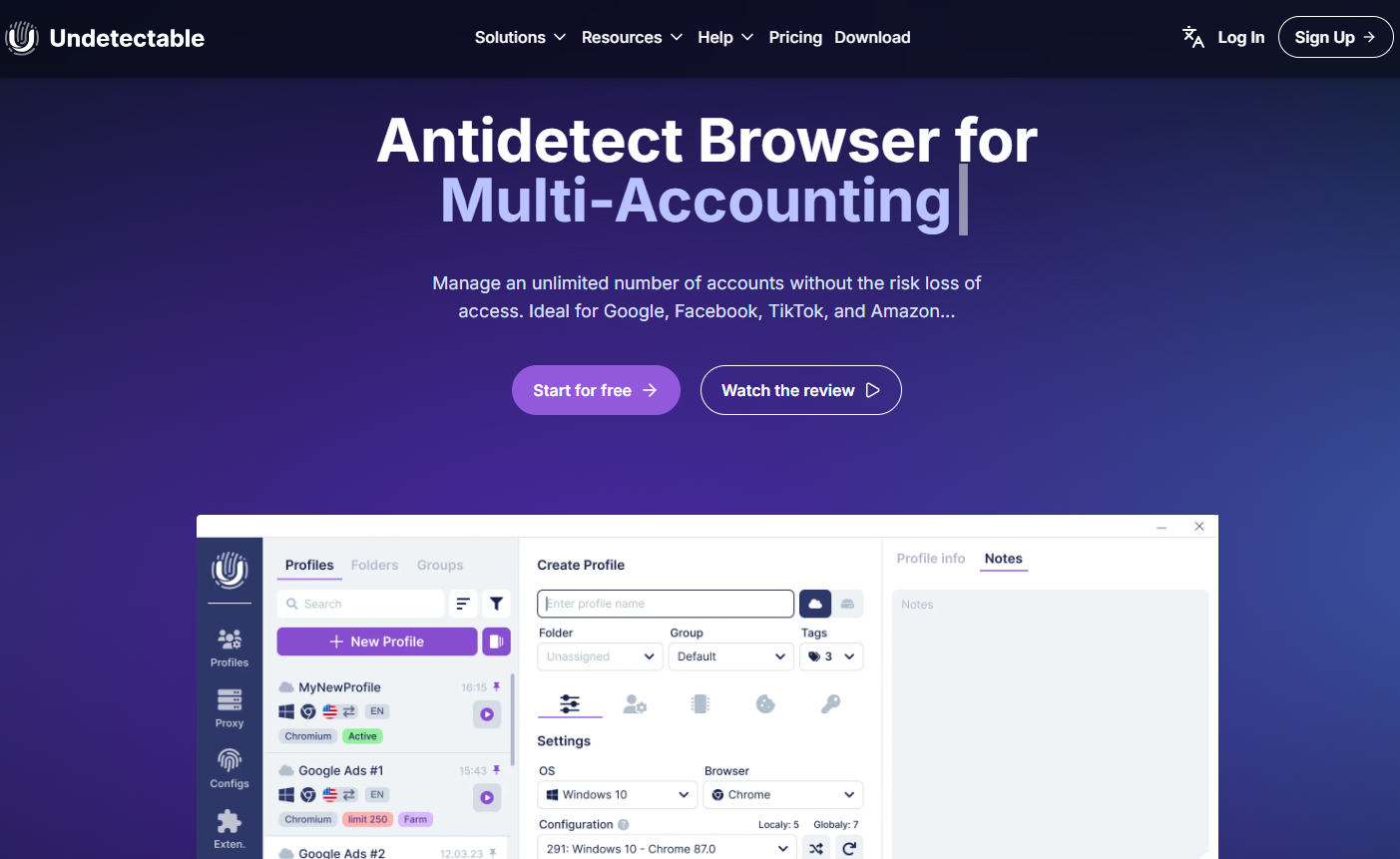
The tool has been on the market for a few years and has grown quickly thanks to its advanced automation features and strong technical capabilities.
Who is Undetectable for?
Undetectable is mainly used by people who need to manage many accounts safely, including:
- Social media marketers (SMM)
- Affiliate marketers
- E-commerce and dropshipping sellers
- Crypto and Web3 users
- QA testers and automation developers
- Teams handling account farming or profile management
These users benefit from Undetectable’s ability to separate identities and avoid account linking.
Initial impression
Undetectable offers strong features, frequent updates, and a powerful technical toolkit. However, its UI/UX and onboarding process may feel less friendly for beginners. The setup requires some technical understanding, and the overall workflow is geared toward experienced users.
A soft note
Some teams prefer switching to tools like Hidemyacc, as the onboarding there is simpler and more beginner-friendly. Still, for technical users who want deeper control, strong automation options, and highly customizable fingerprints, Undetectable remains a solid and capable choice.
3. How much does Undetectable cost?
Undetectable uses a pricing model based on cloud profiles, while local profiles are unlimited on all plans. This means you can create as many profiles as you want locally, but only the profiles stored in the cloud can sync across devices and unlock advanced features.
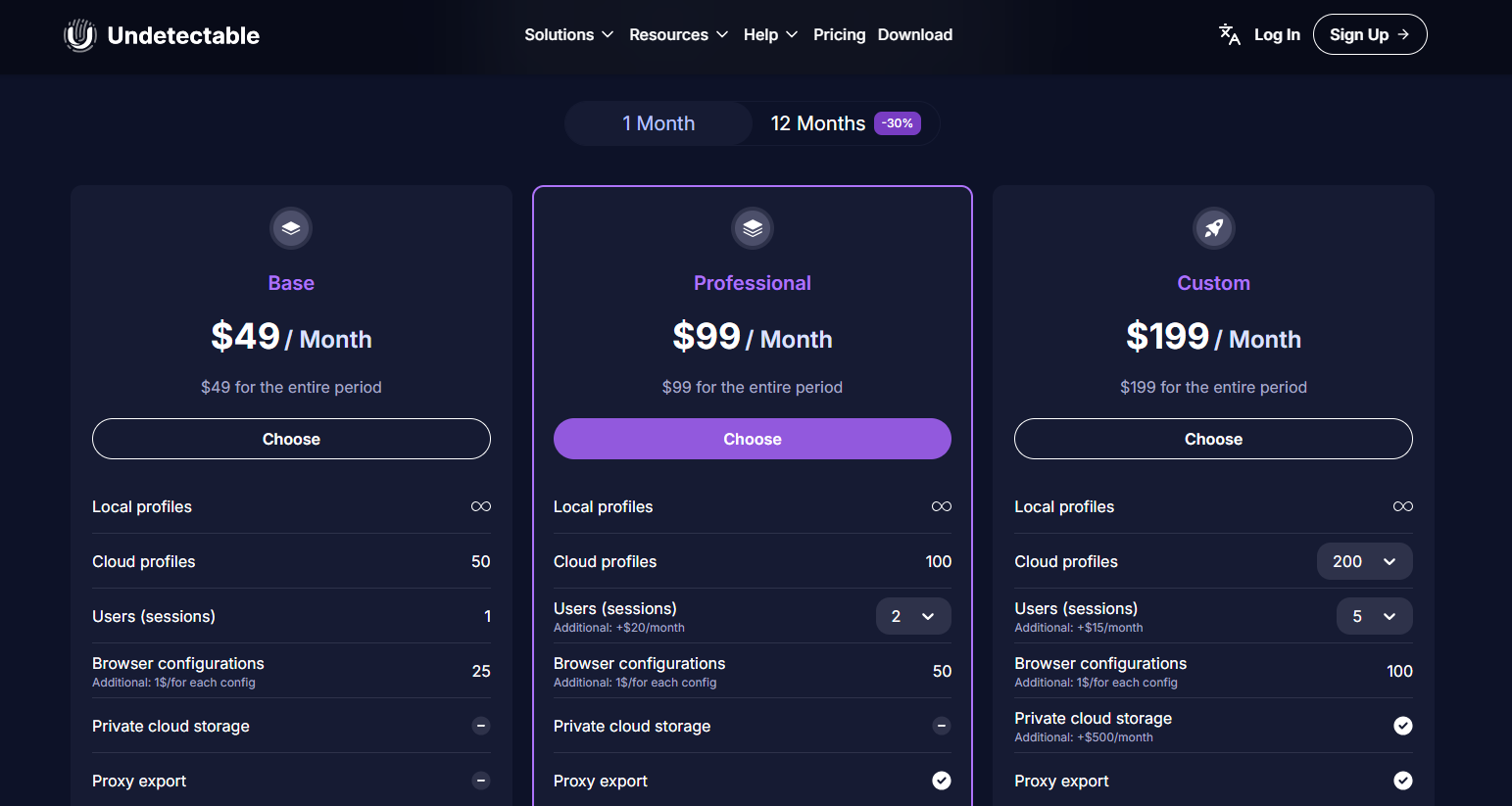
Free Plan
- 5 cloud profiles
- Most features are limited
- Mainly useful for testing the interface and basic profile creation
$49/month - Base Plan
- 50 cloud profiles
- Access to more features, including cookies bot and automation options
$99/month - Professional Plan
- 100 cloud profiles
- For users who manage bigger operations or need more storage and sessions
$199/month - Custom Plan
- 200 cloud profiles
- Unlocks the highest number of configurations and advanced tools
What does this mean for users?
Local profiles are stored only on your own device.
This means:- They do not sync to other computers
- You cannot easily collaborate with teammates
- If your device fails, you may lose your profiles
- Many premium features rely on cloud storage, not local storage
Because of this, users who work across multiple devices, teams, or large account systems usually need a paid plan with cloud profiles.
Higher-tier plans also provide:
- More browser configurations
- More automation options
- More tools for managing large-scale multi-account work
4. Is Undetectable the right antidetect browser for you?
Choosing the right antidetect browser requires looking beyond the marketing claims on the homepage. While technical specifications are important, the actual user experience, system transparency, and software interface heavily dictate your daily operational speed.
Below, we analyze whether Undetectable Browser delivers a practical workspace or if its technical environment introduces unnecessary friction to your workflow.
4.1. Is the Undetectable website user-friendly and transparent?
User-friendliness
The Undetectable website is generally well designed, especially for users who already understand how antidetect browsers work.
What the website does well
- Modern and clean interface: Pages follow a clear structure, making it easy to navigate.
- Clear download options: Supported operating systems and installation files are displayed clearly.
- Good documentation: The site includes guides, a knowledge base, and technical materials for users who want to learn more.
Where the website is less user-friendly
- Onboarding feels a bit rigid: The sign-up process can feel complicated, especially for beginners.
- Technical language: Many explanations use terms like fingerprinting, WebGL, Canvas, configurations… which may be confusing for new users.
- Features sound impressive but lack practical clarity: Some tools are promoted strongly but without a clear explanation of their real-world limitations.
UX Conclusion
- For SMM workers, affiliate marketers, and developers who already know anti-detect tools, the Undetectable website is clean, logical, and fairly easy to understand.
- For complete beginners, the experience is not very friendly because onboarding is complex and many descriptions are highly technical.
Transparency
Undetectable provides a reasonable level of openness about its product and pricing.
Positive points
- Clear pricing page: The plans and limits are displayed openly without hidden steps.
- Free plan is listed publicly: Users can test the tool without paying.
- Legal pages and documentation are available: Terms, privacy policy, and technical info are accessible.
Areas that could be more transparent
- Marketing is slightly optimistic: The website highlights the strengths of the tool but does not clearly mention practical limitations that appear in third-party reviews. For example, fingerprint imperfections or learning curve issues.
4.2. Is the Undetectable interface easy to use?
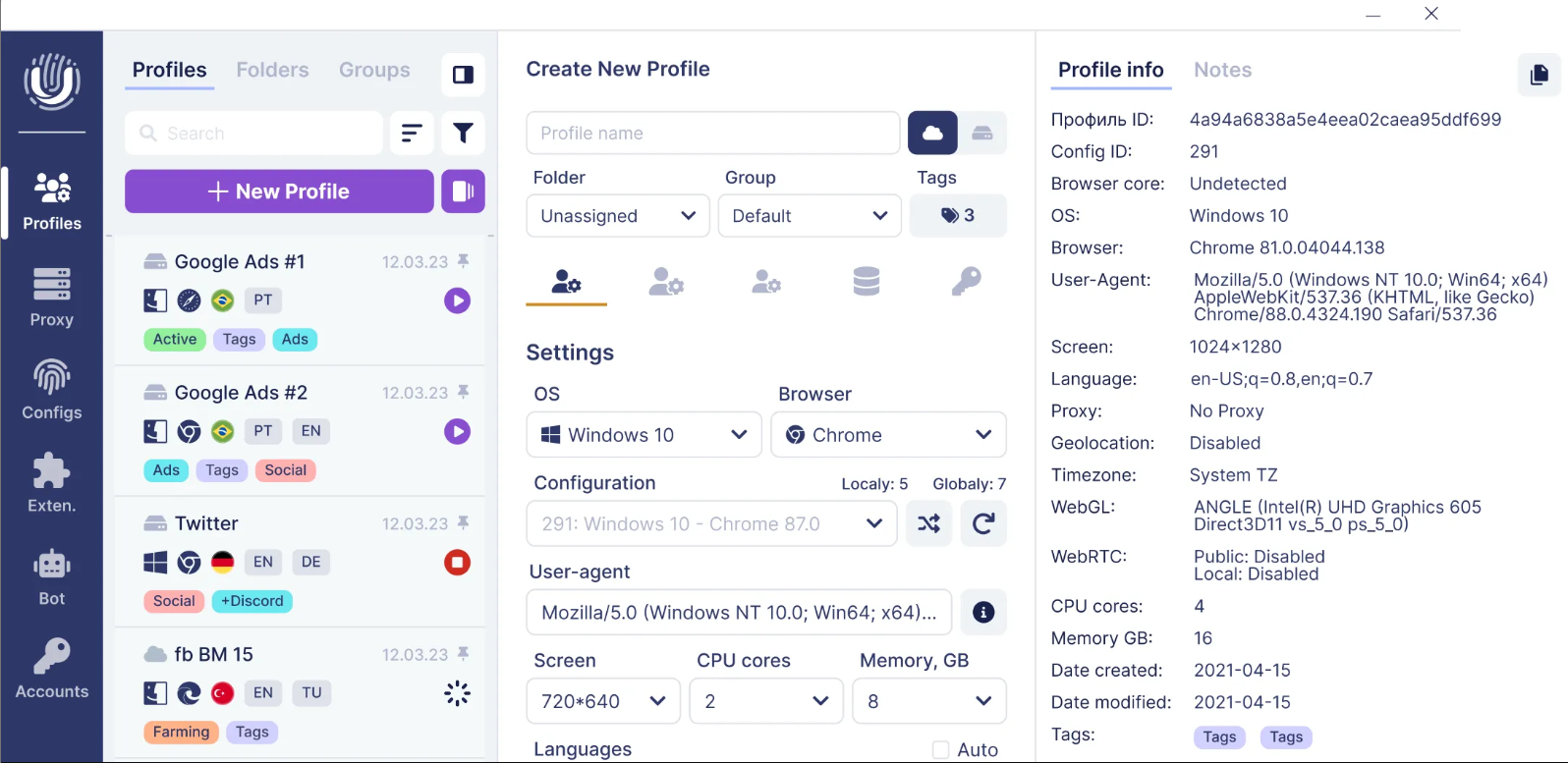
The Undetectable interface is functional, but the overall user experience may feel a bit rough for new users.
Installation and sign-up
- The installation process is straightforward, but not particularly fast.
- When creating an account, users often encounter multiple CAPTCHAs, which can make onboarding feel slow or repetitive.
First impressions of the dashboard
- When you first open the program, the dashboard window appears quite small.
- After you start creating profiles, the interface expands and becomes easier to navigate.
- The layout organizes basic features clearly, and you can quickly view profile details such as settings, proxies, and status.
Working with profiles
- Profiles must be added manually, one by one.
- There are no quick actions like:
- Creating multiple profiles at once
- Generating temporary or “fast” profiles
- Bulk-adding proxies
- For users who manage dozens or hundreds of accounts, this can slow down daily workflows.
A light note
For larger teams or users who rely heavily on bulk actions, a more streamlined UI is often preferred. This is one reason why some teams choose tools like Hidemyacc, which focus on faster profile creation and easier bulk management.
4.3. How does Undetectable handle browser fingerprint customization?
Undetectable allows users to create multiple profiles, each with its own independent fingerprint. This is the core of what an antidetect browser does, making every profile look like a unique device and user.
Fingerprint options and limitations
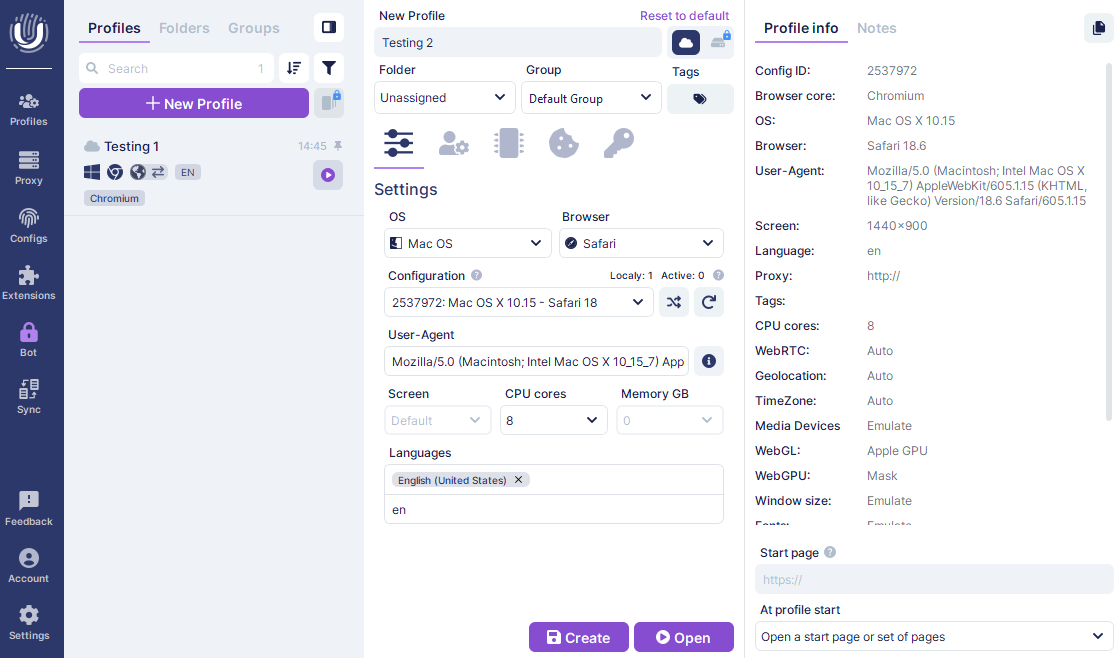
Undetectable supports several basic fingerprint settings, such as: Operating system, Browser version, User agent, Screen resolution, CPU cores, Memory (RAM)
However, some of the more advanced fingerprint parameters such as WebRTC, geolocation, timezone, WebGL, and other hardware-related values are not clearly customizable. In many cases, these settings follow system defaults unless the user upgrades to a higher-tier plan.
Because the company is not fully transparent about these restrictions, it can be difficult for new users to know exactly what is included without testing each plan.
Feature limits by pricing plan
Each pricing tier includes a different number of browser configurations.
This means users who want many types of fingerprints or advanced customization often need to upgrade to the highest plan, which unlocks more configuration options.
Cookies and extensions
Cookies import/export: Undetectable supports importing and exporting cookies, which is useful for account migration or warming.
Extensions: Users can install extensions, but the system manages them globally.
All extensions added through the dashboard apply to every profile.
This can lead to unnecessary clutter. One profile may need an extension, while another does not.
A more flexible, per-profile extension system would reduce this problem.
A light note
Tools like Hidemyacc allow users to freely adjust fingerprint details without limits, including WebRTC, geolocation, timezone, media devices, and more.
Hidemyacc also lets users assign extensions individually to each profile, which avoids the issue of having unwanted extensions appear everywhere.
4.4. How does Undetectable integrate with proxy services?
Undetectable offers solid proxy integration, which is essential for multi-account work. The browser supports both HTTP and SOCKS5 proxy types, allowing users to match the requirements of different platforms or workflows.
Built-in proxy providers
Undetectable includes integrations with several proxy providers. This means users can connect to certain proxy services directly from the interface without needing to visit the provider’s website or manually copy credentials. For users who switch proxies often, this makes the workflow faster and more convenient.
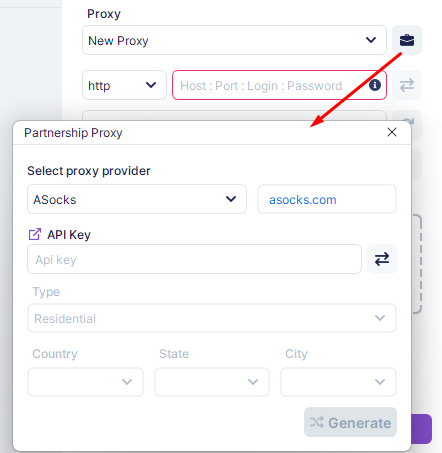
Proxy management: The browser also includes a dedicated proxy management section where users can:
- Add and edit proxies
- Test proxy connectivity
- Import multiple proxies in bulk
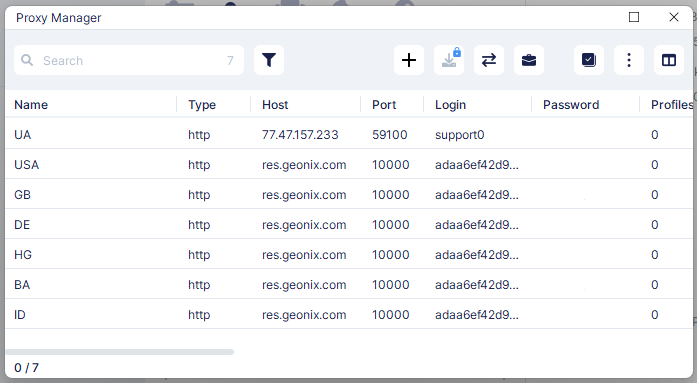
This is helpful for users managing many accounts at once, as it reduces repetitive setup work.
Overall, Undetectable provides a practical proxy integration system that covers the basic needs of most multi-account users.
4.5. Is Undetectable automation easy to use?
Undetectable provides two main automation options: the Synchronizer and API-based automation. Both are powerful, but they come with different levels of complexity.
The Synchronizer lets you control multiple browser profiles at the same time. When you type, click, or scroll in one window, the same action appears in the other linked profiles. This is helpful for users who manage many accounts or need to test the same behavior across different environments.
However, the feature works best on Windows and may not perform as smoothly on macOS. It also requires you to open many profiles at once, which can use a significant amount of RAM.
For deeper automation, Undetectable provides support for DevTools, Puppeteer, Playwright, and Selenium. With these tools, users can build automated workflows such as logging into accounts, checking account status, or publishing content. This level of automation is a major advantage for developers and advanced users who rely on scripting to handle large-scale operations. Still, it is not very beginner-friendly, as it requires technical knowledge and the ability to write and maintain code.
Overall, Undetectable’s automation tools are strong and flexible, but they are best suited for users who already have experience with technical automation. Beginners may find the learning curve steep, while advanced users will appreciate the control and customization offered.
4.6. How is Undetectable rated by users?
On Trustpilot, Undetectable Browser currently has a score of 3.7/5, but this is based on only one review. The single review is positive: the user says the interface is clean and intuitive, proxy management is easy, and the free plan is helpful for getting started. They only complain that buying configurations one by one is expensive and suggest selling them in packs instead.
On G2, Undetectable has a rating of 5.0/5 from three verified reviews. Users there describe it as a “trustworthy, safe and private antidetection browser” and say it helped them replace multiple physical computers with one machine per person. They like that they can run many browser sessions and accounts from a single device, and mention that it saves office space, hardware costs, and makes remote work easier. None of the G2 reviewers report technical or security problems; one only notes that the price feels high but still fair for the features.
On Reddit, Undetectable Browser is mentioned less often, but when it appears, people mainly say that it is legit and used for marketing or multi-account work.
However, it raises questions given the low number of user reviews. Is the tool too new and therefore not widely known? It's also uncertain whether the existing reviews are from real users or simply a form of marketing hype.
Like any antidetect browser, Undetectable has clear strengths and some noticeable trade-offs. It is a strong tool for technical users, but not always the best fit for beginners or very large non-technical teams.
5. What are the pros and cons of using Undetectable?
5.1. Pros
Undetectable is attractive mainly because of its feature set. It offers many useful tools for people working in social media marketing, affiliate marketing, multi-account management, and automation. The browser supports a wide range of fingerprint parameters, allowing each profile to look like a different device and user. For users who need to simulate many environments, this flexibility is a big advantage.
Two standout features are the cookie bot and the synchronizer. The cookie bot helps warm up profiles automatically by generating cookies and browsing history, which can make accounts look more trusted to platforms. The synchronizer lets you control several profiles at once, mirroring your actions across multiple windows. Together, these tools are very convenient for “account farming” and scaling daily work.
Main advantages:
- Strong feature set for SMM, affiliate, and automation workflows
- Wide range of fingerprint settings per profile
- Cookie bot and synchronizer are very useful for growing and managing many accounts
In conclusion, Undetectable Browser provides a robust technical foundation that effectively meets the demands of high-volume account creation and automated warming. However, these powerful features are closely tied to advanced subscription tiers, meaning users must weigh these advantages against the platform's steep pricing and operational complexity
5.2. Cons
On the downside, Undetectable is not the most comfortable tool for new users or large teams that need simple, fast workflows. The UI/UX is not fully optimized for managing hundreds of profiles visually, and onboarding can feel heavy due to Telegram requirements, CAPTCHAs, and a more technical setup process.
Mass and bulk operations remain heavily restricted compared to industry alternatives. Core tasks—such as bulk profile generation, batch proxy assignments, or multi-profile setting updates—require extensive manual intervention, consuming valuable operational time. Additionally, deep control over critical security parameters like WebRTC, WebGL, and precise hardware components is locked behind high-tier subscriptions, leaving lower-tier users vulnerable due to default system fingerprints.
Finally, while the API integration and developer features are highly capable, they are strictly designed for technical specialists. Utilizing frameworks like Puppeteer, Playwright, or Selenium requires intermediate programming knowledge and continuous code maintenance. For marketing teams seeking an intuitive, click-based automation system, this technical barrier creates a steep and inefficient learning curve.
Main disadvantages:
- UI/UX not ideal for large, non-technical teams
- Onboarding can be tiring (Telegram, multiple CAPTCHAs, technical steps)
- Limited mass/bulk operations for profiles and proxies
- Advanced fingerprint control is mostly available on higher-tier paid plans
- Automation and API features are best suited for developers or users who can code.
Ultimately, these drawbacks make Undetectable Browser a highly rigid and costly option for businesses that prioritize speed, ease of use, and budget optimization. If your team cannot afford to waste hours on manual setups or expensive subscription upgrades just to unlock basic fingerprint controls, exploring a more flexible, user-friendly alternative becomes a necessity.
6. What makes Hidemyacc a better choice than Undetectable?
While Undetectable is a strong tool for technical users, many teams prefer Hidemyacc because it focuses more on simplicity, speed, and ease of use. For users who want a smoother workflow without spending time on complex configuration, Hidemyacc can feel more practical in everyday work.
Optimized User Experience and Interface
One of the biggest advantages is the user experience. Hidemyacc has a cleaner and more intuitive interface, making it easier for beginners and teams to learn quickly. The onboarding process is simpler as well, allowing users to sign up and start a free trial immediately without going through extra steps like Telegram verification or repeated CAPTCHAs.
Unlocked Fingerprint Control Across All Plans
In terms of fingerprint customization, Hidemyacc automatically adjusts the user agent and allows unlimited control over fingerprint parameters such as WebRTC, timezone, geolocation, media devices, and more. This flexibility is available across all plans, not only the highest tiers. For users who need many different device configurations, this removes the limits commonly found in Undetectable’s lower plans.
Advanced Bulk Operations for Large-Scale Management
Hidemyacc also offers stronger bulk actions, which is important for teams managing large numbers of accounts. Tasks like creating multiple profiles at once, generating temporary or fast profiles, importing accounts in bulk, and adding large proxy lists are all supported directly through the interface. This makes daily operations much faster and reduces repetitive manual work.
Accessible Automation with No-Code Tools
For automation, Hidemyacc supports API integration similar to Undetectable, but also adds drag-and-drop and record-and-playback tools. These allow users to build automation scripts without writing code, which is helpful for non-technical staff or teams that want faster setup.
Summary of Differences
Overall, Hidemyacc stands out for users who value ease of use, strong bulk tools, flexible fingerprint control, and beginner-friendly automation, while Undetectable remains a better fit for users who prefer deep customization and developer-focused workflows.
Manage Accounts Effortlessly with Hidemyacc
Skip the complex setups. Hidemyacc allows you to quickly create bulk profiles, manage separate extensions, and stay secure with a user-friendly interface.
Start FREE Trial7. Conclusion
Above is a detailed review of Undetectable, a powerful tool for technical users needing deep fingerprint customization and advanced automation support. However, the onboarding experience, UI/UX, and bulk capabilities are still limited, making it less ideal for beginners or large teams.
If you prioritize simplicity, speed, and more convenient bulk features, Hidemyacc might be a better choice. Conversely, if you need detailed control and strong automation capabilities, Undetectable remains a worthwhile option.
>>> Other reviews of antidetect browsers
- Gologin Antidetect Browser: Detailed reviews, Pro & Cons
- What is Multilogin? Detailed Review, Pros, and Cons
- AdsPower Review - Does it provide a high-quality antidetect browser?
- Dolphin Anty Review - Is this antidetect browser worth it?
- Antidetect Browser Kameleo review: Is it worth using?
- MoreLogin Browser: Detailed Review and Alternatives
- Incogniton Browser: Honest Review
- BitBrowser: Detailed, hands-on review
- VMLogin Review - Is it an efficient antidetect browser?
- Is Linken Sphere the Right Antidetect Browser?
- SessionBox review: Honest look at its features & limits
- Ghost Browser in-depth review: A multi-session browser
- Nstbrowser Review: Affordable, but is it powerful enough?
- Is Lalicat a good antidetect browser? Full review & real testing
- Octo Browser: Full Review for Multi-Account Management
- Is Undetectable the right antidetect browser for your needs?
- ixBrowser review: How does it work and is it good for multi-account?
- Is DICloak a reliable antidetect browser? Pros & cons!
8. FAQ
8.1. What is Undetectable used for?
Undetectable is an antidetect browser used to create separate browser profiles with unique fingerprints, helping users manage multiple accounts safely without linking them together.
8.2. Does Undetectable have a free plan?
Yes, Undetectable offers a free plan with a small number of cloud profiles, suitable for basic testing before upgrading.
8.3. Can I use Undetectable on both Windows and macOS?
Yes. Undetectable supports Windows 10/11 and macOS (both Intel and Apple Silicon devices).
8.4. Does Undetectable work without proxies?
It can run without proxies, but using quality proxies is recommended to avoid account linking and improve safety.
8.5. How many profiles can I create in Undetectable?
Local profiles are unlimited on all plans. The number of cloud profiles depends on your subscription level.
8.6. Is Undetectable safe for managing multiple social media accounts?
Yes, as long as you use proper fingerprints, good proxies, and natural behavior. No anti-detect tool can guarantee a 0% ban rate.
8.7. Does Undetectable support automation?
Yes. It supports automation via DevTools, Puppeteer, Playwright, and Selenium, along with a Synchronizer tool for controlling multiple profiles at the same time.
8.8. Can I customize browser fingerprints in Undetectable?
Yes, but some advanced fingerprint settings may require higher-tier plans.
8.9. Does Undetectable support bulk actions?
Bulk actions exist but are limited. Users who need faster large-scale operations may prefer tools with stronger bulk features.
8.10. Is Undetectable beginner-friendly?
Not really. The onboarding process and interface are more suitable for technical users. Beginners may find tools like Hidemyacc easier to start with.