ixBrowser is an antidetect browser that allows users to create and manage multiple independent browser profiles, each with its own fingerprint and proxy. This tool is suitable for marketers, affiliates, e-commerce operators, and anyone who needs to run multiple accounts simultaneously. This article provides a detailed review of ixBrowser, covering an overview, features, user experience, strengths and weaknesses, and comparisons with other antidetect browsers, helping you determine if it’s the right choice for your needs.
1. What is ixBrowser and what does it offer?
ixBrowser is an antidetect browser designed to manage multiple accounts across various online platforms by creating isolated digital environments. Each profile functions independently with its own unique cookies, proxy settings, and browser fingerprint parameters (such as user agent, OS, and screen resolution). This separation ensures that anti-fraud systems perceive each profile as a distinct device, reducing the risk of account linkage and suspensions.
Key specifications of ixBrowser:
- Year founded: 2021
- Free plan: Free forever plan available (basic features)
- Starting price: Paid plans start around $49/month
- Supported OS: Windows and macOS
- Core target users: Marketers, affiliates, e-commerce operators, and social media managers
Unlike traditional antidetect browsers that charge a monthly subscription fee based on the number of profiles, ixBrowser provides the profile creation tool for free. Instead, they generate revenue by selling cloud phone packages, member seats, and integrated proxies within their platform.
While this model lowers the entry barrier for beginners, it introduces limitations. The free version offers basic fingerprint customization and lacks advanced automation or bulk editing. As your business grows, relying solely on basic Canvas/WebGL masking can expose your accounts to modern, strict platform algorithms.
Main features and target audience of ixBrowser
The tool is built to serve individuals and small teams who need a straightforward solution for running multiple online identities safely. Its main technical capabilities include:
- Creation and management of independent browser profiles.
- Basic customization of browser fingerprint parameters (user agent, OS, screen resolution).
- Proxy integration supporting HTTP and SOCKS5 per profile.
- Profile migration via cookie import and export features.
- API automation support compatible with Puppeteer, Selenium, and Playwright.
In practice, e-commerce sellers use it to maintain separate storefronts on eBay or Etsy, while affiliates utilize it to manage multiple ad accounts without immediate bans. However, advanced tasks like automatic proxy rotation, real-time connection monitoring, or granular hardware fingerprint spoofing require technical expertise or upgrading to their paid tiers starting at $49/month.
Many automation setups rely on fingerprint isolation. Our guide explains how antidetect browsers manage browser fingerprints.

>>> New to antidetect browsers? Read our full guide on what they are and how they work
3. What is the cost of ixBrowser and is it worth it?
One of the standout features of ixBrowser is its pricing model, which includes a free forever plan. This allows users to create and test a limited number of profiles without any upfront payment. For individuals, beginners, or those just exploring multi‑account management, this free tier provides a low‑risk entry point and makes ixBrowser attractive compared to tools that require an upfront purchase or subscription.
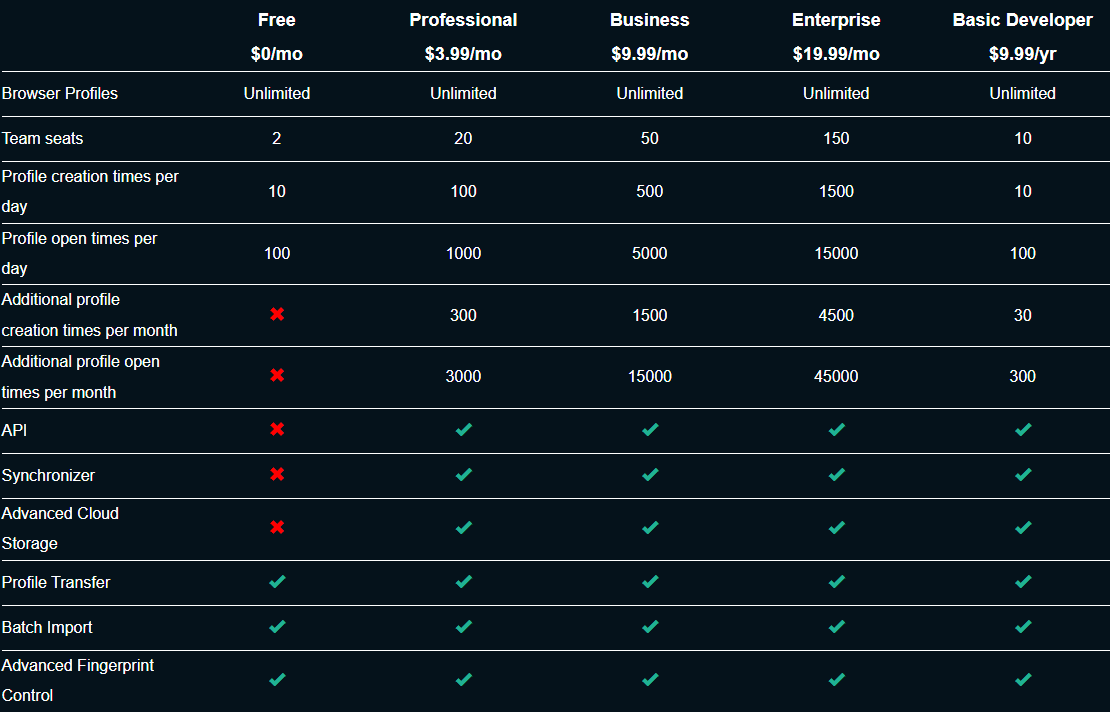
Paid plans for ixBrowser typically start at around $49 per month, unlocking higher profile limits, expanded proxy support, and access to additional features. While this price point may seem accessible, especially for small teams, the feature set at this level remains relatively basic compared to higher‑tier anti‑detect browsers. Users expecting more advanced fingerprint customization, fully automated proxy rotations, or robust bulk profile editing may find that they need to use additional tools or consider higher‑tier solutions.
When evaluating the value of ixBrowser relative to its cost, it performs well for casual multi‑account work and smaller campaigns. Its free plan allows users to experiment and learn without financial commitment, and the entry‑level paid tier keeps costs moderate. However, as multi‑account needs grow in complexity, particularly for agencies, large e‑commerce operations, or high‑volume affiliates, the value per dollar diminishes compared to more fully featured alternatives.
4. Detailed analysis of ixBrowser
How user-friendly is ixBrowser?
ixBrowser offers a clean and simple interface that makes it accessible for users new to antidetect browsers. The dashboard allows quick creation, editing, and switching between profiles, while launching multiple profiles, importing cookies, and applying proxies is intuitive. This ease of use reduces the learning curve and allows users to start managing multiple accounts efficiently. The straightforward layout is particularly helpful for marketers, affiliates, and e-commerce operators who need a practical solution without navigating complex menus.
However, the interface also has limitations. It lacks advanced visual polish and some premium features found in other antidetect browsers. Bulk operations and granular fingerprint customization are restricted, particularly in the free plan. New users may also find onboarding instructions insufficient, which can make understanding some features more challenging.
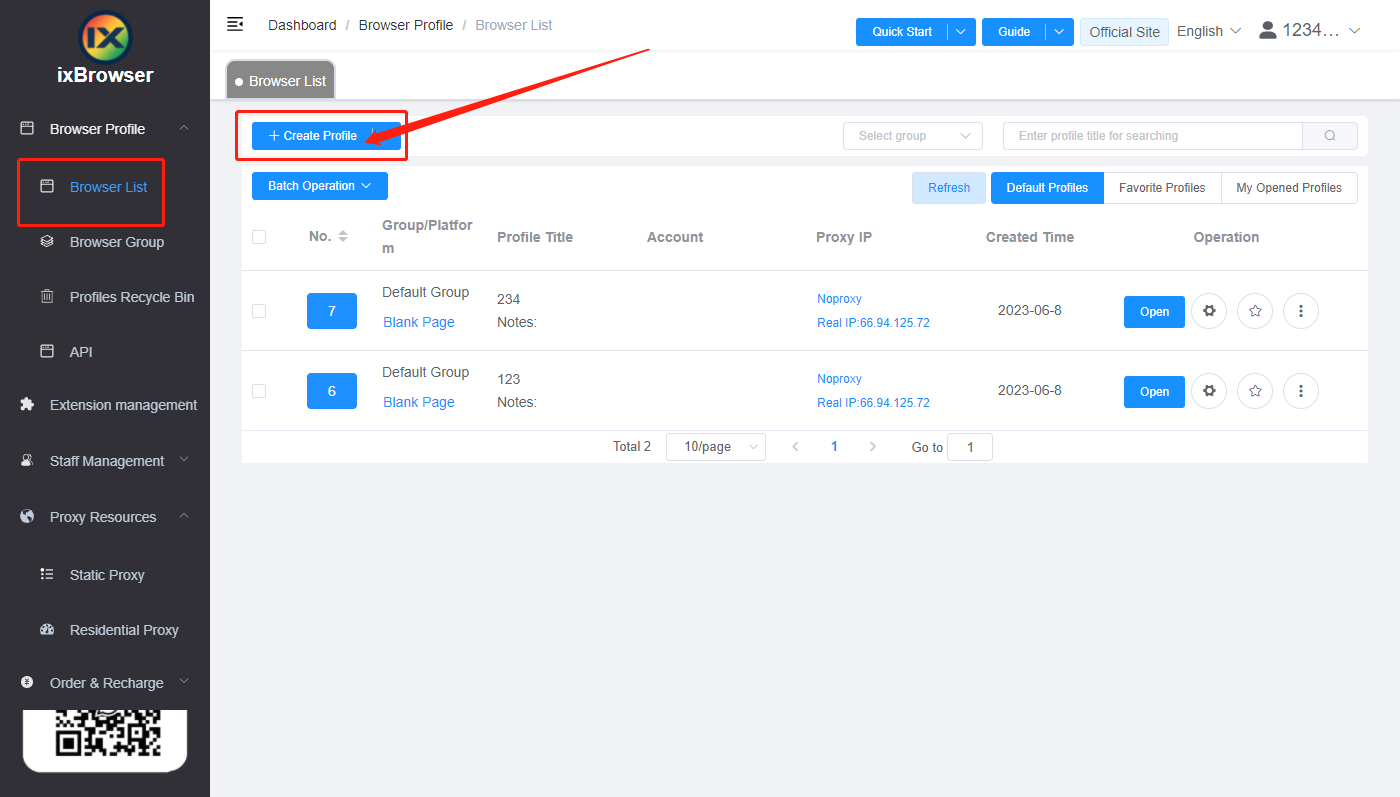
How effective is ixBrowser at browser fingerprint management?
One of ixBrowser’s key advantages is its robust profile management. Each profile operates as an independent environment with separate cookies, extensions, and proxy settings. Users can customize essential fingerprint parameters such as user agent, operating system, screen resolution, timezone, and basic Canvas/WebGL properties. Importing and exporting profiles adds flexibility for migration or team collaboration, making multi-account management more practical and organized.
On the downside, fingerprint customization remains basic and may not satisfy users who need advanced antidetection measures. Bulk editing for multiple profiles is limited, and some settings, like browser extensions, are applied globally rather than per profile, reducing efficiency for large-scale operations. Users looking to simulate highly sophisticated or unique device fingerprints might find these limitations restrictive.
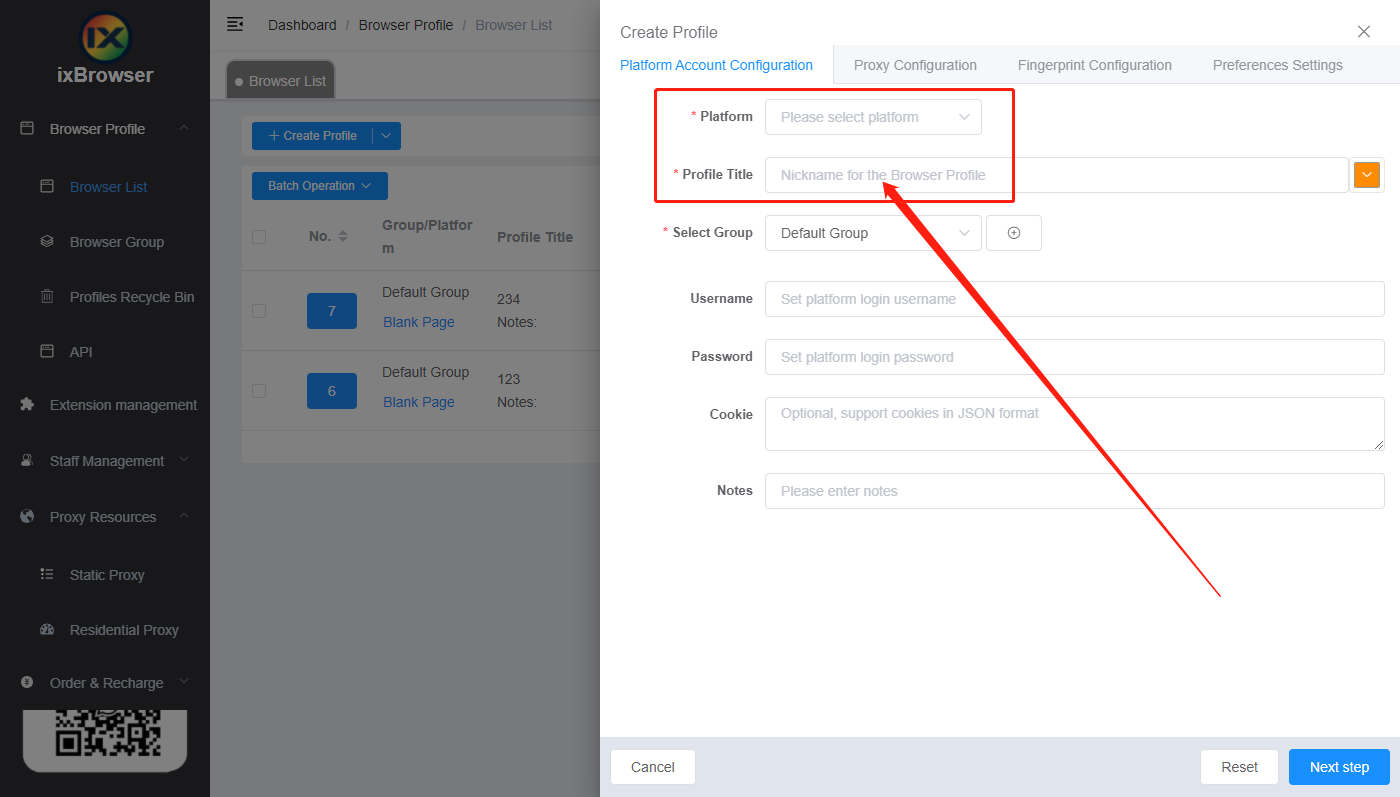
How robust is proxy integration in ixBrowser?
ixBrowser supports both HTTP and SOCKS5 proxies for individual profiles, allowing each account to operate under a separate IP address. Proxy validation tools ensure that connections are active before profiles are launched, reducing the risk of detection or account linkage. For small to medium-scale operations, this proxy integration is effective and reliable, providing a good level of anonymity and security.
Nevertheless, the proxy system has areas that could be improved. Advanced features such as automatic rotation, geo-targeting, or ISP-specific IPs are not fully developed. Real-time monitoring is basic, and users managing large-scale operations may need to handle proxy management manually or rely on external tools to achieve optimal results.
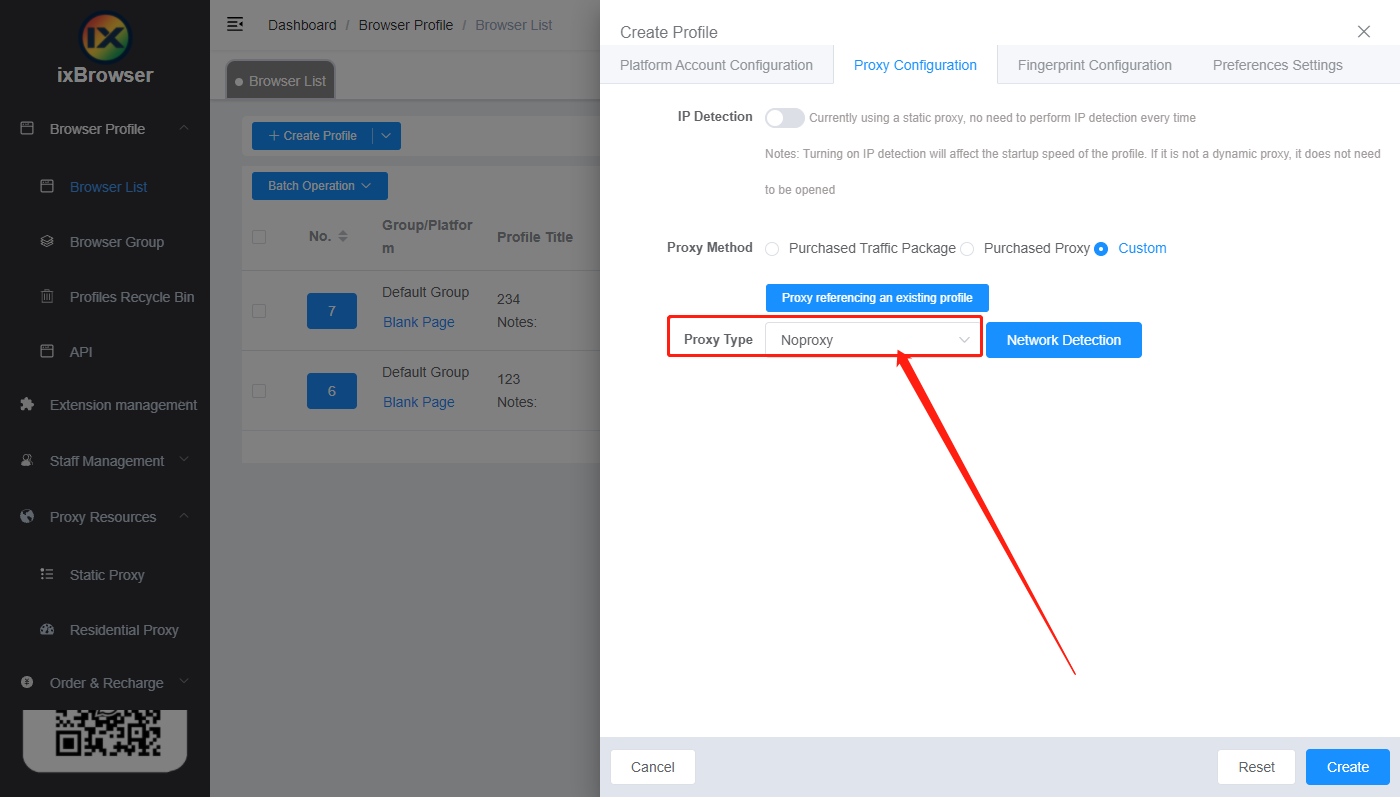
How advanced are ixBrowser’s automation features?
Automation is a standout feature for users with technical expertise. ixBrowser provides API support compatible with tools like Puppeteer, Selenium, and Playwright, enabling repetitive tasks to be executed across multiple profiles. Synchronization tools also allow users to replicate actions efficiently, saving significant time for campaigns or testing workflows. For experienced users, this feature adds substantial value and scalability.
However, automation in ixBrowser requires coding knowledge, which can be a barrier for beginners. Documentation is limited, making setup and troubleshooting more challenging. Certain repetitive tasks, such as bulk profile updates, are not fully automated in the free version, meaning some manual work may still be necessary for larger operations.
Overall, ixBrowser provides a solid combination of usability and functionality, balancing simplicity for beginners with features that appeal to advanced users. Its interface, profile management, proxy support, and automation capabilities make it effective for managing multiple accounts safely and efficiently. At the same time, improvements in fingerprint customization, bulk operations, proxy monitoring, and automation documentation would make the browser even more competitive in the antidetect market.
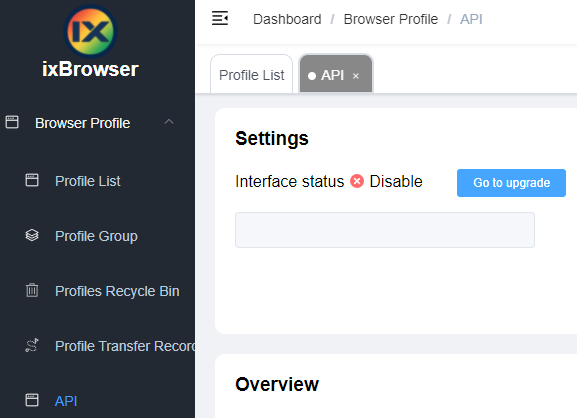
5. What do users and third-party reviews say about ixBrowser?
Community feedback and third-party reviews offer valuable insight into how ixBrowser performs in real-world usage. While official documentation presents the features in an ideal scenario, user experiences highlight practical strengths and areas for improvement.
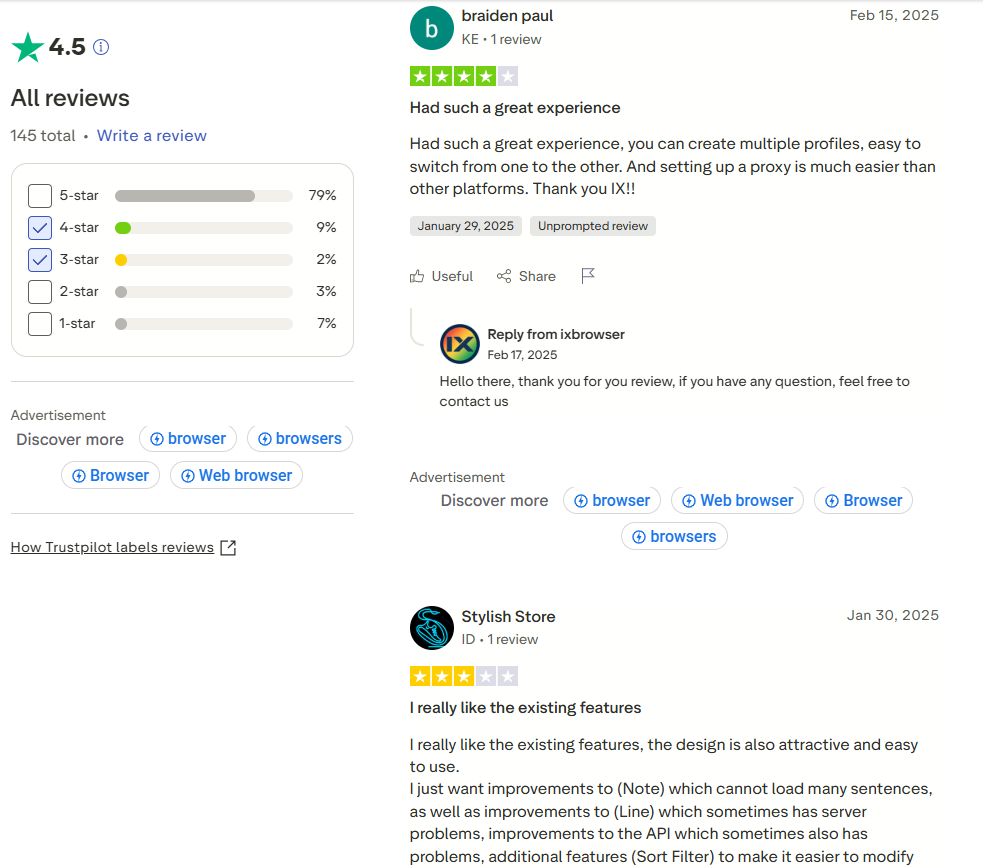
Trustpilot reviews for ixBrowser are limited, but the feedback that exists generally highlights the ease of use and accessibility of the tool. Users appreciate the free plan, which allows them to test multi-account management without financial commitment. Many reviewers also note the simplicity of creating and managing profiles, as well as the proxy integration that helps maintain account separation and reduce detection risks.
On the other hand, the Trustpilot feedback points out some areas that need improvement. The interface is considered basic compared to premium antidetect browsers, and advanced features such as bulk operations, granular fingerprint customization, and automation are either limited or require technical knowledge. Some users also mention the lack of comprehensive onboarding guides, which can make the learning curve steeper for beginners.
Reddit discussions provide additional insights from active marketers, affiliates, and e-commerce operators. Users often highlight the practicality of ixBrowser for small teams and individuals, emphasizing that the free plan makes experimentation and small-scale operations feasible. The simplicity of the dashboard and the ability to manage multiple profiles with distinct fingerprints and proxies are consistently praised.
However, Reddit threads also reveal certain limitations in real-world scenarios. For larger-scale operations, users report challenges with bulk profile updates, advanced fingerprint customization, and automation setup. Proxy monitoring and rotation are not fully automated, which can make management more labor-intensive when handling many accounts. Some experienced users feel that ixBrowser, while reliable, lacks some advanced features that higher-end antidetect browsers offer.
Third-party reviews from security and automation blogs generally describe ixBrowser as a solid entry-level antidetect browser. Reviewers note that the combination of free access, cross-platform support, and independent profile management provides value for both individual users and small teams. Its suitability for marketers, social media managers, and affiliate operators is emphasized, especially for those who need a straightforward, low-cost solution.
Conversely, professional reviews point out technical limitations. The depth of fingerprint customization is basic, automation documentation is sparse, and some proxy features are underdeveloped. For users seeking highly sophisticated antidetection capabilities or large-scale enterprise-level multi-account management, these factors may limit ixBrowser’s effectiveness.
6. What are the pros and cons of using ixBrowser?
ixBrowser has several advantages that make it appealing for users managing multiple accounts. One of the clearest pros is its free forever plan, which allows individuals and small teams to explore multi-account management without any initial investment. This is particularly useful for marketers, affiliates, and e-commerce operators who want to test the tool before committing to a paid plan.
Another pro is the user-friendly interface. The dashboard is clean and intuitive, enabling users to create, edit, and switch between profiles efficiently. Even beginners with minimal technical experience can manage multiple accounts and maintain profile separation. The profile isolation and basic fingerprint customization also help reduce detection risks, ensuring that each account behaves independently.
The proxy integration is also a significant advantage. Each profile can have its own HTTP or SOCKS5 proxy, allowing users to operate multiple accounts with distinct IP addresses. This enhances anonymity and further reduces the likelihood of account linkage or platform restrictions.
For users with technical skills, the automation features provide considerable value. API support allows repetitive tasks to be automated across multiple profiles, improving efficiency and saving time, particularly for campaigns or testing workflows.
Despite these strengths, ixBrowser has several cons. The interface, while simple, is basic compared to premium antidetect browsers, and lacks advanced features such as bulk operations or granular fingerprint customization. This can limit efficiency for large-scale operations or users seeking highly sophisticated antidetection capabilities.
Proxy management, although functional, has limited advanced features. Real-time monitoring, automatic rotation, geo-targeting, and ISP-specific IP configurations are not fully developed. Users handling many accounts may need additional tools to manage proxies effectively.
Automation is powerful but comes with a drawback: it requires coding knowledge. Beginners may find it difficult to set up or use the API efficiently, and limited documentation can make troubleshooting challenging. Some repetitive tasks, such as bulk profile updates, are not fully automated in the free version, which requires manual effort.
In summary, the main pros of ixBrowser include the free plan, ease of use, profile isolation, proxy support, and optional automation. The cons involve a basic interface, limited fingerprint customization, lack of advanced proxy features, and automation that is not beginner-friendly. Understanding these pros and cons can help users decide whether ixBrowser fits their needs for multi-account management.
7. How does ixBrowser compare to Hidemyacc?
When it comes to antidetect browsers, ixBrowser and Hidemyacc are two tools often mentioned by multi-account users. While ixBrowser provides a free and accessible entry point into multi-account management, Hidemyacc offers more advanced features designed for users who require higher levels of security, scalability, and customization.
| Comparison | ixBrowser | Hidemyacc |
|---|---|---|
| Pricing model | Free forever plan; paid from $49/mo | Paid plans; no permanent free tier |
| Fingerprint depth | Basic (user agent, OS, screen, Canvas/WebGL) | Advanced (fonts, plugins, language, deep WebGL control) |
| Proxy features | HTTP/SOCKS5, manual per profile | Multiple proxy types, auto-rotation, geo/ISP targeting |
| Bulk profile management | Limited | Full bulk editing, centralized control |
| Team collaboration | Not a core focus | Built-in team workflows |
| Automation | API support, requires coding, limited docs | API support, more accessible, better documentation |
| Best for | Beginners, small teams, low-budget testing | Agencies, scaling operations, professional multi-account use |
Hidemyacc stands out for its comprehensive browser fingerprint management. Unlike ixBrowser, which primarily allows basic customization of user agent, operating system, and Canvas/WebGL parameters, Hidemyacc provides deeper control over fingerprints, including fonts, plugins, language settings, and advanced WebGL manipulation. This enhanced fingerprint customization makes it significantly harder for platforms to link multiple accounts, providing an extra layer of protection for marketers and e-commerce operators.
Another strength of Hidemyacc is its robust proxy support. Users can integrate multiple proxy types, rotate IPs automatically, and select geo-targeted or ISP-specific proxies, features that ixBrowser lacks. This ensures that each account operates from a unique IP environment, reducing the risk of detection and account suspension, especially for large-scale operations.
Hidemyacc also excels in bulk profile management and team collaboration. While ixBrowser allows profile import/export and running multiple profiles simultaneously, Hidemyacc enables bulk editing, centralized management of large numbers of profiles, and advanced team workflows. For agencies, marketers managing dozens or hundreds of accounts, or affiliate teams, these capabilities significantly increase efficiency and control.
On the automation side, Hidemyacc provides better integration and documentation for API use. While ixBrowser supports automation, it requires more technical knowledge and offers limited guidance. Hidemyacc's automation is more accessible and user-friendly, enabling both beginners and advanced users to implement repetitive tasks across multiple profiles with minimal manual intervention.
Despite these advantages, Hidemyacc has some drawbacks. It is a paid solution, whereas ixBrowser offers a free plan that can be attractive to individuals or small teams just starting. The complexity of Hidemyacc's features may also require a longer learning curve for beginners, and some advanced settings might be overwhelming without prior experience in multi-account management.
In summary, while ixBrowser is a simple and free tool suitable for small-scale operations, Hidemyacc offers superior fingerprint management, proxy control, bulk profile management, team collaboration, and automation support. These features make Hidemyacc a more robust solution for serious marketers, affiliates, and e-commerce operators who need to manage multiple accounts at scale safely and efficiently. For users aiming for higher security, scalability, and professional-grade multi-account management, Hidemyacc clearly surpasses ixBrowser in overall capability.
8. Conclusion
ixBrowser is a practical tool for beginners and small teams managing multiple accounts, offering ease of use and a free plan. However, it has limitations in advanced fingerprint customization, bulk operations, and automation.
Hidemyacc, by contrast, provides superior fingerprint management, robust proxy integration, bulk profile management, and team collaboration features. Its automation support and professional-grade tools make it ideal for marketers, affiliates, and e-commerce operators seeking scalability, security, and efficiency.
For serious multi-account management, Hidemyacc is the recommended choice, offering a more reliable and comprehensive solution than ixBrowser. If you're still weighing your options, see our full breakdown of the best ixBrowser alternatives for a wider comparison beyond just Hidemyacc.
>>> Other reviews of antidetect browsers
- Gologin Antidetect Browser: Detailed reviews, Pro & Cons
- What is Multilogin? Detailed Review, Pros, and Cons
- AdsPower Review - Does it provide a high-quality antidetect browser?
- Dolphin Anty Review - Is this antidetect browser worth it?
- Antidetect Browser Kameleo review: Is it worth using?
- MoreLogin Browser: Detailed Review and Alternatives
- Incogniton Browser: Honest Review
- BitBrowser: Detailed, hands-on review
- VMLogin Review - Is it an efficient antidetect browser?
- Is Linken Sphere the Right Antidetect Browser?
- SessionBox review: Honest look at its features & limits
- Ghost Browser in-depth review: A multi-session browser
- Nstbrowser Review: Affordable, but is it powerful enough?
- Is Lalicat a good antidetect browser? Full review & real testing
- Octo Browser: Full Review for Multi-Account Management
- Is Undetectable the right antidetect browser for your needs?
- ixBrowser review: How does it work and is it good for multi-account?
- Is DICloak a reliable antidetect browser? Pros & cons!
9. FAQ
9.1. What is ixBrowser?
ixBrowser is an antidetect browser designed for managing multiple accounts safely. It allows each profile to operate independently with separate fingerprints, cookies, and proxy settings, reducing the risk of detection or account linkage.
9.2. Who should use ixBrowser?
ixBrowser is suitable for marketers, affiliates, e-commerce sellers, social media managers, and individuals who need to manage multiple accounts on the same platform without triggering security checks. Beginners and small teams benefit from its free plan.
9.3. How much does ixBrowser cost?
ixBrowser offers a free forever plan for basic usage. Paid plans start around $49 per month, providing higher profile limits, enhanced proxy support, and additional features.
9.4. Does ixBrowser support proxies?
Yes, ixBrowser supports both HTTP and SOCKS5 proxies, which can be assigned individually to each profile. This allows users to operate multiple accounts with distinct IP addresses.
9.5. Can I automate tasks in ixBrowser?
Yes, ixBrowser provides API support for automation using tools like Puppeteer, Selenium, and Playwright. However, automation requires coding knowledge, and documentation is limited, making it more suitable for advanced users.
9.6. What platforms does ixBrowser support?
ixBrowser is available for Windows and macOS. It is cross-platform, but mobile support is not currently available.
9.7. How customizable are browser fingerprints in ixBrowser?
Users can customize basic parameters such as user agent, operating system, screen resolution, timezone, and Canvas/WebGL properties. Advanced fingerprint customization is limited compared to professional anti-detect browsers like Hidemyacc.
9.8. Is ixBrowser suitable for large-scale operations?
For small to medium-scale operations, ixBrowser works well. However, limitations in bulk profile management, proxy automation, and advanced fingerprinting may make it less efficient for large teams or enterprise-level multi-account management.
9.9. How does ixBrowser compare to Hidemyacc?
While ixBrowser is accessible and free, Hidemyacc offers more advanced features such as deeper fingerprint customization, robust proxy integration, bulk profile management, team collaboration, and more user-friendly automation. For professional multi-account management, Hidemyacc is considered the superior choice.
9.10. Is ixBrowser safe to use?
Yes, ixBrowser is generally safe to use. Profiles are isolated, and proxies can be configured per account. However, users should follow best practices for multi-account management to minimize the risk of detection.