1. Introduction
Geelark is quickly gaining momentum in the antidetect landscape due to its unique approach: instead of using standard browser-based fingerprinting or traditional local emulators, it operates as a cloud-based Android antidetect phone. Instead of running on your local device, it streams a remote Android environment with its own unique mobile device characteristics.
This mobile-native setup addresses a massive shift in digital marketing. Activities like TikTok automation, social media advertising, and e-commerce store management increasingly rely on real mobile behavior, as platforms now track device-level signals more aggressively than ever.
In this grounded, practical review, we will examine Geelark from multiple angles—including its features, technical reliability, pricing, and critical limitations—to help you decide whether it fits your professional workflow or if an alternative solution is more suitable.
Overview of Geelark
- Year Founded: 2023
- Headquarters: Singapore
- Free Plan: 2 profiles with 30 minutes of use
- Starting Price: From $5/month (5 profiles with 60mins).
- Cross-Platform App: Windows, Mac, Linux
- Support: Email & Telegram.
- Trustpilot Rating: 4.3 / 5 (42 reviews).
To learn more about this technology, see our detailed overview of what antidetect browsers do.
2. What is Geelark? How does it work?
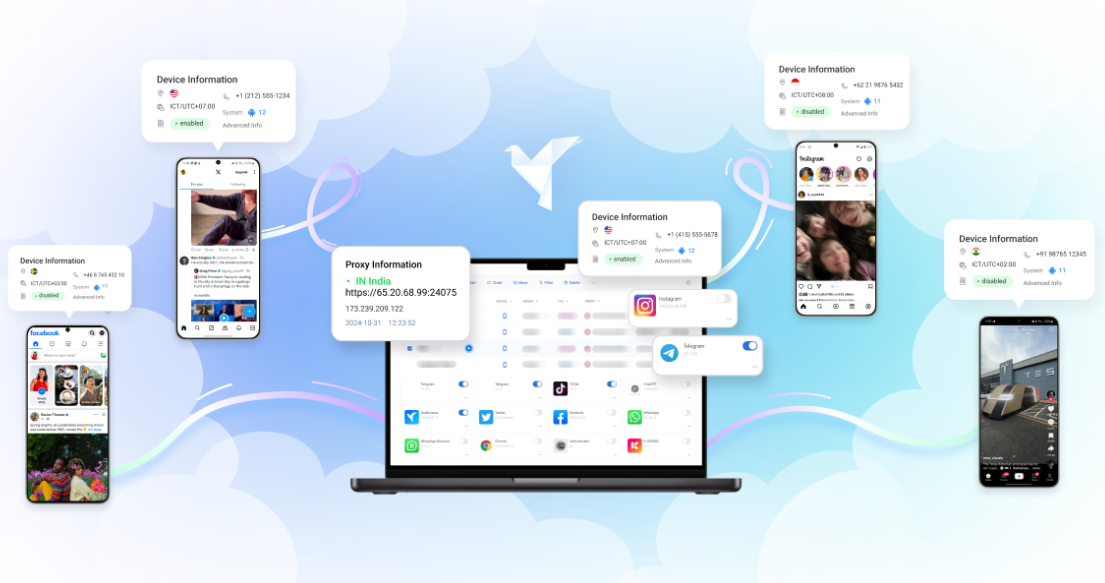
Geelark is positioned as a cloud‑based antidetect solution built specifically for mobile workflows. Instead of modifying browser fingerprints or running virtual Android machines on a local computer, it offers remote Android devices hosted on its servers. Users interact with these devices through streaming, similar to accessing a phone remotely. This architecture allows Geelark to simulate real‑device behavior more closely than browser‑based spoofing or conventional emulators.
The defining characteristic of Geelark is that each instance you use is a cloud phone, a real Android OS running on dedicated virtualized hardware in the cloud. For users who operate in mobile‑first environments such as TikTok, Facebook, Shopee, or mobile ad platforms, this approach attempts to reproduce native device signals instead of software‑generated fingerprints.
2.1. What is a cloud phone?
A cloud phone is an Android device running remotely on server hardware, accessible through a streaming interface. Functionally, it behaves like a physical phone, with its own storage, device identifiers, and system‑level parameters. Although the hardware is virtualized, it operates at a much lower level than an emulator.
The key distinction between a cloud phone and an emulator lies in how deeply the system can mimic hardware identity:
- Emulators simulate the Android environment through software; many signals (e.g., sensors, baseband identifiers, hardware entropy) are synthetic, predictable, or incomplete. As a result, they are frequently flagged by mobile platforms.
- Cloud phones run on server‑side hardware with more realistic system‑level interfaces. They can generate identifiers and behaviors closer to a real device, reducing the inconsistencies that platforms use to detect virtual environments.
Because the fingerprint is built at a lower level, closer to the hardware, cloud phones often provide hardware‑level fingerprint variation, making the device appear more consistent and credible to mobile anti‑fraud systems.
2.2. How does Geelark work?
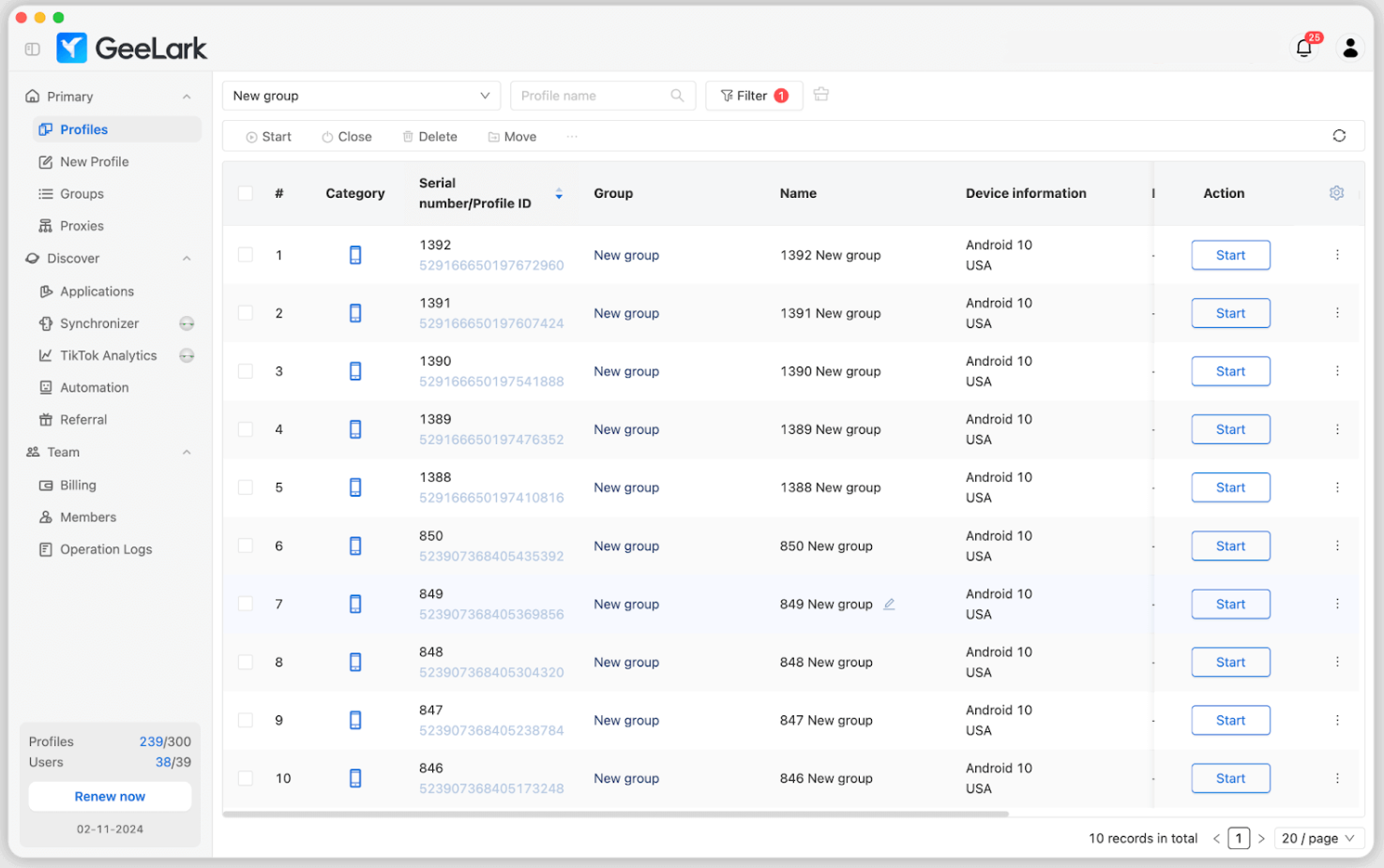
Each Geelark instance corresponds to an Android device hosted in the cloud. When a user opens a profile, they are essentially connecting to a remote Android phone through a streaming session.
Geelark creates a mobile fingerprint by altering or generating multiple device‑level signals, including:
- Device model: Geelark assigns different hardware model identifiers (e.g., Samsung, Xiaomi), which influence how apps interpret the device.
- IMEI: Although virtualized, the system can provide unique IMEI‑like identifiers for each session, allowing apps to treat the device as standalone rather than an emulator.
- MAC address: Network interface identifiers can be varied per device, preventing multiple devices from appearing to originate from the same hardware.
- Android ID: Geelark generates Android ID values unique to each profile, helping isolate identities across accounts.
- App signatures: Some apps verify signature integrity to detect tampering. Geelark attempts to ensure signatures appear consistent with legitimate Android environments.
- User behavior telemetry: Mobile platforms track sensor data, interaction style, battery usage patterns, and system activity. A cloud‑based real Android system generates these signals more naturally compared to an emulator.
- Proxy binding: Each cloud phone can bind to a dedicated proxy. This ensures that IP‑level identity matches the device fingerprint and prevents cross‑contamination.
- Profile isolation: Every profile in Geelark is treated as a separate device with its own identifiers and network path. Switching between profiles does not mix data, cookies, or device signals, reducing risk when operating multiple accounts.
In practice, users interact with Geelark through a dashboard where they launch a cloud phone, assign their proxy, install apps, and operate it just like a normal smartphone.
2.3. What problems does Geelark solve?
Mobile platforms increasingly rely on device signals to judge authenticity. Even when using clean IP addresses or proxies, accounts can still be flagged if the underlying device environment appears inconsistent, virtualized, or previously associated with suspicious activity.
Typical issues include:
- Instant account review or checkpoint after login
- Restriction or disabling due to unusual device fingerprints
- Inability to run mobile‑only campaigns on TikTok or Facebook
- E‑commerce platforms flagging repeated logins from emulated devices
Browser antidetect tools can mask desktop fingerprints, but they do not translate reliably to mobile‑first ecosystems. Emulators, meanwhile, are often detected because their device signals are incomplete or identical across multiple users.
Geelark’s cloud‑phone model attempts to address this by offering:
- More realistic Android device identities
- Better consistency between IP, device model, and OS-level signals
- Reduced mismatch between software and hardware indicators
This helps lower the frequency of checkpoints, login blocks, or account disables on platforms such as TikTok, Facebook, Shopee, or other mobile-native services.
3. What are the key features of Geelark?
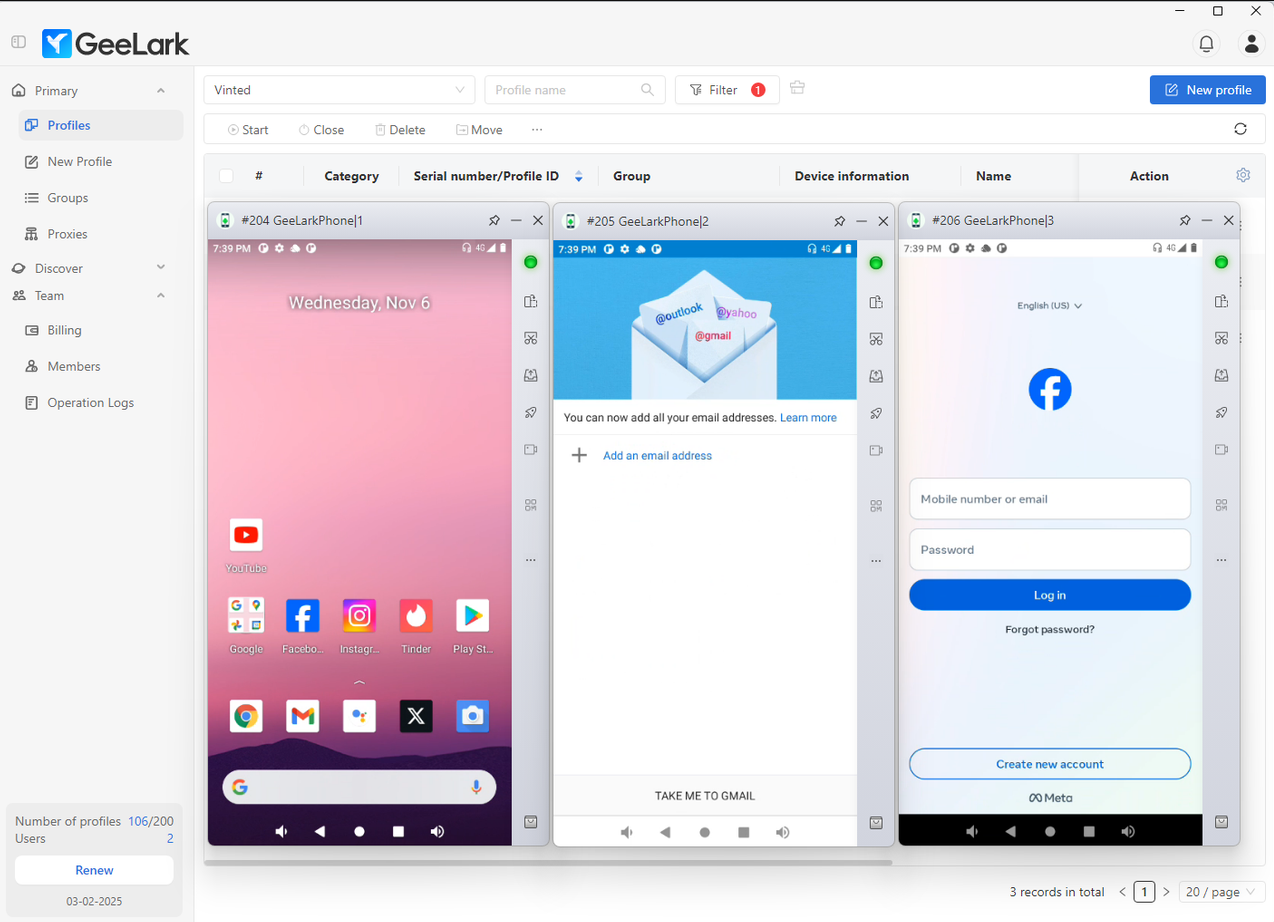
Geelark’s structure is designed around providing isolated mobile environments for multiple accounts. The system offers several core features that distinguish it from traditional browser-based antidetect tools or standard Android emulators. Each feature addresses a specific operational challenge for users managing mobile-first campaigns, multi-account operations, or testing across multiple devices.
3.1. Multi cloud phone management
One of Geelark’s main functionalities is the ability to manage multiple cloud phones simultaneously.
- Large-scale device creation: Users can generate dozens or even hundreds of independent virtual devices, each functioning as a separate Android environment.
- Stateful devices: Each cloud phone maintains its state over time, including installed apps, system configurations, and session data. This stateful approach allows users to pick up exactly where they left off without reconfiguring each device.
- Automatic backup and restore: Geelark provides backup options to preserve device states, which helps maintain account continuity and reduces the risk of data loss in case of system interruptions.
This management layer is particularly relevant for scenarios like social media account farming or e-commerce management, where multiple devices need to operate consistently and independently.
3.2. Real Android fingerprint engine
A core component of Geelark is its fingerprint engine, which aims to create unique, consistent device identities.
- Unique device identity: Each cloud phone is assigned a distinct fingerprint, which differentiates it from other devices in the system.
- Coherent vs. random fingerprint: Random fingerprints can lead to inconsistencies across device signals, making accounts easier to detect and flag. Coherent fingerprints ensure all device-level signals (hardware, OS, and app data) align realistically, reducing detection risk.
Key customizable parameters include:
- CPU/GPU: Simulates specific processing hardware.
- Resolution: Screen size and pixel density are tailored to mimic real devices.
- Carrier: Cellular network identifiers are applied to maintain consistency with region-specific behavior.
- Battery level: Dynamic battery simulation mimics real-world device usage.
- Build properties: Device model, OS version, and manufacturer details can be customized to appear authentic.
These elements help maintain a credible device identity for mobile platforms that track system-level signals.
3.3. Native app support
Unlike browser-based antidetect tools, Geelark allows users to run actual Android applications.
- Play Store and APK installation: Apps can be installed directly from the Play Store or sideloaded via APKs.
- App compatibility: Users can run apps that traditional browser antidetect cannot handle, including TikTok, Instagram, Telegram, Shopee, Lazada, Facebook Ads Manager, Binance, and mobile games.
This feature is critical for workflows that require native app behavior, such as automated interactions, mobile campaigns, or testing in a real app environment.
3.4. Proxy integration
Each cloud phone can be paired with a dedicated proxy connection, providing an additional layer of isolation.
- Per-device proxy assignment: Each virtual device uses its own IP address, preventing network-level overlap between profiles.
- Supported proxy types: Residential, 4G/5G, and rotating proxies are compatible.
- Operational advantage: Combining proxy isolation with unique device fingerprints increases account credibility on mobile platforms and reduces detection risk.
3.5. Automation & Scripting
Geelark provides tools for automating repetitive tasks across multiple devices.
- Auto-task functions: Actions such as login, following, liking, and warm-up sequences can be scheduled or automated.
- Parallel execution: Multiple devices can run scripts simultaneously, increasing operational efficiency for growth campaigns.
- Use case relevance: This functionality supports account farming, social media seeding, and multi-account management in a more streamlined way than manual interaction.
3.6. Team collaboration
The platform offers collaborative capabilities suitable for agencies or teams.
- Role-based access: Administrators can assign roles and permissions, controlling who can access each cloud phone or profile.
- Device sharing without fingerprint leakage: Profiles remain isolated even when shared among team members, preventing cross-account contamination.
- Use case: Useful for marketing agencies, influencer teams, or media buyers managing multiple client accounts on the same infrastructure.
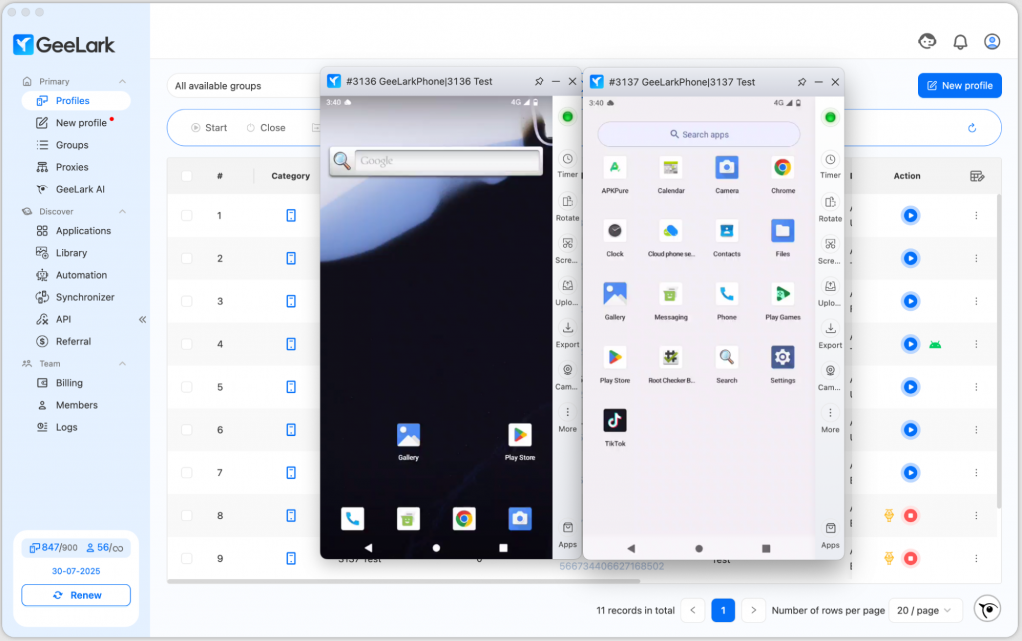
4. Performance testing: How well does Geelark run?
Geelark’s performance depends on network quality, the number of cloud phones, and device configurations. This section summarizes responsiveness, multitasking, and account reliability based on reviews and technical principles.
4.1. Responsiveness and latency
Cloud phones naturally introduce some delay compared to physical devices due to remote streaming.
- Latency: Generally low under stable broadband, suitable for app interactions.
- Bandwidth impact: Slower connections increase input lag.
- Performance drops: Can occur with multiple high-resource apps or during peak server load.
For most tasks like social media, e-commerce, light automation, latency is manageable.
4.2. Multitasking and scalability
Geelark supports multiple devices in parallel:
- Multiple devices: 5–20 devices run smoothly; larger numbers may introduce lag depending on network and server load.
- Stability: Stateful devices maintain apps and sessions over hours; occasional network interruptions may occur.
This supports multi-account management and batch testing.
4.3. Account reliability
Key factors affecting account survival:
- Fingerprint consistency: Coherent hardware-level fingerprints reduce platform flags.
- IP reputation: Dedicated proxies per device improve credibility.
- App behavior: Native app interactions create realistic activity patterns.
While exact survival rates aren’t published, users report fewer checkpoints and account blocks compared to emulators or random fingerprints. Absolute protection is not guaranteed.
Geelark provides low-latency cloud phones, supports moderate multitasking, and improves account reliability via consistent fingerprints and proxy isolation, offering a more stable mobile environment than emulators or browser-based antidetect tools.5. How secure is Geelark and how does it prevent detection?
Security and anti-detection are central considerations for any mobile antidetect tool. Geelark’s architecture addresses some common detection vectors, but certain risks remain.
5.1. How does Geelark prevent detection?
Geelark employs several mechanisms to reduce the likelihood of being flagged:
- No emulators: By running a real Android OS in the cloud rather than a virtualized emulator, it avoids many artifacts that platforms detect as synthetic or non-physical devices.
- Device-level isolation: Each cloud phone operates as an independent environment. Profiles do not share cookies, system data, or app histories, which reduces cross-account contamination.
- Unique hardware identity: Each device has its own fingerprint, including Android ID, IMEI-like identifiers, device model, and MAC address, making it appear as a separate physical phone.
These design choices focus on making the device environment appear consistent and credible to mobile platforms.
5.2. What risks still exist?
While Geelark mitigates several detection factors, some risks persist:
- Cloud environment detection: Some apps may still detect that the device is hosted in the cloud, particularly if they analyze low-level telemetry or server-related anomalies.
- Weak proxies: Using poor-quality or blacklisted IPs can reduce device trust and trigger platform restrictions.
- Over-automated behavior: Automation scripts that behave unnaturally (“robotic”) may still be flagged by anti-fraud systems.
In practice, these risks mean that careful configuration of proxies, automation, and usage patterns is necessary for optimal account stability.
5.3. Is Geelark safe for user data and privacy?
Geelark handles user data on cloud servers, raising standard concerns about privacy and security:
- Data protection: User sessions, installed apps, and fingerprints are stored on Geelark’s infrastructure.
- Privacy: Accounts and device data are isolated per profile. No public data leaks have been reported in reviews.
- Limitations: While Geelark applies encryption and access control, users should avoid storing highly sensitive personal information on cloud phones and follow standard security hygiene.
Overall, Geelark offers a reasonably secure environment for mobile operations, but it is not immune to detection or misuse if best practices are ignored.
6. How affordable is Geelark?
Understanding the pricing structure is crucial for users considering Geelark, especially when running multiple cloud phones or executing long automation sessions. The cost model uniquely combines a monthly base subscription fee with a pay-per-minute usage charge for every active cloud phone.
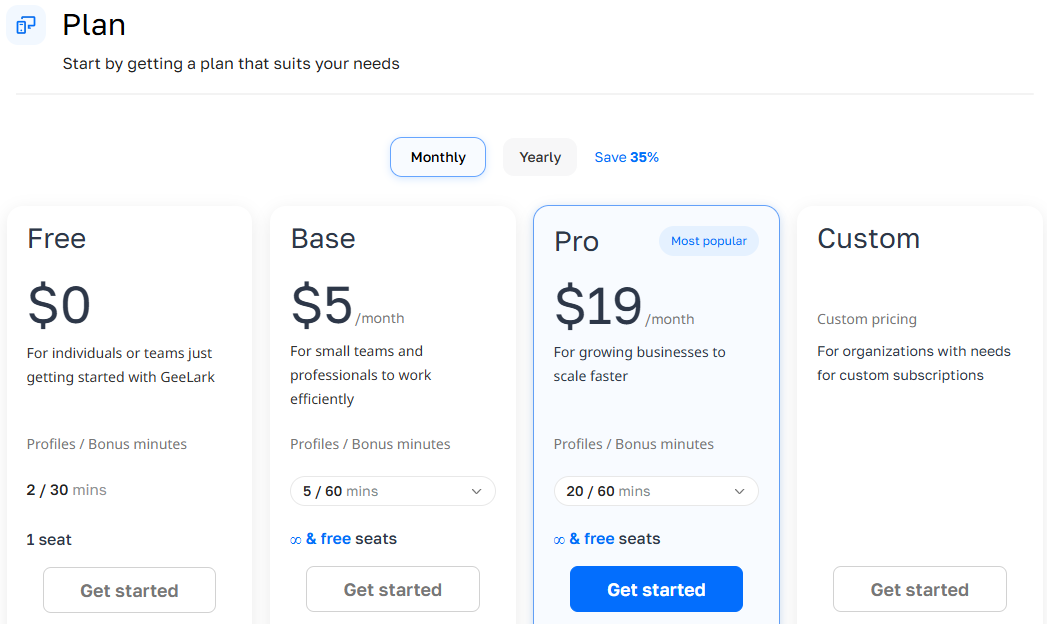
6.1. How does Geelark charge users?
Geelark operates on a dual-pricing mechanism:
- Base Subscription Fee: A flat monthly cost that grants access to the dashboard, basic team management, and profile creation.
- Cloud Phone Minutes: Every single cloud phone profile consumes dynamic minutes whenever it is launched or running tasks. While paid plans start at an attractive $5/month, additional usage is billed at approximately $0.007 per minute per device.
Compared with competitors like Hidemyacc or Multilogin:
- Hidemyacc charges a single, predictable monthly fee for a fixed number of profiles, allowing users to run profiles 24/7 with zero added costs.
- Geelark’s pay-per-minute system is highly flexible but requires continuous monitoring to avoid budget overruns.
6.2. What Are the advantages of Geelark’s pricing?
- Pay-as-you-go Flexibility: Excellent for temporary campaigns, light multi-accounting, or developers who only need occasional device access without committing to heavy flat-rate plans.
- Low Initial Cost: The combination of a free plan and a cheap entry-level subscription makes it easy to experiment with cloud phone technology.
6.3. What are the limitations of Geelark’s pricing?
While the starting price looks incredibly cheap on paper, the mathematical reality changes drastically for professional operations and marketing teams:
- High cost for multiple devices: Running dozens of cloud phones simultaneously can increase costs significantly.
- Not ideal for long sessions: Users who need 8–10 hour sessions every day may find the per-minute charges add up quickly, making flat-rate competitors more economical.
- Scaling considerations: Enterprises or agencies with high usage may need careful budgeting to avoid unexpectedly high bills.
Geelark’s pricing model favors users with moderate or occasional device usage, offering flexibility and a low entry cost. However, heavy or long-duration usage can become expensive compared to flat-rate alternatives.
7. What are the advantages and limitations of Geelark?
Understanding both strengths and weaknesses helps users decide if Geelark fits their workflow. This section evaluates the platform from a practical and technical perspective.
7.1. What are the advantages of Geelark?
- Genuine Cloud Android Core: Runs authentic Android OS instances in the cloud, generating low-level hardware telemetry data that feels more real to strict tracking platforms than traditional desktop-based emulators.
- Native Application Freedom: Allows direct app installation via APKs or the Google Play Store, giving users full access to native mobile app environments like TikTok, Shopee, Lazada, and mobile games.
- Coherent Fingerprinting Layer: Aligns hardware indicators (CPU, GPU, Android ID, carrier signals, battery fluctuations) realistically to lower account checkpoints.
7.2. What are the limitations of Geelark?
- Severe Financial Drain at Scale: The pay-per-minute framework turns heavy, long-duration tasks or automated scaling into an expensive investment.
- Heavy Network Overload: Because the platform streams raw video feeds of remote phones, a highly stable, high-speed internet connection is mandatory. Any latency instantly slows down your workflow.
- Strictly Android‑Only: The platform lacks iOS device emulation entirely. Marketers looking to farm accounts or run target tests on Apple-native ecosystems are left with zero options.
- Steep Learning Curve: New users often struggle with initial multi-proxy assignments, cloud profile management, and setting up remote auto-tasks.
Geelark offers a realistic, flexible, and automation-ready cloud Android environment that benefits multi-account workflows and teams. Its main limitations are cost for heavy usage, network dependency, Android-only support, and a learning curve for new users. These factors should be considered when evaluating its fit for specific use cases.
8. Conclusion
For mobile-focused operations, Geelark currently stands out as a strong choice, offering real Android environments, native app support, and consistent device fingerprints. For web-based workflows, Antidetect browser Hidemyacc is a more cost-effective option. Its automation capabilities and support for multiple accounts make it well suited for growth campaigns and team use. However, casual users or those unfamiliar with proxies may find the platform complex or costly for light usage.
Struggling to keep multiple accounts safe?
Move to Hidemyacc and manage multiple accounts using a reliable antidetect browser built for long-term operations.
>>> Other reviews of antidetect browsers
- Gologin Antidetect Browser: Detailed reviews, Pro & Cons
- What is Multilogin? Detailed Review, Pros, and Cons
- AdsPower Review - Does it provide a high-quality antidetect browser?
- Dolphin Anty Review - Is this antidetect browser worth it?
- Antidetect Browser Kameleo review: Is it worth using?
- MoreLogin Browser: Detailed Review and Alternatives
- Incogniton Browser: Honest Review
- BitBrowser: Detailed, hands-on review
- VMLogin Review - Is it an efficient antidetect browser?
- Is Linken Sphere the Right Antidetect Browser?
- SessionBox review: Honest look at its features & limits
- Ghost Browser in-depth review: A multi-session browser
- Nstbrowser Review: Affordable, but is it powerful enough?
- Is Lalicat a good antidetect browser? Full review & real testing
- Octo Browser: Full Review for Multi-Account Management
- Is Undetectable the right antidetect browser for your needs?
- ixBrowser review: How does it work and is it good for multi-account?
- Is DICloak a reliable antidetect browser? Pros & cons!
9. FAQ
9.1. What is Geelark used for?
Geelark provides cloud-based Android devices for managing multiple mobile accounts, running native apps, automation, and testing workflows while maintaining distinct device fingerprints.
9.2. Is Geelark really undetectable?
Geelark reduces detection risk by using real Android instances and coherent device fingerprints, but no tool can guarantee complete undetectability. Risk depends on proxy quality, automation patterns, and platform monitoring.
9.3. Is Geelark safe?
Geelark stores user sessions and device data on cloud servers with encryption and profile isolation. While generally considered secure, users should follow standard security practices and avoid storing sensitive personal information.
9.4. Does Geelark support iOS?
No, Geelark currently supports only Android devices. iOS devices are not available in the cloud phone environment.
9.5. How many cloud phones can I run?
The platform allows multiple cloud phones in parallel. Users commonly operate 5–20 devices simultaneously, though large-scale usage may depend on internet speed and server load.
9.6. Is Geelark better than antidetect browsers?
For mobile-first apps and native app automation, Geelark offers stronger fingerprint consistency and app compatibility. For web-only tasks, traditional antidetect browsers may be more cost-effective.
9.7. Does Geelark work for TikTok?
Yes, TikTok can be run on Geelark’s cloud Android devices. Native app behavior and coherent fingerprints help reduce account restrictions compared to emulators or browser-based tools.
9.8. Why do accounts still get banned even with Geelark?
Accounts can still be restricted if proxies are low-quality, automation is unnatural, or platforms detect suspicious activity. Geelark reduces risk but does not eliminate it entirely.
9.9. Geelark vs Cloud Emulator - what’s the difference?
Unlike cloud emulators, Geelark runs real Android OS on virtualized hardware, providing more natural device fingerprints, app compatibility, and stateful sessions.
9.10. How much does Geelark cost?
Pricing combines a subscription fee with per-minute usage for cloud phones. This model allows flexible usage but can become expensive for long-duration sessions or multiple devices.
9.11. Can Geelark run 24/7?
Technically yes, but running cloud phones continuously depends on subscription limits, per-minute usage, network stability, and server availability.
9.12. Who should not use Geelark?
Casual users, those with minimal automation needs, or people unfamiliar with proxies may find Geelark complex or costly. Web-only workflows may be better served by traditional antidetect browsers.