


The inability to connect or restricted access to a game system often causes many difficulties for users during their experience and account management. Currently, there are many technical methods ranging from simple to advanced that help resolve this situation quickly. This article will guide you in detail on how to access Roblox safely when blocked, helping to restore the connection, limit disruptions during gameplay, and enhance account login security.
1. Why is Roblox blocked from access?
Besides searching for fixes, understanding the reasons why the network system cannot establish a connection to the game is also incredibly essential. When you comprehend the nature of the issue, you will easily select the appropriate processing method and prevent the error from repeating in the future.
Usually, this network transmission disruption stems from one of the common reasons below:
- School or company policies: Network systems in these areas often set up game-blocking filters to maintain focus for students and employees during school or working hours.
- Firewalls restricting connections: Network administrators utilize next-generation firewalls to scan and automatically block data packets traveling to or from Roblox servers.
- Restricted local network IP addresses: The IP range of the local network you are using falls into Roblox's blacklist because the security system automatically recorded a prior terms-of-service violation.
- Roblox server issues: The inability to access can stem from the game server undergoing maintenance, updating to a new version, or the system falling into an overloaded state.
Pinpointing the exact source causing the connection error will save you a lot of time testing different IP and DNS changing methods. Once the cause is identified, you can select the appropriate method depending on your actual needs.
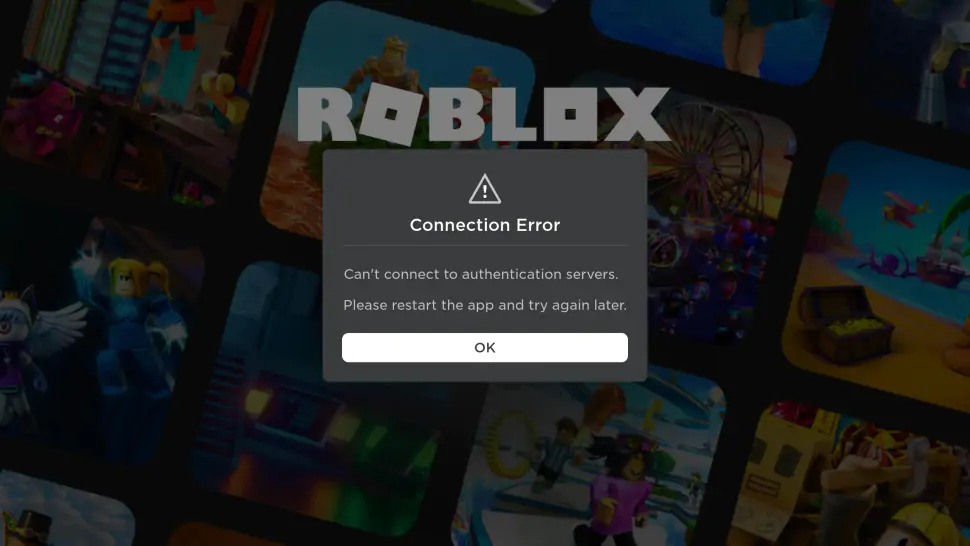
Common connection error notification when Roblox is blocked.
2. Using a VPN to access Roblox when blocked
When Roblox is blocked from access, a VPN is one of the solutions chosen by many due to its ability to change the IP address and establish a connection through an intermediary server.
2.1. How does a VPN work?
VPN (Virtual Private Network) is a tool that encrypts all internet data going to and from your device.
When you turn on a VPN, the application masks the real IP address of the device and replaces it with the VPN server's IP. Concurrently, access data is transmitted through the intermediate server instead of a direct connection as usual, thereby helping to limit the network system's ability to accurately identify the specific service you are using.
A VPN is one of the popular solutions when Roblox is blocked.
2.2. Advantages of using a VPN to access Roblox
This virtual private network method is prioritized by many people because it possesses the following advantages:
-
Operates effectively across multiple network systems: VPN supports changing the IP address and routing connections through an intermediate server, thereby helping users access Roblox in certain cases where the network enforces access restrictions.
-
Enhanced information security: The accompanying data encryption feature helps protect your account and personal information more safely, especially when using public WiFi networks.
-
Shortened setup time: Users do not need to possess deep network knowledge; they only need to turn the application on or off through a few simple operations.
Thanks to its simple usage and ability to support multiple devices, a VPN is currently one of the popular solutions to handle network access restriction issues.
2.3. Limitations to note when using a VPN
Despite possessing many significant advantages, this method still harbors a few real-world drawbacks that you need to consider before using:
-
Increased latency (High Ping): Because internet data must travel through an intermediate server located abroad before reaching the game server, it can easily cause stuttering and lag during gameplay.
-
Bandwidth limits in free versions: Free VPN services often throttle transmission speeds or limit the data volume usage fixed at a very low level each day.
-
Triggers additional security verification steps: Some free VPNs use shared IPs across a large number of users. In certain cases, this can lead to encountering additional security verification steps when logging in.
To minimize these risks as much as possible, you should prioritize using services with stable servers or reference more advanced alternative solutions in the next section of the article.
If you do not know how to install and use a VPN on your device, you can refer to the detailed guides below:
- How to set VPN on Android in a few simple steps
- How to Change VPN Server Location and Get a New IP Address
3. Changing DNS to access Roblox when domain blocked
In addition to using a virtual private network, changing the Domain Name System (DNS) is also an extremely common method chosen by many. This method directly intervenes in the device's network configuration to open a straight path to the game server without needing to install additional intermediate software that burdens the machine.
3.1. Why can changing DNS help access Roblox?
To apply this method effectively, you need to understand the nature of the domain blocking mechanism clearly. A conventional network system prevents users from playing games by configuring local DNS servers to refuse translating the address roblox.com into an actual IP numerical sequence.
In some cases, Roblox has restricted access because the network system controls the domain resolution process. When switching to public servers like Cloudflare or Google DNS, the device can connect to Roblox through a different resolution path instead of using the default configuration of the network currently in use.
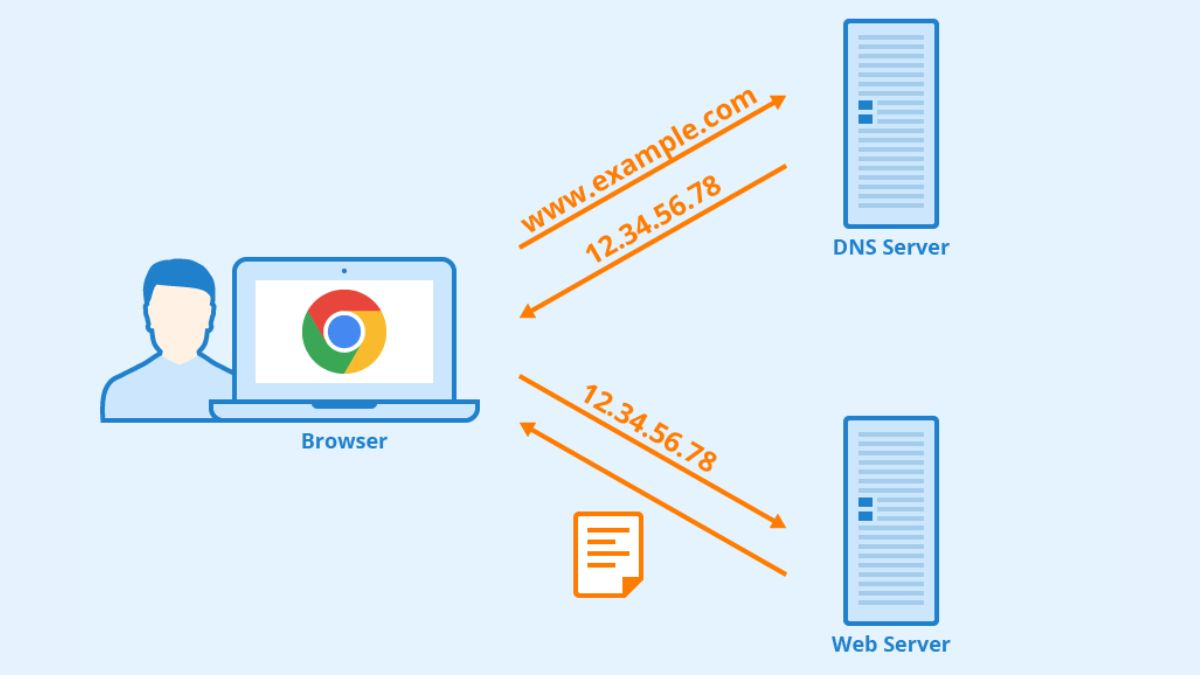
Changing DNS helps the device use a different domain resolution system.
3.2. Advantages of changing DNS to access Roblox
Changing DNS is one of the simplest solutions when Roblox cannot be accessed due to restrictions at the domain level. Compared to a VPN or proxy, this method does not require installing additional software and usually only takes a few minutes to set up. Some prominent advantages include:
-
Easy setup: Users only need to change a few parameters within the device's network settings without needing to install additional applications from third parties.
-
Compatible with many devices: This method can be applied on almost all popular operating systems like Windows, macOS, Android, and iPhone.
-
Effective in certain domain blocking cases: If the network in use applies an access restriction mechanism through the domain name resolution system, switching to public servers can help restore the connection quickly.
Thanks to its simple execution and minimal impact on network performance, this is typically the solution tried by many before moving to more complex methods.
3.3. Limitations to note when changing DNS
Despite being easy to execute and requiring no additional software installation, changing DNS still has certain limitations. This method is usually only effective when Roblox is blocked at the domain level, while more advanced blocking mechanisms might not be affected by a DNS change.
-
Not effective in every case: If Roblox is blocked through a firewall or restricted by IP address, changing the domain resolution configuration usually will not yield results.
-
Does not change the device's IP address: Changing the DNS does not alter the IP address of the device. Therefore, if the network system or Roblox applies an IP-based blocking mechanism, this method usually will not work.
-
Does not enhance connection security: Access data is still transmitted in the conventional way and does not receive additional encryption.
-
Can be restricted by local network policies: Some schools or businesses apply private network configurations that make user-side changes ineffective.
Therefore, if you have tried changing the network configuration but still cannot access Roblox, you can consider other solutions like a VPN, using a different internet network, or tools that support managing a suitable access environment.
Changing the DNS is quite simple, however, the execution steps will differ depending on each device. You can refer to the appropriate guide below:
- Quick and Easy Steps to Change DNS Settings in Windows 10
- How to Change DNS on Android and iPhone
- What is DNS 1.1.1.1? How to Install & Change DNS 1.1.1.1 Quickly
- What is Google DNS? How to Change Google DNS in Detail Across Devices
4. Switching to a different Internet network
If solutions like a VPN or changing the DNS have not brought results, you can try connecting with a different internet network. This is a simple way to test whether the issue stems from the network currently in use.
To transition to a new network transmission line, you can flexibly apply the execution methods below:
-
Using cellular mobile data (4G/5G): You proceed to turn off the WiFi connection on your phone, turn on cellular data to play directly, or activate the WiFi Hotspot feature from your phone to your computer to share this clean line.
-
Connecting to a different WiFi network: You can search for and link to surrounding networks not under the old system's management, such as a nearby cafe's WiFi or a guest WiFi network that does not restrict access.
Appropriate deployment timing: This method is the optimal choice when you only need to enter the game quickly to check in, receive gifts, or when software intervention solutions (VPN, DNS) are completely blocked by advanced security policies.
Proactively changing the internet source not only helps you quickly solve connection issues but is also a way to check how strictly the old network system applies filtering. However, when using mobile data, you also need to note checking your data package volume to avoid incurring unwanted costs during gameplay.

Changing the internet connection source for more stable access.
5. How to use a browser to access Roblox when the Web version is blocked
In cases where standalone applications running on the computer are restricted, redirecting toward using a web browser platform is a very smart alternative. In certain instances, Roblox on the browser can still be accessed even if the application installed on the machine is restricted from connecting.
5.1. What is Roblox Web?
To apply this solution successfully, you first need to familiarize yourself with the concept of the game's browser version. Roblox Web is the form of accessing your account, managing character information, or participating in gameplay directly on an internet browser instead of launching the standalone Roblox Client application on the computer. This form helps reduce the load on device memory and provides massive flexibility for players when needing a quick login on foreign computers.
5.2. How to access Roblox Web when the default browser is blocked
When conventional browsers like Chrome or Edge cannot load the game's homepage, you can apply the alternatives below to re-establish the line:
-
Using a browser with a built-in VPN: Download and use secure browsers like Opera or Brave, then activate the free VPN feature available in the settings so the system automatically handles the domain filter.
-
Using browser extensions (Extension VPN): Access the Chrome Web Store or Edge Add-ons to install lightweight VPN extensions, then turn them on to change the IP address specifically for the browser before entering the Roblox homepage.
-
Playing via cloud platforms: Certain services like Now.gg allow launching Roblox directly on the browser without needing to install the application on the device.
Flexibility in combining a browser and an IP changing tool will help you alter the access environment and try connecting to Roblox through a different method.
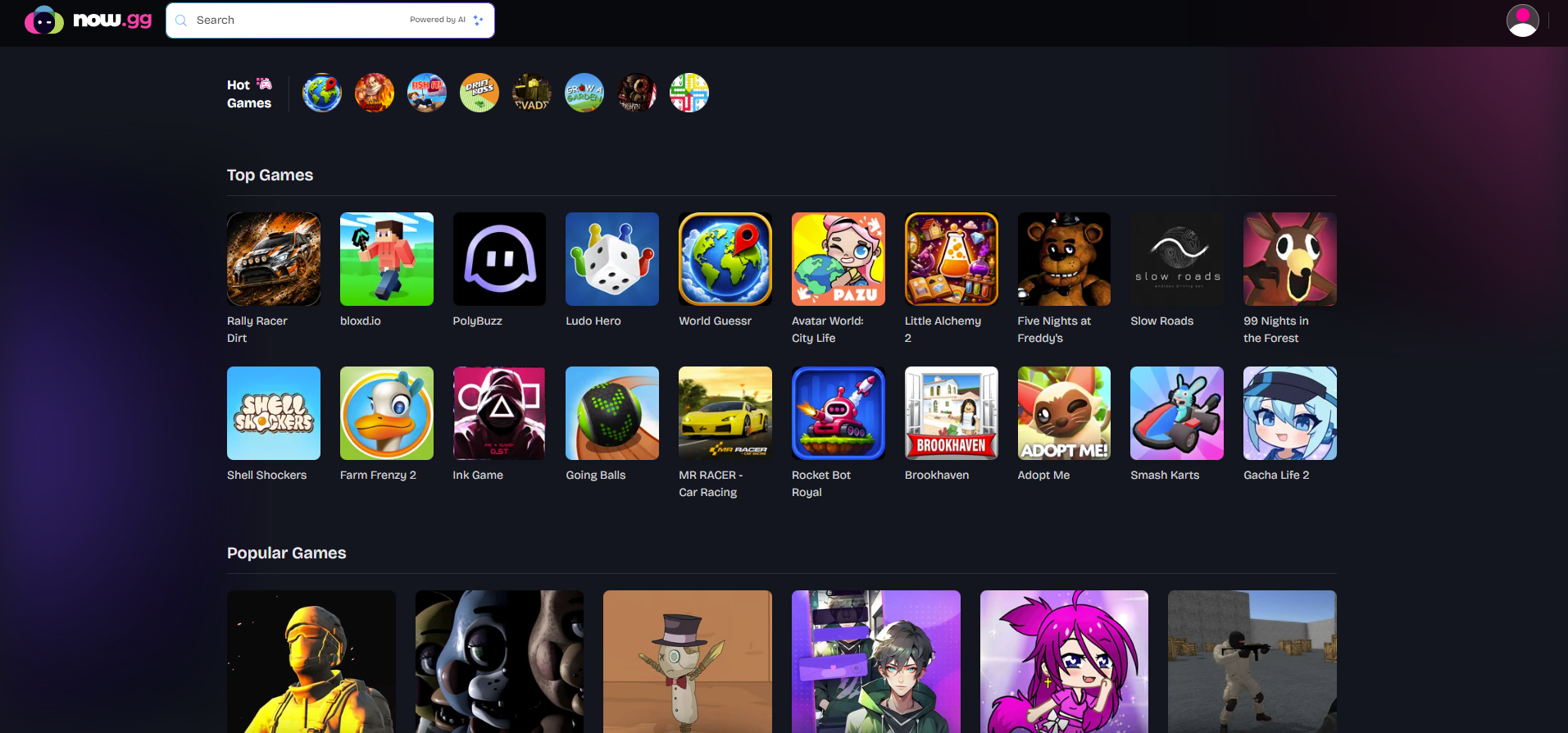
Experiencing Roblox on the browser through the Now.gg platform.
5.3. In which cases should you use Roblox Web?
Although this feature is very convenient, you should prioritize applying the browser-running solution in the specific contexts below:
-
The device is locked out of administrative rights: Your computer does not allow downloading or installing application files in .exe or .dmg formats due to restricted Admin privileges.
-
The network system prioritizes controlling installed applications: Some internal networks concentrate on blocking applications running directly on the device, while accessing via a browser may be less restricted.
Identifying the right time to apply will save you a lot of setup time and ensure the game entry process runs smoothly with the fewest interruption errors.
5.4. Important notes when using Roblox Web
Although the method of operating the game on a browser brings high convenience, you also need to note some real-world factors below to ensure your gameplay experience and device safety:
-
High demands on performance and line quality: Experiencing gameplay directly on a browser or through cloud platforms (Cloud Gaming) often requires computer hardware and the internet network to be extremely stable. If the network is weak, you will easily encounter FPS drops or more lag compared to playing on a standalone application.
-
Potential security risks from extensions: Installing free or unknown-origin VPN extensions can increase the risk of malware infection, cookie theft, or impact account safety.
Weighing performance factors carefully and only using web browsing tools from reputable developers will help you enjoy entertainment comfortably while protecting personal data in the best way.
6. Using the antidetect browser Hidemyacc to access Roblox when blocked
If common methods like a VPN or changing the DNS have not brought the desired results, you can consider using the antidetect browser Hidemyacc. When combined with a proxy, this tool helps create separate browser environments for each access session, supporting a more stable connection in certain cases.
6.1. Why can Hidemyacc support accessing Roblox?
To understand why this tool can assist in certain cases of accessing Roblox when blocked, you need to examine the features that optimize deeply into network configuration and device parameters below:
- Flexible proxy integration to change IP addresses: Hidemyacc allows assigning a proxy to each individual browser profile instead of applying it to the entire device. This helps users easily manage multiple independent access environments on the same computer.
- Creating independent browser environments: The software generates browser profiles completely separate from one another. Each profile possesses its own browser fingerprint set, helping access sessions operate independently instead of sharing a single browser environment.
- Limiting network data conflicts: Each Roblox account is operated on a distinct profile, not sharing cookies, cache, or session data. This limits unintended logouts and reduces the risk of conflict between multiple accounts on the same device.
The combination between device parameter alteration technology and network IP address configuration makes this method a suitable solution for users needing separate access environments and multi-account management capabilities.
6.2. How to set up Hidemyacc to access Roblox
The process of installing the software and configuring a new network line is optimized to be very simple; you can execute it quickly through the following steps:
-
Step 1: Create a new profile: Open the antidetect browser Hidemyacc, click the button to create a new Profile, then select the desired operating system to simulate, such as Windows, macOS, or Linux.
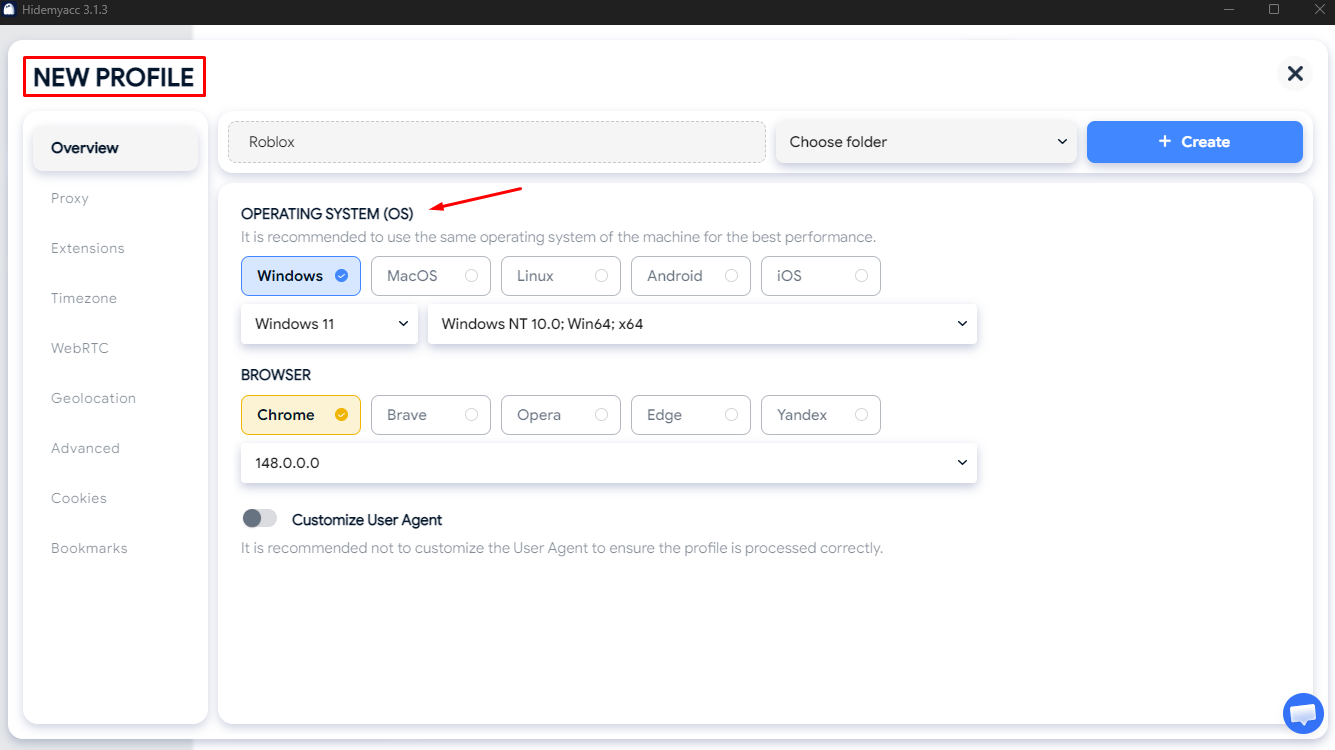
Creating a new Roblox profile in Hidemyacc
-
Step 2: Configure the proxy network: Under network configuration settings, input the complete parameters of the purchased Proxy, including the IP address, connection port (Port), username, and password to proceed with changing the entire network address for that profile.
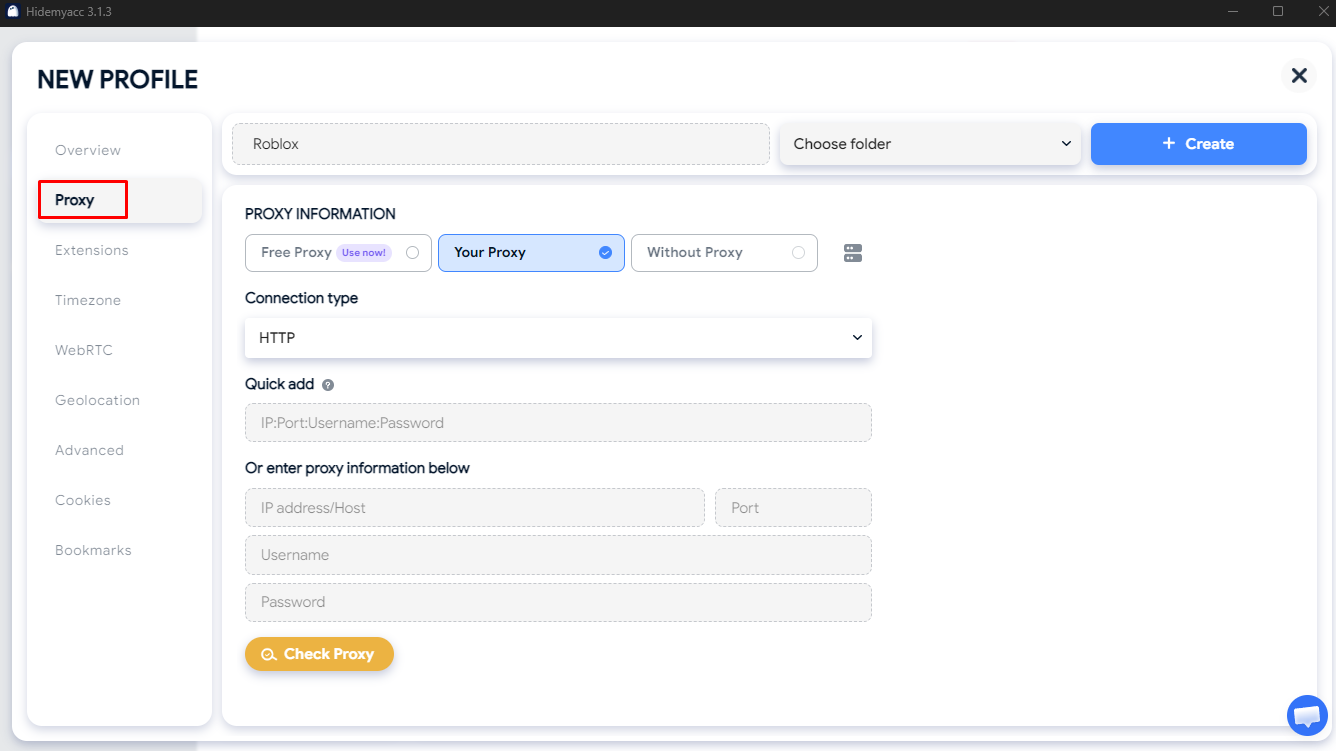
Proceeding with proxy configuration installation
-
Step 3: Launch and access Roblox: Click the button to launch the profile just configured, and a new browser window will open. At this point, you only need to access the Roblox homepage and log into your account to experience the game normally.
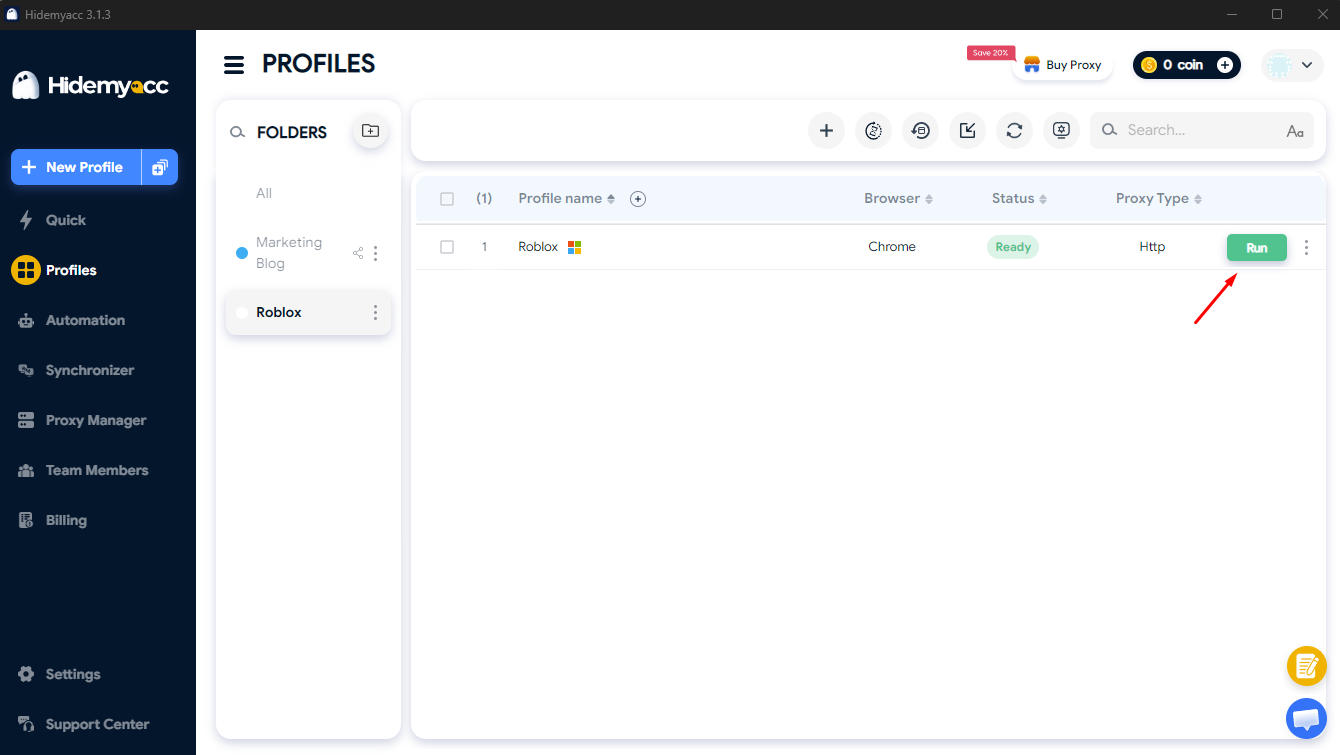
Clicking "Run" to launch the account within Hidemyacc
After completing proxy and profile configurations, you can access Roblox on a new browser environment without affecting other login sessions on the device.
6.3. When should you use Hidemyacc?
Although there are many different methods to bypass firewalls, Hidemyacc can be suitable in the specific cases below:
-
Managing multiple Roblox accounts: Players who have a need to multi-box or operate multiple accounts concurrently to complete events or trade items.
-
Needing separate login environments: Ensures high security and privacy, helping users avoid leaving footprints of browsing history or cookie storage on shared organizational or school computers.
-
Wanting to combine a proxy and an antidetect browser: When conventional VPN solutions push ping too high or trigger constant CAPTCHA verifications on Roblox due to unclean IPs.
7. Comparison table of methods to access Roblox when blocked
To gain an overview and easily select the solution best suited to your personal needs, you can refer to the detailed comparison table between methods below:
| Method | Connection Speed (Ping) | Account Safety | Ease of Execution | Re-blocking Likelihood |
| Using a VPN | Medium - Easily causes lag if using a free version | Medium - May encounter verification steps if using low-quality shared IPs. | Very Easy (Just toggle application on/off) | Low - Difficult for firewalls to recognize |
| Changing DNS | Very High - Does not reduce network speed | Very Safe - Does not intervene with data | Easy (Configure within device settings) | High - Systems with deep blocking cannot use it |
| Using a different network (4G/External WiFi) | High - Depends on mobile reception | Absolutely Safe | Very Easy (Isolates from internal network) | Low blocking likelihood |
| Accessing Roblox Web | High - Only used for management or cloud play | Safe | Easy (Access directly on web) | Medium - If the school blocks the entire domain |
| Using Hidemyacc + proxy | High and Stable (If picking quality proxy) | High - Login environment is isolated between profiles. | Medium (Requires initial profile setup) | Very Low - Suitable for needs requiring distinct access environments. |
Based on the detailed comparison data table above, you can quickly make the most optimal decision depending on your actual personal needs:
- Need to play for quick entertainment, do not want complex configurations: You should prioritize choosing the Changing DNS method or Using 4G/5G mobile data networks. These are direct handling methods that require little time and help devices connect back into the game immediately.
- The device is locked out of administrative rights (Cannot install software): The solution of Accessing Roblox Web combined with browsers featuring built-in VPNs or specialized IP changing extensions will be the most logical choice to bypass firewalls.
- Need to operate multiple Roblox accounts long-term or frequently use them across restricted network environments: Hidemyacc combined with a proxy is a choice worth considering. This solution helps create separate access environments for each account, while supporting stable and more convenient login session management.
Selecting the right method not only helps you quickly remedy connection failure issues but also helps optimize costs as well as system setup time in the most efficient manner.
8. Important notes when accessing Roblox when blocked
To ensure your gameplay process flows smoothly while still protecting your device and personal information absolutely, you need to especially note some vital principles below:
- Do not download unblocking software from strange sources: Absolutely avoid using cracking tools or software of unknown origin to limit the risk of malware infection and losing control of your account.
- Protect your game account: Only use proxies and VPNs from reputable sources, always enable the two-factor authentication (2FA) feature to guarantee account safety when there are sudden IP shifts.
- Consider network usage policies: Some schools or businesses have private regulations regarding internet usage, so you should check before applying connection altering solutions.
Proactively raising security awareness during connection not only lets you enjoy entertainment comfortably but is also the deciding factor helping your game account stay safe, avoiding risks of malicious intrusion or regrettable automated system locks.
You may be interested in: Detailed Guide on How to Enable 2FA to Protect Your Account
9. Conclusion
Accessing Roblox when blocked is not too complex of an issue if you accurately determine the cause and choose the appropriate solution. Depending on each specific case, you can try changing DNS, using a VPN, switching to a different internet network, or accessing Roblox through the web version to restore connection.
For users needing to manage multiple Roblox accounts or wanting to set up distinct access environments, tools like Hidemyacc combined with proxies are also an option worth considering. Choosing the correct method not only helps you access Roblox more stably but also contributes to protecting accounts and limiting login errors during usage.
Hopefully, the guidance in this article will help you quickly fix blocked Roblox issues and secure a more favorable gameplay experience.
10. FAQ
1. Why is Roblox blocked on WiFi but still usable on 4G or 5G?
Because blocking policies only apply to the routers and firewalls of that specific local WiFi network, whereas mobile networks belong to public telecommunication carriers and remain unaffected.
2. Does changing DNS help access Roblox in every case?
No. Changing DNS only takes effect if the local network blocks at a basic domain level. If the network system utilizes firewalls that block based on IP addresses or connection ports, the DNS changing method will not be effective.
3. How do a VPN and a proxy differ?
A VPN encrypts the entire internet traffic of the whole device and changes the IP system-wide. A proxy only changes the IP for specifically configured applications or browsers, executing no whole-system encryption, and therefore typically possesses faster processing speeds if picking a quality proxy.
4. Can you log into multiple Roblox accounts on the same device?
If using conventional browsers, it will easily trigger data conflicts and force constant logging in and out. Utilizing an antidetect browser solution like Hidemyacc can entirely run multiple distinct accounts simultaneously.
5. Can Hidemyacc replace a VPN?
Hidemyacc is not a VPN service. This is a tool that creates deep anonymous browser environments. To change IPs within Hidemyacc, you need to integrate an additional Proxy into the software. This combination delivers unblocking capabilities and higher account security compared to merely using a conventional VPN.






